ContentStudio Review and the Real Catch in Each Pricing Plan
ContentStudio Review and the Real Catch in Each Pricing Plan
Our ContentStudio review covers each plan, the 5-account cap on Standard, the no-card trial and refund rules, and who should skip it. See the verdict.
- 1What Do ContentStudio Reviews Say About It?
- 2How Much Does ContentStudio Cost on Each Plan?
- How Much Does ContentStudio’s Yearly Discount Save?
- What Happens When You Need a Sixth Account on ContentStudio?
- 3Can ContentStudio Post Directly to Instagram and TikTok?
- Does ContentStudio Work With an Instagram Creator Account?
- Can ContentStudio Add TikTok Sounds to a Scheduled Video?
- How Far Do ContentStudio’s AI Credits Go?
- 4Is ContentStudio Free to Use?
- Can You Get a Refund From ContentStudio?
- 5What Are the Pros and Cons of ContentStudio?
- 6Who Is ContentStudio Best For?
- 7What Are the Best ContentStudio Alternatives?
- 8Is ContentStudio Worth It?
- 9Quick Takeaways
Bottom Line: ContentStudio is worth paying for once you run more than five social accounts or work with clients, because Advanced and Agency Unlimited add the social inbox, approvals and cheap extra accounts. Solo creators should check two limits first: Standard stops at 5 accounts with no add-ons, and ContentStudio’s own help guide says Instagram Creator accounts cannot publish through its API. Until November 28, 2026, the Black Friday saving is real on Agency Unlimited and zero on yearly Standard.
What is ContentStudio: A web app for planning and scheduling posts to 12 social channels from one calendar, with AI writing, image and video tools, analytics, and a shared inbox on higher plans.
Every ContentStudio review should start with the number 5, because that is how many social accounts the Standard plan holds. ContentStudio’s own pricing help page says Standard users can only upgrade to get more. Account number six moves you to Advanced, so ContentStudio goes from $29 to $69 a month on monthly billing.
Creator Tribune earns a commission if you subscribe through the ContentStudio links on this page, and the prices and limits below read the same either way. The prices and limits here come from ContentStudio’s own pricing page, help pages and terms, read on November 21, 2026, and the user verdicts from dated reviews on G2, Capterra, Trustpilot and both app stores.
What surprised me most is how little the Black Friday banner, live until November 28, 2026, changes on the cheapest plan. Yearly Standard costs $19 a month with the badge, and the October 14 pricing page showed the same $19 a month.

What Do ContentStudio Reviews Say About It?
ContentStudio reviews score high on software review sites and low in the app stores, with 4.6 out of 5 on G2 and 4.7 on Capterra against 3.9 on Google Play. The web app collects most of the praise, while the phone app, which some publishing routes depend on, drags the store ratings down.
| Where | Rating | Volume | Checked |
|---|---|---|---|
| G2 | 4.6 out of 5 | 355 reviews | November 21, 2026 |
| Capterra | 4.7 out of 5 | 670 reviews | November 21, 2026 |
| Trustpilot | 4.2 TrustScore | 6 reviews, none in the past 12 months | November 21, 2026 |
| Google Play | 3.9 out of 5 | 133 reviews | November 21, 2026 |
| App Store, US | 3.0 out of 5 | 26 ratings | November 21, 2026 |
The praise on G2 and Capterra lands on the same things: one calendar for many networks, bulk scheduling and the AI writing tools. A July 2026 review on G2 from a solo creator says they usually schedule about two weeks of content in one go, and “it works just fine.”
The complaints repeat too. A July 29, 2026 review on Capterra calls the pricing “a bit steep” once you need more social accounts or users. June and July 2026 reviews on G2 describe a steep learning curve and analytics that could go deeper.
The gap between the review sites and the app stores is the finding I would weigh most if you post from your phone. ContentStudio sends Instagram Stories with stickers or music, and posts from Instagram Creator accounts, through that phone app, so a weak app costs more here than it would in a desktop-only tool. Trustpilot adds little, since its 4.2 rests on six reviews and none from the past year.
How Much Does ContentStudio Cost on Each Plan?
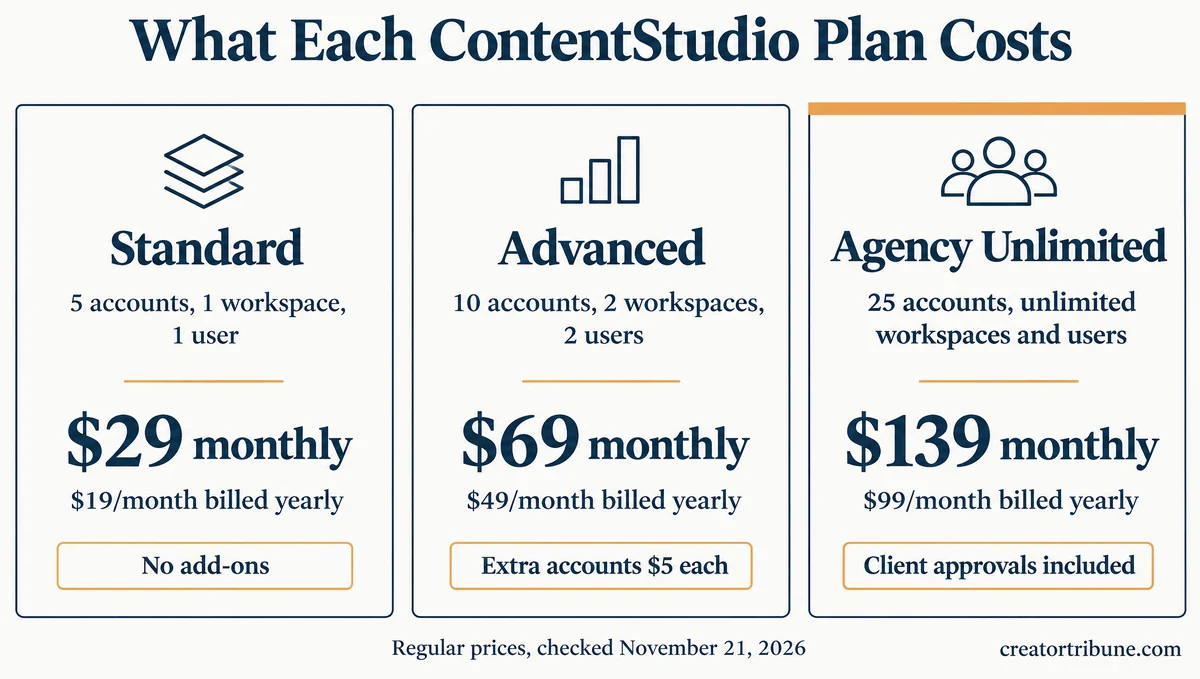
ContentStudio costs $29, $69 or $139 a month on monthly billing for Standard, Advanced and Agency Unlimited, and $19, $49 or $99 a month at its regular yearly prices. Until November 28, 2026, a Black Friday offer cuts yearly Advanced to $42 a month and yearly Agency Unlimited to $69.
Each plan has its own catch:
- Standard: 5 accounts and no add-ons at any price, so account six means moving to Advanced.
- Advanced: only 2 users and 2 workspaces, and each extra one costs $10 a month.
- Agency Unlimited: the unlimited part covers workspaces and users, while social accounts stop at 25 until you pay $5 each for more.
Here is how the prices line up on each billing cycle.
| Plan | Accounts, workspaces, users | Monthly billing | Yearly billing |
|---|---|---|---|
| Standard | 5 accounts, 1 workspace, 1 user | $29 a month | $19 a month ($228 a year), no Black Friday cut |
| Advanced | 10 accounts, 2 workspaces, 2 users | $69 a month | $49 a month ($588 a year), or $42 ($504 a year) until November 28 |
| Agency Unlimited | 25 accounts, unlimited workspaces and users | $139 a month | $99 a month ($1,188 a year), or $69 ($828 a year) until November 28 |
Prices checked on ContentStudio’s pricing page on November 21, 2026, and against the Internet Archive’s October 14, 2026 capture. The countdown on the pricing page ends the Black Friday prices on November 28, 2026 at 9:59 AM UTC. Quarterly billing sits in between, at $25, $49 and $89 a month during the offer.
Every plan includes unlimited posts, the content planner, analytics, best time to post, recurring posts, auto first comment and X threads. Advanced adds the social inbox for DMs and comments, approval workflows, competitor analytics, bulk scheduling, RSS autoposting, Instagram and TikTok grid views and Instagram collab posts. On Agency Unlimited you get client approvals, priority support and paid single sign-on (SSO) and white-label add-ons.
The plan I point most solo creators to is Standard on yearly billing, as long as five accounts covers everything you post to. Best time to post comes on every plan, and our posting times guide covers how to use those slots well.
How Much Does ContentStudio’s Yearly Discount Save?
Yearly billing saves $120 a year on Standard, $240 on Advanced and $480 on Agency Unlimited at regular prices, compared with paying monthly. Those were the savings printed on the October 14 pricing page, before the Black Friday offer.
The Black Friday badges count their savings the same way, against twelve monthly payments. That makes the “save $120” on Standard the regular yearly discount, since the October 14 page showed the same $19 a month.
Against the regular yearly price, the offer takes $84 a year off Advanced ($588 to $504) and $360 a year off Agency Unlimited ($1,188 to $828). The Agency Unlimited badge says “save $840” because it counts from the $139 monthly price. I don’t buy the Standard badge as a reason to rush.
If the Black Friday prices on Advanced or Agency Unlimited are what you are after, check them on ContentStudio before November 28.
What Happens When You Need a Sixth Account on ContentStudio?
A sixth social account forces an upgrade, because ContentStudio’s Standard plan cannot buy add-ons. ContentStudio’s pricing plans help page says Standard users “can only upgrade to a higher plan.” Advanced then sells extra accounts at $5 a month each, plus extra users or workspaces at $10 each.
Before: Five accounts (Instagram, TikTok, YouTube, Facebook and Threads) on Standard with yearly billing cost $19 a month, or $228 a year.
After: Add Pinterest as account six and the plan becomes Advanced, which costs $49 a month on regular yearly billing, or $588 a year. That is $360 more a year for one extra account.
Each Instagram profile counts as its own account, so a second Instagram account can be the one that tips you over. If you are at six accounts, I would buy Advanced yearly rather than monthly, since monthly costs $20 more every month for the same plan.
On the Agency Unlimited pricing card the account counter starts at 25, and raising it to 26 lifts the monthly price from $139 to $144. ContentStudio’s add-on help page lowers that rate in tiers: $5 an account up to 50, $4 to 100, $3 to 200, $2 to 500 and $1 past 500.
ContentStudio sells no lifetime plan on its pricing page. Licenses from its earlier lifetime deals surface as private resale offers instead, like those in an r/appsumo thread.
Can ContentStudio Post Directly to Instagram and TikTok?
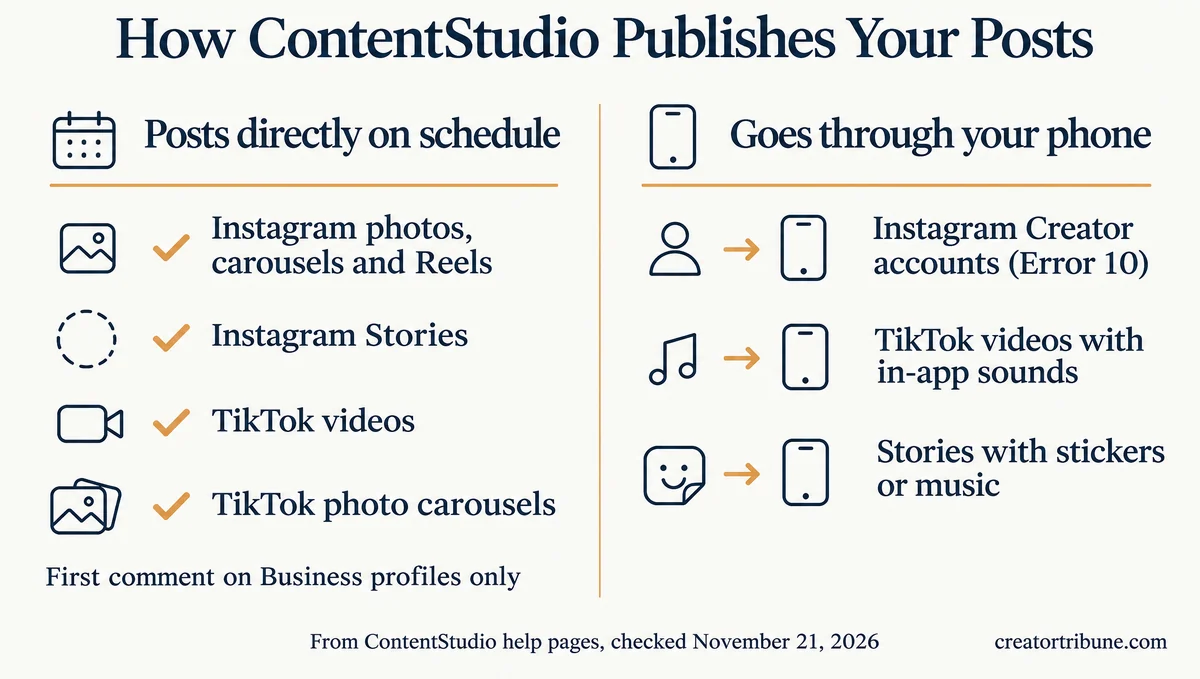
ContentStudio posts Instagram photos, carousels, Reels and Stories, plus TikTok videos and photo carousels, directly at the scheduled time. The exceptions are Instagram Creator accounts, which fail on direct posts according to its error guide, and TikTok videos that need an in-app sound, which you finish inside the TikTok app.
ContentStudio says it publishes to 12 social channels, and names Facebook, Instagram, X, LinkedIn, YouTube, TikTok, Pinterest, Threads, Bluesky, Google Business Profile and Telegram among them.
The first question I ask of any scheduler is whether it can post a Reel at 9 PM while your phone stays in your pocket. ContentStudio’s help pages say yes for an Instagram Business account and for TikTok, as long as the post needs no TikTok sound.
| What you post | How ContentStudio publishes it | Plan |
|---|---|---|
| Instagram photo, carousel or Reel | Directly at the scheduled time | Every plan |
| Instagram Story with up to 10 photos or videos | Directly, or as a phone notification when you want stickers or music | Every plan |
| Instagram first comment | Directly, on Business profiles only | Every plan |
| Instagram collab post with up to 3 collaborators | Directly, on feed posts and Reels | Advanced and up |
| TikTok video | Directly, or as a TikTok app notification for sounds, stickers and text | Every plan |
| TikTok photo carousel with 2 to 35 images | Directly, with an Auto Music toggle | Every plan |
Publishing methods from ContentStudio’s help pages and plan limits from its pricing page, both read November 21, 2026.
In ContentStudio, invited collaborators get the request after the post goes live, according to ContentStudio’s collaborator guide. A private collaborator account stops the post from publishing, because Instagram’s API only works with public collaborators. Our Instagram collab guide covers the other side.
The Advanced plan’s Instagram grid view shows scheduled posts next to your 100 most recent Instagram posts, which helps if you also use Instagram’s grid reorder.
One older ContentStudio help page still lists Stories as “Not Supported” for direct posting. Go by the newer guides, which schedule Stories directly with an Add to Story toggle, and by its 2023 year in review, which dates direct Story publishing to May 2023.
Does ContentStudio Work With an Instagram Creator Account?
ContentStudio’s own error guide says Instagram Creator accounts cannot publish through its API, so a direct post from one fails with Error 10. The API is Instagram’s official posting connection, the route a scheduler uses to publish without your phone. The error reads “The user is not an Instagram Business” (code 10), and the guide states plainly that “users cannot post via API on Creator Accounts.”
That rule bothers me more than any price on the page, because it decides whether the tool can post for you at all. Instagram opened scheduling to outside apps for business profiles first, in January 2018, TechCrunch reported, with other profile types promised later.
You have two routes, plus one check before you pay:
- Switch the profile to a Business account in Instagram’s account type settings, which ContentStudio’s guide names as the fix.
- Keep the Creator account and publish through ContentStudio’s phone notifications, finishing each post inside Instagram.
- Schedule one test Reel during the free trial and confirm it posts before you pay either way.
Can ContentStudio Add TikTok Sounds to a Scheduled Video?
To add a TikTok sound to a scheduled video, ContentStudio sends the video to your phone as a TikTok App Notification, and you finish the post inside TikTok. Photo carousels are the exception, since they post directly with an Auto Music toggle.
At the scheduled time, the notification opens TikTok with the video loaded, and you add the sound, text or stickers, write the caption, set privacy and tap Post yourself.
A missed notification waits in TikTok under Inbox, then System notifications. I would not schedule a trend video this way unless you will be near your phone at posting time, because nothing goes live until you tap through. Music rights shift between apps too, and our audio fix guide covers what happens when one video goes to TikTok, Reels and Shorts.
How Far Do ContentStudio’s AI Credits Go?
Standard includes 25,000 AI text credits counted in words, 25 image credits, 100 video credits and 100 video clipping credits a month. Advanced doubles each of those, and Agency Unlimited gives five times the Standard amounts. Every plan card lists “NanoBanana Pro & 24+ image models” and “Seedance 2.5 & 20+ video models.”
Clipping is the easiest credit to plan, because ContentStudio’s credit guide charges 1 credit per minute of source video, rounded up, no matter how many clips one run makes. A 6 minute 30 second video costs 7 credits, so Standard’s 100 credits cover up to 100 minutes of long video a month.
Extra image credits cost $5 per 100 on Advanced and Agency Unlimited, and extra text credits $0.75 per 1,000, according to the add-on help page. Standard cannot buy either. Twenty-five image credits a month feels thin to me for anyone who makes a thumbnail for every post, so treat ContentStudio’s AI Studio on Standard as a caption helper.
Is ContentStudio Free to Use?
There is no free ContentStudio plan, but there is a 7-day free trial with no credit card required, once per user. The signup page and section 4.2 of ContentStudio’s terms both state the 7-day trial, and the billing help page limits it to one trial per user.
The Black Friday version of the pricing page, live until November 28, 2026, shows no trial line at all, only a 30-day money-back guarantee. The October 14 version led with “No credit card required” and “7-day free trial” above the plans, and the signup page still says “7 days free trial, no credit card required.”
I like that the web trial asks for no card, because a forgotten trial cannot turn into a charge. A second trial will not reconnect the accounts from your first one, according to the billing help page. Start it only when you can test a real Reel and a real TikTok within the 7 days.
ContentStudio’s iPhone app works differently. Its only in-app plan is a monthly Standard (Mobile) plan billed through Apple, with a 14-day trial for new users, and annual or Advanced plans are sold only on the website.
Can You Get a Refund From ContentStudio?
First-time subscribers get a refund if they ask within 30 days of their first paid charge, and ContentStudio may refund a forgotten renewal if you ask within 7 days of that charge. Section 4 of its terms rules out prorated or partial refunds for the rest of a billing cycle, and a cancelled plan stays active until the cycle ends.
You can pause a subscription instead of cancelling, which stops billing and keeps your data, according to the billing help page. Only the account’s Super Admin can cancel, so an agency should confirm who holds that role before a client leaves. Apple handles refunds for plans bought inside the iPhone app.
Put the 30-day date in your calendar the day you pay. It is the one deadline I watch on any new subscription.
What Are the Pros and Cons of ContentStudio?
ContentStudio’s biggest strengths are unlimited posting on every plan and cheap extra accounts at agency scale, and its biggest weaknesses are the locked Standard plan and a weak phone app. The con that worries me most is the phone app, because a scheduler that needs your phone for some posts should work well on it.
Pros:
- Unlimited posts on every plan, with best time to post, recurring posts, auto first comment and X threads included even on Standard.
- Extra accounts get cheaper at agency scale on Agency Unlimited: $5 each up to 50 accounts, $4 past 50, and $1 past 500.
- Direct publishing covers Instagram Reels, carousels and Stories plus TikTok videos and photo carousels.
- You can pause billing instead of cancelling, and your data stays.
- The web trial needs no card, and its customer service scores 4.6 out of 5 on Capterra.
Cons:
- Standard stops at 5 accounts, 1 workspace and 1 user, with no add-ons at any price.
- The social inbox, approvals, grid views and Instagram collab posts all need Advanced.
- The phone apps rate 3.9 on Google Play and 3.0 on the US App Store, and some publishing routes depend on them.
- Direct posts from an Instagram Creator account fail with Error 10, so you either switch to Business or finish each post on your phone.
- Agency Unlimited caps social accounts at 25 before paid add-ons.
- Recent G2 reviews describe a steep learning curve and analytics that could go deeper.
Who Is ContentStudio Best For?
ContentStudio is best for creators and small teams on 6 to 25 accounts and for agencies that need client approvals, while a solo creator on one or two Instagram accounts can often pay nothing elsewhere. My pick for a solo creator on five accounts or fewer is Standard on yearly billing, but only after the trial proves your account type can post.
| You are | Plan to pick | Why |
|---|---|---|
| A solo creator on up to 5 accounts | Standard, yearly ($19 a month) | Unlimited posts and first comments, no team tools needed |
| A creator or small team on 6 to 10 accounts | Advanced, yearly ($49 a month, $42 until November 28) | Social inbox, approvals and grid views |
| A team past 10 accounts | Advanced with $5 add-on accounts, or Agency Unlimited | Advanced stays cheaper up to about 24 accounts on monthly billing |
| An agency with client sign-off | Agency Unlimited, yearly ($99 a month, $69 until November 28) | Client approvals, unlimited workspaces and users |
| A Creator account that posts only to Instagram | Instagram’s own scheduler | Free, and it works on Creator accounts |
Plan prices from ContentStudio’s pricing page, checked November 21, 2026.
On monthly billing, Advanced plus $5 add-on accounts reaches $139 at 24 accounts, the same as Agency Unlimited, before you count extra users at $10 each. Skip ContentStudio if you post to one or two Instagram accounts and nothing else, or if your whole workflow runs from your phone.
What Are the Best ContentStudio Alternatives?
The best ContentStudio alternative depends on your setup: Instagram’s own scheduler for Instagram-only creators, and Vista Social for teams that want scheduling, an inbox and analytics in one tool. A free scheduler that does the job beats a paid one in my book, so Instagram-only creators should start with Instagram’s own.
Instagram’s in-app scheduler reached all professional accounts in November 2022, TechCrunch reported, with posts, Reels and carousels schedulable up to 75 days ahead at launch. Professional accounts include Creator accounts, so it covers the case ContentStudio’s API cannot.
Vista Social suits a team that wants one paid tool for scheduling, inbox and analytics, and its review covers the plans and connection rules. For cheaper per-channel tools, our scheduling tool comparison lines up Buffer, Later, Metricool and Hootsuite by price.
Is ContentStudio Worth It?
ContentStudio is worth it for creators and teams who run more than five accounts or need approvals, and for agencies on Agency Unlimited, especially at its Black Friday price until November 28, 2026. It is a weaker buy for a solo creator on an Instagram Creator account. For me, ContentStudio earns its price at Advanced and above, where the inbox, approvals and $5 extra accounts solve problems a growing team hits every week.
Standard is fair for five accounts, and it is also a dead end. The day you need a sixth account, a second user or the inbox, you are paying Advanced prices.
If your account type and account count fit, start the ContentStudio trial, schedule one Reel and one TikTok in the first week, and choose the plan only after both post.
Quick Takeaways
- ContentStudio’s Standard plan holds 5 social accounts and sells no add-ons, so a sixth account means Advanced at $49 a month yearly or $69 monthly.
- Against regular yearly prices, the Black Friday offer (until November 28, 2026) saves $360 a year on Agency Unlimited, $84 on Advanced and nothing on Standard.
- ContentStudio’s own error guide says Instagram Creator accounts cannot publish through its API, so test one scheduled Reel in the 7-day, no-card trial.
- TikTok videos that need in-app sounds finish inside the TikTok app, while Instagram posts finished by phone use ContentStudio’s own apps, rated 3.9 on Google Play and 3.0 on the US App Store.
- First-time subscribers can ask for a refund within 30 days of the first charge, and a forgotten renewal within 7 days.