See Old Usernames on Instagram When It Only Shows a Number
See Old Usernames on Instagram When It Only Shows a Number
Instagram shows how many times a username changed, rarely the old names. See your own history and find clues to anyone else's old handle.
- 1How Do You See Old Usernames on Instagram?
- How Do You See Your Own Old Username on Instagram?
- Can You Download Your Instagram Username History?
- 2How Can You Find Someone’s Old Instagram Username?
- 3Why Does Instagram Show a Number Instead of Old Usernames?
- Why Do Former Usernames Not Show on Some Instagram Accounts?
- 4Why Won’t About This Account Load on Instagram?
- 5Can You Delete or Hide Former Usernames on Instagram?
- Does Changing Your Profile Picture Reset Former Usernames on Instagram?
- Does the Instagram Former Username Count Go Down on Its Own?
- 6What Happens When You Change Your Username on Instagram?
- 7Does a High Former Username Count Make an Instagram Account Look Bought?
- 8Quick Takeaways
TL;DR: To see your own old usernames on Instagram, open Your activity, then Account history, which logs each username change you made. For anyone else’s account, About this account shows how many times the username changed and rarely the old names, so your best free clue is old comments that still tag the previous @handle. No setting deletes or hides that number.
Anyone trying to see old usernames on Instagram hits the same wall. Tap Former usernames on someone’s profile and you get a number where the names should be.
Instagram’s Help Center says that is how it works now: you can see “the number of changes made to an account’s username, but not the former usernames themselves.”
A February 2026 post on r/Instagram ran into exactly that, a row that “doesn’t list anything, just says it’s changed 4 times.” Your own account is a different story, because Instagram keeps a log of your changes, and the steps for reading it are below.
It was not always a number. When Instagram announced About This Account on August 28, 2018, TechCrunch reported it would show “a lineage of that account’s username changes over the last year.”
Plenty of guides still describe that list, which is why I check the date on any guide before trusting its steps on this topic.

How Do You See Old Usernames on Instagram?
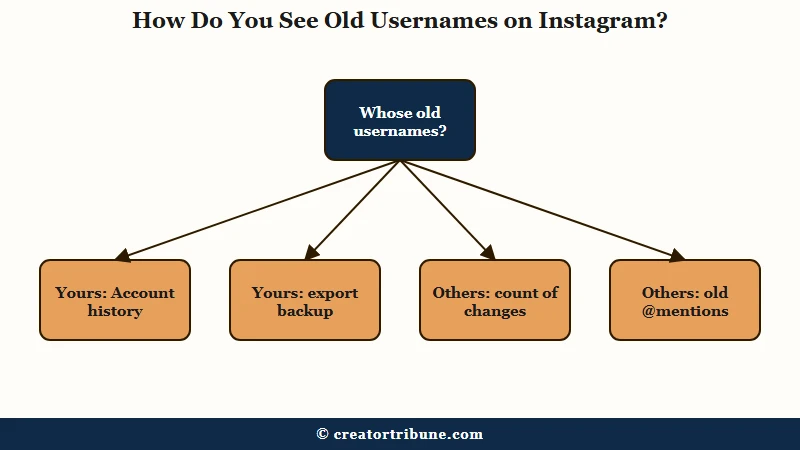
You see your own old usernames on Instagram in Account history, which names each username you switched to. For anyone else’s account, About this account shows how many times the username changed, usually without the names.
What is About this account: An Instagram panel, opened from the three dots on a profile, showing when the account joined, how many times its username changed and, for some accounts, its country.
Account history is the route I trust most, because Instagram logs every change made on your account, including ones you did not make. Instagram’s account history help page says it lets you “review all the changes you made to your account.” You must be logged in to open it.
| Where to look | Whose account | What it shows | Time and cost |
|---|---|---|---|
| Account history | Yours | Each username change, with the name you switched to and when | About a minute |
| Export your information | Yours | A downloadable copy of your Instagram information | Free, but the link can take up to 30 days |
| About this account | Anyone’s | Date joined and the number of username changes, rarely the names | Seconds, while logged in |
| Old comments and captions | Anyone’s | An old handle typed as an @mention before the change | Free, and slow to search |
How Do You See Your Own Old Username on Instagram?
Your own old usernames are in Account history, under Your activity. Each username change appears as its own entry naming the username you switched to and when you did it.
These are the app steps from Instagram’s help page:
- Tap your profile picture in the bottom right to go to your profile.
- Tap the menu icon in the top right.
- Below How you use Instagram, tap Your activity.
- Tap Account history and scroll through your changes.
- Tap Update type to filter the list by type of change, or All dates to narrow it to a date range, then tap Apply if prompted.
On a computer, click Menu in the bottom left, click Your Activity, then click Account history on the left. Sort and filter at the top changes the order or narrows the list to a date range. The help page lists no filter by type of change on the web, so scroll for the username entries.
An entry names the username you changed to, so the handle you signed up with may never get a line of its own. That wording is how one r/Instagram poster caught a change they never made in June 2026, when account history “said that I changed my username to OldUser 10 hours ago.”
OldUser stands in for the poster’s real earlier handle. A change you did not make is a sign someone else may have had access, so recover a hacked account before anything else on this page.
To see the count strangers see on your own profile, open Settings and activity, search for About, and open About your account.
Can You Download Your Instagram Username History?
You can download a copy of your Instagram information from Accounts Center, under Export your information. Treat the file as a backup to Account history, because Instagram does not list which profile edits it includes.
The steps come from Instagram’s export help page:
- Open Settings, then Accounts Center or Meta Account, then Your information and permissions.
- Tap Export your information, then Create export, and pick your Instagram profile.
- Choose Export to device, pick the information, the date range and the format, then start the export.
The export costs nothing but time. Instagram warns that “It may take up to 30 days for us to email you an export link,” and once a file is ready you have 4 days to download it.
The export also has documented gaps: Instagram says some information you have deleted “will not appear” in it, which is also why deleted Instagram messages rarely turn up there.
How Can You Find Someone’s Old Instagram Username?
You usually cannot see someone’s old Instagram username in the app. The best free clue is older comments and captions that tagged the account before the change, because those @mentions keep the old handle in their text.
Linktree’s guide to changing your handle explains why this works: “Comments that directly tag your old username will lead to a blank Instagram account with the message ‘user not found.'” The same guide says “Tagged photos will remain connected to your account and reflect your new Instagram name,” so the Tagged tab updates while the text around it does not.
The comment trick is the one I reach for first, because it needs no login and no money:
- Open the account’s Tagged tab and scroll to its oldest posts.
- Read the captions and comments on those posts for @mentions that do not match the current handle.
- Tap a mention that looks wrong. A dead page or a stranger’s profile means that handle changed hands or was dropped, so count it as their old name only when the post is plainly about this person.
Before: You search the current handle in Instagram and on a username lookup site, and nothing older than the current name comes up.
After: You open a 2023 post the account is tagged in, find a friend’s comment still reading @oldhandle, and tapping it opens a dead page instead of the account you came from.
Paid lookup sites and scripts promise more. Some open-source scripts that pull account details, such as Toutatis, ask for an Instagram session ID, which is a live login to an Instagram account.
Any site that wants your login or session is a bigger risk than an old username is worth, and profile viewer apps fail on exactly that point.
Why Does Instagram Show a Number Instead of Old Usernames?
Instagram has not said why it stopped listing old usernames, but it presents the count as a trust signal. Its Help Center says the former username count “may help identify whether an account is authentic or misleading.”
The trade makes sense to me, since a count can warn you about an account that was bought and resold without publishing anyone’s old handles. It also means guides written around the old list can promise something the app no longer shows.
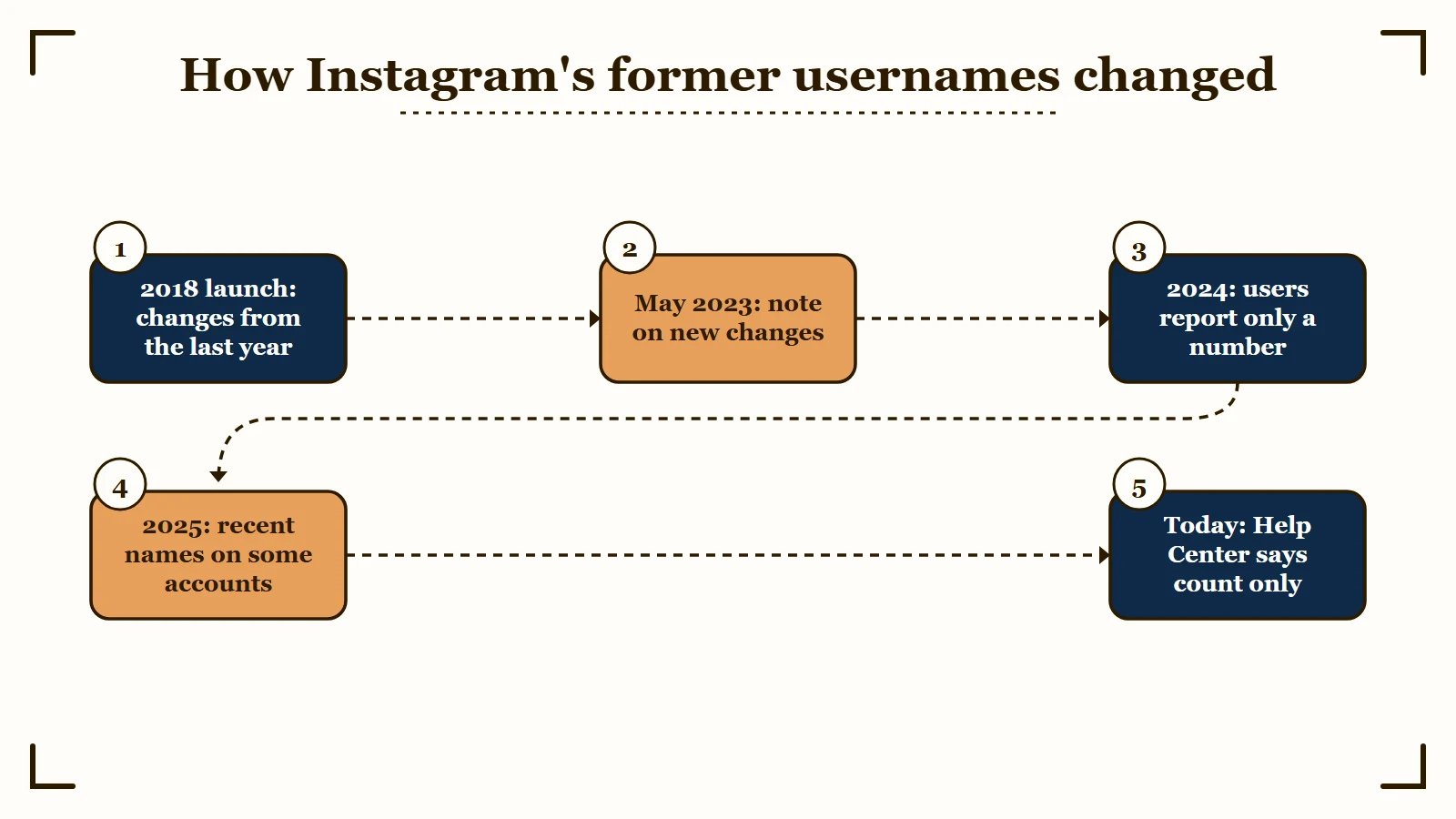
| Date | What Instagram said or showed | Source |
|---|---|---|
| August 28, 2018 | About This Account would show “any username changes in the last year,” first for accounts that “reach large audiences” | Instagram’s launch post |
| May 25, 2023 | The launch post gained a note: “See new changes to ‘About This Account’ in the Instagram Help Center” | Instagram’s launch post |
| January 2024 | A user asked why they could see “the amount of usernames, not the actual usernames” | r/Instagram, January 2024 |
| January 2025 | A guide said the row shows recent usernames “on some accounts,” while its writer’s own seven-month-old change showed no names | Make Tech Easier |
| October 2026 | “Former username count,” with “the number of changes” and not the names | Instagram Help Center |
The May 2023 note does not say what changed, so the switch cannot be pinned to that day. What the record does show is a feature that began as a one-year list and now reads, in Instagram’s own words, as a count.
Make Tech Easier’s January 2025 guide is the reason not to call the names gone for good. It says tapping the arrow next to Former usernames shows recent usernames on some accounts, while the writer’s own account, unchanged for nearly seven months, showed only the count. Expect a number, and treat any names that do appear as the latest changes only.
Why Do Former Usernames Not Show on Some Instagram Accounts?
The Former usernames row usually appears only after an account has changed its username at least once. You also have to be logged in, because Instagram’s Help Center describes About this account for signed-in users.
A reply in an October 2025 thread put it plainly: “If an account never changed their username it won’t show up.” Instagram does not document the rule, so treat a missing row as a likely sign the handle never changed. Plenty of brands have kept one handle since they joined, so a missing row on a big account is nothing sinister.
The fastest check I know is to compare two profiles side by side: one you know was renamed, and the one you are curious about. If the renamed one shows the row and the other does not, the second account has most likely never changed its handle, or its old changes have dropped out of the count.
Why Won’t About This Account Load on Instagram?
About this account can fail to load with an error screen even when your app is up to date. Refresh it, check that you are logged in, then try instagram.com; if it fails on every profile and on the web, the fault is most likely on Instagram’s end.
The app version of the error reads: “An unexpected error occurred. You are receiving this error because something went wrong loading this screen. Tap the refresh icon below to try again.” An October 2026 post described that screen on every profile, plus a “Failed to load” message on a laptop, after logging out and in, updating the app and restarting the phone.
Work through these in order before you reinstall anything:
- Tap the refresh icon on the error screen.
- Check that you are logged in, since the Help Center says About this account works “When you’re logged in to your account.”
- Update the app and restart your phone.
- Open the same profile on instagram.com in a browser.
- Check whether Instagram is down for other people before changing anything else.
When the panel still fails on every profile, I leave it for a day rather than reinstalling. If it loads for some profiles and not others, try the failing one again later before reading anything into it.
Can You Delete or Hide Former Usernames on Instagram?
Instagram gives you no way to delete or hide former usernames. Its help pages describe no setting for it, the unofficial tricks covered below are unproven, and the photo one is risky.
The only profile sure to show no changes is a new account that keeps its first username. Starting over costs your followers, your post history and the join date that proves your account’s age.
My advice is to leave the count alone and let a long join date and steady posting answer any doubts.
If you do start over, growing the new account back is the slow part, and creators who run several accounts sometimes automate that with SMTasker, which runs on Android phones you connect yourself.
Its own Instagram guide calls for a 30-day warm-up before an account runs at normal volume, and its press release warns that automation breaking platform rules “may result in temporary restrictions.” If the new account is the only one you have, grow it by hand.
Does Changing Your Profile Picture Reset Former Usernames on Instagram?
Changing your profile picture dozens of times is a Reddit rumour that Instagram has never documented. It fails for some people who try it, and the method itself says to keep going until Instagram stops letting you change the photo.
The trick costs 15 to 100 back-to-back profile photo changes, depending on who tells it.
One early version appears in a November 2024 thread, where the person who posted it said they learned it from “friends who can ban, unban, swap users, remove shadow ban, and other services on Instagram.”
Replies in that thread and three later ones split three ways, and none of them includes a before and after screenshot:
| Thread | Said it lowered the count | Worked once or stalled | Said nothing changed |
|---|---|---|---|
| November 2024 | 3 | 1 | 3 |
| August 2025 | 3 | 0 | 0 |
| October 2025 | 4 | 2 | 1 |
| July 2026 | 2 | 0 | 1 |
| All four | 12 | 3 | 5 |
In the October 2025 thread, the step-by-step version says “If it stops working, it means your at limit.” One of the five who saw no change wrote there, in Portuguese, that the account picked up a restriction and the count did not move.
An August 2026 reply in the July 2026 thread says to keep changing “until it tells you you can’t,” and that stopping point sounds like Instagram’s rate limit.
If all that swapping trips Instagram’s limits, the result can be an action block, which typically lasts 24 to 48 hours on a first offense. I wouldn’t run it on any account that earns money.
The same July 2026 thread carries a second version: change your bio every day for 3 to 5 weeks and the count returns to 0. It comes with the same kind of evidence as the photo version, a commenter’s word and no screenshot.
Does the Instagram Former Username Count Go Down on Its Own?
The former username count may fall on its own, but Instagram publishes no rule for when. The 2018 version covered only the last year of changes, which would let old changes drop off, and Instagram has not said whether that window still applies.
A February 2026 reply said the count went from 9 to 8 between January and early February, and guessed old changes “disappear after some time, like a year.”
The poster who started the July 2026 thread said username changes made earlier in their main account’s history did not show up in the count.
Both fit a rolling window like the one Instagram described in 2018, though nothing official confirms one today. If you are waiting it out, check About your account once a month instead of every day.
What Happens When You Change Your Username on Instagram?
Changing your Instagram username adds one to your former username count and logs an entry in Account history. Old links and @mentions that used the old handle stop pointing to you, while tagged photos follow your account.
Instagram’s profile help page adds two details: “If your account reaches a lot of people, your username change may need to be reviewed,” and “Your followers may be notified of your username change.”
SocialBee’s 2026 username guide adds that “mentions using your old username won’t link to your account anymore.” Switching back to a name you used before is still a change to your username, so expect it to count.
Your display name is a separate field, and the Help Center describes the former username count only as changes to your username. Instagram’s page for Meta Verified creators caps name edits at “twice every 14 days.”
Before you save a new handle, update every link that points to your profile. If you have no single page for those links yet, a free link-in-bio template gives you one hub, so the next rename means updating one link.
Test the handle in the username field first, since Instagram shows whether a name is available before you save it. I’d make the next change your last one for a long while.
Does a High Former Username Count Make an Instagram Account Look Bought?
A high former username count can make an Instagram account look bought or flipped, because frequent changes are also what a resold account looks like. Instagram’s own help page frames the count as an authenticity check.
A May 2026 post from a blogger who cycled through names early on put the problem bluntly: “A long username history is a red flag, it looks like the account has been bought and sold.”
Another poster with about 300 followers wrote: “If it were 3 or less changes then I’d feel fine, but 5? I worry that people will find that suspicious.”
What bothers me about the count is that a blogger’s naming phase and an account sale leave an identical figure behind. A stranger cannot tell them apart, so your profile has to do the explaining.
| Your situation | What a stranger sees | What to do next |
|---|---|---|
| You renamed often while finding your niche | An old join date and a high count | Keep your current handle and mention the old name in your bio or a pinned post |
| You are planning another rebrand | The count rising by one | Make it one deliberate change, not a run of tests |
| The count rose and you changed nothing | One more change than you made | Check Account history for it, then treat it as a hack and secure the account |
| The count bothers you more than your audience | An unchanged count | Leave it, since no setting removes it |
A join date years in the past, with posts running back to it in one niche, is the evidence a stranger can check. Keep posting under one name and the number matters less every month.
If you are checking someone else, start with their oldest tagged posts and read the count as one signal among several. If the number is yours, leave it alone and let the next year of posts speak for the account.
Quick Takeaways
- Your own old usernames are in Your activity, then Account history, and a downloadable copy of your information comes from Export your information in Accounts Center.
- For anyone else’s account, About this account shows how many times the username changed and rarely the names, so old comments that tag the previous @handle are the better clue.
- No setting deletes or hides the count, and the profile-photo reset is undocumented: 12 of 20 Reddit replies say it lowered their count, none posted proof, and it runs into Instagram’s limits.
- If About this account will not load on any profile, refresh, check that you are logged in, try instagram.com, then give it a day.
- Each username change adds one to the count, and a switch back is still a change, so test a handle in the username field before you save it.