Instagram Action Blocked and How Long It Really Lasts
Instagram Action Blocked and How Long It Really Lasts
Instagram action blocked? Here is how long each block type really lasts, what extends it, the recovery sequence that works, and what to do when it persists.
- 1The 4 Block Types Instagram Fires
- 2How Long Each Block Lasts
- 3How to Tell Which Block You Have
- 4The Shadowban Hashtag Test
- 5The 4 Things That Extend Your Block
- 6The Recovery Sequence (Hour 0 to Day 14)
- 7The Link-to-Facebook Trick and What It Really Does
- 8When and How to Submit a Support Review
- 9What Does Not Work (Skip These)
- 10Why Inactivity Can Trigger a Block (The Counterintuitive One)
- 11When the Block Persists Past Two Weeks
- 12Frequently Asked Questions
- How do I know if I am action blocked vs shadowbanned?
- Will my action block clear faster if I delete the post that caused it?
- Does Meta Verified protect me from action blocks?
- Will my account survive multiple action blocks in a year?
- Can I move to a new account if my current one is permanently disabled?
- What if my account got blocked from someone else logging in?
- 13Quick Reference
TL;DR: Instagram does not publish how long an action block lasts, and the only firm date is the end date Account Status shows for a listed restriction. In November 2026 reports, one restriction lifted within minutes of an ID review, while a store’s messaging restriction was set to run a full month. Stop the blocked action, check Account Status, and change your password only if an app or another person had your login.
The first time I hit an Instagram action block, I spent two hours testing whether it had lifted, and a block I expected to clear overnight lasted three days. Instagram never says whether those retries count against you, so I stopped testing that way.
Since then I have walked four creator accounts through the recovery sequence below without a second block during the cooldown. The step that saves the most time is opening Account Status first, because it is the one screen that can give you a real end date.
This guide covers the four ways Instagram restricts an account, how to tell which one hit you, what real block lengths look like in dated reports, and a recovery sequence that does not provoke a second block.
The 4 Block Types Instagram Fires
Instagram restricts accounts in four different ways, and they differ most in whether you get an end date. Telling them apart first decides whether you wait it out, ask for a review, or fix a login problem.
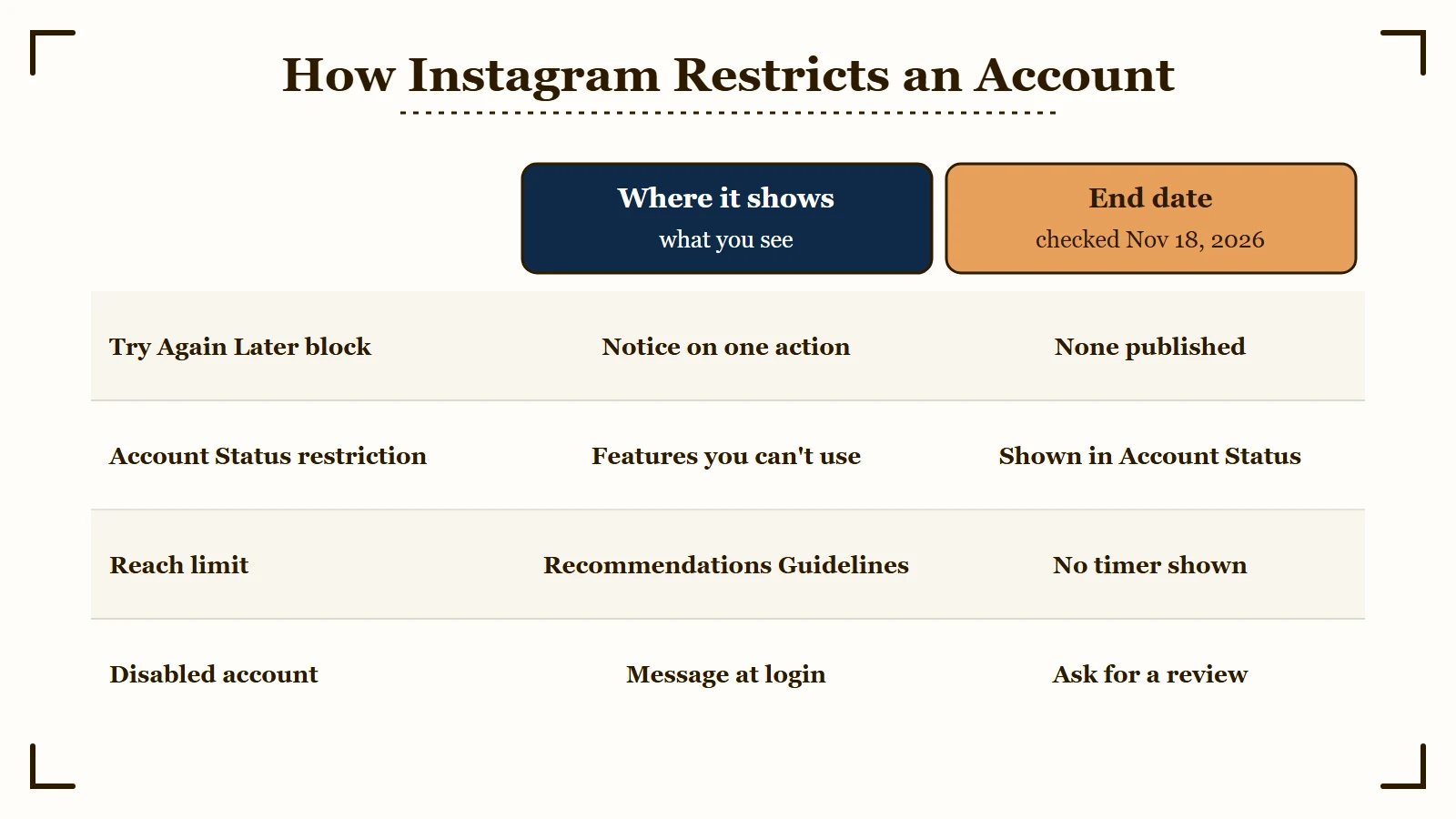
Most guides treat “action blocked” as one thing, which is why their timelines rarely match what readers see. The four states are:
| Block type | What happens | How long it lasts | What it looks like |
|---|---|---|---|
| Try Again Later block | One action stops working, such as following, liking or commenting, while the rest of the app still works | Instagram publishes no length; reports run from about a day to two weeks | A “Try again later” notice, sometimes with a “Let us know” button |
| Account Status restriction | Instagram lists features you can’t use, such as “You can’t interact with certain accounts” or “You can’t send messages” | Until the end date Account Status shows, unless a review lifts it sooner | An entry under Features you can’t use in Account Status, with a review option |
| Reach limit (the “shadowban”) | Everything works, but your posts stop being recommended to people who don’t follow you | No timer shown; Account Status offers edit, remove or Disagree with decision | No notice; professional accounts can check Recommendations Guidelines in Account Status |
| Disabled account | Login fails and the account is no longer visible to others | Permanent unless a review reverses it | A disabled message when you log in, with on-screen steps to ask for a review |
The Try Again Later block is the mildest, and it usually stops one action at a time. Instagram’s help page on the “Try again later” error ties the message to detected inauthentic activity and lists securing the account first, starting with your password and any suspicious third-party apps.
An Account Status restriction is the one with a real date. Meta’s Transparency Center says Account Status shows “some restrictions your account might have and how long they’ll last,” and Instagram’s Account Status page lists them under Features you can’t use with a way to appeal. One restriction that came up repeatedly in November 2026 reads “You can’t interact with certain accounts,” and a November 6 poster quoted its reason: “we restricted your account because of content or accounts you’ve interacted with.”
The reach limit is what most people call a shadowban, and Instagram’s own name for it is recommendation eligibility. Professional accounts can check it under Recommendations Guidelines in Account Status, and our cross-platform shadowban test covers reach checks across Instagram, TikTok and other platforms.
A disabled account is the last stage. Instagram’s disabled-account page says you may be able to ask for a review by logging in and following the on-screen instructions, and it names no deadline. Meta’s suspended-account help page gives Facebook users 180 days and says the window varies by region, so appeal as soon as you see the screen; our Instagram account disabled guide walks through it.
How Long Each Block Lasts
Instagram does not publish how long an action block lasts, so the only firm answer is an end date Account Status shows you. Without one, you are going by what other people report, and those reports vary widely.
A 1, 3, 7 and 30-day ladder does exist, but it belongs to Meta’s strike system for Facebook. Meta’s restricting-accounts page lists a one-day restriction from creating content at seven strikes, rising to 30 days at ten or more, and says these restrictions “generally only apply to Facebook accounts” (checked November 18, 2026).
Instagram has never confirmed the 24 to 72 hours that most guides give for a first block either. Some reports below fit it, such as a repost block that lifted in about a day, while others lasted two weeks or kept coming back for months.
Here are dated reports, all but the April one from the weeks before this update, so you can compare against your own notice:
| What people reported | How long it lasted | Where |
|---|---|---|
| A follow block on a two-year-old account after following “every other artist in Artist Alley” at a convention | Started on day 2 of the convention; still active when posted | r/Instagram, November 15 |
| “You can’t interact with certain accounts,” first on October 28 | Lifted after a video selfie review, then returned on November 4 and November 11 | r/Instagram, November 13 |
| The same restriction, first received after a mass unfollow more than four months earlier | Lifted within minutes of an ID review, then came back weekly for over four months | r/Instagram, November 6 |
| A 3-day DM restriction over one comment | Review approved, but chat was still restricted when posted | r/Instagram, November 6 |
| A store’s business account told “You can’t send messages” | November 11 to December 11, kept after review; support called it automatic | r/Instagram, November 17 |
| A repost block after a burst of reposts | About a day, then back the next day; one reply says the same block lasted two weeks | r/Instagram, April |
In these reports, a review did not always end a dated restriction: the 3-day DM restriction was still on after its review was approved, and the store’s review was marked complete with the restriction kept to December 11. The “certain accounts” restriction behaved differently, clearing within minutes of a review and then returning a week later.
If a block passes two weeks with no date anywhere, treat it as stuck rather than still counting down. The support-review steps on this page cover both routes, Account Status and Report a problem.
How to Tell Which Block You Have
The notice wording, Account Status and which actions still work tell you the type within a minute. Classify the block before you start the recovery sequence.
Run this check the moment the first failure happens:
- Read the notice. “Try again later” with “we restrict certain activity to protect our community” is a Try Again Later block. A disabled message at login means the account itself is disabled.
- Open Account Status: tap your profile picture, then Menu, then Account Status under More info and support. A restriction listed under Features you can’t use has an end date and a review option, while a plain Try Again Later block often does not appear there at all.
- Try a different action. If following is dead but liking and commenting work, the block covers one action. If liking is the only thing failing, our guide to when Instagram won’t let you like posts separates glitches from blocks.
- If no notice fired but reach has dropped, check Recommendations Guidelines in Account Status on a professional account, then run the hashtag test described on this page.
I have seen creators run the full recovery plan for a block that Account Status showed ending the next morning. Thirty seconds on that screen can save a week of guessing.
The Shadowban Hashtag Test
The official check for a reach limit is Recommendations Guidelines in Account Status; a small unique hashtag checked from a non-follower’s view is a rough second test. Run it when Account Status shows nothing but your reach still looks off.
Step-by-step:
- From your account, post a Reel or feed image with a hashtag of 100 to 1,000 total uses (small enough to scan completely, large enough that “Recent” is populated). Use one obscure hashtag and four or five normal ones.
- Open Instagram on a different device or in a private browser window logged out of your account, OR ask a friend who does not follow you.
- Search the obscure hashtag and switch to the “Recent” tab if your app still shows one.
- Wait 15 minutes after your post. If your post does not appear, it is probably not being shown on that hashtag.
- Repeat with two more independent hashtags before drawing a conclusion. Three failed checks point to a wider reach limit, so go back to Account Status and look again.
If you only fail one hashtag test, you may have used a banned or limited hashtag without realizing. Delete the post containing that hashtag and replace it with a clean version.
The 4 Things That Extend Your Block
Instagram never says what lengthens a block, so these four are precautions drawn from its help pages and from user reports. Avoid all four during the cooldown.
- Retrying the blocked action. Instagram does not say retries count against you, but posters describe blocks returning the day after they cleared, and a test every few minutes tells you nothing a single test a day later would not. If you see the notice once, wait at least a day before trying again.
- Turning on a VPN or hopping between devices. A like block reported on October 7 started while a VPN was on. Stay on your usual device and network, and turn a VPN off rather than on.
- Opening a second account to wait it out. Instagram does not say how it links accounts, so there is no safe assumption that a new one starts clean. If the main account is ever disabled, Instagram’s Terms of Use also bar anyone whose account Meta has “previously disabled” for breaking its policies.
- Keeping the third-party tool that caused it. Instagram’s page on apps that offer likes and followers says accounts that keep using them “may notice that certain parts of their Instagram account are limited.” Remove the app under Website permissions, then Apps and websites in Instagram’s settings, and if you are choosing a growth service, our growth services comparison shows which ones ask for your password.
If you have already done any of these, restart the recovery sequence with 48 hours of total quiet instead of 24. That longer pause is a cautious habit, since Instagram publishes no reset rule.
The Recovery Sequence (Hour 0 to Day 14)
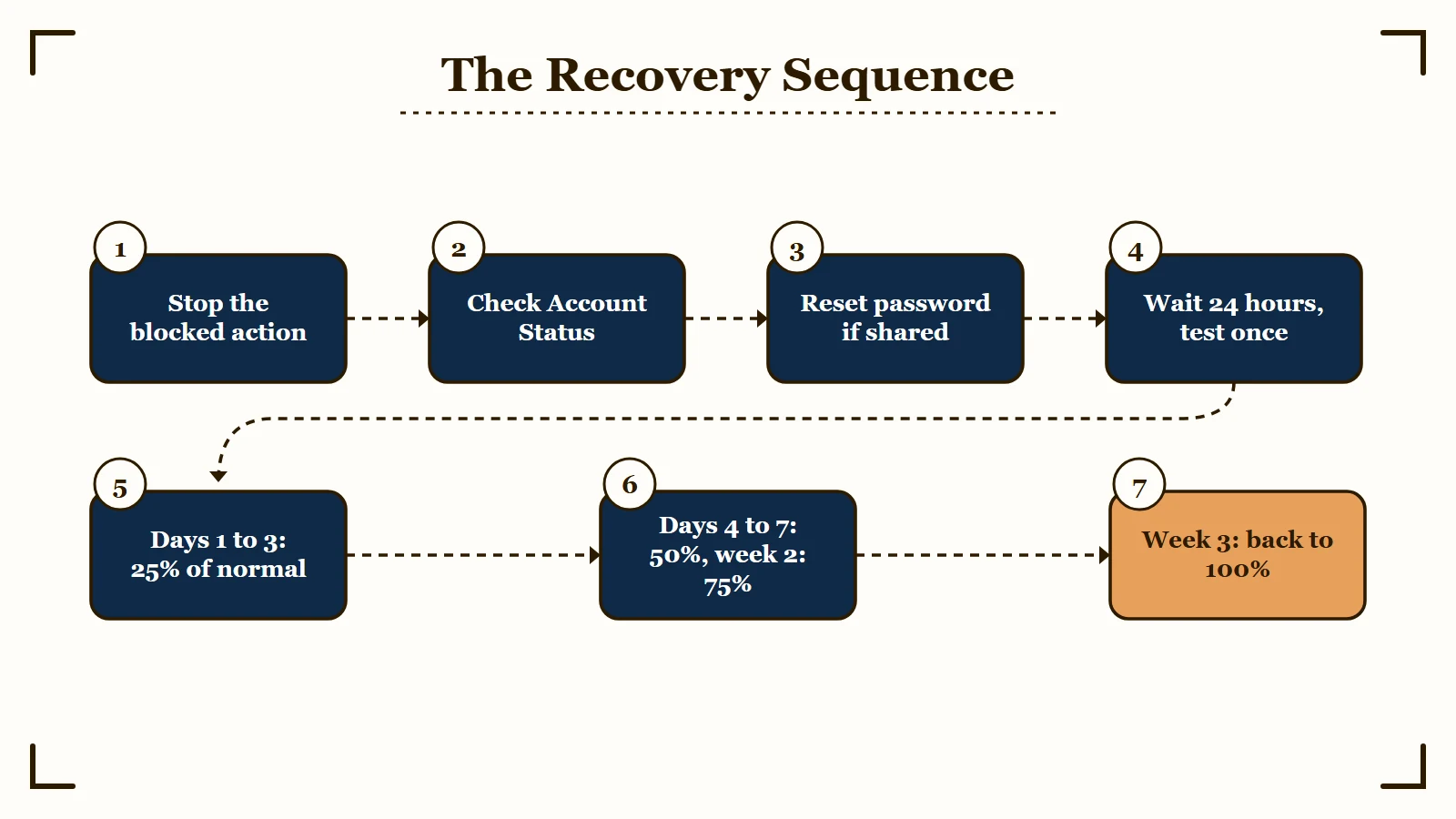
The Quarter-Capacity Method is a cautious ramp back to normal use: a day of quiet, one test action, then 25, 50 and 75 percent of your usual activity over two weeks. Instagram publishes no activity limits, so the percentages come from the accounts I have walked through it.
The sequence:
- Hour 0 to Hour 2. Stop the blocked action and close the app. Check Account Status once, because a listed end date replaces the rest of this timeline.
- Hour 2 to Hour 24. Do nothing in the app. If an app or another person had your login, change your password now and remove the app, which is what Instagram’s help advises for this error; otherwise leave the account alone.
- Hour 24. Try the blocked action once: one follow if following was blocked, one like on a post from someone you already follow if liking was. If it works, the block has lifted; if the notice comes back, wait another 24 hours before the next single try.
- Days 1 to 3 (after block clears). Run at 25 percent of your normal daily activity. If you usually do 100 follows a day, do 25. If you usually leave 30 comments, do 7 or 8.
- Days 4 to 7. Move to 50 percent of normal activity.
- Days 8 to 14 (Week 2). Move to 75 percent of normal activity.
- Day 15+ (Week 3). Return to 100 percent of normal activity.
Here is what this looks like end-to-end with a worked example:
Before: A creator gets blocked at 7pm Tuesday after a follow burst. They wait two hours and try one follow at 9pm, and the notice comes back. They try again at 11pm and at 1am Wednesday, get the same notice each time, and spend Wednesday and Thursday locked out before resuming on Friday.
After: Same creator, same Tuesday 7pm block. They close the app immediately, check Account Status, find nothing listed, and do nothing in-app for 24 hours.
Wednesday 7pm they try one follow, it goes through, and the block is cleared. They run 25 percent of normal Wednesday through Friday, 50 percent Saturday and Sunday and 75 percent the following week, and by day 14 they are back to full activity with no further blocks.
The “after” version tests once instead of three times, and it never repeats the burst that caused the first block.
The Link-to-Facebook Trick and What It Really Does
Nothing Meta publishes says that linking a Facebook profile shortens an Instagram block. Its help pages on the Try Again Later error, third-party apps and Account Status (all read on November 18, 2026) do not mention it.
Linking does put both logins in Accounts Center, so a compromised Facebook account becomes a route into Instagram during a block. Instagram’s help on Try Again Later errors tells you to “check Accounts Center and remove any linked accounts you don’t recognize.”
Skip creating a fresh Facebook profile just to link it. It adds another login to protect, and nothing Meta has published ties it to a faster recovery.
When and How to Submit a Support Review
Use Account Status first, because a restriction listed there has its own review option, and use Report a problem only when Account Status shows nothing. Meta’s Transparency Center puts it plainly: “If you think we got something wrong, you can let us know in the app.”
For a listed restriction, open Account Status, tap the restriction under Features you can’t use, and request a review. Reviews can ask for a video selfie or a photo of your ID, and one November poster’s selfie review ended with a message that the system had made a mistake (r/Instagram, November 13).
For a Try Again Later block with nothing in Account Status, use Report a problem from the Help menu in Settings and include:
- Account username
- Date the block started
- Which action is blocked and the exact notice wording
- A brief, specific description of what you were doing when it fired
- Whether you have used third-party tools
- That you have stopped the blocked action since
Instagram gives no review time, and a review that goes your way does not always end the restriction. On November 6, one poster’s 3-day DM restriction stayed on after the review was approved, and the poster said Meta’s AI support assistant reported no current restrictions at all (r/Instagram).
If a week passes with no reply, resubmit once with the same details. Account Status is not limited to creators: Instagram’s help gives the same path for every account, and professional accounts also see Recommendations Guidelines there.
What Does Not Work (Skip These)
Most bypass advice does nothing for an action block, and a few tricks add new problems. These are the things creators try most:
- Resetting your password as a fix for an ordinary block. A new password leaves an account-level block in place. If an app or another person had your login, though, Instagram’s help tells you to change it, and a change logs every device out.
- Uninstalling and reinstalling the app. The block lives on Instagram’s side, so a fresh install changes nothing. One November 6 poster reinstalled, restarted and went inactive for a week, and still woke up to the same restriction.
- Switching to a different phone. It does not clear a block that sits on the account, and it adds a new login to the picture while you wait.
- Using a VPN to change your IP. A new IP address leaves the block in place.
- Opening a new account to “wait it out.” It does not lift the block on the main account.
- Posting more “good” content to compensate. Posting during a block does nothing toward unblocking.
- Counting on a support chat to lift it. One November poster paid for Meta’s subscription to reach a support agent, spoke with two, and neither fixed a restriction that kept returning (r/Instagram).
- Paying an “unblock” service. These services need your login to do anything, and giving an outside app your login is exactly what Instagram’s page on third-party apps warns against.
Switching from Wi-Fi to cellular data is harmless to try when the app itself is misbehaving. It will not clear a real block, which sits on the account.
Why Inactivity Can Trigger a Block (The Counterintuitive One)
Instagram has no published rule about returning from a break, so this one is a precaution: a burst of follows after weeks away is the same burst that sets off blocks on active accounts. A two-year-old account was blocked from following on day 2 of a convention after following “every other artist in Artist Alley” (r/Instagram, November 15).
If you have been off Instagram for 14 or more days, ramp activity back up gradually:
- Day 1 of return: scroll for 15 minutes, like 3 posts from accounts you follow, leave the app.
- Day 2: scroll, like 5 to 10 posts, watch a few Stories.
- Day 3: same as day 2 plus 1 to 2 follows.
- Day 4: scale to roughly 25 percent of your historical normal activity.
- Day 7: 50 percent normal.
- Day 14: full normal activity.
This warm-up is shorter than the post-block sequence because no restriction is in place yet. Skipping it repeats the kind of burst that set off the convention block described in this section.
When the Block Persists Past Two Weeks
Past two weeks with no end date anywhere, stop waiting and use the review routes, because nothing Instagram publishes says a dateless block will clear on its own. Retrying the action will not move it.
If you have been at zero activity for 14 days and still see the block:
- Check Account Status again (profile picture, Menu, Account Status). If it lists a restriction, use its review option.
- If Account Status shows nothing and your first Report a problem got no reply, resubmit it once through Help, then Report a problem.
- Verify your identity if asked. A review inside the Instagram app can request a video selfie or a photo of your ID; treat the same request arriving by DM or email as a scam.
- Do not delete the account to start over. Instagram’s disabled-account help says “If your account was deleted, there’s no way to restore it.”
- While waiting, confirm the phone number and email in your settings are correct, one of the steps Instagram’s help lists for this error.
For a parallel case, the follow limit guide covers follow blocks in detail, and the daily limit guide collects the pacing bands creators use to stay clear of new blocks once you are back.
Frequently Asked Questions
How do I know if I am action blocked vs shadowbanned?
An action block stops a specific action and shows a notice, usually “Try again later.” A shadowban, which Instagram treats as a recommendation limit, shows no notice: your posts simply stop reaching people who don’t follow you, and professional accounts can confirm it under Recommendations Guidelines in Account Status.
Will my action block clear faster if I delete the post that caused it?
For a Try Again Later block, Instagram does not say, and deleting comments or posts has no published effect on the timer. Where Account Status lists the content behind a reach limit, it gives you an Edit or remove content option and a Disagree with decision button, which are the routes Instagram itself offers.
Does Meta Verified protect me from action blocks?
No. Paying for Meta Verified does not lift a block, and Instagram’s help pages on the Try Again Later error and Account Status give subscribers no separate route.
Will my account survive multiple action blocks in a year?
Usually, if they are Try Again Later blocks and you stop what caused them. Instagram’s help warns that accounts that keep using apps for likes or followers may find parts of the account limited and may be disabled, and for content removed under its Community Standards it says “In most cases, you’ll get a warning before losing access to your account.”
Can I move to a new account if my current one is permanently disabled?
Not if Meta disabled it for breaking its rules. Instagram’s Terms of Use say you can use Instagram only if Meta has not “previously disabled your account for violation of law or any of our policies,” so appeal the disabled account first.
What if my account got blocked from someone else logging in?
Secure the account before you start the inactivity window. Instagram’s help for this case lists changing your password, revoking suspicious third-party apps, turning on two-factor authentication, confirming your phone number and email, and removing linked accounts you don’t recognize in Accounts Center.
Quick Reference
If you just got blocked and want the 60-second version:
- Stop the blocked action and close the app. No taps, no testing.
- Check Account Status for an end date. If one is listed, that date is your answer.
- Stay off the app for 24 hours.
- Try the blocked action ONCE at hour 24. If it works, the block has lifted. If not, wait another 24 hours.
- Run 25 percent normal for 3 days, 50 percent for 4 days, 75 percent for week 2, 100 percent in week 3.
- Keep your usual device and network, and change your password only if an app or another person had your login.
- If nothing shows in Account Status after a week, use Help, then Report a problem.
- For a reach drop, check Recommendations Guidelines in Account Status, then try the hashtag test.
- Skip paid unblock services and any app that wants your password.
Nothing the posters above tried on their own, from reinstalling the app to going quiet for a week to paid support, ended a restriction early. The ones that lifted did so after a review or after a wait.
For ongoing prevention, the Instagram daily limit guide collects the pacing bands creators use, and the follow limit deep-dive covers follow blocks and the unfollow audit. Instagram’s own page on apps that offer likes and followers explains why third-party growth apps get accounts limited.
If you are looking at the notice right now, close the app, check Account Status for a date, and set a 24-hour timer before you try anything again.

Hello instagram team please find disabled account
Rohit, I should say up front that Creator Tribune is an independent site, so nobody here can see or restore Instagram accounts. A disabled account can only be reviewed by Instagram itself.
If you see the “Your account has been disabled” screen when you log in, you have 30 days to appeal from that screen, and after that an Instagram account disabled this way is gone for good. Open the app on the phone you normally use, tap the appeal option, and complete the selfie or ID check it asks for. Send it once and wait, because repeated submissions slow things down.