Why Is My Instagram Story Music Only 5 Seconds Instead of 15
Why Is My Instagram Story Music Only 5 Seconds Instead of 15
Instagram Story music only 5 seconds? Reset the length on a photo draft and see why some accounts get 45 seconds while yours stops at 15.
- 1Why Is Instagram Story Music Only 5 Seconds?
- 2How Do You Make the Song Longer on an Instagram Story?
- How Do You Fix a Greyed-Out Length on a Video Story?
- 3Why Can Some Accounts Add 45 Seconds of Music and Others Only 15?
- Does Instagram Publish a Maximum Music Length for Stories?
- Why Is the Song You Want Missing on a Business Account?
- 4Why Does Instagram Story Music Stop at 20 Seconds on a Longer Video?
- 5Why Does My Instagram Story Video Freeze When I Add Music?
- 6Why Did My Instagram Story Get Cut to 3 or 5 Seconds After Posting?
- 7Why Do Old Instagram Highlights Play the Song From the Start?
- 8Can One Song Keep Playing Across Several Instagram Story Slides?
- 9How Do You Hide the Music Sticker on an Instagram Story?
- 10Frequently Asked Questions
- Why is my Instagram story music only 5 seconds?
- How do I make the song longer on my Instagram story?
- Why can’t I put more than 15 seconds of music on my story?
- Why does my story video freeze when I add music?
- Can I change the music on a story after posting it?
- How do I hide the song name on my Instagram story?
- 11Quick Takeaways
TL;DR: Instagram Story music usually stops at 5 seconds because the clip is only 5 seconds long or because the app is reusing a length you set on an earlier photo story. Tap the number beside the song slider to pick a longer length, and if the number is greyed out on a video, set the length on a photo story draft first. Instagram has never published a maximum, and the 45-second option is still reaching accounts one at a time.
When your Instagram Story music is only 5 seconds long, the cause is often a length the app remembered from your last photo story. You pick 15 seconds of a song and the story plays 5. In 2026 the same glitch picked up new forms, from videos that freeze when you add a song to music that goes silent 20 seconds into a longer clip.
Instagram’s own Stories help page says you can choose “which part of the song” plays. It never says how long that part can be.
The 45-second option some accounts see today began as a test that the German marketing news site OnlineMarketing.de spotted in October 2025. That is why two people can open the same menu and get different limits.
When a song cuts out early on one of my stories, I check the number beside the song slider before I touch any other setting. That check takes five seconds, and it rules out the most common cause straight away.
Below, a table matches each symptom to its cause, and every section after it gives the fix, including what to do when the bug sits on Instagram’s side.
Why Is Instagram Story Music Only 5 Seconds?
Instagram Story music is only 5 seconds when the clip is 5 seconds long, when the length number is stuck on an old 5-second setting, or when a bug on Instagram’s side cuts it short.
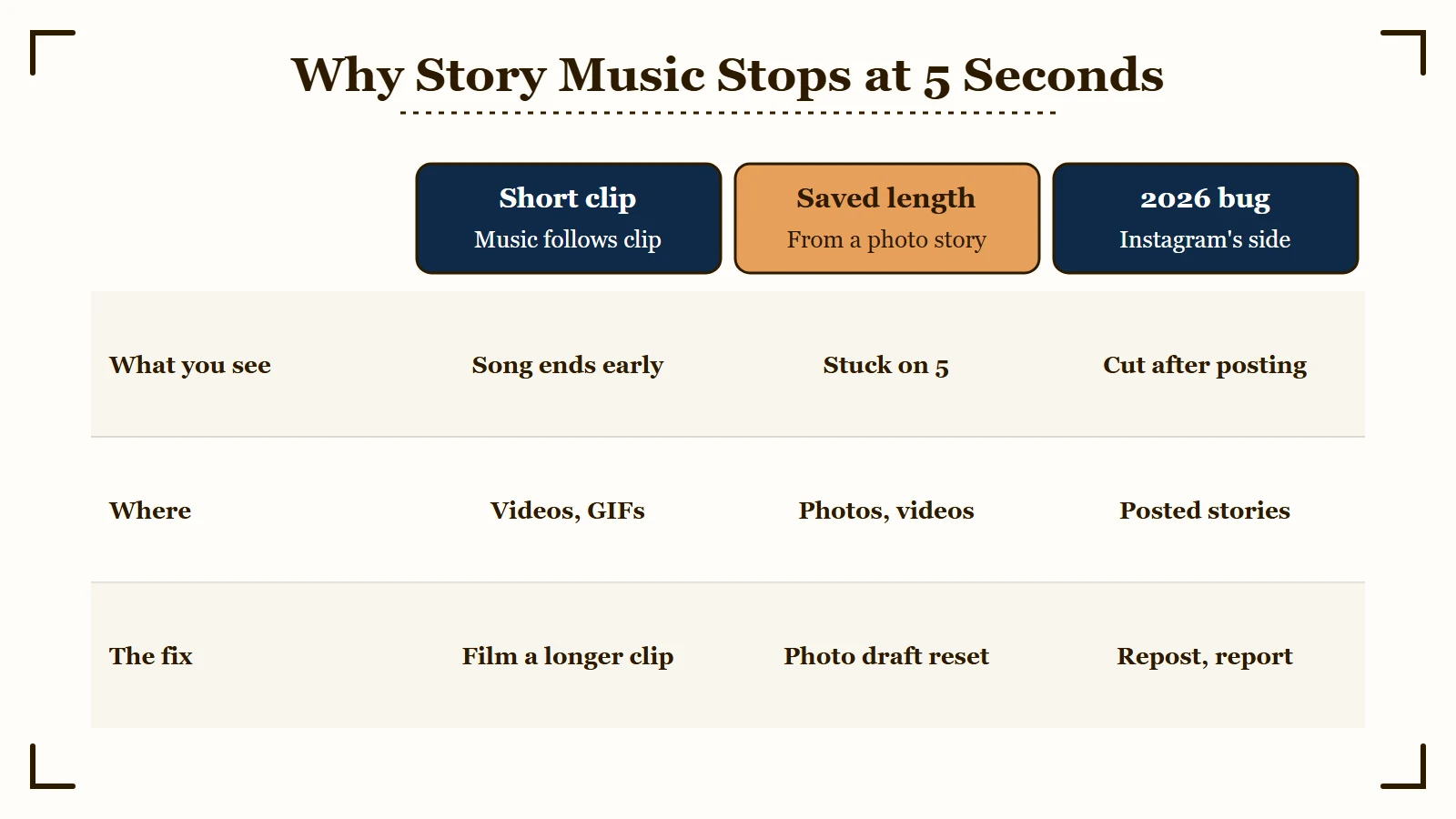
A remembered length is the cause I rule out first, since it can make a 30-second song stop at 5 without any warning. Find the row that matches what you see, then jump to that section.
| What you see | Likely cause | What to do |
|---|---|---|
| The length on a video shows 5 and will not change | The song is matched to a short clip, or the picker is reusing an old photo setting | Film a longer clip, or reset the length on a photo draft |
| The length goes to 15 but never higher | Your account does not have the longer limit yet | No setting unlocks it, so edit the song into a video instead |
| Music stops at 20 seconds, then silence, on a longer video | The February 2026 video bug | Reset the length on a photo draft at your maximum |
| The video freezes on one frame after you add a song | The July 2026 Android bug | Set a photo draft to the video’s exact length |
| You chose 15 or 20 seconds and the posted story plays 3 or 5 | The July 2026 bug that cuts stories after posting | Delete, repost and report it |
| Old highlights play 5 seconds from the start of the song, or say audio unavailable | Changes Instagram makes to archived photo stories | Repost from the original file with the song edited in |
Short clips are the simplest cause. A 5-second video, a Boomerang or a GIF gets a song of the same length, because on anything that is not a photo the music follows the clip.
Start with the first row that matches, because most of the fixes below take under a minute.
How Do You Make the Song Longer on an Instagram Story?
You make the song longer by tapping the small number to the left of the song slider and scrolling to a bigger one. On a photo story, that number also sets how long the photo stays on screen.
On a video story the song follows the clip, so a 12-second video gets up to 12 seconds of music. I set the number by hand on every story instead of trusting the default, because it tends to reopen on whatever length I used last.
Here is the full sequence for a photo story:
- Open the story camera and pick a photo from your camera roll.
- Tap Music at the top of the editor, or add the music sticker from the sticker tray.
- Search for the song and tap it.
- Drag the slider to the part of the song you want to use.
- Tap the number on the left, scroll to the longest length it offers, and tap Done.
Most accounts can go to 15 seconds, and accounts with the longer limit can go to 45.
How Do You Fix a Greyed-Out Length on a Video Story?
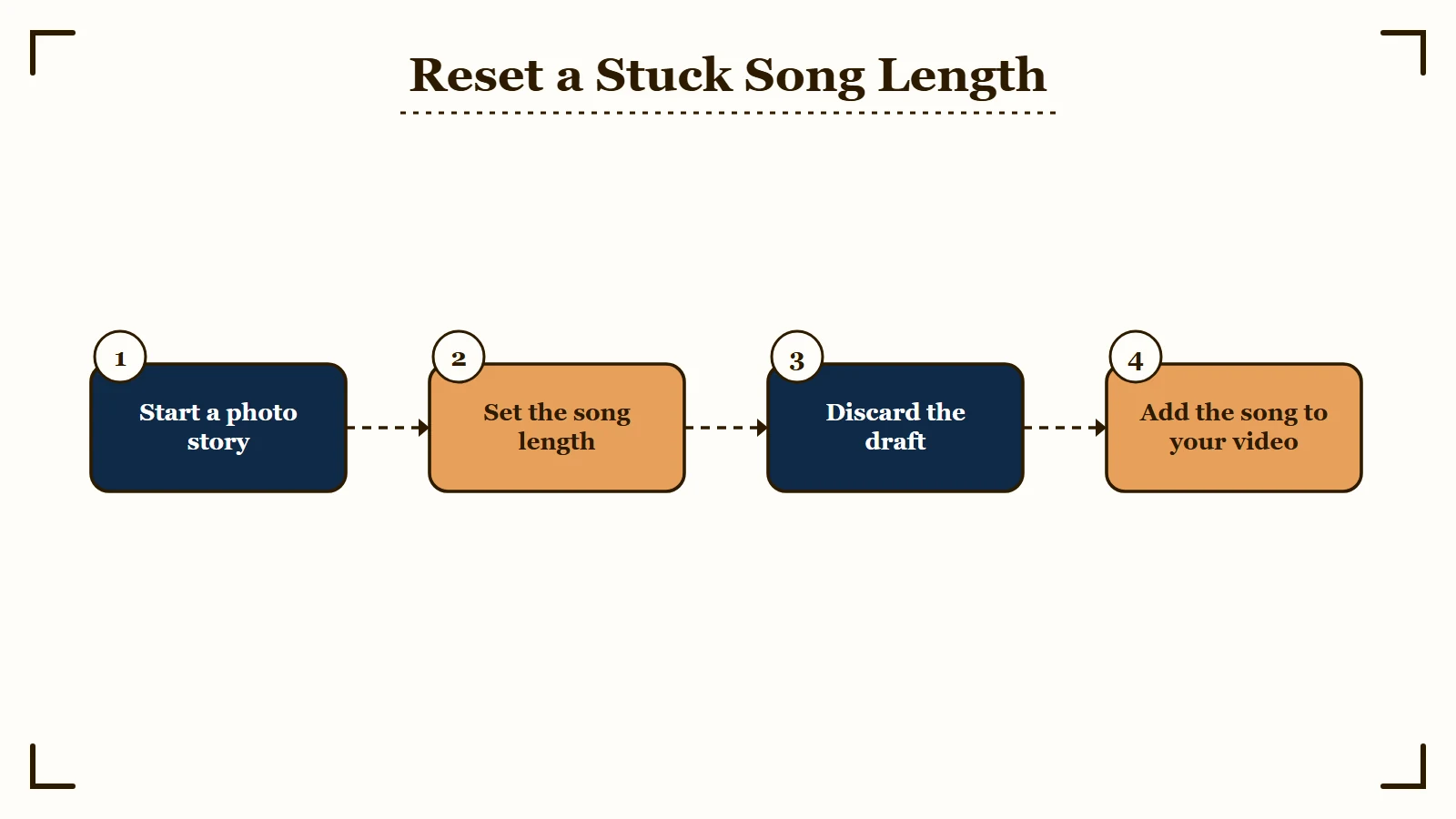
A greyed-out or stuck length on a video resets when you set the song length on a photo story first. The trick has circulated since 2021, and a February 2026 thread shows it still working in August 2026.
- Start a new story and choose any photo. You will not post it.
- Add the same song and set the length to the number you want, up to your account’s maximum.
- Back out and discard the draft.
- Open your video, add the song again, and it should take the length you just set.
Posting the photo is usually unnecessary. If the length still will not stick, share the photo to Close Friends, delete it, and try the video again.
Before: You add a song to a 12-second video, the length is greyed out on 5, and the music stops while the clip keeps playing.
After: You set the song to 15 seconds on a photo draft, discard it, and the same video now plays the song for all 12 seconds.
Run the photo-draft reset whenever the number on a video looks wrong.
Why Can Some Accounts Add 45 Seconds of Music and Others Only 15?
Some accounts can add 45 seconds because Instagram is switching the longer limit on account by account, and no setting on your side turns it on.
OnlineMarketing.de reported on October 13, 2025, that app researcher Ahmed Ghanem had spotted a test that let some accounts add up to 45 seconds of music to a story. The outlet’s own account still stopped at 15 at the time.
The rollout has stayed uneven. In one January 2026 r/Instagram post, a person’s older main account was capped at 15 seconds while their second account could go past it. A few days later, the longer option appeared on the main account without warning.
Reinstalling will not unlock it. I would not burn an afternoon trying, since deleting the app took the longer limit away from one commenter on that post. Instagram’s technical problem page even warns that an issue can mean “a feature isn’t available to everyone yet.”
FlexClip’s guide, last updated in March 2026, calls 45 seconds a finished update. That does not match the accounts still capped at 15 in 2026.
Does Instagram Publish a Maximum Music Length for Stories?
No, Instagram’s Stories help page describes choosing “which part of the song that you want to play” and gives no length at all. Its music guidelines do say “There are no limits on using music in Stories”, but that sentence belongs to the licensing rules for videos and Live. It never mentions the length number, so it does not explain why yours stops at 15.
If you need more music than your limit allows, edit the song into the video before you upload it. A single story now plays continuously for up to 60 seconds instead of being cut into 15-second clips, a Meta spokesperson told TechCrunch.
Why Is the Song You Want Missing on a Business Account?
Business accounts get a smaller library on purpose. Instagram’s licensed music page says “certain business accounts and certain types of posts do not have access to the library” and that licensed music “may also not be available in certain countries or regions.”
The fallback is Meta’s Sound Collection, which the same page describes as “over 14,000 songs and sounds” that are royalty free and “can be used for commercial purposes like ads.” My rule for anything promotional is to pick from that collection and skip the chart hits, and music on feed posts follows the same account-type lock.
Why Does Instagram Story Music Stop at 20 Seconds on a Longer Video?
Music that stops at 20 seconds on a longer video is a bug that surfaced in February 2026, and resetting the length on a photo draft fixes it up to your account’s limit.
The complaint took off around February 8, 2026, in an r/Instagram thread where the song played for 20 seconds and the rest of the video went silent. The stuck number was not always 20. Others in the same discussion were held at 36, 17, 13, 10, 8 and 7 seconds, and one person saw 7 on an iPhone and 10 on an iPad.
The iPhone and iPad split suggests the stuck number is saved by each copy of the app, while the 15 or 45 ceiling belongs to the account.
The photo-draft reset described earlier clears this bug too. Set the photo to the longest length your account offers, then return to the video. On any clip longer than 15 seconds I look at that number before posting, because the picker is the only place the cut shows.
The reset only reaches your photo maximum. A commenter in that thread set 45 seconds on a photo and found every video after that locked to 45, so a one-minute video still ends with about 15 seconds of silence. For a full minute of music, edit the song into the video before uploading.
Why Does My Instagram Story Video Freeze When I Add Music?
A story video that freezes on one frame after you add music is an Android bug that surfaced in July 2026. Setting a photo draft to the video’s exact length is the workaround that has held up.
The freeze surfaced around July 11, 2026. In the main r/Instagram thread, it hit Samsung Galaxy S23 Ultra, S24 Ultra and S24 owners on both the beta and the stable Android app.
Reinstalling and clearing the cache made no difference there, so I skip both for this bug. The fix posted in the same discussion traces the freeze to a mismatch between the song length and the video length. Here is the sequence that did work.
- Check how long your video is, for example 8 seconds.
- Start a new story with a photo instead, add the same song, and set the length to 8.
- Discard the photo story.
- Go back to the video and add the song again, and playback and the music controls should work.
If you need the story up right now, there are two rougher options. One person in that thread posted anyway and the uploaded video played with the song, although the music could not be lined up first. Adding a GIF sticker restarts the preview too, but the music stays out of sync.
If the story will not upload at all, that is a different fault, and the story upload checklist covers it.
Why Did My Instagram Story Get Cut to 3 or 5 Seconds After Posting?
A story that previews at 15 or 20 seconds and posts at 3 or 5 is a separate bug that surfaced in July 2026. The only reliable response is to delete it, post it again and report the problem.
In a July 17 r/Instagram post, a photo story with 20 seconds of music previewed in full and dropped to 3 seconds the moment it went live, across several photos and songs. A July 31 report describes a story shrinking from 15 seconds to 5, even with the music removed, while other people’s stories still played for 15.
No fix for this one has been confirmed. Instagram has no way to change a story’s music after it is posted, unlike a feed post’s song, so deleting and reposting is the only repair.
Report it from inside the app so the bug reaches Instagram. Its help page lays out the path: go to your profile, tap the menu, tap Help, then Report a Problem, where you can shake your phone at the broken story or report without shaking.
I watch the first loop of every story with music right after posting, since that is the only moment I can catch the cut before my followers do.
Why Do Old Instagram Highlights Play the Song From the Start?
Instagram permanently changes some archived photo stories that use the music sticker, including muting the music. Highlights are built from that archive, so those changes are the likeliest reason an old highlight goes silent or plays the wrong part.
Instagram’s Stories help page spells the rule out. It says “some stories may be changed when they are saved to your archive” and that “these changes can mean muting music or freezing videos or gifs.” Those changes “are permanent” for stories that “are of a photo and use the music or GIF stickers.”
Since around July 2026, some highlights have started playing only 5 seconds from the very start of the song, and others replay the intro instead of the chorus that was chosen. Instagram has not described that exact symptom, so treat the archive rule as the likely cause until Instagram confirms it.
Video stories are the safer format. The same help page says the change does not affect stories that “contain or reshare original videos that have not been shared to Feed or Reels.” Anything I want in a highlight for years goes up as a video with the song already in it.
Silent archived stories get their own section in the guide to stories that are not available. Keep the original files for any highlight you care about, so you can repost it if the music changes.
Can One Song Keep Playing Across Several Instagram Story Slides?
No. Each story slide plays its own music, so a song starts over on every slide unless you set each slide to the next section of the track or edit the slides into one video.
A February 2026 r/Instagram post puts the complaint plainly: the same song restarts on every slide, and no setting carries it across. Several photos on one story run into the same wall.
You can fake a continuous track by hand. Put the song on slide one at the part you want, note where it ends, and start slide two’s music at exactly that point. The hand-off will not be perfect, because each slide starts its own playback.
For a truly continuous song, combine the photos into one video with the track in an editor, then upload it as a single story of up to 60 seconds. Consecutive sections are my fallback when I am posting from my phone with no editor handy.
How Do You Hide the Music Sticker on an Instagram Story?
You hide the music sticker by shrinking it and dragging it to the edge of the frame or under another sticker. The song name still shows under your username at the top of the story, though.
Tap the sticker to cycle its looks, from title and artist to album art or on-screen lyrics, then pinch it as small as it goes. Drag it to the edge of the frame or tuck it under a photo sticker or text. The song keeps playing either way.
The label at the top is the part you cannot remove. One Android user summed it up: the title “still appears right below your icon/name in the stories” and “there’s no way to remove that.”
My view is that a small, visible sticker beats a hidden one, because viewers can tap it to hear more of the song. The only way to post music with no label at all is to edit the song into the video yourself before you upload it.
Frequently Asked Questions
Why is my Instagram story music only 5 seconds?
Your story is either a short clip, which caps the song at the clip’s length, or the length picker is reusing an old 5-second setting. Tap the number beside the song slider and pick a longer length, or reset it on a photo draft first.
How do I make the song longer on my Instagram story?
Tap the number to the left of the song slider and scroll to a bigger number. On a video, the song follows the clip, so a longer clip gets a longer song, and a greyed-out number resets on a photo draft.
Why can’t I put more than 15 seconds of music on my story?
Your account does not have the longer limit yet. The 45-second option was spotted as a test in October 2025 and is still reaching accounts one at a time, and no setting on your side unlocks it.
Why does my story video freeze when I add music?
It is an Android bug that surfaced in July 2026. Set a photo story draft to the video’s exact length with the same song, discard it, then add the song to the video again.
Can I change the music on a story after posting it?
No. Instagram has no way to edit a story’s music once it is live, so delete the story and post it again with the right song and length.
How do I hide the song name on my Instagram story?
You can shrink the music sticker or drag it to the edge, but the song name stays under your username at the top. Editing the song into the video before you upload is the only way to show no label.
Quick Takeaways
- Check the number beside the song slider before you post, because it often reopens on the last length you used.
- A greyed-out or stuck length on a video resets when you set the song length on a photo story draft and discard it.
- The 45-second limit is still reaching accounts one at a time, and Instagram has never published a maximum.
- The July 2026 Android freeze clears when a photo draft is set to the video’s exact length.
- For anything permanent, post a video with the song edited in, since Instagram says archived photo stories with music can be changed for good.