How to Make a TikTok Account Private Without Killing Reach
How to Make a TikTok Account Private Without Killing Reach
How to make a TikTok account private, what changes when you do, the greyed-out toggle fix, and why going private quietly kills your reach. Full guide inside.
- 1How to Make a TikTok Account Private
- 2What Changes When You Go Private
- 3Why Your Private Toggle Is Greyed Out or Missing
- 4What the Friends Only Setting Does
- 5Does Going Private Stop You Earning on TikTok
- 6Are Teen TikTok Accounts Private by Default
- 7Frequently Asked Questions
- How do I make my TikTok account private?
- What happens to my followers when I go private?
- Why can’t I make my TikTok account private?
- Can I make just one video private instead of my whole account?
- Does a private TikTok account still make money?
- Are TikTok accounts private by default for teens?
- 8Quick Takeaways
TL;DR: To make a TikTok account private, open Profile, tap the Menu icon, go to Settings and privacy, tap Privacy, and turn on Private account. That takes four taps, but for a creator it also pulls your videos off the For You feed and switches off Creator Rewards earnings. This guide covers the steps, what changes, the greyed-out toggle fix, and how to protect your privacy without losing reach.
Learning how to make a TikTok account private takes about four taps, but for a creator the setting does a lot more than hide your videos from strangers. The moment you go private, your posts drop off the For You feed, which means they stop reaching new people and stop earning.
That trade-off is the part most guides skip over. A private account cannot appear in the For You feed or in search, and TikTok’s Creator Rewards program only pays for public For You views, so private and paid pull against each other.
So this guide does two jobs. It walks through the exact steps to go private, including how to lock a single video instead of the whole account, and it covers what changes, why the private toggle is sometimes greyed out, the friends-only middle ground, and how to protect your privacy without giving up your reach.
How to Make a TikTok Account Private
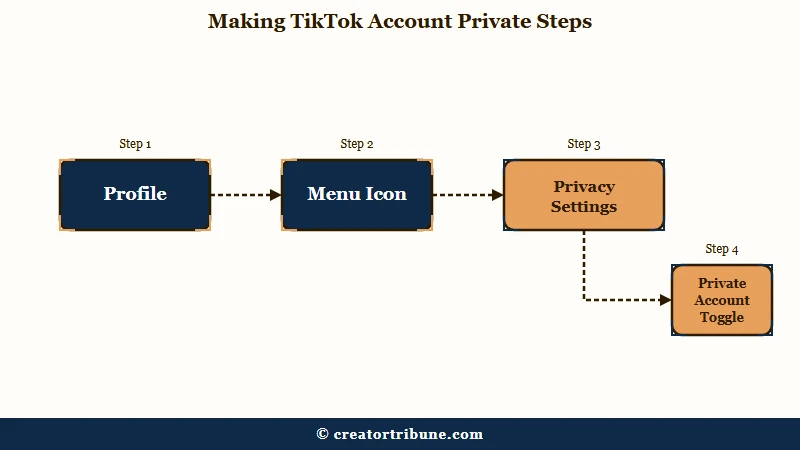
To make a TikTok account private, go to your Profile, tap the Menu icon, open Settings and privacy, tap Privacy, and turn on the Private account toggle.
Only approved followers can then see your videos, likes, and follower lists.
What is a private TikTok account: An account where only followers you approve can view your videos, LIVE streams, bio, likes, and follower lists. Your name, username, and photo stay public.
The switch itself is quick, and the step I always point out is the confirmation slide that comes up from the bottom, because you have to tap Switch for the change to stick. Here is the order I would follow:
- Open TikTok and tap Profile in the bottom right.
- Tap the Menu icon (the three lines) in the top right, then tap Settings and privacy.
- Tap Privacy.
- Turn on the Private account toggle and confirm on the slide-up prompt.
You do not have to lock the whole account to get privacy on one clip. If you only want to hide a single video, tap the three dots on that post, open Privacy settings, and set Who can watch this video to Only you. That keeps your account public for reach while pulling one post out of view.
What Changes When You Go Private
When you go private, only approved followers can watch your videos, and other users lose the ability to Duet, Stitch, or download them.
Your name, username, and profile photo stay visible to everyone, and any existing videos keep their view counts.
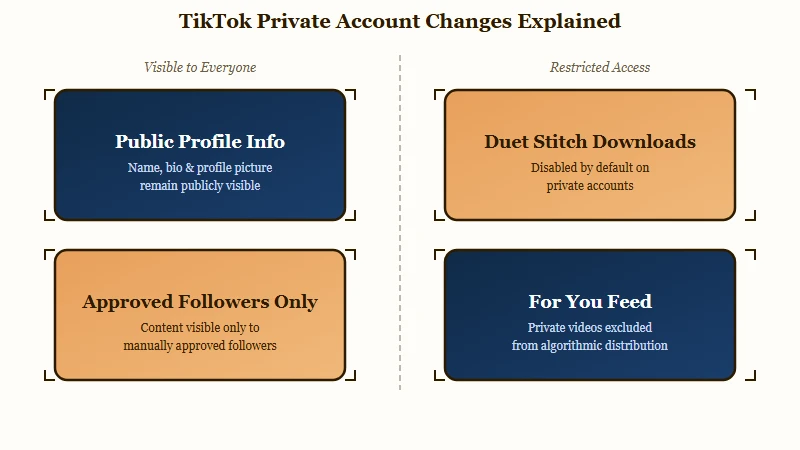
The reason I flag Duet and Stitch here is that they are two of the strongest discovery tools on TikTok, and going private switches both off for your content. That is a real growth cost, not a footnote. Strangers can no longer follow you with one tap either, they have to send a request that you approve or deny.
One thing that surprises people is that going private is not the same as disappearing. Your handle and photo are always public, and if you flip an old viral video to private, its view count does not reset to zero. Here is what stays public versus what locks down when you go private.
| Element | On a private account |
|---|---|
| Name, username, photo | Always visible to anyone, on or off TikTok |
| Videos, likes, follower list | Only approved followers can see them |
| Duet, Stitch, downloads | Disabled for everyone, permanently while private |
| For You feed and search | Excluded, so no new reach from non-followers |
| Existing video view counts | Kept, they do not reset when you go private |
Why Your Private Toggle Is Greyed Out or Missing
The Private account toggle is greyed out or missing because you are on a Business account, which cannot be set to private.
The fix is switching back to a Personal account, though a 30-day verification hold sometimes traps the switch.
If you upgraded to a Business account for the analytics or the instant bio link, this catches a lot of creators off guard. Business profiles are public by design, so the private toggle either disappears or will not move. The clean fix is to switch to a Personal account under Settings and privacy, then Account, then Switch to Personal Account.
Where it gets messy is the glitch where the app keeps snapping you back to Business. TikTok’s own support line here is to wait, telling users an unverified Business account auto-downgrades after 30 days. Frustrated users report faster workarounds, and I would rank them from safest to riskiest before you resort to waiting a month.
| Symptom | Likely cause | Fix |
|---|---|---|
| Private toggle greyed out | Account is set to Business | Switch to Personal under Settings, Account, Switch to Personal |
| Switch to Personal keeps reverting | Linked TikTok Shop or Seller account | Unlink Shop and Seller Center, then switch again |
| Still stuck on Business | Ad account permission is holding it | Sign in to TikTok Ads Manager on desktop and unlink the app |
| Nothing works in-app | Verification hold on the account | Wait out the 30-day auto-downgrade as a last resort |
What the Friends Only Setting Does
The Friends setting limits a post to followers you follow back, a middle ground between fully public and fully private.
It lets you keep a public profile for reach while sharing some videos only with mutuals.
The way I see it, most creators who go private do not really want to hide from everyone, they want to stop strangers from harassing them or lurking. You can get almost all of that protection without touching the private toggle, which is the move I would make first. TikTok gives you a set of controls that act like your own bouncer.
Turn off Suggest your account to others so TikTok stops pushing your profile to phone contacts. Restrict who can send you Direct Messages and mentions down to Friends, and switch on comment keyword filters so spam and abuse get hidden automatically. You stay in the For You feed the whole time.
Before: You go fully private to stop strangers, and your reach plus Creator Rewards earnings drop to zero overnight.
After: You stay public, turn off Suggest your account, lock DMs to Friends, and filter comments, so you get the safety without surrendering the algorithm.
Does Going Private Stop You Earning on TikTok
Going private stops you earning on TikTok because the Creator Rewards program only pays for qualified For You feed views, and private videos never reach the For You feed. Business accounts are also shut out of Creator Rewards entirely.
The numbers make the trade-off concrete. Creator Rewards pays roughly $0.40 to $1.00 per 1,000 qualified views, and a video needs at least 1,000 qualified For You views before it earns a cent. A private post gets none of those views, so its payout is a flat zero.
If your videos are stalling even while public, the reasons behind low For You views are worth ruling out before you blame the privacy setting.
What is the Creator Rewards Program: TikTok’s main payout program for videos over one minute, paying for unique For You feed views watched longer than five seconds. It needs a public Personal account.
To be eligible in the first place you need a public Personal account, 10,000 followers, and 100,000 views in the last 30 days, so a Business account or a private one both disqualify you. If your videos keep getting knocked out of the program, a Creator Rewards rejection usually has a fixable cause.
The bigger lesson I would take from all of this is that renting your reach from an algorithm is fragile. Building an owned channel with something like the free Creator Money Page template and turning views into subscribers protects you no matter what the privacy rules become.
Are Teen TikTok Accounts Private by Default
Teen TikTok accounts are private by default. Users aged 13 to 15 are set to private and cannot be Duetted or sent direct messages, while 16 and 17 year olds also start private but can switch to public.
TikTok has tightened this a lot for 2026. Accounts for 13 to 17 year olds carry a 60-minute default daily screen time limit, and push notifications mute overnight, starting at 9 PM for the youngest group.
For the under-16 tier especially, the account behaves like a walled garden that parents can manage through Family Pairing. If a younger creator is stuck on a verification step, my guide on how to verify your age on TikTok covers the process.
There is a wider privacy story here too. TikTok’s 2026 policy update, which followed its shift to a US-based ownership entity, drew a backlash over language allowing the collection of precise location data, as CBS News reported.
If that worries you, the setting to check is device-level location permission, not just the in-app private toggle.
Frequently Asked Questions
How do I make my TikTok account private?
Open Profile, tap the Menu icon, go to Settings and privacy, tap Privacy, and turn on Private account. Confirm on the slide-up prompt. Only followers you approve can then see your videos and likes.
What happens to my followers when I go private?
Your current followers stay and keep full access to your content. New people cannot follow you automatically, they must send a follow request that you approve or deny before they see anything.
Why can’t I make my TikTok account private?
You are almost certainly on a Business account, which cannot be private. Switch to a Personal account under Settings and privacy, then Account. If it keeps reverting, unlink any TikTok Shop first.
Can I make just one video private instead of my whole account?
Yes. Tap the three dots on the video, open Privacy settings, and set Who can watch this video to Only you. Your account stays public while that single clip is hidden.
Does a private TikTok account still make money?
No. Creator Rewards only pays for public For You feed views, and private videos never reach that feed. You need a public Personal account with 10,000 followers to be eligible at all.
Are TikTok accounts private by default for teens?
Yes. Accounts for users aged 13 to 17 are set to private by default at sign-up. Under-16 accounts have stricter locks, while 16 and 17 year olds can switch to public in their settings.
Quick Takeaways
- Going private takes four taps (Profile, Menu, Settings and privacy, Privacy, Private account), but it pulls your videos off the For You feed.
- A private account earns nothing from Creator Rewards, which only pays for public For You views.
- If the private toggle is greyed out, you are on a Business account, so switch back to Personal to unlock it.
- Use Friends-only posts and the Suggest your account toggle to protect your privacy without going fully private.
- Flipping an existing video to private keeps its view count, it does not reset to zero.