Fix TikTok Not Working on PC and Web Browser
Fix TikTok Not Working on PC and Web Browser
TikTok not working on PC but fine on your phone? It is almost always a browser or account session issue, not an outage. Here is how to fix it fast.
- 1Why TikTok Is Not Working on Your PC
- 2Common TikTok PC and Web Bugs Right Now
- 3How to Fix TikTok on PC Step by Step
- 4When It Is TikTok’s Servers and Not You
- 5Frequently Asked Questions
- Why can’t I see my liked videos on TikTok PC?
- Why do my TikTok likes keep disappearing on desktop?
- Is TikTok web down or is it just me?
- Why does TikTok only show a few creators in my Following feed?
- Does clearing cache delete my TikTok drafts or saved videos?
- 6Quick Takeaways
TL;DR: When TikTok is not working on PC but runs fine on your phone, the problem is almost never a global outage. It is your browser session, cache, or account login on that one machine. The fastest fixes are clearing your browser cache, disabling extensions, and logging out and back in. The one fix most guides miss: the Windows TikTok app routes through Microsoft Edge, so you have to clear Edge’s cache even if you never open Edge yourself.
Here is the tell that saves you an hour of pointless troubleshooting. If TikTok not working on PC is your problem but the app loads fine on your phone with the same account, the platform is not down and your account is not banned. The break is happening on that one computer.
I see this confusion every time a desktop bug spreads. People assume the whole site crashed, or worse, that they got shadowbanned, when the real cause is a stale browser cache or a corrupted login session sitting on their PC. The phone-versus-desktop split is the single most useful diagnostic you have, and most fix guides skip right past it.
This guide walks through the desktop and web-specific bugs that hit TikTok users most often: the liked videos tab showing your own uploads, likes that undo themselves seconds after you tap them, a Following feed that collapses to two or three creators, and videos that just refuse to load in the browser. For each one I will tell you the likely cause and the exact fix, in the order I would try them.
What is a browser cache: A store of temporary files your browser keeps so pages load faster. When those files get out of date or corrupt, a site like TikTok can break in odd ways even though nothing is wrong with the site.

Why TikTok Is Not Working on Your PC
TikTok not working on PC is almost always a local browser or account-session problem, not a server outage.
If the mobile app works on the same account, you have proof the issue lives on your computer, in your browser data, or in that machine’s login session.
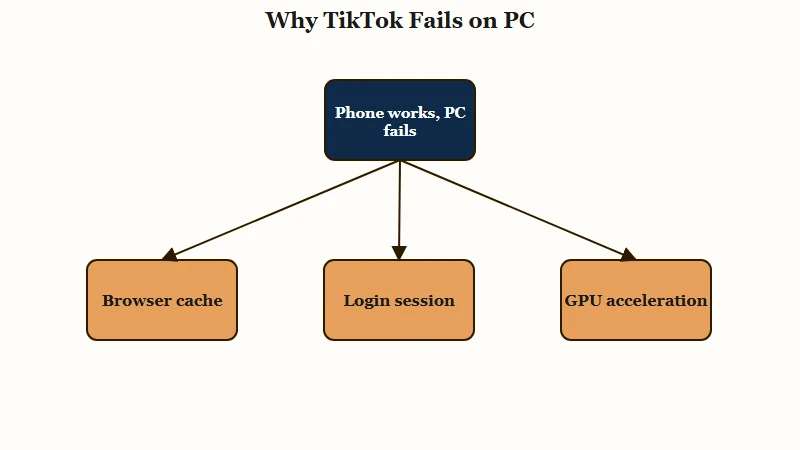
The way I see it, this is the first thing to establish before you touch anything else. Pull out your phone and open TikTok. If your feed, likes, and search all work there, you can stop worrying about an outage and start fixing your desktop.
What stands out to me is how consistent this pattern is. People report their account broken on the desktop site while a different account works perfectly on the same machine. That points straight at session or cookie corruption tied to one login, not a platform-wide failure.
There is also a hardware-acceleration angle that older guides ignore. If videos load but stutter, freeze on a black screen, or lag badly while everything else on your PC runs fine, your browser’s GPU rendering is often the culprit. I will cover the toggle for that in the fix steps below.
Common TikTok PC and Web Bugs Right Now
The most reported desktop bugs are the liked tab showing your own videos, likes that unlike themselves, a collapsing Following feed, and videos failing to load.
Each one has a different root cause, so matching the symptom to the fix matters more than running every fix blindly.
The strangest of these is the validation bug where you tap the heart on a video and it quietly un-taps itself about five seconds later. That points to a sync failure between the desktop client and TikTok’s servers rather than a connection problem, and it usually clears with a fresh login once the bad session is gone.
The liked and favorited tabs redirecting to your own uploads is a UI mapping glitch on the web client. Your saved videos are not gone, the page is just pointing at the wrong place, which is why checking the same tab on mobile shows everything intact.
Here is the quick-reference table I would keep open while you work through it.
| Symptom | Likely cause | Fix |
|---|---|---|
| Liked or Favorited tab shows your own videos | Web UI mapping glitch or session corruption | Log out and back in, then clear cache. Check mobile to confirm saves are safe. |
| Likes undo themselves after a few seconds | Client to server sync failure | Fresh login, clear cookies, hard refresh the page. |
| Following feed shows only 2 to 3 creators | Feed data filtered wrong by the desktop client | Log out, clear cache, reload. Switch account to confirm it is session-side. |
| Videos will not load or play | Stale cache, outdated browser, or extension conflict | Clear cache, update browser, test in a private window. |
| Video stutters or shows a black screen | Browser hardware acceleration or GPU driver | Toggle hardware acceleration off, update graphics driver. |
| Links open the app store instead of the video | Intentional redirect to push the mobile app | Use Request Desktop Site or a viewer extension. |
If your trouble is the feed serving low views on your own posts rather than a loading bug, that is a different problem, and our guide on low TikTok FYP views covers that distribution side in detail.
How to Fix TikTok on PC Step by Step
Fix TikTok on PC by clearing browser data, refreshing your login session, and ruling out extensions and hardware acceleration, in that order.
Most desktop bugs clear in the first two steps, so I would not jump straight to reinstalling anything.
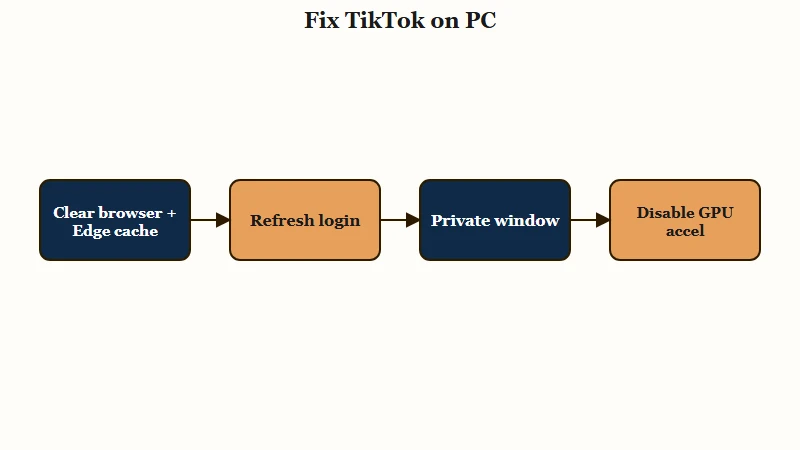
From my testing, cache and session data cause the majority of these desktop bugs, so I would run this sequence top to bottom and test after each step rather than doing everything at once.
- Clear your browser cache and cookies. In Chrome, open Settings, then Privacy and Security, then Delete Browsing Data, and select cached images and files plus cookies. In Safari, open Settings, then Privacy, then Manage Website Data, and remove the TikTok entries.
- Clear Microsoft Edge’s cache too if you use the Windows app. This is the fix almost nobody mentions. The downloaded TikTok app for Windows runs through Edge’s engine, so a corrupt Edge cache breaks the app even if you never open Edge directly. Clear it the same way you would in Chrome.
- Log out and back in. A fresh login rebuilds the broken session that causes the self-unliking and the wrong liked tab. Do this before anything more drastic.
- Hard refresh the page. Press Ctrl and Shift and R together to force the browser to reload everything from scratch instead of from cache.
- Test in a private or incognito window. This runs TikTok with no extensions and no stored data. If it works here, an extension or your cache was the problem.
- Disable extensions one at a time. Ad blockers, script blockers, and privacy add-ons are the usual offenders. Turn them off, reload, and re-enable them one by one to find the culprit.
- Turn off hardware acceleration. If videos stutter or black-screen, open your browser settings, search for hardware acceleration, switch it off, and restart the browser. Update your graphics driver while you are at it.
- Try a different account. If a second account works on the same machine, you have confirmed the issue is session-side on your main login, and a full logout plus cookie clear is your fix.
Here is what good troubleshooting looks like versus the version that wastes your afternoon.
Before: TikTok looks broken on my laptop so I assume the site is down, refresh the page fifty times, then panic that my account got banned.
After: I open TikTok on my phone, see my feed loads fine, and now I know the break is local. I clear my browser cache, clear Edge’s cache for the Windows app, log out and back in, and I am working again in three minutes.
If your desktop trouble is really the app freezing or closing rather than a web bug, the mobile-app side has its own causes, and our walkthrough on when TikTok keeps crashing handles that path.
When It Is TikTok’s Servers and Not You
It is a server-side problem only when TikTok fails across every device and network at once.
If your phone on mobile data is also broken, then a local cache fix will not help and waiting it out is the right call.
What I would check first is the cross-device test again, but in reverse. Open TikTok on your phone using mobile data instead of your home Wi-Fi. If it is still broken there, the problem is bigger than your PC.
A handful of the recent desktop glitches genuinely were short server hiccups that resolved within a day or two, with users reporting the liked tab and feed fixing themselves. That happens, but it is the exception, and it is worth confirming before you assume it. Our breakdown on whether TikTok is down shows the exact signals that separate a real outage from a local fault.
TikTok also redirects browser links to the app store on some devices to push you into the mobile app, so a link that will not open in your browser is not always a bug. Using your browser’s Request Desktop Site option usually gets around it.
If your uploads look soft or compressed after posting from desktop, that is a separate encoding issue covered in our guide on TikTok video quality after posting.
For context on how many people hit these desktop issues, TikTok has more than 1.5 billion monthly active users worldwide according to Statista, so even a minor web-client bug surfaces in thousands of search queries within hours.
Frequently Asked Questions
Why can’t I see my liked videos on TikTok PC?
Your liked videos are not deleted. The desktop site has a known glitch where the Liked or Favorited tab points at your own uploads instead of your saved videos. Log out and back in, clear your cache, and confirm on mobile that your saves are still there.
Why do my TikTok likes keep disappearing on desktop?
This is a sync failure between the desktop client and TikTok’s servers, where a like registers then undoes itself after a few seconds. A fresh login and a cookie clear fix it in most cases, because the bug rides on a corrupted session.
Is TikTok web down or is it just me?
If TikTok works on your phone but not your PC, it is just your machine, usually a cache or login-session issue. If it is broken on your phone over mobile data too, then TikTok may be having a genuine outage.
Why does TikTok only show a few creators in my Following feed?
The desktop client is filtering your feed data incorrectly, collapsing it to a handful of accounts. Logging out, clearing cache, and reloading usually restores the full feed, and switching accounts confirms whether it is session-side.
Does clearing cache delete my TikTok drafts or saved videos?
No. Clearing your browser cache only removes temporary web files on that device. Your drafts live in the mobile app and your saved videos live on your account, so neither is affected by a browser cache clear.
Quick Takeaways
- The phone-versus-PC test is your fastest diagnostic. If mobile works on the same account, the break is local, not an outage or a ban.
- Clear Microsoft Edge’s cache even if you use the standalone Windows TikTok app, because the app runs on Edge’s engine.
- Likes that undo themselves and a liked tab showing your own videos are session bugs, fixed by a fresh login and a cookie clear.
- Toggle off hardware acceleration when videos stutter or black-screen, then update your graphics driver.
- Only treat it as a TikTok outage when every device fails at once, including your phone on mobile data.