How to Add Affiliate Links to Instagram Reels
How to Add Affiliate Links to Instagram Reels
How to add affiliate links to Instagram Reels after the April 2026 update. Eligibility, the Add Products steps, limits, and what changed.
- 1What Changed With Affiliate Links in Instagram Reels
- 2Who Is Eligible to Add Links in Reels
- 3How to Add an Affiliate Link to a Reel
- 4How Reel Links Compare to Bio and Story Links
- 5Frequently Asked Questions
- Can you put affiliate links directly in Instagram Reels now?
- How many followers do you need to add links to Reels?
- Does Meta take a cut of Reel affiliate sales?
- How many products can you tag in one Reel?
- Do I need the Edits app to add links to Reels?
- 6Quick Takeaways
TL;DR: As of an April 2026 update, eligible creators can tag affiliate products and clickable links directly inside Instagram Reels through an “Add Products” option in the publishing flow. You need to be 18 or older with at least 1,000 followers and a public account in good standing. Meta is not taking a commission cut, and you can tag up to 30 products per Reel.
For years the answer to monetizing a Reel was “link in bio,” a clunky redirect that lost most of the people who tapped. That changed in April 2026, and it is a genuinely big deal for anyone earning from affiliate content.
Learning how to add affiliate links to Instagram Reels now means working inside the Reel itself, not pointing people to a bio they have to hunt through. Meta’s head of global business, Nicola Mendelsohn, said at Shoptalk 2026 that “the era of link in bio is finally over,” a shift Retail Dive reported in detail.
This guide covers who qualifies, the exact steps to tag a product or link in a Reel, the limits to know, and how this differs from the old bio and Story methods. I will keep it practical so you can ship a monetized Reel today if you are eligible.

What Changed With Affiliate Links in Instagram Reels
Instagram added native clickable affiliate links and product tags directly inside Reels in April 2026.
A new “Add Products” option in the publishing flow lets viewers tap a label and reach a product page or checkout without leaving the app.
Announced at Shoptalk 2026 in early April, the feature replaces the friction-heavy bio redirect that Meta openly admits “bled conversions.” The tags show up as floating, tappable labels right on the video.
The big strategic shift is reach. A Story link sticker only reaches people who already follow you, but a Reel tag can convert a non-follower who found you through the algorithm. That is the difference between monetizing your audience and monetizing your discovery.
There is one detail creators love: Meta confirmed it is not taking a commission cut from affiliate sales generated through these native Reel tags in 2026. The cut you negotiate with the brand is the cut you keep.
Who Is Eligible to Add Links in Reels
To tag affiliate products in a Reel you generally need to be 18 or older, have at least 1,000 followers, and run a public account in good standing with Meta’s monetization policies.
General clickable links outside affiliate tagging are tied to a Meta Verified subscription.
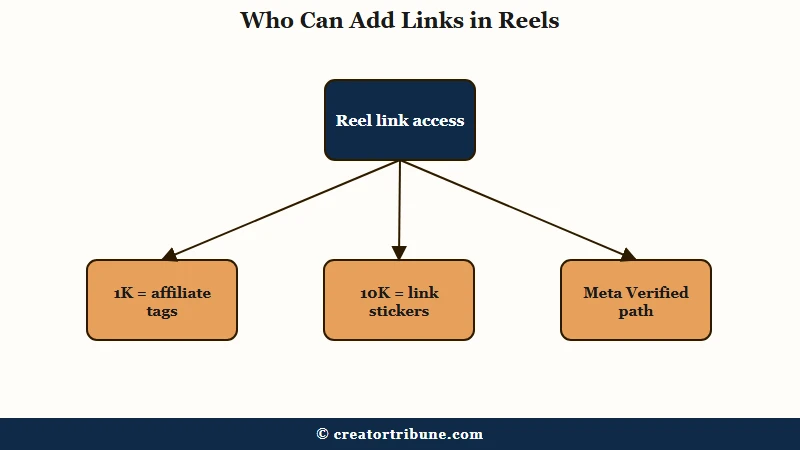
The way I read the rollout, there are a few different doors and they have different keys. Here is how the access tiers break down so you can find the one that fits your account.
| Access path | Requirement | Best for |
|---|---|---|
| Affiliate product tagging | 18+, 1,000 followers, public account | Most affiliate creators |
| Link stickers in Reels | 10,000 followers, or any Meta Verified tier | Larger accounts |
| Meta Verified Links in Reels | Plus tier around $44.99/month | Smaller accounts buying access |
If you are under the follower thresholds, the Meta Verified route is the paid shortcut. The Plus tier starts around $44.99 a month, with Premium and Max costing more and unlocking more linked Reels per month.
From my experience the 1,000-follower affiliate path is the one most creators should target first, since it is free and covers the core use case of tagging products you promote.
How to Add an Affiliate Link to a Reel
You add an affiliate link by tapping “Add Products” on the Reel share screen, then pasting a product URL or selecting from a verified brand catalog.
The whole flow lives in the normal publishing steps, so there is nothing hidden to enable.
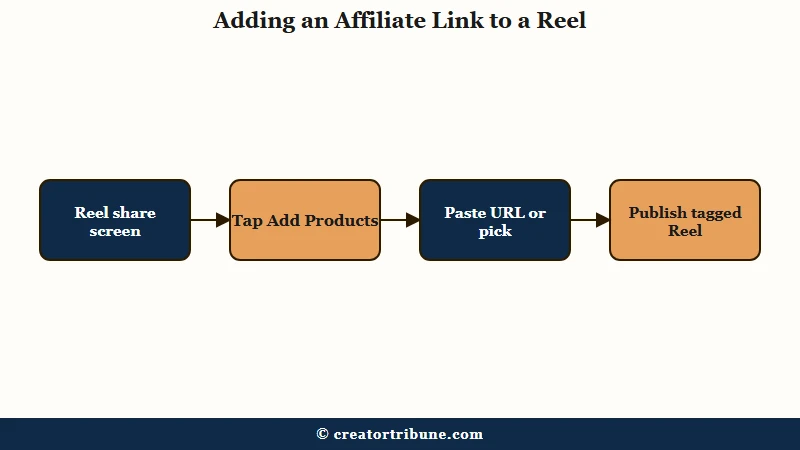
Here is the sequence I would follow once your account is eligible.
- Record or import your Reel and continue to the share screen where you write the caption.
- Tap “Add Products,” which sits just below the caption field.
- Paste a direct affiliate product URL, or tap “Search brand” to browse a verified Meta commerce catalog.
- Select the product, which must be listed in a verified commerce catalog to tag it.
- Repeat to tag more items if you want, then publish the Reel.
Once it is live, the tags appear as tappable labels on the video that viewers can open without leaving Instagram. You can tag up to 30 products in a single Reel, though I would keep it to the one or two that genuinely fit the content.
Some creators also format these exit points through Instagram’s Edits app before publishing, which Meta uses as a filter for how links appear. If your account does not show “Add Products” yet, check that you meet the eligibility rules and that the app is updated.
Before: A skincare Reel with “link in bio” in the caption, sending viewers to a bio they have to open, scroll, and tap through, losing most of them on the way.
After: The same Reel with the exact serum tagged via “Add Products,” so a viewer taps the floating label and lands on the product page in one move.
How Reel Links Compare to Bio and Story Links
Reel links beat bio and Story links because they convert non-followers at the moment of discovery, not after a detour. The old methods still work, but they leak attention that the in-Reel tag keeps.
The bio link was always a compromise. It forced a viewer to leave the video, open your profile, find the link, and pick the right destination, and most people quit somewhere in that chain.
The classic link-in-bio tools exist precisely to manage that mess, and they are still useful for your profile.
Story link stickers convert better than bio links but only reach existing followers, so they cannot capture the algorithmic discovery a Reel gets. If you are still setting up the basics, the walkthrough on adding your Instagram bio link covers the profile side.
What I would not do is treat the platform tag as your only plan. Features get throttled or gated without warning, so pairing in-Reel tags with a destination you own is the durable move.
A link page you control keeps your monetization intact even if Meta changes the rules again, and it pairs well with a system to convert views into subscribers.
Frequently Asked Questions
Can you put affiliate links directly in Instagram Reels now?
Yes. Since an April 2026 update, eligible creators can tag affiliate products and clickable links directly in Reels using the “Add Products” option in the publishing flow. Viewers tap a floating label to reach the product without leaving Instagram.
How many followers do you need to add links to Reels?
Affiliate product tagging generally requires 1,000 followers, plus being 18 or older with a public account in good standing. Standard link stickers in Reels need 10,000 followers unless you have a Meta Verified subscription, which unlocks access at any tier.
Does Meta take a cut of Reel affiliate sales?
No. Meta confirmed it is not taking a commission from affiliate sales generated through native Reel product tags in 2026. You keep whatever commission you arrange with the brand or affiliate program.
How many products can you tag in one Reel?
You can tag up to 30 products in a single Reel. In practice, tagging one or two products that genuinely fit the content converts better than overloading a Reel with labels that distract from the video.
Do I need the Edits app to add links to Reels?
Not always, but some clickable link formats are set up through Instagram’s Edits app before publishing. Affiliate product tagging itself runs through the normal “Add Products” step on the Reel share screen, so most creators will not need a separate app.
Quick Takeaways
- Since April 2026, eligible creators can tag affiliate links and products directly in Instagram Reels through “Add Products,” ending the link-in-bio detour.
- You need to be 18 or older with at least 1,000 followers and a public account in good standing, or a Meta Verified subscription for broader link access.
- Meta takes no commission on native Reel affiliate sales, and you can tag up to 30 products per Reel.
- Reel tags convert non-followers at the point of discovery, which bio and Story links cannot do.
- Pair the platform tag with a link page you own so a future rule change cannot wipe out your monetization.