Is TikTok Down or Are You in View Jail?
Is TikTok Down or Are You in View Jail?
Is TikTok down or is it your account? Confirm an outage in two minutes, rule out view jail, and avoid the panic moves that damage your reach.
- 1How Do You Check if TikTok Is Down
- 2Is It an Outage or Is It Just Your Account
- 3Why Does TikTok Keep Going Down
- 4How Often Does TikTok Actually Go Down?
- 5What Should You Do While TikTok Is Down
- 6What Happens to Your Views When TikTok Comes Back
- 7Frequently Asked Questions
- How do I check if TikTok is down right now?
- Why are my views at zero during an outage?
- How long do TikTok outages usually last?
- How often does TikTok go down?
- Does an outage hurt my account long term?
- How do I reach a human at TikTok support?
- 8Quick Takeaways
What’s Changed: TikTok’s US infrastructure has failed repeatedly since the January 2026 ownership transfer, and every outage floods creators with zero-view posts that look exactly like a shadowban. You can confirm whether TikTok is down in about two minutes using outage trackers and TikTok’s own support channels. During a confirmed outage, the worst move is deleting and reposting.
Is TikTok down, or did your account quietly get flagged? That question lands in creator group chats every few weeks now, and the maddening part is that both problems look identical from the inside. Your views flatline, your For You page loops the same five videos, search spits out nonsense, and a fresh upload sits at zero.
Tens of thousands of people search some version of this question on a normal day. During the January 2026 outage, outage trackers logged over 585,000 reports in roughly 48 hours, which tells you how fast confusion spreads when the platform wobbles.
I run a simple two-minute check before I let myself worry about any of it. This guide walks through that check, shows you how to tell a server outage apart from a personal account problem, and covers the panic moves that quietly damage accounts while everyone waits for the servers to come back.

How Do You Check if TikTok Is Down
Checking if TikTok is down takes two minutes. Look for a report spike on an outage tracker, check the official @TikTokSupport account on X, and confirm with peer reports. If all three are quiet, the problem is probably on your end.
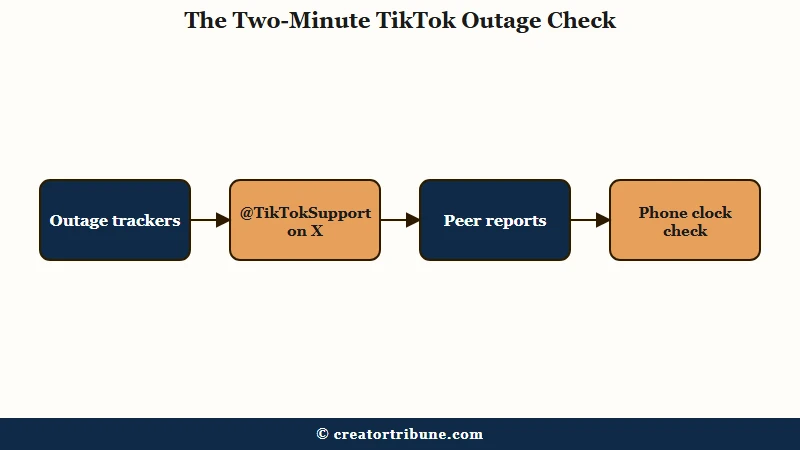
The check works because outages are loud. When TikTok’s servers fail, hundreds of thousands of people notice within minutes, and that noise is measurable in public places. Here is the sequence I’d run, in order:
- Open an outage tracker like Downdetector, StatusGator, or IsDown and look at the last hour. A giant vertical spike in reports means a real outage. A flat line with a handful of reports means it is probably you. StatusGator alone logged 99 TikTok problem reports in a single 24-hour window on June 11, 2026, with “app not loading” leading the list.
- Check @TikTokSupport on X. During a major server failure, TikTok usually posts an “aware of the issue” update there before anywhere else.
- Search the #TikTokDown hashtag. If the app is truly broken, memes and complaints pile up within minutes.
- Skim r/TikTok’s newest posts. During the June 2026 service degradation, posts like “Yep it’s a glitch” and “the whole platform for some reason” stacked up within a few hours of each other. That crowd confirmation is your answer.
- If everything looks quiet, check your phone’s clock. TikTok’s servers reject connections when a device clock drifts five minutes or more, because the security certificates stop matching. Set Date and Time to automatic and reopen the app before you assume anything worse.
That last step surprises people, and it is the cheapest fix on the list. A drifted clock produces a fake outage that no tracker will ever show, and I’d rule it out before touching anything else.
Is It an Outage or Is It Just Your Account
An outage hits every function at once and shows up in public report spikes. An account problem is quiet, personal, and follows a pattern, usually low views on new posts while the rest of the app works fine.
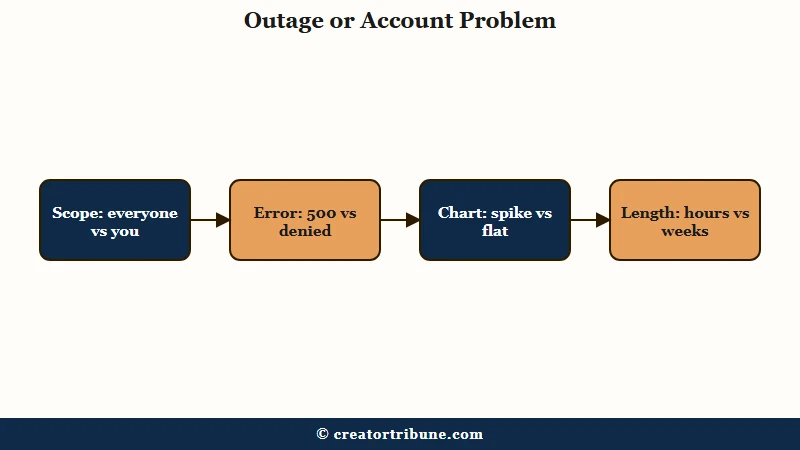
The reason creators struggle here is that the symptoms genuinely overlap. During the January 2026 infrastructure failure, fresh uploads showed zero views for days, which is exactly what a suppressed account looks like. People sat in what the community calls 0-view jail with no way to know whether to blame the servers or themselves.
| What you see | During an outage | If it is your account |
|---|---|---|
| New post stuck at 0 views | Common, affects everyone posting | Affects only you, app otherwise normal |
| FYP repeats the same videos | Classic outage symptom | Rare, usually a cache issue |
| Search results broken | Platform-wide during failures | Not an account penalty symptom |
| Error messages | “Server Error” or “500 Internal Error” | “Access Denied” or no error at all |
| Outage tracker charts | Sharp report spike in the last hour | Flat baseline |
| Duration | Minutes to hours, most recent incidents over an hour | Days to weeks until resolved |
Error messages are the underrated tell I lean on first. A “Server Error” or a 500 code points at TikTok’s machines. An “Access Denied” or a silent reach collapse with a perfectly functional app points at your account, and that is a different repair job.
If the trackers are flat and the app works but your numbers are dead, start with the low FYP views diagnostic to separate a reach cap from a true restriction. If your hashtags have stopped surfacing and non-followers cannot find your content at all, work through the TikTok shadowban recovery process instead.
And if you have seen the dreaded warning label on your profile, the account not recommended fix covers that specific flag.
Why Does TikTok Keep Going Down
TikTok’s reliability dropped after the US ownership transfer in January 2026. The platform now runs on new Oracle-managed infrastructure, and it has suffered multiple major outages since the transition, including back-to-back failures within weeks.
The way I see it, this is the piece most creators are missing. TikTok US moved onto infrastructure controlled by the USDS Joint Venture, which closed on January 22, 2026. Oracle, Silver Lake and MGX hold 15 percent each, other existing ByteDance investors hold 30.1 percent, and ByteDance itself retained 19.9 percent.
The transition has not been smooth, and the outage record since then reads like a stress test.
| Date | Duration | What broke | Scale |
|---|---|---|---|
| May 15, 2025 | About 1.5 hours | Widespread app failure | Global reports |
| January 25 to 26, 2026 | Multi-day disruption | Uploads failed, new posts stuck at 0 views, view counts frozen | 585,000+ cumulative reports |
| March 3, 2026 | 12 hours 17 minutes | Posting lags, fresh uploads earned no views or engagement | US creators, Oracle Ashburn facility |
| May 26, 2026 | 6 hours 43 minutes | Comments and notifications failed to load | US-centered reports |
The January failure started with a power outage at a primary US data center that triggered what engineers called a cascading systems failure. TechCrunch’s coverage framed the March 3 incident as the second Oracle-linked outage since the sale, and Tom’s Guide’s live blog tracked the January failure as report counts climbed past half a million.
Industry analysts have been blunt about what repeat failures mean. Sarah Chen, a cloud infrastructure analyst at Gartner, told TechBuzz that two outages in a matter of days “isn’t just bad luck” and instead “suggests fundamental capacity or configuration issues.” For creators, outages are now a recurring fact of posting on TikTok, so a personal diagnostic routine matters more than it did a year ago.
How Often Does TikTok Actually Go Down?
Far more often than the headline outages suggest. Independent monitor StatusGator detected nine separate TikTok incidents during June 2026 alone, running from 42 minutes to 5 hours 15 minutes. Most of them never made the news.
Creators tend to picture TikTok breaking three or four times a year, because those are the failures that get written up. The monitoring record for a single ordinary month looks nothing like that.
Two of those June incidents hit the exact symptom that sends people into a panic. On June 9, video uploads stopped appearing or being visible to others for 2 hours 44 minutes. Three days later, on June 12, uploads and view counts failed to update for 3 hours 34 minutes.
The rest of the month ran through app-loading and login faults. June 18 blocked access to liked and favorited videos for 5 hours 15 minutes, June 22 carried two separate incidents including a 2 hour 37 minute login failure, and June 28 produced two more. StatusGator’s TikTok incident history timestamps each one, and July has been quieter so far, with a 50-minute search and page-loading fault on July 8.
June 11 sits in a different category and it is worth understanding why. Reports piled up that day with app-not-loading complaints leading, but no confirmed incident was ever logged against it.
That gap between a report spike and a confirmed incident is the ambiguous case this whole guide exists for. A cluster of reports tells you other people are struggling, not that TikTok has acknowledged anything.
Check whether your dead post landed inside one of those windows before you read it as a verdict on your content. The odds of that are higher than most creators assume.
What Should You Do While TikTok Is Down
During a confirmed outage, do nothing destructive. Leave your posts up, save new content as local files, and wait. Deleting and reposting during degraded service hurts your account’s standing once the platform recovers.
This is where creators do real damage, and I get why. A video you worked hard on sits at zero views, panic kicks in, and the instinct is to delete it and try again.
During an outage that instinct is exactly backwards, because the views are not gone. The engagement data is delayed, and TikTok has confirmed after past incidents that counts update once service stabilizes.
Before: Your upload sits at 0 views for three hours during a confirmed outage. You delete it, repost it twice, and toggle the app’s cache settings while the servers struggle. After recovery, your account carries duplicate-content signals and a burst of erratic behavior right when the algorithm re-evaluates everything.
After: Your upload sits at 0 views during a confirmed outage. You confirm the spike on a tracker, leave the post alone, and note the timestamp. When service recovers, the views backfill and the post performs on its actual merits.
A few more moves worth avoiding while everything is broken. Uninstalling the app accomplishes nothing except re-login friction, and uninstall panic is common enough that Sensor Tower measured a near 150 percent jump in US uninstalls across the five days after the transfer. Routing a support ticket through a VPN backfires too, because TikTok assigns tickets to regional teams based on device metadata, and a mismatched location drops you into the wrong queue.
One quiet outage symptom deserves its own mention. Uploads sometimes hang in review during degraded service, which looks like a moderation problem rather than a server problem. If your post has been stuck longer than the platform’s normal processing window after service recovers, the video under review guide walks through what each stuck stage means.
What Happens to Your Views When TikTok Comes Back
Views and engagement usually backfill within hours of recovery, but distribution can stay shaky for one to two days after a major outage. Resume your normal posting schedule and judge performance only on content posted after stability returns.
Recovery is rarely a clean switch flip. After the January 2026 failure, creators reported broken view counts and an erratic algorithm for roughly two days after the official fix, even though the engagement data itself was preserved. Minor incidents resolve faster, though not as fast as creators hope. Across the nine incidents StatusGator logged in June 2026, the shortest ran 42 minutes and the longest 5 hours 15 minutes.
My rule for the aftermath is to treat the first 24 to 48 hours as untrustworthy data. Posts published during or right after an outage often underperform through no fault of yours, and reading those numbers as a verdict on your content leads to bad decisions. If a video that was pushing real numbers suddenly cratered mid-outage, give it two days before you do anything, and if the collapse persists, the views collapse recovery guide covers the non-outage causes.
What I’d watch instead is your first post after confirmed stability. That video gets a clean algorithmic read, and it tells you whether anything about your account changed or whether the whole episode was server-side noise. In nearly every outage case, it was the servers.
Frequently Asked Questions
How do I check if TikTok is down right now?
Open Downdetector, StatusGator, or IsDown and look for a report spike in the last hour, then check @TikTokSupport on X. A spike plus crowd reports means a real outage. Flat charts mean the problem is local to you.
Why are my views at zero during an outage?
Server timeouts stop engagement data from processing, so new uploads display zero views even when people can watch them. TikTok has stated the underlying data is safe and counts update after service stabilizes. Do not delete the post.
How long do TikTok outages usually last?
Minor incidents can clear inside an hour, but most run longer. Of the nine incidents StatusGator logged in June 2026, only three finished in under an hour. Major infrastructure failures run longer still, including a 12-hour outage in March 2026 and a January 2026 disruption whose effects lingered for days.
How often does TikTok go down?
Much more often than the major outages imply. StatusGator detected nine separate TikTok incidents in June 2026, including upload and view-count failures on June 9 and June 12. Short incidents of under an hour rarely get reported anywhere.
Does an outage hurt my account long term?
The outage itself does not. The damage comes from panic behavior during it, like deleting and reposting videos or mass-editing settings. Accounts that sit still through an outage recover with no lasting penalty.
How do I reach a human at TikTok support?
The Ads Manager live chat is the fastest path, available weekdays 9 am to 7 pm ET, and you do not need to spend money on ads to use it. In-app tickets are usually acknowledged within 24 to 48 hours, and re-sending the same ticket resets you to the back of the queue.
Quick Takeaways
- Confirm an outage in two minutes with an outage tracker spike, @TikTokSupport on X, and peer reports before assuming your account is the problem.
- Zero views during a confirmed outage is delayed engagement data, and the counts backfill once service recovers.
- Never delete and repost during degraded service. That behavior carries real penalties into the recovery period.
- A phone clock off by five minutes fakes a full outage. Set Date and Time to automatic before panicking.
- Judge your content only on posts published after confirmed stability, and treat the first 48 hours of post-outage numbers as noise.