Fix Instagram After a Fake Views and Bot Flood
Fix Instagram After a Fake Views and Bot Flood
Hit with fake views or bot followers on Instagram? You probably will not get banned. Here is how to clean up and recover your reach safely.
- 1Will Instagram Ban You for Fake Views You Did Not Buy
- 2Did Instagram Just Remove a Chunk of Your Followers
- 3How Fake Views and Bot Followers Hurt Your Account
- 4How to Tell Bots From Ghosts and Real Followers
- 5How to Remove Bot Followers Without Getting Blocked
- 6Should You Delete the Bombed Post
- 7How to Recover Your Reach After the Flood
- 8How to Prevent the Next Bot Flood
- 9Frequently Asked Questions
- Will buying followers to “balance out” the bots help?
- How many bot followers can I remove per day safely?
- How long until my reach recovers?
- Should I make my account private during a bot attack?
- Why did my follower count suddenly drop instead of rising?
- Can I tell if it was sabotage or a random botnet?
- 10Quick Takeaways
Quick Fix: If someone flooded your Instagram with fake views or bot followers, you are very unlikely to be banned, because Instagram penalizes the buyers, not the targets. Do not mass-delete the bots in a panic, that is exactly what trips an action block. Remove them slowly, under 100 a day, and lean on Reels to rebuild real reach.
The instinct when a wave of fake views or bot followers hits your Instagram is to delete them all right now. That instinct is the thing that gets you in trouble.
Instagram reads a fast mass-removal of followers as spam behavior, and it will hand you an action block for doing it. The fake views and bot followers themselves rarely get the victim banned, since the platform aims its penalties at accounts that buy fake engagement, not the ones that receive it.
So the real risk is your own cleanup, plus a temporary hit to reach while the algorithm recalibrates. This guide covers how to tell the bots apart, remove them without a block, decide what to do with the bombed post, and get your reach back.
Will Instagram Ban You for Fake Views You Did Not Buy
No, you almost certainly will not be banned for fake engagement you did not purchase, because Instagram targets the buyers. The damage is to your metrics and reach, not your account’s survival.
Enforcement is pointed at people gaming the system on purpose. Accounts caught buying engagement face reduced distribution, lockouts, or suspension.
There is a legal ceiling on top of that for commercial actors. The figure often quoted in creator guides, $51,744, is the FTC Act’s 2024 per-violation maximum for deceptive practices; the FTC raised it to $53,088 with effect from January 17, 2025, and left it unchanged for 2026. It is a general maximum for deceptive commercial conduct rather than a fine written specifically for buying followers.
If a third party or a sabotage attack dumped bots on you, that legal and enforcement weight does not land on you. What you are left with is a skewed engagement rate and suppressed reach, which is annoying but fixable.
There is one edge case worth knowing. When Instagram runs its own bot purges, a sudden mass follower drop can briefly look suspicious on your account, so a short reach dip during a platform-wide cleanup is normal and not a strike against you.
Did Instagram Just Remove a Chunk of Your Followers
If your follower count fell sharply rather than jumping, that is most likely Instagram deleting bots for you, and it needs no cleanup at all.
This is the opposite situation to a bot flood, and the fix list on this page does not apply to it.
Instagram ran exactly that kind of sweep beginning on May 6, 2026, removing fake, inactive and spam accounts across the platform. Follower counts fell everywhere from small creators to the largest accounts on the app, and the drops arrived with no warning or notification.
Head of Instagram Adam Mosseri addressed it directly in an Instagram Stories session days afterwards. He said the accounts removed were “either inactive for a very long time or actual bots”, that “it’s not actual real followers that you have lost”, and added: “I know a lot of people are nervous about this, but it’s not going to affect your reach”, as reported by Yahoo Creators.
Creators did not universally accept that. Reports on Threads described active accounts disappearing, including followers who had been liking and commenting hours before, and Mosseri himself conceded the rollout had been handled badly.
A purge-driven drop needs no removal work from you. Buying followers to replace the missing count is the one response that turns a cosmetic problem into a policy one.
How Fake Views and Bot Followers Hurt Your Account
Fake views and bot followers crush your engagement rate and tell the algorithm your content is boring, which suppresses your future reach. The harm is mathematical and algorithmic, not a manual penalty.
There is a real paradox in how this plays out. Fake views drop off in the first second or two, which tanks your completion rate, and completion rate is one of the strongest signals Instagram uses to decide whether to push a Reel.
So a Reel padded with fake views looks less appealing to the algorithm, not more, and that negative signal can bleed into the reach of your next posts. Meanwhile your engagement rate falls because bots inflate your follower count without ever liking, saving, or sharing.
The lingering problem is data pollution. Even after the bots are gone, your audience insights on location, age, and active hours stay corrupted for a while, which makes them useless for planning. For the bigger picture on sudden reach loss, the breakdown of why Instagram reach drops covers the algorithm signals in depth.
How to Tell Bots From Ghosts and Real Followers
Bots show random-string usernames, no profile photo, almost no posts, and a wildly lopsided following-to-follower ratio, while ghosts are real-looking accounts that never engage. Sorting them is the first cleanup step.
The ratio is the giveaway. A clear bot is something like an account following 6,000 people while having 3 followers, usually with a garbled username and an empty grid.
Ghost followers are trickier because they can be dormant real people or follow-for-follow accounts that never interact. Engagement pods are a third category, where members trade likes and views that carry zero watch time and zero algorithmic value.
The table below sorts the three so you know what you are removing and why.
| Type | How to spot it | What to do |
|---|---|---|
| Bot | Random-string username, no photo, lopsided follow ratio | Remove gradually |
| Ghost follower | Real-looking, zero engagement over months | Remove slowly or leave |
| Engagement pod | Real accounts, likes with no watch time | Leave the pod, stop using it |
If your reach already cratered and you are not sure bots are the cause, run the cross-platform shadowban diagnostic test before you start deleting anyone.
How to Remove Bot Followers Without Getting Blocked
Remove bot followers slowly, staying under 100 a day, because Instagram treats fast follower removal as spam and will action-block you. Slow and boring is the safe way through.
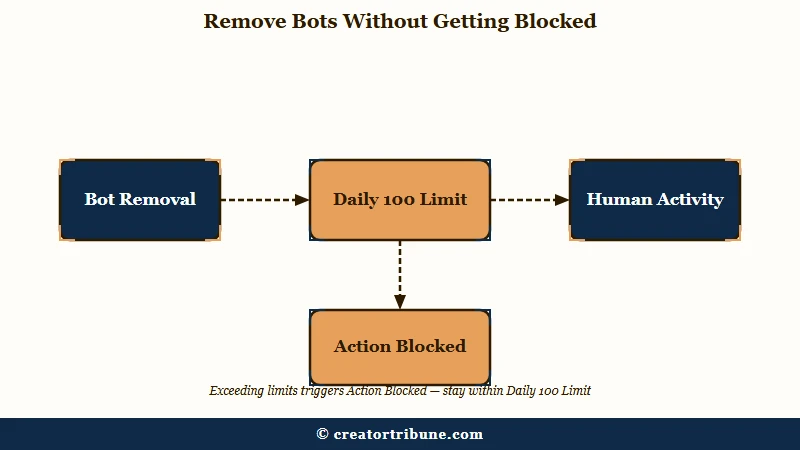
The people who get blocked are generally the ones who try to clean everything in one sitting. Follower-management tools space removals out over hours rather than minutes for the same reason, and copying that cadence by hand is the safest approach.
Work through the cleanup in this order.
- Make a list of the clearest bots first, using the ratio and no-photo signals.
- Remove no more than 100 followers in any single day, fewer if your account is newer.
- Spread the removals across the day rather than in one block, ideally a handful every few hours.
- Between removal sessions, post a Story or answer a DM so your activity looks human.
- Stop immediately if you see an “Action Blocked” message and wait 24 to 48 hours before resuming.
The thresholds below are the limits creators and tool makers have converged on through trial and error. Instagram publishes no official rate limits and adjusts them quietly by account age and standing, so treat these as a conservative ceiling rather than a published rule.
| Action | Established account | New account |
|---|---|---|
| Remove or unfollow | Under 100 per day | Well under 100 per day |
| Likes | 30 to 50 per hour, 1,000 per day | 15 to 20 per hour, 500 per day |
| Comments | 20 per hour, 150 per day | 10 per hour, 100 per day |
| DMs to strangers | 8 per hour, 60 per day | 5 per hour, 30 per day |
Before: you see 4,000 new bot followers overnight and delete 1,500 in an hour to fix it. After: Instagram action-blocks you for mass unsubscribing, so you remove under 100 a day instead and the block never fires.
Should You Delete the Bombed Post
Do not rush to delete the flooded post; archiving it is usually the safer move because deleting also wipes the real engagement it earned. The post is rarely the lasting problem.
The honest answer is that the evidence here is mixed. One creator reported relief after deleting and re-uploading a bombed Reel, while others treat the dip as normal recalibration that passes on its own.
Archiving beats deleting, because it hides the post and its skewed metrics without throwing away the genuine likes and comments from real followers. If reach is still flat a week later, a delete-and-reupload is a reasonable next experiment.
How to Recover Your Reach After the Flood
Lean on Reels to reach non-followers, post consistently, and give it time, because a recommendation limit lifts in 7 to 14 days while full engagement recovery takes 3 to 6 months. Reels are your fastest way back.
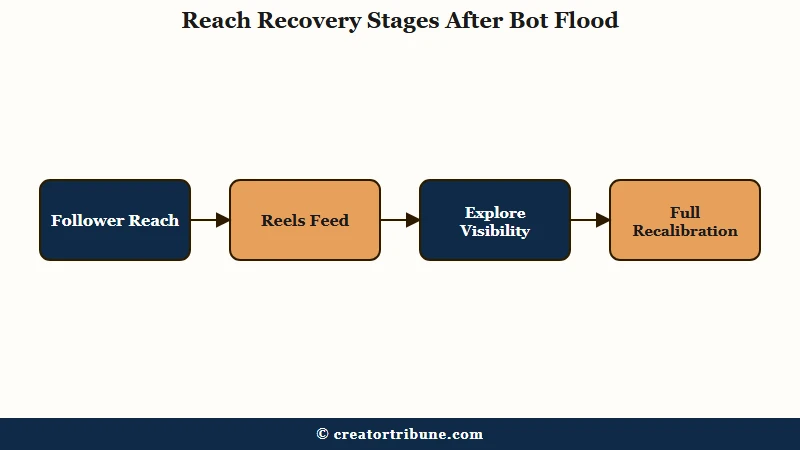
Reels target non-followers, so they let you build a fresh audience signal independent of your bot-polluted follower list. That is what makes short, hooky Reels the center of recovery.
Aim your hooks at the opening seconds, because that is where retention is won or lost. Instagram does not publish threshold numbers for this, so treat the specific percentages that circulate in growth guides as rules of thumb rather than published targets.
Those windows come from creator-reported recoveries rather than anything Instagram publishes, and the climb back arrives in stages. Reach stabilizes for current followers first, then your content starts appearing in the non-follower Reels feed, and finally Explore visibility returns. If you are stuck deciding whether the account is even worth saving, the dead account recovery playbook and the diagnostic in why no one likes posts both help you judge it.
On whether to rebuild or restart, the question worth asking is how large the genuine core underneath the bots actually is. An account with a few hundred real followers left has little to preserve, while one with a few thousand still has an audience worth the months of cleanup.
How to Prevent the Next Bot Flood
Use Instagram’s Limits and Hidden Words tools during an attack, go private if it is severe, and never accept “promotion” offers from random accounts. Prevention is mostly about cutting off the entry points.
The tool to reach for mid-attack is Limits, which hides comments and DMs from people who do not follow you, breaking a bot’s automated engagement loop without shutting your account to everyone. Hidden Words filters do the same for spammy comment text.
Most floods that are not pure sabotage trace back to a creator accepting a shady “we will feature you” offer that quietly opts them into a coordinated bot network. Treat unsolicited growth offers as the threat they are. If banned hashtags are also dragging your posts, the banned hashtags checklist is worth a pass while you clean up.
Frequently Asked Questions
Will buying followers to “balance out” the bots help?
No. Buying engagement is the behavior Instagram penalizes, with shadowbans and lockouts, and commercial accounts also sit under the FTC Act’s deceptive-practices penalty, a maximum of $53,088 per violation since January 2025. Adding paid fakes on top of unsolicited ones makes the metrics and the risk worse.
How many bot followers can I remove per day safely?
Keep removals under 100 per day, and fewer on a newer account. Spread them across the day in small batches every few hours, and stop if you see an “Action Blocked” message, then wait 24 to 48 hours.
How long until my reach recovers?
A recommendation limit usually lifts in 7 to 14 days after you stop the flagged activity. Fully recalibrating your engagement rate takes 3 to 6 months of consistent, high-quality posting, with Reels driving the fastest gains. Instagram publishes no official recovery timeline, so treat both windows as creator-reported rather than platform guidance.
Should I make my account private during a bot attack?
It can help in a severe flood, since approving followers stops the inflow. For most cases the Limits feature is enough, because it hides comments and DMs from non-followers without locking out your real audience.
Why did my follower count suddenly drop instead of rising?
That is almost always Instagram removing bots and long-dormant accounts, not a penalty against you. The platform ran a large sweep of this kind from May 6, 2026, and Adam Mosseri said the removed accounts were inactive or automated rather than real followers.
Can I tell if it was sabotage or a random botnet?
Targeted sabotage tends to hit one specific post or arrive right after a conflict, while a random botnet follows many accounts to look real. Either way the cleanup is the same: remove slowly, tighten Limits, and rebuild with Reels.
Quick Takeaways
- You are very unlikely to be banned for fake engagement you did not buy; Instagram penalizes buyers, not targets.
- Do not mass-delete bot followers; staying under 100 removals a day is what keeps you off an action block.
- Archive the bombed post rather than deleting it, so you keep the real engagement while hiding the skewed metrics.
- Rebuild with Reels aimed at non-followers, expect a limit to lift in 7 to 14 days, and give full recovery 3 to 6 months.