Descript vs Riverside for Podcasters and Video Creators
Descript vs Riverside for Podcasters and Video Creators
Descript vs Riverside compared on recording quality, AI editing, pricing, and the hidden media-minute trap. See which one fits your workflow.
- 1What Is the Real Difference Between Descript and Riverside
- 2How Do Descript and Riverside Pricing Compare in 2026
- 3Why Does Descript’s Media Minute Billing Catch People Off Guard
- 4Which One Records Better Quality for Remote Guests
- 5Which One Edits Faster Once Recording Is Done
- 6Who Should Choose Descript
- 7Who Should Choose Riverside
- 8Should You Just Use Both Descript and Riverside Together
- 9Descript vs Riverside Final Verdict
- 10Frequently Asked Questions
- Is Descript or Riverside better for podcasts?
- How much do Descript and Riverside cost?
- Does Descript charge per upload?
- Can Riverside edit videos like Descript?
- Which one is better for a solo creator?
- 11Quick Takeaways
The Verdict: Riverside wins recording, Descript wins editing, and most serious creators end up paying for both. If you interview remote guests, start with Riverside for its local recording. If you edit heavily or work solo, Descript saves you more hours. The catch nobody warns you about is Descript’s media-minute billing, which charges you per uploaded file.
Descript vs Riverside is the comparison I get asked about more than any other, and the honest answer surprises people: these two tools are not really competing for the same job. One is built to capture clean recordings from guests on shaky internet. The other is built to turn raw footage into a finished episode without touching a traditional timeline.
The part that trips up almost everyone is Descript’s 2026 pricing. It moved to a metered model where every file you upload eats into your monthly “media minutes.” Upload three camera angles for a one-hour podcast and you have just spent three hours of your allowance, not one. That single detail changes the math for anyone shooting multicam.
Here is what I want you to walk away with: a clear sense of which tool fits your actual workflow, what each one costs once the hidden meters are accounted for, and why the smartest creators I know quietly run both. By the end you will know exactly which one to open first.

What Is the Real Difference Between Descript and Riverside
Descript is an editing-first tool and Riverside is a recording-first tool. Riverside captures broadcast-quality audio and video from remote guests, while Descript turns that footage into polished content using text-based editing.
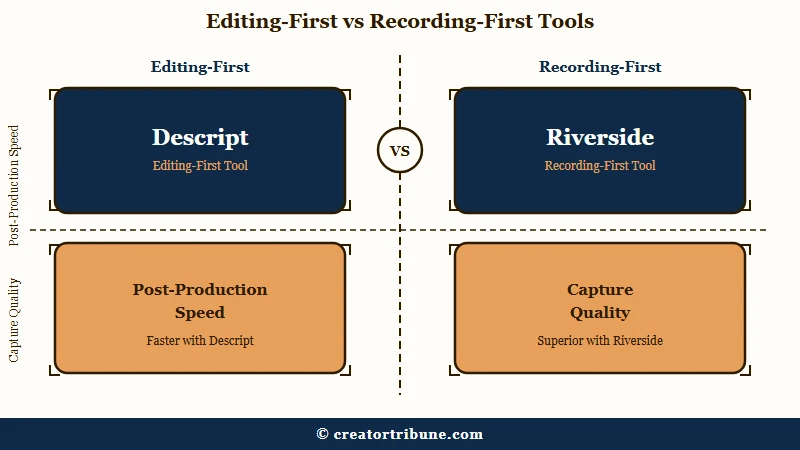
The way I see it, the labels matter because they predict where each tool will frustrate you. Riverside is obsessive about capture quality and lighter on post-production. Descript is the opposite, a deep editing suite with recording bolted on as a convenience feature.
What is local recording: A method where each participant’s audio and video is saved directly on their own device, then uploaded afterward, instead of streaming over the internet during the call.
That difference in philosophy is why the hybrid workflow exists. I have watched plenty of podcasters record in one and edit in the other rather than forcing a single tool to do both jobs badly.
How Do Descript and Riverside Pricing Compare in 2026
Descript bills by media minutes and AI credits, while Riverside bills by recording hours. Both start around $24 per month on annual billing, but the meters they count are completely different, and that is what decides which one is cheaper for you.
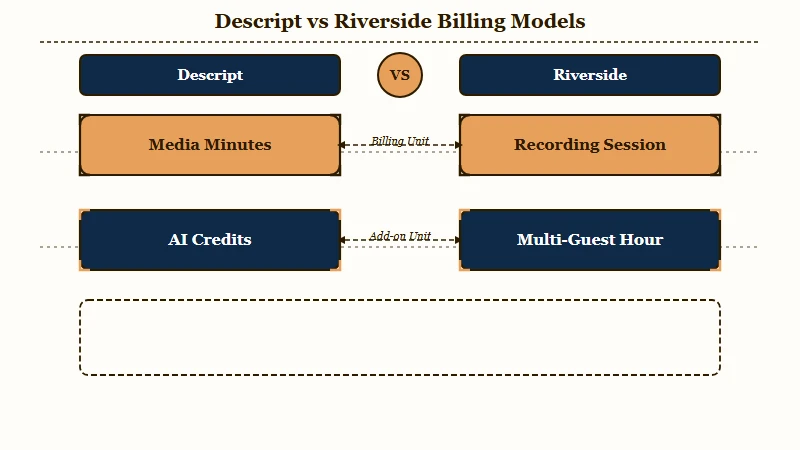
What surprised me most is how Descript’s September 2025 shift to a metered model rewrote the value calculation. You are no longer paying for transcription hours. You are paying for every minute of media you push through the platform, and high-end AI features like eye contact correction draw down a separate credit pool on top of that.
Here is how I read the two pricing structures side by side.
| Plan | Descript (annual) | Riverside (annual) |
|---|---|---|
| Free | 60 media minutes, 100 one-time AI credits, 720p watermarked exports | Limited recording, watermarked exports, good for testing |
| Entry paid | Hobbyist, $16/mo, 600 media minutes, 400 credits, 1080p no watermark | Pro, $24/mo, 15 hours multi-track recording, up to 4K |
| Mid tier | Creator, $24/mo, 1,800 media minutes, 800 credits, 4K, full Underlord | Live, $34/mo, multistreaming and 1080p live streaming |
| Top tier | Business, $50/mo, 2,400 media minutes, 1,500 credits, team and brand kits | Webinar, $79/mo, 100 registrants and lead capture |
Those monthly figures assume annual billing. Pay month to month and Descript’s tiers land closer to $24, $35, and $65, which is the detail I always tell people to check before they commit. My full Descript pricing breakdown walks through the credit math in more detail.
Why Does Descript’s Media Minute Billing Catch People Off Guard
Every file you upload to Descript consumes media minutes, even duplicates of the same session. A one-hour podcast shot with three camera angles burns three hours of your monthly allowance, not one.
This is the single most expensive surprise in the comparison, and it is the reason I lead with it. If you shoot multicam or upload several takes, your “1,800 minute” Creator plan shrinks fast. A weekly multicam show can chew through a mid-tier plan before the month is half over.
Riverside counts hours differently, and in your favor. Recording time is measured by total session length rather than per participant, so a one-hour interview with three guests counts as a single hour against your limit. For interview-heavy creators, that math alone can decide the winner.
Example scenario: You record a 60-minute interview with two remote guests, each on their own camera. On Riverside, that counts as 60 minutes against your 15-hour Pro limit. On Descript, if you upload the host feed plus both guest angles to edit, you have spent 180 media minutes, three times the draw, for the same episode.
Which One Records Better Quality for Remote Guests
Riverside records better remote quality because it captures locally on each device instead of over the internet. It saves up to 4K video and 48kHz uncompressed audio per participant, so a glitchy call still produces a clean final file.
To my mind, this is not a close call. Riverside’s progressive upload keeps saving even if a guest’s connection drops mid-sentence, and you get separate track stems for every speaker, which is what you want for serious audio mixing. Descript’s remote recording runs through the cloud and is more exposed to connection problems.
There is a technical gate worth flagging here that most comparisons miss. On Riverside, the ability to lock a specific frame rate like 24 FPS is reserved for the Business tier, so cinematographers chasing a film look cannot get it on the cheaper plans. If exact frame rate control matters to you, budget for the higher tier or plan around it. The Riverside feature and pricing review covers the recording setup in depth.
One more point in Riverside’s favor: it expanded transcription to more than 100 languages, while Descript supports around 23. For multilingual shows, that gap is real.
Which One Edits Faster Once Recording Is Done
Descript edits faster because you cut audio and video by deleting words in a transcript. Remove a sentence from the text and the matching footage disappears, which turns hours of timeline scrubbing into minutes.
What I found genuinely impressive is the speed on dialogue cleanup. Descript’s Underlord AI co-editor can strip every “um” and “uh” in one pass, and the time savings are not marketing fluff. A 45-minute interview that used to take two to four hours to clean by hand now runs closer to 12 minutes, and in one tracked test a 31-minute interview was edited in under four minutes against 53 minutes by hand.
The honest catch is stability on long projects. Power users consistently report that Descript starts to lag, render slowly, or crash once a project crosses about 120 minutes of content. The saving grace is that it uploads in real time, so even a crash rarely costs you any work.
If you batch long-form episodes, I would keep individual projects under that threshold. For turning finished episodes into clips, pair it with a dedicated tool like the workflow in repurposing long videos into shorts.
Here is the quick decision guide I hand to people who just want the short version.
| Your priority | Better pick | Why |
|---|---|---|
| Clean remote guest recording | Riverside | Local capture survives bad internet |
| Fast text-based editing | Descript | Delete words to cut footage |
| Multicam or multiple takes | Riverside | Session-based hour counting |
| Filler word removal at scale | Descript | Underlord one-pass cleanup |
| Multilingual transcription | Riverside | 100+ languages supported |
| All-in-one solo workflow | Descript | Record, edit, caption in one place |
Who Should Choose Descript
Descript is the better pick for solo creators who edit heavily. Commentary channels, tutorial makers, and course creators get the most from its all-in-one record, edit, and caption environment.
In my experience, the people happiest with Descript are the ones doing the editing themselves and doing a lot of it. The text-based workflow, the one-click Studio Sound cleanup, and Overdub voice correction are genuine time-savers when post-production is your bottleneck. If you rarely have remote guests, you can record straight into Descript and skip a second subscription entirely.
I would steer you toward Descript if your week is dominated by editing rather than scheduling guests. Just keep an eye on the media-minute meter and avoid uploading more footage than you need to.
Who Should Choose Riverside
Riverside is the better pick for interview shows and production teams. Its local recording, separate track exports, and Producer Mode are built for capturing multiple remote guests reliably.
The way I see it, Riverside earns its place the moment a remote guest enters the picture. Producer Mode lets someone monitor a session without being recorded, the per-device capture protects you from a guest’s bad wifi, and the stems make professional mixing possible. That is a different job than editing, and Riverside does it better than anything else at this price.
If you run a weekly interview podcast or a team production, this is where I would start. Pair it with a heavier editor afterward, because Riverside’s own editing tools stay deliberately basic.
Should You Just Use Both Descript and Riverside Together
For most serious creators, running both is the strongest setup. Record in Riverside for pristine source files, then import those tracks into Descript for fast AI editing, for roughly $40 to $48 per month combined on annual billing.
This is the recommendation I land on more often than any single-tool answer. You get Riverside’s capture reliability and Descript’s editing speed without asking either tool to do the job it is weak at. Podcasting is a large enough market to justify it, with roughly 584 million listeners worldwide in 2025 according to Statista, so the tooling spend pays back fast for anyone treating it seriously.
If budget is tight, here is the sequence I walk people through when they can only justify one subscription.
- Count how often you record remote guests. If it is weekly, Riverside earns its seat first.
- Add up the hours you spend editing each episode. If editing is your bottleneck, Descript pays for itself faster.
- Check whether you shoot multicam. If you do, Descript’s per-file billing pushes you toward recording in Riverside and exporting only the angles you need, then editing the clips in a tool like the ones compared in Opus Clip vs Submagic.
Descript vs Riverside Final Verdict
Riverside is the recording winner and Descript is the editing winner. The right choice comes down to whether your workflow is bottlenecked at capture or at post-production.
Here is the head-to-head I would put in front of anyone still deciding.
| Criteria | Descript | Riverside |
|---|---|---|
| Best at | Text-based editing | Remote recording |
| Recording quality | Cloud, standard | Local, up to 4K and 48kHz |
| Pricing meter | Media minutes and AI credits | Recording hours |
| Multicam cost | Charges per uploaded file | Session-based, friendlier |
| Trustpilot rating | About 2.2 out of 5 | About 4.0 out of 5 |
| Ideal user | Solo heavy editor | Interview and team shows |
One number worth sitting with: despite strong professional ratings on G2, Descript carries a Trustpilot score around 2.2 out of 5 against Riverside’s 4.0, driven by complaints about bugs and support. It tells me the editing power is real, but the experience can be rough on long projects.
Frequently Asked Questions
Is Descript or Riverside better for podcasts?
Riverside is better for recording podcasts with remote guests because of its local capture and separate track exports. Descript is better for editing them. Many podcasters record in Riverside and edit in Descript for the best of both.
How much do Descript and Riverside cost?
Both start around $24 per month on annual billing. Descript’s Hobbyist plan is $16 per month and its Creator plan is $24. Riverside’s Pro plan is $24 per month for 15 hours of multi-track recording.
Does Descript charge per upload?
Yes. Descript’s 2026 model counts every uploaded file against your monthly media minutes. Uploading three camera angles for one episode consumes three times the minutes, which matters most for multicam creators.
Can Riverside edit videos like Descript?
Riverside has basic AI editing and Magic Clips for social cuts, but it is not a full editing suite. For deep post-production like text-based cutting and filler word removal, Descript is the stronger tool.
Which one is better for a solo creator?
Descript is usually better for solo creators who handle their own editing. Riverside’s main value is solving remote guest quality, which solo creators rarely need, so a solo show can often run on Descript alone.
Quick Takeaways
- Riverside wins remote recording with local capture, Descript wins editing with its text-based workflow.
- Descript charges per uploaded file, so multicam shoots burn media minutes fast on the Creator plan.
- Riverside counts recording by session, so a one-hour interview with three guests still costs one hour.
- For most serious creators, running both at around $40 to $48 per month beats forcing one tool to do everything.
- If you must choose one, pick by your bottleneck: editing leans Descript, guest recording leans Riverside.