
Grammarly Scam Hijacks YouTube Accounts
Grammarly Scam Hijacks YouTube Accounts
A phishing scam is using Grammarly notification emails to hijack YouTube channels as of June 2026. Here is how it works and how to stay safe.
- 1What Is the Grammarly YouTube Scam
- 2Why the Grammarly Trick Slips Past Your Defenses
- 3How to Protect Your YouTube Channel
- 4What to Do If You Already Clicked
- 5Frequently Asked Questions
- Is an email from [email protected] a real Grammarly email?
- How do I know if a Grammarly email is a scam?
- Does two-factor authentication stop this YouTube scam?
- Does the fake copyright strike always claim to come from YouTube?
- 6Quick Takeaways
What Happened: Creators began flagging this in late May 2026, and fake copyright-strike emails were still being reported in August 2026. A phishing scam routes a YouTube account-takeover lure through Grammarly notification emails to slip past spam filters and the usual [email protected] suspicion. The link leads to a fake copyright-strike page that steals your Google session, and because it grabs your session cookie, two-factor authentication does not stop it.
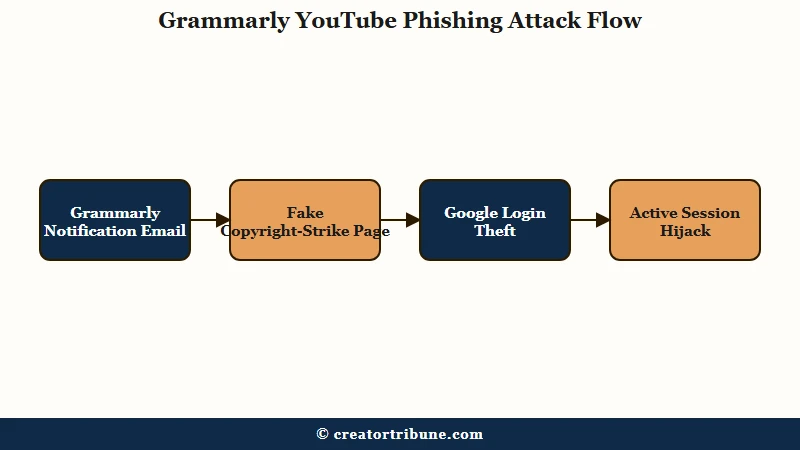
A new delivery trick is putting a familiar YouTube phishing scam back in front of creators who thought they knew the warning signs. Late in May 2026, creators began flagging phishing links arriving inside Grammarly notification emails, which carry a trusted sender reputation most spam filters wave through.
This matters even though the underlying scam is not brand new. Security firms have tracked this YouTube creator phishing campaign for months, and the Grammarly twist is just the newest way to get the lure into your inbox. The mechanics behind it are nasty enough that your password and even your two-factor code may not save you.
The way I see it, the Grammarly angle is dangerous precisely because it bypasses the one rule most creators learned first: check the sender. When the email genuinely comes from Grammarly’s system, that rule fails. Here is exactly what is happening and how to protect your channel.
What Is the Grammarly YouTube Scam
The Grammarly YouTube scam is a phishing attack that uses Grammarly notification emails to deliver a fake YouTube copyright-strike link, which then steals your Google login and session.
The Grammarly email is just the envelope; the payload is the same account-takeover kit security researchers have been tracking all year. The catch is that the sender can be a genuine Grammarly address. The domain @notification.grammarly.com sits on Grammarly’s own list of legitimate sending domains, so an email from [email protected] passes normal authentication and looks real, which is why “check the sender” quietly fails here.
Grammarly says as much on that same page. Of the notification text and the linked document, its own guidance reads: “Neither is created or reviewed by Grammarly, which means attackers can use them to embed fraudulent instructions, phone numbers, links, or email addresses.”
What is a session cookie: A small token your browser stores after you log in, so the site keeps you signed in. Steal the cookie and an attacker is logged in as you, no password needed.
Once you click, the link opens a personalized scare page that pulls your real channel data, including your avatar, subscriber count, and most recent upload, to build a convincing copyright notice. Malwarebytes documented this copyright-strike kit on April 15, 2026, noting the page even generates fake infringement timestamps based on the length of your actual video.
The kit is not one person with a fake page. Malwarebytes found an affiliate tracking system in its source code, where every operator gets a referral ID stitched into the links they send and a central backend records which operator delivered which victim and how far that person got through the funnel. The traffic capture it published carried the default tag ref=huyznaetdmca, and the code writes “Google” and “YouTube” using lookalike Cyrillic characters so automated scanners read past them.
Creators are worked from two directions at once, and the numbers from one keep getting attached to the other. Separate CloudSEK research, as reported in December 2024, counted more than 200,000 YouTube creators targeted through over 340 mail servers, but by a different lure: fake brand collaboration offers carrying password-protected malware archives. Malwarebytes put no victim count on the copyright-strike kit, so treat that 200,000 as belonging to the brand-deal campaign rather than to this one.
My read is that the Grammarly delivery method is one franchise operator trying a fresh envelope while the engine stays the same.
Why the Grammarly Trick Slips Past Your Defenses
This scam slips past your defenses because it steals your session cookie, which lets attackers bypass two-factor authentication entirely. A strong password does not help once they hold a valid session token; they become you in the eyes of Google’s servers.
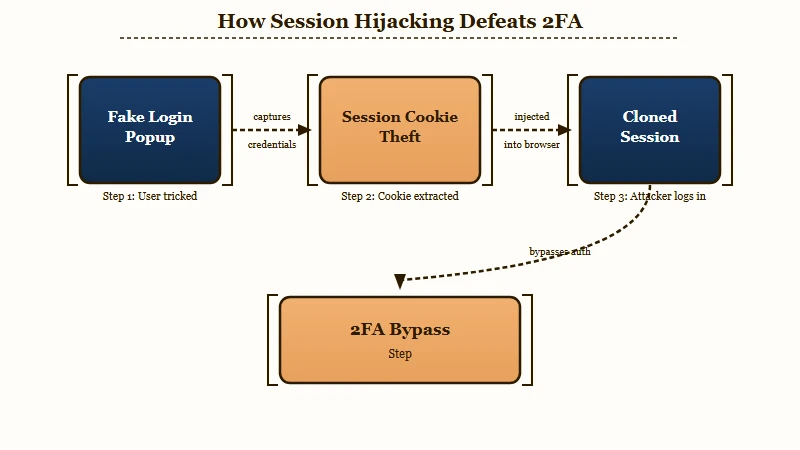
The login box you see is the most convincing part. Bitdefender has warned creators about a Browser-in-the-Browser trick, where the “Sign in with Google” popup is not a real window at all. It is a fake window drawn entirely in HTML and CSS, complete with a padlock icon and a fake accounts.google.com address bar that are just graphics.
| Red flag | What it really means | What to do |
|---|---|---|
| Login popup will not drag outside the browser | It is a fake Browser-in-the-Browser window | Close the tab, do not type anything |
| Email is from Grammarly but about a YouTube strike | Trusted-sender abuse to bypass filters | Ignore the link, go to Studio directly |
| Copyright notice with a 3-day countdown | Pressure tactic to rush your login | Check studio.youtube.com instead |
| Popup vanishes when you minimize the browser | Confirms it is a fake in-page window | Treat the whole page as hostile |
What surprised me most is the bypass for large channels. The kit reads your subscriber count first, and above three million it skips the phishing flow entirely and serves the line “Your channel is in good standing. No further action is needed.” instead, which keeps it clear of the security teams and trust-and-safety contacts that big channels tend to have. Smaller creators are the real targets, and a clean result from that page proves nothing, because it may only mean you were too big to be worth the risk.
How to Protect Your YouTube Channel
To protect your channel, never log in from any link in an email, verify strikes only inside YouTube Studio, and test any login popup before touching it. The Grammarly envelope changes nothing about the right habit: notifications get verified at the source, not by clicking.
Here is the sequence I would burn into muscle memory for any “copyright strike” or “policy change” message, no matter who appears to send it:
- Do not click the link. Open a new tab and go straight to studio.youtube.com to check for any real strike or notice.
- If a Google login popup ever appears, try to drag it outside the browser window. A real window moves freely; a fake one is trapped inside the page.
- Minimize your browser. A real popup stays on your desktop; a fake one disappears with the page.
- Read the permanent address bar at the very top of your browser, not the URL shown inside the login box.
- Turn on passkeys or a hardware security key for your Google account, since those resist credential and cookie theft far better than a password alone.
Before: “The email is from Grammarly and the login says accounts.google.com, so it must be safe.”
After: “The email is from Grammarly but it is about a YouTube strike, the popup will not drag off the page, and the real address bar says dmca-notification dot info, so this is a scam.”
YouTube never sends official policy changes through private video shares or third-party notification emails. If a message claims your monetization is changing, my guide on recovering from account scams and terminations covers what real enforcement looks like, and the copyright strike removal walkthrough shows where genuine strikes appear.
What to Do If You Already Clicked
If you already entered your login, change your Google password immediately, sign out of all sessions to kill stolen cookies, and check for unfamiliar devices. Speed matters, because hijackers often rebrand a channel to a fake crypto company within minutes.
Go to your Google Account security page, change the password, then use the “sign out of all devices” option, which invalidates any stolen session cookie. Review recent security activity for logins you do not recognize and revoke any unfamiliar third-party app access.
If your channel was already taken over, report it through YouTube’s official recovery flow right away and keep evidence of the original ownership. A hijacked or wrongly terminated channel is recoverable, and my walkthroughs on getting a terminated channel back and rebuilding channel trust signals cover the steps that give the appeal the best chance.
Frequently Asked Questions
Is an email from [email protected] a real Grammarly email?
The @notification.grammarly.com domain is on Grammarly’s official list of legitimate sending domains, so a message from [email protected] passes normal authentication and looks genuine. Attackers exploit that trust by routing a fake YouTube copyright-strike link through Grammarly’s real notification and document-share system. A real sender domain does not mean the content is safe, so verify any strike only at studio.youtube.com.
How do I know if a Grammarly email is a scam?
Check what the email asks you to do, not just who sent it. A genuine Grammarly notification never routes you to a YouTube copyright-strike page or a Google login box. Grammarly publishes its legitimate domains and asks you to forward anything suspicious to [email protected].
Does two-factor authentication stop this YouTube scam?
No. The kit steals your active session cookie after you log in on the fake page, which lets attackers reuse your signed-in session without your password or your 2FA code. Passkeys or a hardware security key resist this far better than a password and a code.
Does the fake copyright strike always claim to come from YouTube?
No. A MalwareTips writeup published on August 1, 2026 describes fake copyright-strike emails from the same period impersonating rights holders such as Disney, Netflix and Warner Music alongside YouTube and Google, usually with a 48-hour or seven-day deadline and a button reading Review Case or Submit Appeal. Whoever the sender claims to be, open studio.youtube.com yourself, and if no strike is listed there, the message is phishing.
Quick Takeaways
- A phishing scam uses Grammarly notification emails to deliver a fake YouTube copyright-strike link, and the wider campaign was still active in August 2026.
- It steals your session cookie, so two-factor authentication and a strong password will not stop the takeover on their own.
- Never log in from an email link; verify every strike or policy notice directly at studio.youtube.com.
- If you clicked, change your password and sign out of all sessions immediately to kill any stolen cookie.


Hey!!!!!
My Google account have been just hacked with the different way by Grammarly.
It was impossible to recover.
My YouTube got hijacked and spammer posted Live video about Bitcoin and Fundraising with Elon Musk video. Fundraising was about Ukraine and I’m sure it’s fake.
It seems that Grammarly are not hacked but they are hacking people’s account on purpose!!!!
I got email from [email protected] about “Paid YouTube Collaboration Proposal – Grammarly”
And on the email it was written “You can find all collaboration details on our website: gramcollab ”
When I searched about “[email protected]” to check it was real email, there was page about “I received an email that appears to be from Grammarly; how do I know if it’s legitimate?”
https://support.grammarly.com/hc/en-us/articles/4416837787149-I-received-an-email-that-appears-to-be-from-Grammarly-how-do-I-know-if-it-s-legitimate”
Now I see that they put this page on purpose to make people to believe.
I’ve sent the email to them but no reply. They don’t warn people on Insta and website about being hacked.
Now I can see that Grammarly is committing crime purposely.
D, I’m really sorry this happened to you. Getting locked out while a stranger livestreams a fake Elon crypto giveaway on your own channel is every creator’s nightmare, and it is not your fault for trusting an email that arrived under a name you already knew.
One thing worth clearing up, because it changes how you fight back: Grammarly is not hacking anyone here. The attackers are abusing Grammarly’s real document-sharing feature, the “invited you to view a doc” notification, so the phishing link ships from Grammarly’s own servers and slips past spam filters. The support page you found is Grammarly’s genuine help article, not something the scammers planted.
The reason a password reset alone did not save you is the session cookie. Once they copied that token they were signed in as you, so changing the password without killing every active session leaves them right where they were.
Here is the order that actually works. Open your Google Account from a device you trust, go to Security, then “Your devices”, and sign out of every session you do not recognize. Only after that, change the password and recheck your 2-step verification, app passwords, recovery email and recovery phone, since hijackers usually swap those so they can walk back in.
For the channel itself, use Google’s hijacked-account recovery at g.co/recover and YouTube’s dedicated “my channel was hijacked” help flow rather than the standard contact form, since those route to a different team. Also open Gmail settings and delete any forwarding rules or filters the attacker may have added to intercept your reset emails.
If the recovery wall keeps blocking you, submit the account-recovery form from the same device, browser and rough location you normally signed in from, and enter the oldest password you can remember. That combination moves the needle more than most people expect. Hang in there, plenty of creators have clawed these accounts back.
By the way, whole emails is this
==
Email title – Paid YouTube Collaboration Proposal – Grammarly
On Email
Bold Title – Grammarly Manager has invited you to view a Grammarly doc.
“Hi dear YouTube Creator,
We’d love to work with you — we’ve been following your channel and think a partnership with Grammarly could be a great fit.
You can find all collaboration details on our website: gramcollab
We’ve also attached a short brief below with the same overview.
If you’re interested, please submit the collaboration form on our site — we’ll review it and get back to you shortly.
Thank you,
Grammarly Creator Partnerships”
Open doc – (Button)
Thanks for posting the full email, D. This is exactly the version going around right now, and the “Grammarly Manager has invited you to view a doc” line is the giveaway, because a genuine brand deal never lands as a shared document with an “Open doc” button. For anyone else reading: if a partnership email pushes you toward a doc or an outside site like that “gramcollab” link to fill in a form, treat it as hostile and verify the brand through their official creator program first.