Vizard AI Review When the Virality Score Stops Predicting
Vizard AI Review When the Virality Score Stops Predicting
Vizard AI review for solo creators in 2026. Virality score reliability, credit burn, multi-speaker lag, pricing, and who should skip.
- 1What Is Vizard AI and Who Is It For
- 2How Does Vizard AI Pricing Work in 2026
- 3Is the Vizard Virality Score Worth Trusting
- 4Where Vizard Falls Short and What Breaks
- 5Who Should Pay for Vizard AI and Who Should Skip
- 6Verdict
- 7Pros and Cons
- 8Frequently Asked Questions
- Is Vizard AI free to use?
- How does Vizard compare to Opus Clip and Submagic?
- Can I trust the Vizard Virality Score?
- How much does Vizard cost annually?
- Does Vizard have an affiliate program?
- What is the maximum upload length on Vizard?
Bottom Line: Vizard AI is a credible long-form-to-shorts tool with a sharper image-generation stack than Opus Clip and Submagic, but its Virality Score is noisy enough that you should not let it pick clips for you. The Creator plan at $14.50/month annual is the buy-in tier for anyone serious about 4K and no watermark. Skip Vizard if you record two-speaker podcasts.
The Vizard AI review most creators read in 2026 trusts the Virality Score as a verdict. I do not. The single most useful thing I can tell you about Vizard before you swipe a card is that its 0 to 99 hook score is a directional signal, not a ranking, and treating it as a ranking will waste your best clips.
Vizard pitches itself as the AI editor that turns 10 hours of long-form into 30+ short-form clips with one click, ranks them on viral potential, and exports them with captions ready for TikTok, Reels, and Shorts. The pitch is mostly true, but the ranking part is where the marketing collapses on contact with real videos.
What you will get in the next five minutes is the actual 2026 pricing math, where the credits go when you do not get a clean first pass, which competitor I would use instead if you record podcasts, and the one quiet feature that puts Vizard ahead of every other tool in this category right now.
What Is Vizard AI and Who Is It For
Vizard AI is an AI video repurposing tool that turns long-form video, podcasts, and Zoom recordings into short-form vertical clips with auto-captions, speaker tracking, and a virality score for each clip.
It targets solo creators, podcast teams, and SMB marketing groups who need to ship to TikTok, Reels, and Shorts without paying an editor.
What is AI clipping: Software that uses speech-to-text plus a scoring model to identify short, high-energy moments inside a long video and export them as vertical clips ready for short-form platforms.
The way I see it, Vizard sits in the middle of three tools that all do roughly the same job. Opus Clip is the precision pick for podcasters because its multi-speaker reframing tracks better. Submagic is the captions pick because its caption accuracy and template library are still ahead of the pack.
Vizard is the one I would put on the shortlist for solo creators repurposing their own long-form YouTube into Shorts, especially anyone who wants 4K exports without paying Submagic Growth prices.
The company is run by CEO Gary Zhang, was founded in 2021, and registered as Vizard, Corp. The user base skews toward English-speaking solo creators and small podcast teams, with 32 languages of transcription support for the multilingual cases.
How Does Vizard AI Pricing Work in 2026
Vizard AI’s 2026 pricing has four tiers: a hard-watermarked Free, a Creator plan at $14.50 per month billed annually, a Business plan at $19.50 per month annual, and a Pro tier near $42 per month for 100 hours of upload.
The Creator plan is the realistic entry point because the Free tier exists only to demo the tool.
Here is the tier breakdown in the format you actually need to make a buy decision:
| Tier | Price | Quota | Key limit |
|---|---|---|---|
| Free | $0/mo | 60 credits/mo | 720p, watermark, 3-day storage |
| Creator | $14.50/mo annual ($174/yr) or $19/mo monthly | 7,200 credits/yr (~600 min/mo) | 4K export, no watermark, permanent storage |
| Business | $19.50/mo annual or $39/seat/mo | Team seats, brand kits | 20 connected social accounts |
| Pro | ~$42/mo | 100 hours of upload | High-volume publishers, agencies |
The credit logic is one credit per minute of source video processed, with one nuance: a single project counts once even if both clipping and transcription run on it. What I would want every Vizard buyer to know is that this also means iteration burns credits. Every time the AI gives you a clip set you do not love and you re-run the job with different settings, you spend another batch of minutes from your monthly quota.
This is the hidden cost in the marketing math. Klap’s review of Vizard makes the point directly: Vizard charges credits for every new clipping job, where some competitors only charge on the upload. If you do not get a clean pass on the first try, you can chew through a month of Creator credits in a single weekend of testing.
Is the Vizard Virality Score Worth Trusting
The Vizard Virality Score is a noisy 0 to 99 ranking that is useful for filtering but not for ordering, and the difference matters more than the marketing wants you to think.
Independent benchmarks document clips scored as low as 40 that outperform clips rated 85 once they actually go live. The score is directionally helpful, not predictive.
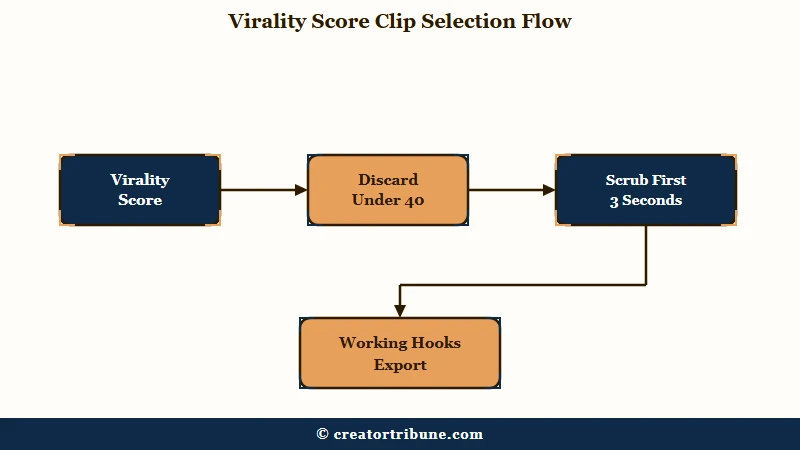
From what I have seen in this category across Vizard, Opus Clip, and Submagic, virality scores share the same defect. They reward the things models can detect (energy peaks, sentence completeness, on-screen text density, speaker face presence) and miss the things only a human catches (cultural timing, payoff structure, contrarian hooks).
Here is the practical use I would recommend, in numbered form because this is how I walk through a Vizard output myself:
- Sort the clips by Virality Score and discard anything under 40. Those are usually broken segments where the AI cut mid-sentence or grabbed an unimportant transition.
- Treat everything 40 to 99 as one bucket, not as a ranking. The top-scored clip is not your best clip; it is one of your top quartile clips.
- Manually scrub the first three seconds of every clip in that bucket. The hook is binary, it works or it does not, and the score does not reliably catch this.
- Export only the 3 to 5 clips where the hook lands. A 30-clip dump straight from Vizard with no human filter is the fastest way to train your audience to scroll past your content.
The worked example that drove this home for me was a podcast clip that scored 87. Beautiful caption styling, clean speaker reframe, two-second hook. It got 1,200 views on Shorts and stalled.
Vague: “Trust the Virality Score and post the top three clips.”
Specific: “Sort by Virality Score, throw out anything under 40, watch the first three seconds of everything 40 and above, post only the clips with a hook that works in three seconds.”
The 87-scored clip went out. So did a 52-scored clip from the same episode where the host opened with a contrarian sentence. The 52 outperformed the 87 by an order of magnitude in completion rate. That is the score noise problem in one example.
Where Vizard Falls Short and What Breaks
Vizard falls short in three specific places: multi-speaker reframing on podcasts, Zoom recordings where the speaker window stacks over the shared screen, and the subtitle template lock after a video has been generated.
None of these are deal-breakers alone, but together they define the audience that should not pay for Vizard.
The multi-speaker issue is the one I would call out hardest. PixelPanda’s 2026 review reports Vizard’s speaker tracking lags behind Opus Clip on two-person podcast setups.
The reframe drifts off-speaker for half a beat when the conversation cuts back and forth, which is exactly when you need it most. If your channel is solo content, this never comes up.
If it is podcast content, you will spend more time fixing camera framing manually than the tool saves you.
The Zoom stacked-window failure is the niche issue that catches webinar and meeting recorders. When the speaker camera is laid on top of the shared-screen content rather than alongside it, Vizard’s AI cannot separate them. The official help-center workaround is to duplicate the scene and manually cut out the shared screen to force separate identification.
That is a real fix, but it defeats the purpose of automated clipping. If you are repurposing weekly Zoom calls, expect manual cleanup on every recording. For a side-by-side workflow comparison of the long-to-short pipeline, the YouTube to Shorts workflow covers what the manual pass actually looks like.
The subtitle template lock is the smallest of the three but the most annoying. Once a video has been generated, you cannot change the caption template without restarting the job, which costs more credits. Several G2 reviewers in 2026 flagged this as the single biggest UI friction in the editor.
Who Should Pay for Vizard AI and Who Should Skip
Vizard AI is worth $14.50 per month annual for solo creators repurposing their own YouTube long-form into Shorts, AdMaker users who need fast AI image generation inside the same workspace, and Business-tier teams managing 20 connected social accounts under one brand kit.
Skip Vizard if you record two-speaker podcasts or rely on Zoom recordings with stacked speaker windows.
Here is the decision matrix I would use, condensed into a markdown pipe table so it is scannable:
| Use case | Vizard fit | Better alternative |
|---|---|---|
| Solo YouTube creator, long-form to Shorts | Strong | Vizard Creator |
| Two-person podcast | Weak (multi-speaker lag) | Opus Clip |
| Captions are the priority, not extraction | Weak | Submagic |
| Webinar / Zoom recordings, side-by-side layout | OK | Vizard Creator |
| Webinar / Zoom recordings, stacked speaker window | Avoid | Manual edit in CapCut or DaVinci |
| Need 4K export on an entry tier | Strong | Vizard Creator (cheapest 4K in the category) |
| AI image generation alongside clipping | Strong | Vizard (Nano Banana 2 integration) |
| Agency, 30+ clips per week | Strong | Vizard Pro |
The quiet feature that earned Vizard the recommendation for several of these rows is the Nano Banana 2 integration, which uses Google’s Gemini 3.1 Flash Image to generate production-ready 4K images in 4 to 6 seconds directly inside the workspace. None of Vizard’s direct competitors ship this kind of native image-gen stack today, and it lifts Vizard’s case for thumbnail and B-roll generation considerably.
For creators stacking tools, the Opus Clip vs Submagic comparison covers the case for using Submagic as a finishing layer on top of an extraction-first tool. Vizard slots into that same workflow, with Submagic for caption polish where the budget allows.
If your day job is faceless AI-driven video at scale, the HeyGen review covers the AI avatar route that pairs naturally with a Vizard-style clipping pass for distribution.
Verdict
Vizard AI is worth the $14.50 per month annual for solo creators repurposing long-form into Shorts, and a clear no for two-speaker podcasters. The Virality Score is a filter, not a ranking, and treating it as a ranking is the mistake most reviewers and most creators make.
The Creator plan at $14.50/month annual on Vizard AI is the realistic entry point for anyone serious about output quality. Free is a demo, not a workflow.
Business at $19.50/month annual makes sense once you are managing 20 social accounts under a brand kit. Pro at $42/month is the agency tier.
The one Vizard feature I would call out as genuinely ahead of the category in 2026 is the Nano Banana 2 image generation integration. That alone is what separates Vizard from a long list of clipping tools that all do roughly the same speech-to-text-plus-reframe pipeline.
If you record solo and you want one tool for both clips and AI imagery, Vizard earns the shortlist. If you record podcasts, save the money and use Opus Clip instead. According to G2’s Vizard reviews, the same split applies, solo creators rate it highest, podcast and webinar producers rate it lowest.
Pros and Cons
The case for Vizard AI is its cheapest-in-category 4K export tier and built-in Nano Banana 2 image generation; the case against is a noisy Virality Score, weak multi-speaker reframing, and a credit model that punishes iteration.
Here are the things I would put on the side that earns the price:
- Cheapest 4K export tier in the AI clipping category ($14.50 per month annual)
- Nano Banana 2 image generation built into the workspace, 4 to 6 second renders
- Up to 10-hour source video uploads on paid plans
- 32 languages of transcription with 97 to 98.5 percent English caption accuracy
- One credit per minute pricing logic that does not double-charge clipping plus transcription on the same file
And here are the things to walk in with eyes open:
- Virality Score is noisy; sort but do not rank by it
- Multi-speaker reframing lags Opus Clip on two-person podcast setups
- Zoom recordings with stacked speaker windows require manual cleanup
- Subtitle template cannot be edited after generation without restarting the job
- Iteration burns credits; re-running a clip job consumes another batch of monthly minutes
Frequently Asked Questions
Is Vizard AI free to use?
Vizard offers a Free tier with 60 credits per month, 720p resolution, mandatory watermark, and 3-day storage. The Free tier exists to demo the product. For real output, the Creator plan at $14.50 per month billed annually unlocks 4K export, no watermark, and roughly 600 minutes of processing per month.
How does Vizard compare to Opus Clip and Submagic?
Vizard is the value pick for solo creators, Opus Clip is the precision pick for podcasts, and Submagic is the captions specialist. Vizard’s Nano Banana 2 image generation gives it a unique edge for creators who need AI imagery alongside clipping.
Can I trust the Vizard Virality Score?
Use it as a filter, not a ranking. Discard clips scored under 40, but do not assume the highest-scored clip is your best one. Watch the first three seconds of every clip above 40 and choose based on the hook, not the number.
How much does Vizard cost annually?
The Creator plan is $174 per year, or $14.50 per month annual; monthly billing costs $19. The Business plan is $19.50 per month annual or $39 per seat per month, and the Pro tier sits near $42 per month for 100 hours of upload.
Does Vizard have an affiliate program?
Yes, Vizard runs a 25 percent recurring commission for the first 12 payments through Rewardful, with a 60-day cookie and $50 minimum payout. The official signup portal is at vizard-corp.getrewardful.com.
What is the maximum upload length on Vizard?
Paid plans support source videos up to 10 hours in length, and the AI can automatically generate 30 or more short clips from a single upload in one click.