Fix YouTube Zero Browse Impressions Despite High CTR
Fix YouTube Zero Browse Impressions Despite High CTR
Your YouTube video has a 16% CTR and 70% retention but only 145 external impressions? Here is the 5-step fix for limited algorithmic distribution.
- 1Why High CTR and Retention No Longer Guarantee Impressions
- 2How to Read Your YouTube Studio Numbers for the Real Cause
- 3The Five-Step Recovery Plan
- 4What Counts as Algorithmic Throttling vs. an Actual Policy Issue
- 5Why External Traffic Can Help (and Why It Can Also Hurt)
- 6Frequently Asked Questions
- Why does YouTube push my video to 1,800 impressions and then stop?
- How long does limited distribution last on a YouTube video?
- Can deleting and re-uploading the stuck video fix it?
- Does adding more tags or longer descriptions help?
- Is “limited distribution” the same as being shadowbanned?
- Will the algorithm recover my video if I just keep posting normally?
TL;DR: A YouTube video with high CTR and high retention can still get zero browse and suggested impressions in 2026 because the algorithm now weighs viewer satisfaction, session contribution, and watch-history clustering above the metrics most creators track. Recovery is a five-step plan that starts with auditing satisfaction signals and ends with re-priming the algorithm through a content burst.
A 4,300-subscriber creator posted on r/SmallYoutubers asking why his channel was stuck. His latest video had a 16% click-through rate, 70% average retention on a 3:30 piece, and 36% CTR on the channel page. Suggested videos had pushed it 145 times. Browse Features, the home feed, had given it 1,800 impressions and stopped.
That math should not exist. A 16% CTR with 70% retention is “top-tier outlier” territory on every benchmark I have read. The algorithm should be hand-feeding the video to new audiences. Instead, the channel is locked into a loop where only existing subscribers and direct visitors see anything.
This is not a shadowban. It is not termination. It is “limited distribution”, which is what YouTube calls it when the algorithm has confidently decided that your video is doing well with the small group it tested, but does not match a wider audience profile worth expanding to. Here is the five-step plan to fix it.
Why High CTR and Retention No Longer Guarantee Impressions
YouTube’s 2026 algorithm weighs viewer satisfaction, session contribution, and watch-history clustering above raw CTR and retention.
A video can pass the metrics most creators track and still fail the metrics that decide distribution.
The way I see it, the biggest shift creators are missing is the satisfaction score. Post-watch surveys, like rate, dislike signal, and return-viewer rate now feed a “satisfaction-weighted” recommendation layer that sits above the click and watch-time math.
A video with 70% retention but a low satisfaction score (think: clicks were impressive, but the surveys came back lukewarm) will get throttled the moment YouTube hits “Performance Analysis” in the testing cycle.
The second shift is the February 2026 Browse feed overhaul. The home feed no longer recommends by broad category. It recommends by “watch history clusters”, which are micro-niche groupings of viewers based on their actual recent behavior. If your video does not slot into a recognizable cluster, the algorithm has nowhere to expand it to, even if everyone who watches it loves it.
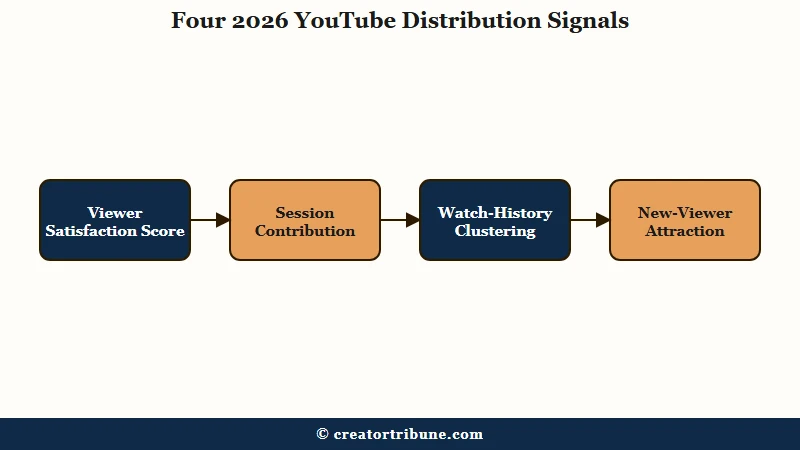
The four 2026 signal shifts in plain language look like this.
| Signal | What it tracks | Why your video can stall on it |
|---|---|---|
| Viewer Satisfaction Score | Post-watch surveys, likes, returns | Strong retention without a satisfaction lift signals overdelivery on a narrow audience |
| Session Contribution | Does the viewer keep watching YouTube after? | Videos that “end sessions” get pushed less, regardless of retention |
| Watch-History Clustering | Does the video match a micro-niche pattern? | Generic or cross-niche content gets filtered out of Browse |
| New-Viewer Attraction | Does the video win non-subscribers? | If your 16% CTR comes from subscribers only, no Expansion happens |
If the OP from r/SmallYoutubers maps his channel to those four signals, the likely failure is either Cluster (subscribers love it but it does not match a broader micro-niche) or New-Viewer (every click came from existing fans). Both have specific fixes.
How to Read Your YouTube Studio Numbers for the Real Cause
The numbers that diagnose limited distribution are not the headline CTR and retention; they are Traffic Source Type, the 7-second curve, and the subscriber-to-non-subscriber click split.
Studio shows all three but buries them three menus deep.
What I would check first is Traffic Source Type for the affected video. If “Browse features” and “Suggested videos” are near zero while “Channel pages” and “Direct or unknown” carry the views, the algorithm has locked the video into the subscriber-only loop. That is the classic limited-distribution fingerprint.
Next is the audience retention curve, specifically the first 7 seconds. The 2026 algorithm has shortened the hook window from the 15-to-30 second range it used in earlier years. If your retention drops 8 percentage points or more inside the first 7 seconds, the algorithm interprets that as a packaging-versus-payoff mismatch and stops expanding regardless of where the curve settles after second 15.
Third is the subscriber-versus-non-subscriber split, which lives under Audience in Studio. If non-subscriber view percentage is under 20% on a video with high CTR, the algorithm sees a “loyal audience win” rather than a “new audience win” and routes future impressions back to your existing subscribers rather than expanding outward.
The diagnostic order looks like this in practice.
- Open Studio, click the affected video, then Analytics, then Reach.
- Look at Traffic Source Type. If Browse + Suggested combined are under 15% of total impressions, you have the limited-distribution pattern.
- Switch to Audience. Check the Subscribed versus Not Subscribed view split. Under 20% non-subscriber = audience match failure.
- Switch to Engagement. Look at the audience retention graph, specifically seconds 0 through 7. Any drop steeper than 8 percentage points there is the hook problem.
- Scroll to the bottom of Studio and check for any policy notification, undisclosed-AI warning, or “limited or no ads” yellow icon. Those are independent flags that override metrics.
For a deeper dive on what the “limited or no ads” yellow icon really represents in the 2026 enforcement layer, the YouTube shadowban diagnostic guide on Creator Tribune walks through the Limited Distribution status indicator and the four checks that confirm or rule it out.
The Five-Step Recovery Plan
Recovery from limited distribution takes 2 to 4 weeks of consistent uploads that fix the specific signal that failed, not generic posting frequency increases.
Posting more of the same content that triggered the throttle deepens the throttle.
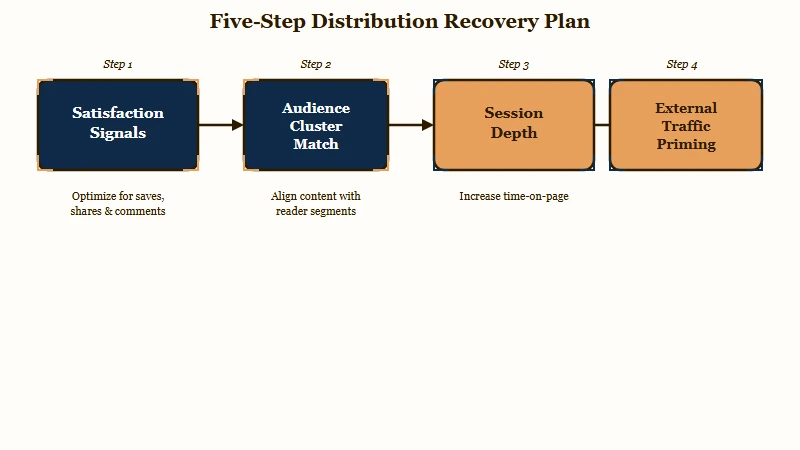
Step one is the satisfaction fix. If your retention curve looks healthy but the algorithm is not expanding, the failure is almost always satisfaction.
Add a clear closing frame and a like prompt phrased around outcome rather than engagement bait. Likes-per-view and returns-per-view are the two satisfaction signals that move first, and they respond to language framing more than most creators expect.
Vague: “Smash that like button and subscribe for more videos like this.”
Specific: “If this saved you 20 minutes of YouTube Studio digging, the like is the only thing that helps the next stuck creator find it. Subscribe only if you want the next two videos in this distribution series.”
Step two is the cluster fix. Open YouTube, log out, and search for the topic of your video.
Look at the top 10 results. If your video’s title, thumbnail, and topic frame do not visually match those top 10, you are outside the cluster the algorithm has assigned to that topic.
Rewrite the title and re-render the thumbnail to match the cluster pattern explicitly. This is the single highest-leverage move on a stalled video.
Step three is the session contribution fix. End the video with a hard recommendation to a specific second video on your own channel (not “watch more from me” but “this exact video covers the next question you should be asking”). Use an end screen that points to that specific video. Session contribution measures whether YouTube keeps the viewer on the platform, and a strong handoff to your own second video is the cleanest way to push that signal up.
Step four is the new-viewer fix. Publish two more videos within 14 days on the same topic, in the same cluster, with thumbnails that visually echo the stalled video. The algorithm uses this as evidence that you are committed to the cluster and starts re-testing the original video against the same audience it should have expanded to the first time.
Step five is the external prime. Drive 200 to 500 external clicks to the video from a single source over a 48-hour window: a Reddit comment that adds real value and links the video naturally, a newsletter mention, or an X post that fits your existing audience.
The algorithm does not directly count “external traffic helped, therefore boost”, but the secondary signals (the cluster these new viewers belong to, their session behavior after watching) feed back into the recommendation testing cycle and frequently un-stick a video that was hovering at zero Browse impressions.
For more on how the broader 2026 distribution penalties show up, the YouTube Shorts views stopped recovery framework on Creator Tribune covers the Shorts-specific version of this same algorithmic test-and-throttle cycle.
What Counts as Algorithmic Throttling vs. an Actual Policy Issue
Algorithmic throttling never produces a notification; policy throttling always does.
This is the cleanest line between “the algorithm is being cautious” and “you tripped a rule”.
If your Studio dashboard shows no notifications, no yellow ad icons, no community guidelines strike, and no Policy Center entries, but Browse impressions are at zero, what you have is algorithmic. That is the case in the r/SmallYoutubers situation: no notification, just silence. Algorithmic throttling responds to the five-step recovery plan above.
If your Studio shows any of the following, you have a policy issue, not an algorithmic one, and the recovery path is different.
- A yellow dollar sign icon on the affected video (limited or no ads), which routes to advertiser-friendliness recovery, not distribution recovery.
- A “limited distribution” status indicator at the channel level under Settings, Channel, Advanced. This is a separate enforcement layer.
- A Community Guidelines strike notification within the last 90 days.
- A “channel inauthenticity” warning under Policy Center, which is the 2026 successor to the “reused content” violation and primarily targets AI-generated channels without disclosure.
The fourth one matters more than creators realize. In July 2025 YouTube updated the Inauthentic Content Policy to target “template content” or videos “easily replicable at scale without meaningful human creative input.”
Channels that look AI-generated or that batch-produce visually identical content with low original input now face active suppression. Even a single faceless-channel upload that the system reads as AI-template can quietly cap distribution on the rest of the catalog until disclosure is added.
For an end-to-end breakdown of how channel-wide distribution caps and termination differ from per-video throttling, the dead account recovery framework on Creator Tribune walks through the channel-level diagnostic and the 30-day rebuild plan.
Why External Traffic Can Help (and Why It Can Also Hurt)
External traffic helps the algorithm only when the external visitors look like the cluster the algorithm is testing the video against; otherwise it adds noise and stalls the test cycle longer.
Most creators get this exactly backward.
From what I have seen on stalled videos, a clean external traffic source (a single, on-topic Reddit thread, a niche newsletter, a Discord that matches the topic) gives the algorithm a small batch of “lookalike” new viewers. Their watch patterns and session behavior reinforce the cluster the algorithm is trying to assign the video to, and Browse impressions usually re-open within 48 to 72 hours.
The mistake is throwing the video at a broad audience that does not match the cluster. A general “check out my new video” tweet to mixed followers, a Facebook share that hits friends-and-family rather than the niche, or a paid traffic push to a generic audience all pollute the cluster signal. The algorithm reads that as “this video appeals to a mixed audience that does not match any single watch-history pattern” and locks distribution down harder.
The good external sources for the 4,300-subscriber Roblox creator from r/SmallYoutubers would look like this in practice.
- r/RobloxDev, r/roblox, or r/RobloxArt comment on a relevant existing thread, with the video linked only if it directly answers a question.
- A Roblox-focused Discord channel where members are already discussing the topic.
- A reply to an X post about a Roblox controversy or update that the video addresses.
The bad external sources for the same creator would be a general gaming subreddit, a LinkedIn post, or a paid Reddit promotion to a non-Roblox audience. Each of those signals breaks the cluster assignment rather than reinforcing it.
The full 5-step distribution recovery framework looks like this when you map each step to its underlying signal.
Step 1: Fix satisfaction       → likes/view, returns/view, survey rate
Step 2: Match the cluster       → title + thumbnail visual match to top 10
Step 3: Drive session depth     → end-screen to specific second video
Step 4: Reinforce commitment    → 2 more videos in same cluster within 14 days
Step 5: External cluster prime  → 200-500 clicks from a cluster-matched source
According to Statista’s 2026 YouTube data, the platform now serves over 2.5 billion monthly users and runs more than 3 million Partner Program channels, which means the recommendation algorithm is testing tens of millions of new uploads against cluster signals every day. The pool is large enough that any video failing the cluster match has a vanishingly small chance of natural recovery without the specific moves above.
Frequently Asked Questions
Why does YouTube push my video to 1,800 impressions and then stop?
This is the standard “Small Audience Test” cycle. YouTube tests the video against an initial pool of viewers, measures satisfaction and session behavior, then either expands to Stage 2 (5,000 to 20,000 impressions) or stops. A stop at 1,800 means the test pool’s satisfaction or cluster match did not meet the expansion threshold.
How long does limited distribution last on a YouTube video?
Algorithmic limited distribution typically lasts 2 to 4 weeks if the underlying signal is fixed in the next 3 to 5 uploads. If the pattern repeats (same cluster mismatch, same satisfaction gap), the throttle extends and can become semi-permanent for that specific topic on the channel.
Can deleting and re-uploading the stuck video fix it?
No, and it usually makes the problem worse. The 2026 algorithm matches videos against an audience cluster based on watch-history signals; deletion erases the small audience match that already exists and forces the algorithm to start the test cycle from zero with no cluster data.
Does adding more tags or longer descriptions help?
Marginally. Tags and descriptions inform the initial topic classification, but the 2026 algorithm primarily uses watch-history clusters to route impressions, not metadata. The highest-leverage metadata change is the title and thumbnail visual match to the top 10 results for your topic.
Is “limited distribution” the same as being shadowbanned?
No. Shadowban is a colloquial term that creators use for any distribution problem. YouTube’s actual taxonomy includes Limited Distribution (algorithmic, no notification), Limited or No Ads (advertiser-friendliness, yellow icon), and Restricted Mode filtering (policy, separate from impressions). Algorithmic limited distribution is the most common cause of the high-CTR-zero-impressions pattern.
Will the algorithm recover my video if I just keep posting normally?
Sometimes, but usually not on the specific stuck video. The algorithm builds cluster trust at the channel level as you publish more videos in the same cluster, which can re-open distribution on later uploads. The originally stuck video usually stays at its current impression cap unless you actively trigger the 5-step recovery above on it.