Why Your TikTok Video Is Under Review and How to Fix It
Why Your TikTok Video Is Under Review and How to Fix It
TikTok video stuck under review? The real timeline, the seven triggers, and the MD5-hash re-upload trick most creators get wrong. Get it cleared faster.
- 1What “Under Review” Really Means On TikTok
- 2The Real Timeline By Trigger Type
- 3The Seven Triggers That Send A Video To Manual Review
- 4What To Do At Each Time Mark
- 5How to Check Whether Your Video Is Still Under Review
- 6Why Re-Uploading the Same File Does Not Work
- 7Why Two Accounts Get Different Review Times
- 8The Hardening Pass For Future Uploads
- 9Frequently Asked Questions
- How long does TikTok under review take?
- Should I delete and re-upload a TikTok video stuck under review?
- Why are all my new TikTok videos going under review?
- Does appealing a TikTok video under review help?
- Can a TikTok video under review still get views later?
- Why is my TikTok video under review for AI content I made myself?
- Can I check a TikTok video for violations before I post it?
- Where do I find Account check on TikTok?
- How many TikTok videos actually get removed?
- 10Closing Note
TL;DR: Every TikTok video passes a moderation check before it reaches the For You page, and the ones that stall on “under review” hit one of seven triggers. Most creators try the wrong fix first, then make it worse by re-uploading the identical file. TikTok publishes no review-duration figures of its own, so the trigger type and your account’s recent record are the only signals you have.
You posted, and instead of views you got a grey banner that says “under review”. The share button is greyed out. The video does not appear on your profile to viewers, and the For You page is treating it like it does not exist.
The frustrating part is that almost no one tells you why this happens, how long it really takes, or which fix matches your specific situation. Generic advice says “wait 48 hours” or “delete and re-upload”. Both pieces of advice can make things worse if you apply them to the wrong cause.
This guide covers the actual review pipeline TikTok runs, the seven triggers that send a video to the slower human-review queue, the timing windows you should expect by trigger type, and the one re-upload trick that works when waiting does not.
What “Under Review” Really Means On TikTok
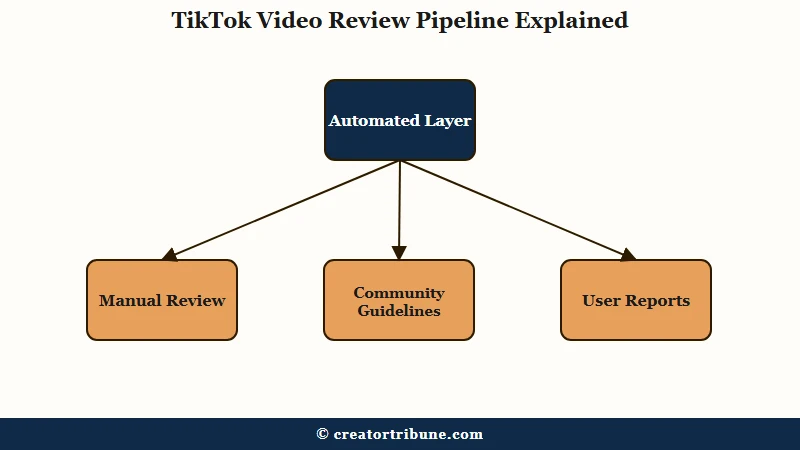
Every video uploaded to TikTok passes through a moderation check before it reaches anyone’s For You page.
Most videos clear that check without the creator ever seeing a status change. The ones that stall on “under review” have been routed to a slower queue, usually a human one.
TikTok has never published how many uploads get held in review, or for how long. What it does publish is the removal side, in its quarterly Community Guidelines Enforcement Report.
The Q1 2026 edition, published in July 2026, records 184,012,576 videos removed worldwide, which TikTok puts at roughly 0.5 percent of everything published that quarter. Automated detection accounted for 178,014,154 of those removals, about 96.7 percent. Another 8,838,710 videos were reinstated after further review.
Two things follow from that. Removal is rare enough that a review banner is far more likely to end in a clear than in a takedown, and reinstatement happens often enough to be worth appealing for. Dividing one published figure by the other gives 4.80 percent, which is a platform-wide ratio and not a rate TikTok itself quotes, so it says nothing about your odds on any single video.
Three things are true about a video in review that most creators do not realize:
- The video is visible only to you in the creator app. Viewers cannot see it on your profile, in DMs you sent, or anywhere else on the platform.
- The share button is disabled at the system level. You cannot share, repost, or even download the original from inside the app while it is in review.
- The For You page does not see it at all. Even if the review clears later, the video did not accumulate any FYP impressions during the wait, so the first hour of post-review activity often looks weak.
That third point is the cost most creators miss. A video held for a day accumulates no For You page impressions during the wait, so when it clears it starts from a standstill instead of from the momentum a fresh post would have had.
The Real Timeline By Trigger Type
The duration of a TikTok review depends almost entirely on which moderation queue the video landed in.
Automated reviews close in minutes, human review queues close in 24 to 48 hours, and edge cases stretch to 3 to 7 days.
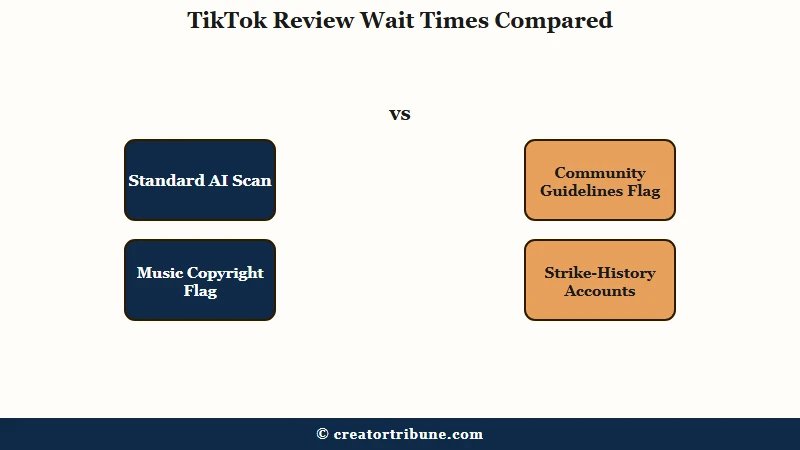
The breakdown by trigger type, ordered fastest to slowest:
| Trigger | Review queue | Typical duration |
|---|---|---|
| Standard AI scan (no flag) | Automated | Instant to 1 hour |
| Soft AI flag, low confidence | Hybrid | 2 to 12 hours |
| Music or copyright flag | Music-specific automated | 1 to 6 hours |
| Community guidelines flag | Trust and Safety manual | 24 to 48 hours |
| User-reported video | Trust and Safety manual | 24 to 72 hours |
| AI-generated content without label | Manual plus policy review | 48 to 96 hours |
| Repeat-flagger account or strike history | Stricter manual queue | 48 hours to 7 days |
These durations come from creator reports and support-forum threads. TikTok publishes no service-level target for review, so read them as a rough guide to which half of the wait you are in, never as a deadline.
Used that way the table is positional. At hour 12 on a soft AI flag you are near the end of the usual range and intervening is likely wasted effort, while at hour 24 on an AI-label trigger you are still inside the first half of it.
The Seven Triggers That Send A Video To Manual Review
A TikTok video lands in the slower manual review queue when the automated scan detects one of seven specific patterns.
Knowing which pattern matched is the difference between waiting it out and submitting an appeal.
These are the seven, in rough order of frequency.
- Community guidelines edge cases. Anything the AI cannot classify cleanly: a kitchen knife in a cooking video that looks like a weapon prop, a sports clip with fake blood, satire that reads as hate speech to the classifier. Manual review is the cleanup pass.
- Music or audio copyright flag. Original audio mixed with a copyrighted track, a backing music bed flagged by Audible Magic, or a cover song without proper licensing. Music-flag reviews close faster than other types but still pause the FYP rollout.
- AI-generated content without the label toggle. The rule is much older than the 2025 date most guides give it. TikTok’s May 9, 2024 announcement describes the requirement to label realistic AI-generated content as already more than a year old at that point, and says its self-labeling tool had been used by over 37 million creators. The same announcement started automatic labeling of AI content carrying C2PA Content Credentials metadata, so a clip made in a tool that writes those credentials may be labeled for you, while AI B-roll carrying nothing for TikTok to read is the case that quietly lands in a queue.
- High-frequency posting flagged as spam. New accounts posting 10 or more videos in 24 hours, established accounts posting 20 or more, or any account suddenly tripling its normal cadence. The spam classifier is conservative.
- User reports during the first hour. A video that triggers reports from multiple viewers in its first 30 to 60 minutes gets pulled back into manual review even after the initial AI scan cleared it.
- Misinformation pattern match. Health claims, election content, financial advice, or any topic the platform is actively suppressing. The classifier here is broader than most creators expect.
- Account history with prior strikes. Creators with a recent violation consistently report slower reviews on everything they post afterwards. TikTok has never published how long that lasts or confirmed that it routes uploads differently, so the widely repeated 90-day window is a community estimate rather than a stated rule.
The seventh trigger is the one most creators miss, because a warning from months ago still shapes how today’s upload gets treated. Pausing for a day or two after a strike costs almost nothing and is the cheapest thing on this list to try.
What To Do At Each Time Mark
The right action when a TikTok video is under review depends on how long it has been in review and which trigger you suspect.
Acting too early wastes the wait. Acting too late means you delete a video that was about to clear.
Work from the moment the under-review banner appears.
- Hour 0 to 2. Do nothing. Most automated reviews close in this window. Refreshing the app, deleting and re-uploading, or contacting support all reset whatever progress the review had made.
- Hour 2 to 6. Run Account check, which is where TikTok shows you your account status. Look for any open violation on the account. A recent one usually means the upload is sitting in the stricter routing and will close on its own without an appeal.
- Hour 6 to 24. Open the video in the creator dashboard and look for any policy hint at the bottom of the review notice. If the notice mentions music or copyright, the review will close within 6 hours. If it mentions community guidelines, expect 24 to 48 hours.
- Hour 24 to 48. Submit one detailed appeal through the in-app appeal flow. Explain context, e.g. “this video is a fictional skit using prop weapons” or “this is educational content about a sensitive topic”. Do this once. Spamming the appeal button pushes the review to the back of the queue.
- Hour 48 to 72. If the appeal has not moved the review, do not delete. Post a genuinely re-edited version as a separate upload, using the re-upload section below. Keep the original in case the review clears later.
The pattern is that the first 24 hours are for patience, the second 24 hours are for one focused appeal, and only after 48 hours is re-uploading the right move.
How to Check Whether Your Video Is Still Under Review
TikTok’s Account check tool reports which parts of your account are currently restricted, which is the fastest way to tell a routine review apart from an actual violation.
Account check is the button you tap and account status is what it shows you, which is why guides use the two names interchangeably. Open your profile, tap the menu button, choose TikTok Studio, then Account check under More tools.
There is a second route if that menu looks different on your build: Settings and privacy, then Support, then Safety Center, then Account check.
It reports separately on the things that can be restricted, including logging in, posting, commenting, your profile and direct messages. Each comes back clear or flagged, so a video held on an otherwise clean account reads very differently from one on an account that is also blocked from commenting.
Two readings are worth knowing. If Account check shows nothing wrong while a single video is still held, the review is almost certainly routine and there is nothing yet for an appeal to argue against. If it flags posts, the video has been actioned already and is no longer just waiting in a queue, so the in-app appeal is the right next step.
Why Re-Uploading the Same File Does Not Work
Re-uploading the identical file after a review delay almost never works, because the copy is recognized as the same video and lands in the same queue.
Genuinely re-editing the video does help, but the reason usually given for it is wrong, and acting on the wrong reason is what makes creators waste an upload.
Before: you delete the video stuck under review, drag the original .mp4 back into TikTok, and re-upload. The new upload enters the same queue carrying the same flag, because nothing about the video itself has changed.
After: you trim a second or two off the start in CapCut, apply a color filter, re-export, and upload that file instead. What you are submitting is a new edit, so the upload is not a second pass at the clip that was already judged.
The popular version of this tip says the point is to change the file’s MD5 hash. That explanation does not survive a second look, because a file hash changes if you re-export the same video at a slightly different bitrate, or even if you only change the container it is wrapped in.
A duplicate check that a re-encode defeated that easily would catch almost nothing, so it cannot be what the platform relies on. TikTok publishes nothing about how it recognizes a repost, so nobody outside the company can state the real mechanism.
What the behavior is consistent with is content-level matching, which compares what a video looks and sounds like rather than the bytes it is stored in, and that kind of matching survives a re-export untouched. So point the edit at what a viewer would see, because that is what a content-level check is reading.
Changes worth making before a re-upload:
- Trim 1 to 2 seconds off the start or end of the video.
- Apply a single color filter or LUT, even one that is visually subtle.
- Add or remove a sticker, text overlay, or sound layer.
- Change the cover frame thumbnail to a different timestamp.
One change is often enough and two is safer. The aim is a second upload that is a genuinely different edit, close enough to keep what worked in the original and far enough that it is not the same clip submitted twice.
If the original review was triggered by a genuine guidelines problem, none of this helps. Re-uploading a violating video in a fresh edit earns a faster strike, and re-editing is only worth trying when the first flag looked like a false positive or a soft automated one.
For deeper context on what happens after a strike lands, the TikTok ban appeal walkthrough covers the appeal flow when a video crosses from “under review” to “removed”.
And if the same account keeps landing in review queues, the TikTok FYP views diagnostic walks through whether the issue is review queues or broader algorithm throttling.
Why Two Accounts Get Different Review Times
Two accounts can post near-identical videos and wait very different amounts of time, which is the clearest sign that account history feeds into how an upload gets routed.
Creator forums call the thing behind it a trust score. TikTok has never confirmed such a score exists, has never published one, and gives creators no number to look at, so treat everything below as pattern-spotting by creators, with no documentation behind it.
Three kinds of account are consistently reported to clear faster:
- Accounts managed through TikTok’s official partner and agency programs. The concrete advantage here is a human support channel, so their problems get answered by a person.
- TikTok Shop sellers in good standing. Sellers with a clean policy record report fewer holds, though TikTok documents no such benefit anywhere.
- Business accounts with a long clean history. The 60-day figure that circulates is a community estimate and has never appeared in anything TikTok published.
And four are reported to wait longer:
- New accounts under 30 days old, especially if the first 5 posts include sensitive topics.
- Accounts with any strike in the previous 90 days.
- Accounts that have appealed multiple takedowns in a short window, even successfully.
- Accounts the system has flagged for high-frequency posting in the past, even if no strike was issued.
What creators describe is a gap measured in hours rather than minutes on the same kind of video. Nobody outside TikTok can measure it, so the useful response is to fix the inputs you control instead of chasing a number you cannot see.
This is also why a rejected Creator Rewards application and the TikTok music removed playbook come up frequently for the same accounts. The same accounts tend to collect all three problems at once, which is consistent with history being weighed at the account level and then showing up in all three places.
The Hardening Pass For Future Uploads
A single video stuck under review is annoying. A pattern of reviews on every new upload points at the account itself, and the fix is a hardening pass on how you post for the next 30 days. Creators who tighten up report the holds easing within about a month, though TikTok documents no such recovery window.
Lock these into your posting workflow:
- Toggle the AI-generated content label every time you use AI tools, even for B-roll. TikTok has been reading C2PA Content Credentials since May 2024 to apply that label automatically, so on a lot of AI footage the label arrives with or without you and self-labeling is simply the cheaper route to the same outcome.
- Stay under 8 posts per 24 hours for the first 30 days of any new account, then ramp slowly to 12 per day if your engagement rate supports it.
- After any strike, wait 24 to 48 hours before posting again. Creators who post straight through a warning report the slow reviews lasting longer.
- Use TikTok’s Commercial Music Library for any background music. Sounds outside the CML can be technically free to use elsewhere but trigger TikTok’s audio copyright flag.
- Avoid topics on the misinformation watchlist (medical claims, election content, financial advice without disclosures) until the account is 90+ days old with zero violations.
- Re-watch every video before publish in a private playback session. The fastest way to spot what the AI will flag is to watch the video without sound and see if any frame would scan as graphic, sexual, or violent out of context.
- Pre-check the video before you post it. If you sell through TikTok Shop or have Creator Center access, TikTok’s Video Pre-Check tool scans a draft for likely policy problems and returns risk flags in about ten minutes, so you can fix an issue before it ever reaches the review queue. TikTok says creators get at least five pre-checks a day, that the number rises as you generate more sales, and that the tool shows how many you have left. The walkthrough sits on TikTok’s official Video Pre-Check guide.
The compounding payoff is worth the discipline. Creators who hold a 30-day clean streak generally report the stricter routing easing off, and the under-review pause stops showing up on most uploads. None of that is documented by TikTok, so treat it as the pattern creators describe.
For creators rebuilding after a hit, the TikTok shadowban recovery guide covers the broader rebuild and pairs naturally with this hardening pass.
Frequently Asked Questions
How long does TikTok under review take?
Most automated reviews close within an hour. Manual reviews from the Trust and Safety team typically close in 24 to 48 hours. Reviews triggered by user reports, AI-content-label policy, or accounts with strike history can stretch to 3 to 7 days.
Should I delete and re-upload a TikTok video stuck under review?
Not in the first 48 hours. If the review crosses 48 hours and an appeal has not moved it, upload a genuinely re-edited version, trimming a second or two and adding a filter, in place of the original file. An unchanged file is recognized as the same video and enters the same queue.
Why are all my new TikTok videos going under review?
Either the account is carrying recent history that slows everything down (a new account, a recent strike, or a high-frequency posting flag), or you are triggering one of the seven manual-review flags repeatedly without realizing it. Run Account check for open violations, then read the seven triggers above against your recent posts.
Does appealing a TikTok video under review help?
One detailed appeal helps if the flag was a false positive. Multiple appeals on the same video hurt, the system reads spammed appeals as low-priority and pushes the review to the bottom of the queue.
Can a TikTok video under review still get views later?
The video can still get views after clearing, but the first-hour-velocity signal is lost during the review pause. Post-clear videos generally underperform what they would have done if they had cleared immediately. The longer the review, the steeper the under-performance.
Why is my TikTok video under review for AI content I made myself?
TikTok has required creators to label realistic AI-generated content since around 2023. Its May 2024 announcement describes the requirement as already more than a year old by then, so guides dating the rule to 2025 are years behind. Failing to toggle the label can put the video into a slower review queue regardless of whether the AI use was creative or harmful, which is why the toggle is worth using even on footage that feels obviously synthetic.
Can I check a TikTok video for violations before I post it?
Yes, if you have TikTok Shop or Creator Center access. TikTok’s Video Pre-Check tool scans a draft shoppable video for likely policy problems and returns risk flags within about ten minutes, which lets you fix an issue before it can trigger the under-review queue. TikTok says creators get at least five pre-checks a day, and that the number varies with creator performance, with the tool showing how many checks remain.
Where do I find Account check on TikTok?
Open your profile, tap the menu button, choose TikTok Studio, then Account check under More tools. A second route runs through Settings and privacy, then Support, then Safety Center, then Account check.
How many TikTok videos actually get removed?
In its Q1 2026 Community Guidelines Enforcement Report, TikTok removed 184,012,576 videos globally, which it describes as roughly 0.5 percent of everything uploaded in the quarter. It reinstated 8,838,710 of them after further review. TikTok publishes no equivalent figure for videos that are held in review but never removed.
Closing Note
A TikTok video stuck under review usually says more about the account’s recent record than about that single upload. Match your response to the time elapsed, the suspected trigger, and what Account check reports.
The first 24 hours are for patience, the second 24 for one focused appeal, and a genuine re-edit is the move at the 48-hour mark, but only when the original flag looked like a false positive. Hardening the posting workflow afterward is what keeps the next 30 videos out of the queue.