Put Spaces in Instagram Captions Without Losing the Line Breaks
Put Spaces in Instagram Captions Without Losing the Line Breaks
To put spaces in Instagram captions, delete the space before Return and leave the blank line empty. See the iPhone 123 trick and the spacer to copy.
- 1How Do You Put Spaces in Instagram Captions?
- Why Does Instagram Remove the Spaces in Your Caption?
- 2Where Is the Return Key in the Instagram Caption on iPhone?
- What If Tapping 123 Shows No Return Key on Instagram?
- 3What Do Instagram Line Break Generators Paste Into Your Caption?
- How Do You Copy an Invisible Space for Instagram?
- Do Spaces Count Toward Instagram’s 2,200-Character Limit?
- 4Does Writing Your Instagram Caption in Notes Keep the Spacing?
- 5Should You Use Dots or Emojis Between Instagram Paragraphs?
- Can You Still Hide Hashtags Below a Column of Dots on Instagram?
- 6How Do You Add Line Breaks to Your Instagram Bio?
- 7Do Instagram Reels and Carousels Keep Caption Line Breaks?
- 8Why Do Scheduled Instagram Posts Lose Their Line Breaks?
- Can You Fix Instagram Caption Spacing After You Post?
- 9Quick Takeaways
TL;DR: To put spaces in Instagram captions, end each paragraph with no space after its last character, tap Return twice, and leave the blank line completely empty. On iPhone, the Return key hides behind the 123 key in Instagram’s caption box. If a pasted or scheduled caption still merges, put one invisible U+2800 spacer on each empty line.
Knowing how to put spaces in Instagram captions comes down to one character: the last one before you press Return. If that character is a space, or the blank line below it holds a space, Instagram can glue your paragraphs back into one block when you post.
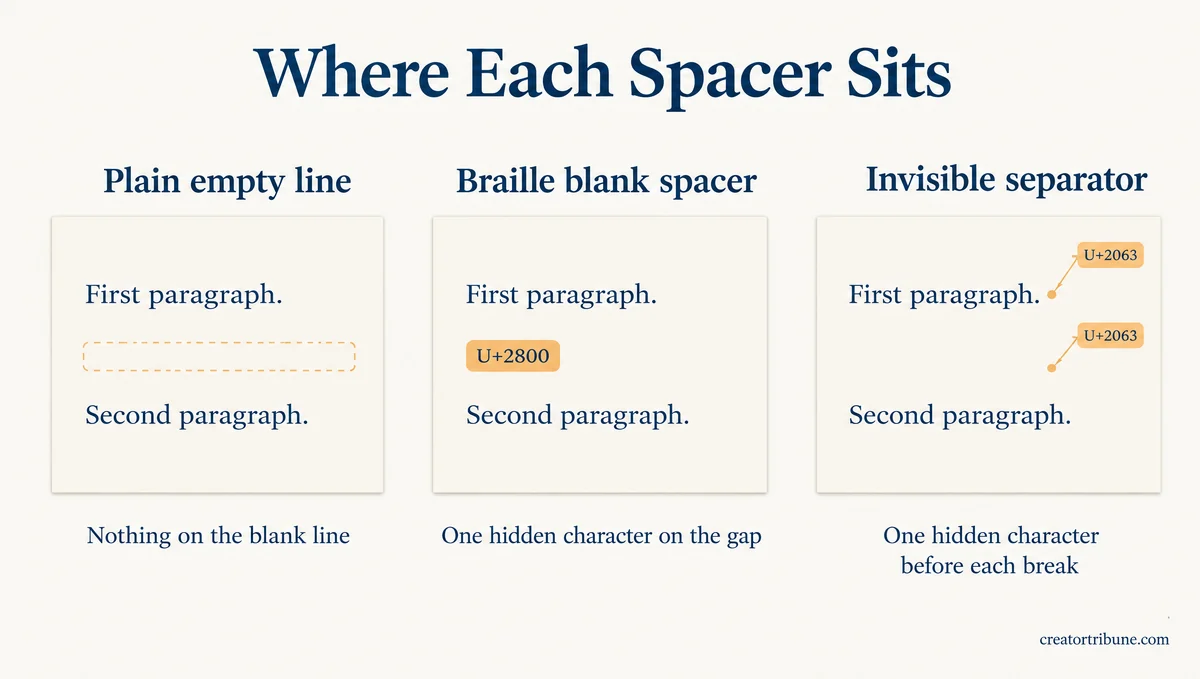
Search for a fix and you land on line break generators, which do not agree on what to paste. The code behind their web pages shows Postiz and Blotato putting an invisible Braille Pattern Blank (U+2800) on the empty lines. Apps 4 Life Host slips an invisible separator (U+2063) in before every line break instead.
The no-space tip lives in posts like a Reel from @live_savvy_sa, posted October 4, 2026, and Instagram’s Help Center has no page on caption spacing.
The check I run costs about ten seconds per caption, which beats retyping a post after it goes live. When a keyboard or a scheduler fights the plain method, the spacer template further down is the one-paste fallback.

How Do You Put Spaces in Instagram Captions?
You put spaces in Instagram captions by ending each paragraph with no space after its last character, tapping Return twice, and typing nothing at all on the blank line. A stray space on either side of the gap is the usual reason Instagram drops it.
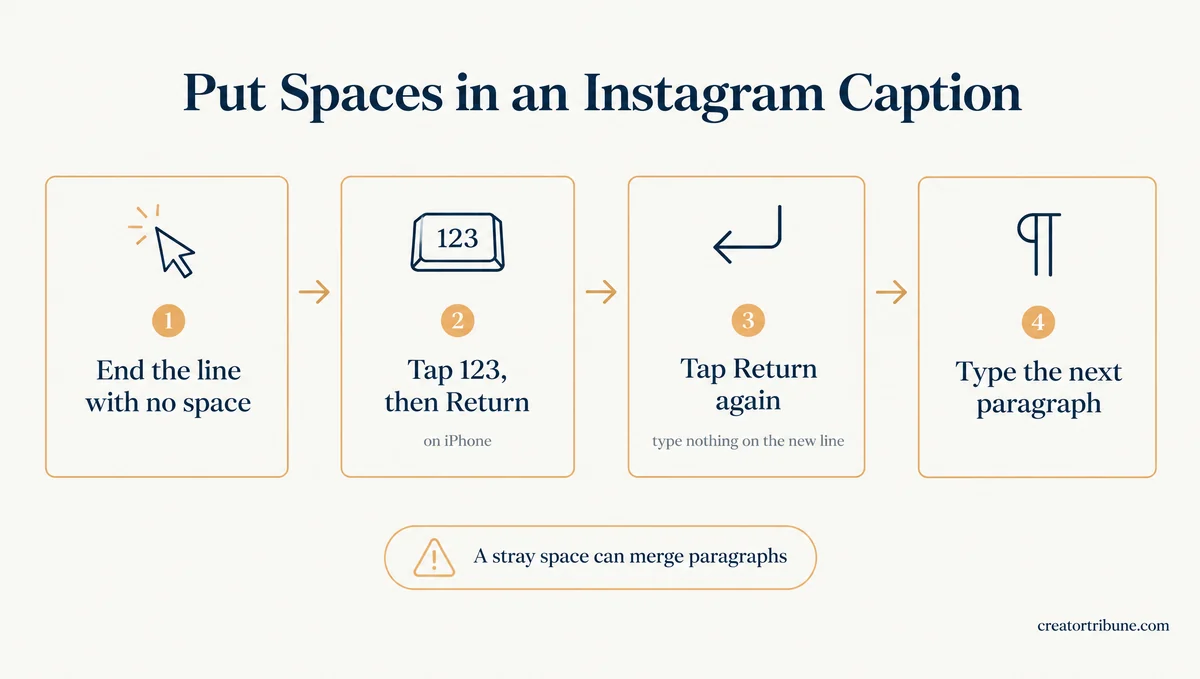
I end every paragraph on its punctuation mark and press Return straight after it. Here is the full sequence in the Instagram app:
- Type your first paragraph in the caption box.
- Check the end of it. If a space follows the last word or period, delete it.
- Tap Return. On iPhone, tap 123 first to reach it.
- Tap Return a second time, and type nothing on the new empty line.
- Type your next paragraph, then repeat the same steps for every gap.
- Tap Share, then open the post and check that the gaps held.
Before: Doors open at 9.[space][Return][Return]Bring your own mat. The space after the period can be enough for Instagram to merge the two lines into one.
After: Doors open at 9.[Return][Return]Bring your own mat. Nothing sits between the period and Return, and nothing sits on the blank line.
One iPhone habit adds that space without you noticing. Apple’s keyboard guide says double-tapping the space bar ends a sentence with a period and a space, so a paragraph you close that way ends on a space.
Press backspace once before Return, or switch off the “.” Shortcut in Settings, then General, then Keyboard.
Why Does Instagram Remove the Spaces in Your Caption?
Instagram can remove a line break when a space sits right before it or on the empty line below it. The exact mechanism is not public, and the rule comes from creators’ own trial and error since at least 2019.
Meta’s developer reference gives a caption a 2,200-character limit and says nothing about line breaks. A 2020 post on Apple’s support forum put the working rule in one line: add no space before the line break, or Instagram will ignore it.
The same fix closed a 2019 r/Instagram thread whose poster had already tried Notes, symbols and double spacing. The poster’s paragraphs only stayed apart once the spaces at each paragraph’s end were gone.
Plain blank lines still survive in 2026. The October 4, 2026 Reel from @live_savvy_sa repeats the rule in its caption, telling viewers not to add a space on the blank line. That caption’s own gaps are plain empty lines with no hidden character.
Where Is the Return Key in the Instagram Caption on iPhone?
The Return key in Instagram’s caption box on iPhone sits on the number layer: tap 123 at the bottom left, and Return appears at the bottom right. The letter layout shows @ and # keys where Return usually sits.
A second Apple forum post, from June 2020, described the same 123 workaround on an iPhone 7. Android keyboards usually keep Enter on the letter layout in Instagram, so the 123 step is an iPhone quirk, while the no-space rule applies on both.
What If Tapping 123 Shows No Return Key on Instagram?
If tapping 123 shows no Return key, use iPhone dictation: tap the microphone and say “new line” twice to add a blank line without touching Return. Pasting a caption drafted in another app is the other route, though it failed for the iPhone 17 Pro owner below.
The 123 trick does fail for some people. On September 10, 2026, an iPhone 17 Pro owner reported seeing only a blue arrow after tapping 123, even after updating Instagram and restarting the phone, and pasting from Notes did not help either.
Apple’s list of dictation commands includes “new line” to start a new line and “new paragraph” to start a new paragraph. Dictation is the workaround I trust most here, since it needs no other app. Here is the sequence:
- If the keyboard shows no microphone, turn on Dictation in Settings, then General, then Keyboard.
- In Instagram’s caption box, put the cursor right after the last character of your paragraph.
- Tap the microphone and say “new line”, then say “new line” again.
- Tap the microphone to stop, then type your next paragraph.
What Do Instagram Line Break Generators Paste Into Your Caption?
Instagram line break generators paste an invisible character onto your blank lines or line ends, so the app sees text where there was only space. The popular tools do not agree on which character to use or where to put it.
| Generator | Character it adds | Where it goes | Side effect |
|---|---|---|---|
| Postiz | U+2800 Braille Pattern Blank | The gap between paragraphs | Merges extra blank lines and trims paragraph edges |
| Blotato | U+2800 Braille Pattern Blank | Every empty line you typed | Strips trailing spaces from every line first |
| Apps 4 Life Host | U+2063 Invisible Separator | Just before every line break | One extra character per line break |
Checked against the code behind each tool’s web page, November 4, 2026.
Unicode files U+2800 as a symbol in its Braille Patterns block, so code that trims spaces leaves it alone. On screen it shows up as an empty gap.
My take is that most people never need one of these tools, since the empty-line method costs nothing and adds no hidden characters. They earn their place when a keyboard will not give you Return, or when a scheduler publishes the caption for you.
How Do You Copy an Invisible Space for Instagram?
You copy an invisible space for Instagram by copying a blank line that already holds the U+2800 character, like the template below, and pasting it into your caption.
Your first paragraph goes here.
⠀
Your second paragraph goes here.
⠀
Your third paragraph goes here.
The second and fourth lines each hold one U+2800 character and nothing else. Copy the whole block, paste it into the caption box, then type over the placeholder sentences without touching the spacer lines.
Do Spaces Count Toward Instagram’s 2,200-Character Limit?
Yes, spaces, line breaks and invisible spacers all count toward the 2,200-character limit Meta sets for an Instagram caption. Every one of them is a character.
A blank line typed the normal way costs two characters, the two line breaks. The same gap built with a U+2800 spacer costs three, and the Apps 4 Life Host method adds one more character at every line break. In a long caption that barely matters, but in a 150-character bio it adds up fast.
Does Writing Your Instagram Caption in Notes Keep the Spacing?
Writing your Instagram caption in Notes keeps the line breaks when you paste it, but it also carries any space left at the end of a line, so a pasted caption can still collapse.
Notes is where I draft any caption longer than a few lines, because the paste brings my line breaks across intact. The risk sits at the line ends, so check each one before you copy.
Use this order when you draft outside Instagram:
- In Notes or Docs, press Return straight after each paragraph’s last character.
- Leave one empty line between paragraphs, with nothing typed on it.
- Copy the text and paste it into Instagram’s caption box.
- Tap at the end of each paragraph. If the cursor lands one space past the last character, delete that space.
- Post, then open the post and check the gaps.
Saving an Instagram draft is the other way to stage a caption, since Instagram keeps a draft’s caption until you post it.
Should You Use Dots or Emojis Between Instagram Paragraphs?
Dots or emojis on the blank line keep the gap, because the line is no longer empty. Readers see them and screen readers can read them out, so use them only after the empty line and the invisible spacer fail.
A bare empty line gives the cleanest result when it works. A period on the empty line is a fallback, and it does hold the gap, since Instagram has real text to keep there.
Dots are the last thing I try, because a column of them reads like a typo on a phone screen. The American Foundation for the Blind advises against excessive line breaks used for visual spacing and decorative symbols such as repeated punctuation, and notes that screen readers announce emojis aloud.
UW-Madison’s accessibility guidance says to keep emojis to a minimum and put any you use at the end of a sentence. Postiz’s own generator page adds that a small number of older screen readers and braille displays announce U+2800 as “braille pattern blank”, and it advises against stacking five or more in a row.
| Spacer on the blank line | What readers see | What a screen reader does | Extra characters per gap |
|---|---|---|---|
| Nothing (empty line) | A clean gap | Nothing to announce | 0 |
| U+2800 spacer | A clean gap | Usually silent; some older readers say “braille pattern blank” | 1 |
| Period or dot | A small dot | Can read the punctuation out | 1 |
| Emoji | The emoji | Reads the emoji’s name aloud | 1 or more |
Can You Still Hide Hashtags Below a Column of Dots on Instagram?
You can, but there is little left to hide, because Instagram now caps a post at five hashtags, a change it announced in December 2025. Five tags fit on one short line at the end of a caption, so a column of dots above them mostly adds clutter. The guide to the five-tag cap covers which tags are worth keeping.
How Do You Add Line Breaks to Your Instagram Bio?
You add line breaks to your Instagram bio in Edit profile with the caption rule: no space before Return, and Return on the 123 layer on iPhone. The whole bio, breaks included, has to fit Instagram’s 150-character limit.
- Go to your profile and tap Edit profile.
- Tap Bio.
- Type your first line, then tap Return. On iPhone, tap 123 first.
- For a blank line, tap Return twice. If the gap disappears after you save, paste the U+2800 spacer line from the template above instead.
- Save the change, then open your profile and check that the breaks held.
Instagram’s Help Center lists a 150-character bio limit. Every line break and spacer counts toward that number, so two spacer gaps cost six characters, 4% of the whole bio.
In a bio, I drop blank lines before I drop words, because every gap spends characters a sentence could use. Check the live profile after you save, since that is what visitors see.
Do Instagram Reels and Carousels Keep Caption Line Breaks?
Instagram Reels and carousels follow the same caption rules as photo posts, since all three share one caption field and the same 2,200-character limit. A carousel gets one caption for the whole post, and the slides inside it take none of their own.
Meta’s developer reference lists the caption for Reels and carousels and does not take a caption on the individual images inside a carousel.
Comments are less predictable. A reply in a 2016 r/Instagram thread said the hidden Return key worked in captions and not in comments, so check a long comment after you post it. I’d still open any live post once before sending people to it.
Why Do Scheduled Instagram Posts Lose Their Line Breaks?
Scheduled Instagram posts can lose their line breaks at the auto-publish step, when the tool hands the caption to Instagram. Later’s own help center says line breaks and formats are often stripped by Instagram when Later auto-publishes.
To keep the breaks, Later’s help center says to schedule auto-publish posts from Later on the web, or to publish through its mobile notifications. That second route copies the caption to your clipboard so you paste it into Instagram yourself, under the same rules as any other caption.
An April 2026 r/InstagramMarketing post reports “line breaks disappearing” on captions prepared in advance, so a caption that looks clean while you prepare it can still turn into a mess once published. If you are still choosing a tool, the scheduling tools compared page lays the options side by side.
I don’t trust an auto-published caption until I have seen it on my phone. A line holding U+2800 is no longer blank, so it should survive a scheduler that drops empty lines. Test the first scheduled post that uses one before you batch a month of them.
Can You Fix Instagram Caption Spacing After You Post?
You can fix spacing after you post by editing the caption from the post’s menu and pasting the whole corrected caption back in.
Instagram’s Help Center gives the path: tap the three-dot Options menu on the post, tap Edit, change the caption, then tap Done. Outfeed AI, which makes a line break generator, warns that spacer characters are part of the text, so editing in the app can knock them out.
Select the full caption, paste the corrected version over it, and save.
Quick Takeaways
- Before you post, delete any space after each paragraph’s last character and leave the blank line empty.
- On iPhone, tap 123 to reach Return, or say “new line” twice with dictation if Return never appears.
- If a gap still merges, paste the U+2800 spacer line from the template above.
- Keep dots and emojis as a last resort, since screen readers can read them out.
- Open every scheduled post on your phone once it goes live, because Later says auto-publishing often strips line breaks.