SMTasker Review and What the Five Day Trial Cannot Show You
SMTasker Review and What the Five Day Trial Cannot Show You
SMTasker runs Instagram, TikTok and Threads automation on real Android phones. Here is what the $19 plan covers, what it hides, and who should skip it.
- 1SMTasker Review in Short and What the Tool Does
- 2How Much Does SMTasker Cost Per Month?
- 3Why the Five Day Trial Is Not Long Enough to Judge It
- 4How Fast Can You Grow With SMTasker’s Own Limits?
- 5Does SMTasker Break Instagram and TikTok Rules?
- 6What Hardware and Setup Does SMTasker Need?
- 7SMTasker Pros and Cons
- 8Who Should Use SMTasker and Who Should Skip It
- 9My Verdict on SMTasker
- 10Quick Takeaways
Bottom Line: SMTasker is a real tool that runs Instagram, TikTok and Threads actions from Android phones you connect yourself, starting at $19 a month. The catch is the five day trial, which is shorter than the thirty day warm up SMTasker’s own guide tells you to run before the tool does much of anything. It suits operators running several accounts at once, and it is the wrong buy for one creator growing one channel.
Most of what you find searching for an SMTasker review was written by SMTasker. The top results are the company’s own pages, a September 2026 press release, and a software directory listing that carries zero user reviews.
So this one measures SMTasker against its own documentation and against the platform rules it has to live inside.
The software starts at $19 a month for one device and five accounts. That is the number on the pricing page. The number that matters more is what you have to add to it, and I spend most of the pricing section below on exactly that.
Creator Tribune takes a commission if you buy through the link above. It does not change the rating, and nothing on this site is ever sold as a placement.
This review covers what the tool does, what it costs once you add the parts that are not included, how fast its own limits let you grow, and where it sits against Instagram and TikTok rules. You will know by the end whether the $19 is worth spending.
SMTasker Review in Short and What the Tool Does
SMTasker is desktop software that drives real Android phones through the normal social apps. You install a client on Windows or Mac, plug in an Android phone or run a supported emulator, log into your accounts on that phone, and the software taps through them on a schedule you set.
The action list is broad. The company’s September 2026 press release describes “likes, follows, unfollows, comments, direct-contact workflows, saved posts, story viewing, reel viewing and publishing” across eight networks: Instagram, TikTok, Threads, Reddit, Snapchat, YouTube, Facebook and LinkedIn.
That architecture is the whole pitch. Cloud bots send requests to a server and never touch a phone, which is why the last generation of them died. SMTasker instead makes a real handset do the tapping.
The part that interests me is what it does not do. It will not write your content or pick your niche. A weak account just stays weak faster, because the software only repeats actions you already decided to take.
If your reach problem is content rather than volume, start with why Instagram reach drops before you buy any automation at all.
How Much Does SMTasker Cost Per Month?
SMTasker costs $19 to $179 a month depending on how many phones you connect, and the subscription is not the full bill. Every plan is priced per device, with a cap on how many accounts each device can hold.
| Plan | Price | Devices | Accounts |
|---|---|---|---|
| Solo | $19 per month | 1 connected device | Up to 5 per device |
| Growth | $79 per month, $15.80 per device | 5 connected devices | Up to 7 per device |
| Agency | $179 per month, $11.93 per device | 15 connected devices | Up to 10 per device |
| Custom | $9.99 per device | 15 or more devices | Up to 15 per device |
Yearly billing takes 20% off any tier. At $19 a month the Solo plan is a fair entry price for this category.
What is a proxy: A paid internet connection that routes an account through its own IP address, so each account looks like it is logging in from a separate place.
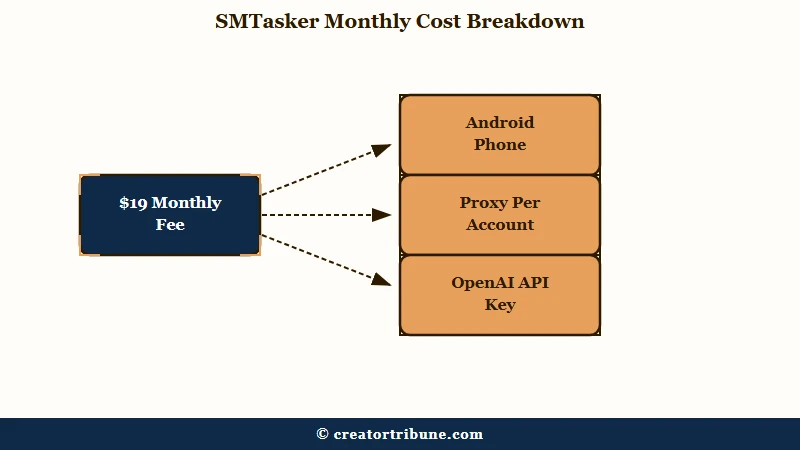
Three costs sit outside that table. You supply the Android phone, and you supply a proxy for every account, because the software’s own proxy guide sets a one proxy per account rule.
The built-in AI manager, Skye, needs a key you pay for separately.
That last one surprised me. The homepage sells the product as “social automation with a built-in AI manager”, but the Skye page states plainly that “Skye only works after you add a valid API key from one of the supported providers” and that “API usage is billed separately by that provider and is not included in your SMTasker subscription.”
So the advertised AI feature is included in the sense that the button exists. My rough floor for one phone already owned, one proxy, and a light month of API use is closer to $40 than $19. Budget the real number, not the sticker.
Why the Five Day Trial Is Not Long Enough to Judge It
The free trial runs five days, and SMTasker’s own Instagram guide prescribes a thirty day warm up before an account runs at normal volume.
The trial ends during the phase where the tool is meant to be doing almost nothing.
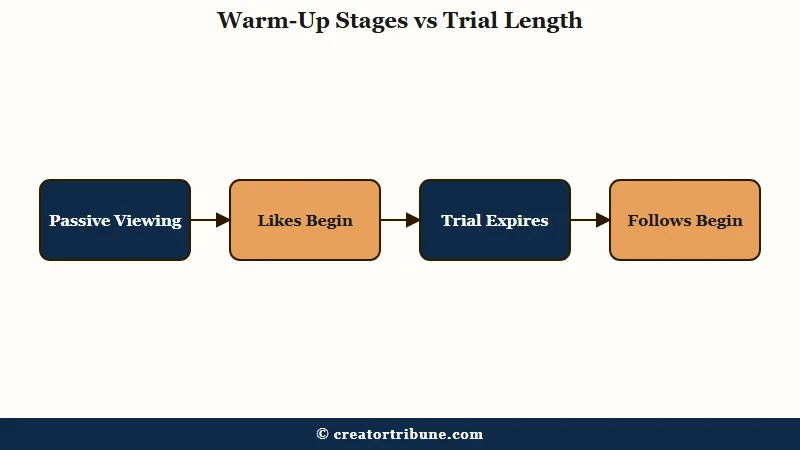
Read the vendor’s warm up schedule and the problem is plain. Its Instagram rate limits guide lays out four phases across thirty days. Its ReelViewer article is stricter at the start: days 1 to 3 are passive viewing only with zero likes, likes begin on day 4, follows on day 8, and comments wait until day 15.
Both of those are SMTasker’s own documents, and they do not agree with each other on the length of a warm up. One says thirty days, the other builds a fifteen day ramp. Either way, on day 5 your trial account has taken a few likes and no follows at all.
A five day window to judge a thirty day process is the thing I hold against this product most. The trial expires before the tool is scheduled to take a single automated follow.
There is a way to use the trial well, and it is not “see if it grows my account”.
Before: Sign up, switch on likes, follows and comments at default limits, and check the follower count on day 5.
After: Sign up, connect one phone, and spend the five days testing whether the client stays connected, whether your proxy holds, and whether the scheduling screen does what you need. Judge the plumbing, not the growth.
How Fast Can You Grow With SMTasker’s Own Limits?
At the ceilings SMTasker publishes, a mature account runs 10 to 20 follows and 50 to 80 likes a day. Those are the vendor’s numbers, not a critic’s, and they set the honest upper bound on what the tool can do for you.
| Account stage | Likes per day | Follows per day | Comments per day | Story and Reel views |
|---|---|---|---|---|
| Days 8 to 14 | 10 to 25 | 0 to 5 | 0 to 1 | 30 to 60 |
| Days 15 to 30 | 25 to 50 | 5 to 12 | 1 to 3 | 60 to 120 |
| Day 30 and later | 50 to 80 | 10 to 20 | 2 to 5 | 120 to 200 |
The guide also caps hourly density at three to five interactions for new accounts and five to ten once established, and it recommends four active days a week with a rest day.
Do the arithmetic before you buy. Ten to twenty follows a day is the number I would put in front of anyone running this math, because it works out to roughly 300 to 600 follows a month per account, and only a slice of those ever follow back.
That is a slow, steady outreach machine. It is not a growth hack, and a tool that promised you one would be lying about its own limits.
Volume also cannot fix timing or targeting. Getting the best time to post right costs nothing and moves more than an extra ten follows a day will.
Does SMTasker Break Instagram and TikTok Rules?
Automation sits against platform rules, and the rule that catches it turns on how fast you act.
Meta’s spam policy bans posting, engaging or creating accounts “either manually or automatically, at very high frequencies”, and adds that restrictions can apply “at lower frequencies when other indicators of Spam” or “signals of inauthenticity are present.”
Read that twice, because the rule people quote at me is usually the wrong one. Meta’s spam standard does not care whether a human or a script performed the action. It cares how fast, how repetitive, and how authentic the pattern looks.
Instagram’s Terms of Use add a separate clause aimed at a different thing: “You can’t attempt to create accounts or access or collect information in unauthorized ways. This includes creating accounts or accessing or collecting information in an automated way without our express permission.”
TikTok’s terms of service are blunter about data. Users may not “scrape, crawl, export or otherwise extract any data or content in any form, for any purpose, from the Platform using any automated system or software, including automated ‘bots'”, and may not “engage in inauthentic commercial behaviors”.
SMTasker does not pretend otherwise. Its own press release states that “users are responsible for ensuring that all automation settings, account activity and use of the software comply with the terms of service, policies, rate limits and community guidelines of applicable platforms”, and warns that non-compliant automation “may result in temporary restrictions, reduced functionality, account limitations or other actions”.
Its support documentation goes further and has a whole category on avoiding blocks, describing action blocks that typically last 24 to 48 hours. A tool that ships a guide on handling blocks is telling you blocks happen.
This history is not new. Instagram shut down Mass Planner, one of the biggest tools of its day, in May 2017, as Fstoppers reported at the time. Jarvee, the desktop tool that dominated afterwards, now greets visitors with one line: “We regret to inform you that Jarvee is permanently closed.”
I will flag one thing the marketing around this category gets loose about. Plenty of pages describe SMTasker as the successor to Jarvee and Mass Planner, and neither SMTasker’s site nor Jarvee’s says so. Treat the lineage as an industry story, not a fact, and judge the tool on its own documentation.
The honest summary is that this carries real risk on an account you cannot afford to lose. If you have already been through an Instagram account disabled recovery or a TikTok ban appeal, do not point this at that account.
What Hardware and Setup Does SMTasker Need?
You need a Windows PC or Mac running the client, an Android phone or supported emulator wired to it, and one proxy per account.
The computer and the phone both have to stay on and connected while anything is running.
That last requirement is the one buyers underestimate. This is not a cloud service you configure and close. A laptop that sleeps at night is a laptop that stopped your schedule at 11pm, which is its own kind of unnatural pattern.
The Proxy Manager handles the network side, assigning a dedicated IP per account and re-testing every proxy on a default thirty minute loop so a dead connection gets caught. My setup rule here is one proxy per account with no exceptions, which is what the software’s own guide asks for anyway.
Emulators are supported on Windows, and they are the cheaper path. They are also the path that killed the previous generation of tools, since platforms added hardware checks that emulators struggle with. Real handsets are the safer choice if you plan to run this for months.
Set up the phones and proxies first, then add accounts one at a time.
SMTasker Pros and Cons
The strengths are control and price per account; the weaknesses are hidden costs, setup load and a trial too short to test any of it.
What works well:
- Real device architecture, which is the only approach with a future after Meta added hardware checks.
- Genuinely granular controls: daily caps, hourly ranges, active hours, rest days, ignore lists and logs.
- Per account cost falls fast at scale, down to $11.93 per device on Agency and $9.99 beyond it.
- Broad platform coverage across eight networks, including Threads and Reddit, which most schedulers skip.
- Documentation that names its own limits and blocks instead of promising safety.
What works against it:
- A five day trial against a warm up its own guide puts at thirty days.
- The advertised AI manager needs an API key you buy separately from OpenAI or Anthropic.
- Phones, proxies and an always-on computer are all on you.
- No independent review base at all, and its Software Advice listing carries no user reviews.
- Two of its own help pages give different warm up lengths, which is a bad sign in documentation you are trusting with an account.
The con I weigh heaviest is the trial length, because it is the one that stops you from checking the others before you pay.
Who Should Use SMTasker and Who Should Skip It
SMTasker fits operators running several accounts who already know which repeatable actions they want; it does not fit a single creator growing a single channel.
The pricing, the per-device caps and the setup load all point at the same user.
Buy it if you manage accounts for clients, if you already own spare Android phones, if you have a proxy budget, and if the work you want automated is outreach and publishing you are doing by hand right now.
Skip it if you run one account you care about. The ceiling is 10 to 20 follows a day, the risk lands on the account you cannot replace, and the setup is a weekend. If you run one account, my answer is no.
Skip it too if your problem is content. Automation multiplies whatever your account already does, so a profile that converts badly will convert badly faster.
If you are rebuilding after a loss, get the account healthy first. Work through recovering a dead account or clearing a bot follower flood before you add any automation on top.
My Verdict on SMTasker
SMTasker is competent software sold with a trial too short to prove it, and it earns a qualified yes for multi-account operators and a clear no for everyone else.
The architecture is right, and the documentation is more honest than the category norm.
The $19 entry price is fair, and it is also not the price. Add a phone, a proxy per account, and an API key, and Solo lands nearer $40 a month for one device.
Against the rules, the position is unchanged from what it has been since 2017. Instagram serves three billion monthly users, per Statista, and enforcement on that scale is automated pattern matching.
Running conservative limits lowers your odds of tripping it. Nothing lowers them to zero, and SMTasker says as much itself.
I would buy the Solo plan only to test a workflow I already knew I wanted, on an account I could afford to lose, and I would use all five trial days on the plumbing rather than the follower count. If that is your situation, the five-day trial is the sensible way in.
Quick Takeaways
- SMTasker starts at $19 a month for one device and five accounts, and the real cost lands nearer $40 once you add a proxy and an API key for Skye.
- The five-day trial is shorter than the thirty-day warm-up SMTasker’s own Instagram guide prescribes, so spend it testing the setup, not the growth.
- Its published ceiling is 10 to 20 follows a day on a mature account, which is roughly 300 to 600 a month, not a growth hack.
- Meta’s spam rule targets high-frequency actions “either manually or automatically”, so pacing matters more than which tool performed the action.
- Run it on accounts you can afford to lose, and never on the one you have already had to recover.