Instagram Story Not Available and How to Tell Which Cause
Instagram Story Not Available and How to Tell Which Cause
Instagram story not available means it expired after 24 hours, was deleted or is hidden from you. How to tell which, and why stories leave Highlights.
- 1Why Is an Instagram Story Not Available?
- 2Is the Problem Their Story or Your Own Archive?
- 3How Do You Tell If You Were Blocked or Just Hidden?
- 4Why Does the Story Ring Still Show If the Story Is Gone?
- 5Why Can Some Followers See Your Story and Others Cannot?
- 6Why Are Your Old Archived Stories Silent or Frozen?
- 7Why Do Stories Keep Disappearing From Your Instagram Highlights?
- 8What Happened to Archived Stories in 2024?
- 9Can You Recover a Story That Says It Is No Longer Available?
- 10Quick Takeaways
TL;DR: “Instagram story not available” is one error message covering two unrelated problems. Either you cannot open somebody else’s story, or your own story, archive or Highlight has lost something, and those have completely different causes. Clearing your app cache, the fix almost every guide leads with, does nothing for either one in most cases.
You get “Instagram story not available” when you tap a story, and the app tells you nothing else. No reason, no next step, just a black screen and a message that fits five completely different situations.
Two very different people search this phrase. One tapped a friend’s story and it will not open. The other opened their own archive or Highlights and found gaps where their memories used to be.
Most guides answer both with the same list and the same advice, which is why the advice so often does nothing.
The detail that surprised me most sits in Instagram’s own documentation, and it is missing from every guide on the first page of results. Instagram permanently alters stories when it saves them to your archive, muting music and freezing videos and GIFs, and it says plainly that “these changes are permanent.”
So if your old archived story is silent or frozen, that is documented policy, not a bug you can troubleshoot. This guide splits the error along the line that matters, then walks the causes on each side in the order worth checking.
Why Is an Instagram Story Not Available?
An Instagram story is not available for one of two reasons: the content is genuinely gone from Instagram’s servers, or it is still there and you personally are not allowed to see it.
Every specific cause below is a version of one of those two.
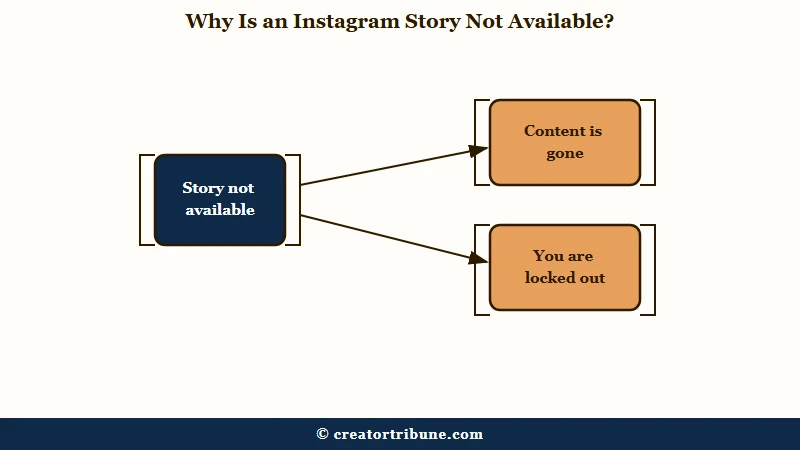
Gone means the story expired past its 24 hour window, the poster deleted it, or Instagram removed it for breaking its rules or after a copyright report. Locked out covers private accounts, Close Friends lists, hidden stories, blocks, and age or region restrictions.
The two halves have opposite outcomes, which is why sorting them first saves you time. Nothing recovers a story that expired, and no amount of reinstalling changes that. A story you are locked out of is still sitting there for everybody else.
My rule is to work out which half you are in before touching a single setting. It takes about ten seconds and it saves you from the reinstall-and-hope cycle that most advice pushes you into.
Is the Problem Their Story or Your Own Archive?
If you tapped somebody else’s story, you have a permissions or expiry problem. If you opened your own profile archive or highlights, you have a storage or account problem.
Read the rest of this guide from whichever branch you are on.
Instagram’s story lifecycle help puts the basic rule plainly. Photos and videos you share to your story “disappear from Feed, your profile and Direct after 24 hours, unless you add it as a highlight.”
That single sentence explains the most common viewer-side case. A story link somebody sent you in a DM three days ago will not open, because there is nothing left to open.
One quick test separates a network fault from everything else in this guide. If no story from anyone will open, the problem is your connection, the app or an Instagram outage. Switch between Wi-Fi and mobile data, update Instagram, or log out and back in before you suspect any one account.
I treat the viewer side as the default assumption, since it is where most of this traffic lands. The creator side is rarer and more upsetting, so it gets its own sections further down.
How Do You Tell If You Were Blocked or Just Hidden?
If you can still see their profile, posts, and follower count, you were not blocked. Instagram’s hide-story help states that hiding a story from someone “doesn’t prevent them from seeing your profile and posts.”
A block removes everything, not just the story.
This is where the search results get it wrong most often. Nearly every page-1 guide lists “you were blocked” near the top of the cause list, which sends people into a spiral over what is usually a hidden story or an expired one.
Run these four checks in order and the answer falls out fast:
- Search their username from your account. If nothing comes up, that points to a block or a deleted account.
- Open their profile from a direct link. A block shows an empty profile or “User not found.”
- Check your old DM thread. If their name has changed to “Instagram User,” the account is gone or you are blocked.
- Look at their grid. If posts and follower counts load normally, you are not blocked, and a hidden story is the likely answer.
Before: “Their story will not open, so they must have blocked me.”
After: “Their story will not open, but their profile, grid, and follower count all load fine, so I am hidden from their story or it already expired.”
One more distinction trips people up constantly. Restricting somebody does nothing to your stories at all, and a restricted account still sees them normally and still shows up in your viewer list.
The full walkthrough of restriction signals covers what restrict does and does not touch. For the deeper version of the block test, spotting an Instagram block goes further than the four checks above.
| What you see | Blocked | Story hidden from you | Story expired |
|---|---|---|---|
| Their profile loads | No | Yes | Yes |
| Username is searchable | No | Yes | Yes |
| Posts and follower count visible | No | Yes | Yes |
| Story ring appears | No | No | Sometimes, briefly |
| DM thread shows “Instagram User” | Often | No | No |
Why Does the Story Ring Still Show If the Story Is Gone?
The colored ring is cached on your device, and it survives the story it points to.
Your app drew that ring during its last refresh; tapping it asks Instagram’s servers for a file that has since been deleted or expired, and the server returns the unavailable message.
This is the single most confusing version of the error, because the ring is a visible promise the app cannot keep. You are not imagining it and you did not mistap.
It shows up most sharply in a narrow window right after somebody deletes a story. You tap within seconds or minutes, your device still believes the story exists, and the server has already dropped it.
I would not spend any time troubleshooting this one. Pull down to refresh your feed and the ring clears itself, which is the only case in this article where the standard cache advice is genuinely the right call.
Why Can Some Followers See Your Story and Others Cannot?
When a story is visible to some followers and unavailable to others, the cause is almost always audience filtering rather than a fault: Close Friends, sensitive content age-gating, or a regional restriction.
Nothing is wrong with the story itself, and Instagram is quietly serving it to a narrower audience than you think.
Close Friends is the easiest to rule out. A green ring means the story went only to that list, and somebody outside it cannot open it even through a link forwarded in a DM.
Age-gating is the one creators rarely consider. When Instagram’s automated systems flag a story as sensitive, it stops serving it to accounts registered as under 18, which produces the exact pattern of some friends seeing it and others hitting a wall.
Regional restrictions are rarer and more jarring. Instagram can restrict a story in a single country under local law. Posts about protests in India have been restricted under the country’s Information Technology (Intermediary Guidelines and Digital Media Ethics Code) rules, with a notice saying the content is unavailable in that country.
If a story of mine went quiet for half my audience, the age gate is the first thing I would check, because it is silent and it needs no action from anyone to trigger.
| Cause | Who it hits | Tell-tale sign | Can you fix it |
|---|---|---|---|
| Expired past 24 hours | Everyone | Old DM or notification link | No, it is gone |
| Poster deleted it | Everyone | Ring vanishes on refresh | No |
| Close Friends only | Anyone off the list | Green ring on their profile | Only they can change it |
| Sensitive content age gate | Under-18 accounts | Some followers see it, others do not | Adults can change content settings |
| Regional legal restriction | One country | Notice naming the country | No |
| Archive degraded by Instagram | The creator | Silent music, frozen GIF | No, Instagram calls it permanent |
Why Are Your Old Archived Stories Silent or Frozen?
Instagram permanently strips parts of your archived stories to save storage, and it publishes this in its own help pages.
Music stickers stop playing and GIFs freeze, and the company states that “these changes are permanent.”
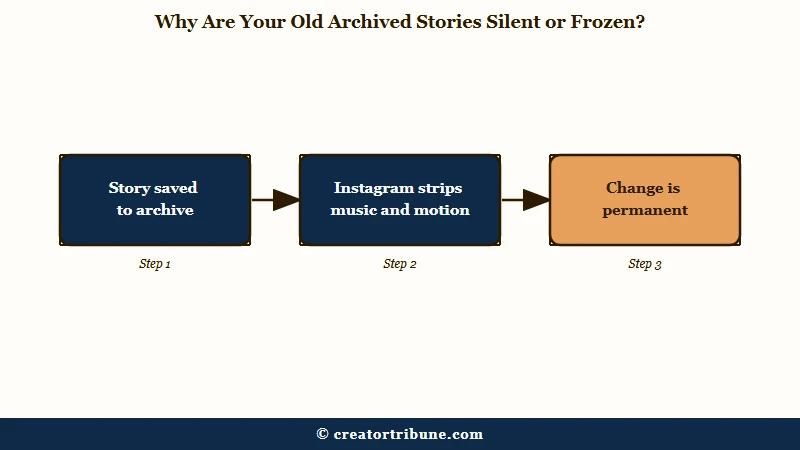
Instagram’s Stories Archive help spells this out in wording no competing guide quotes. It says some stories “may be changed when they are saved to your archive” so that Instagram can “keep up with storage needs.” Those changes, it adds, “can mean muting music or freezing videos or gifs.”
There is a carve-out that matters if you post original video. Instagram says the degradation does not affect stories that “contain or reshare original videos that have not been shared to Feed or Reels.” Reshare a degraded archived story and it goes out without whatever was removed.
Two more lines from the same page explain a lot of missing archives. Instagram states that “Stories Archive and Highlights aren’t available for all accounts,” so an archive that never existed is not a bug. And if you switch the archive off, “any stories you share from that point on will be deleted after 24 hours.”
One more thing I would not have expected to find in a storage FAQ. Instagram says “archived stories that you shared publicly will be used to improve AI at Meta unless you delete them or change your account to private.” On a public account, your archive is training data by default.
Why Do Stories Keep Disappearing From Your Instagram Highlights?
Stories in a Highlight should stay until you remove them, because Instagram says they “remain visible as highlights until you remove them, even after the original story has disappeared.”
When they vanish anyway, Instagram’s own help points to the archive copy behind them being deleted or, in a subscriber-only Highlight, a 30-story limit. Readers report two more causes: the story was a reshare of someone else’s, or its song became unavailable.
Instagram ties Highlights to your Stories Archive. Its help on deleting archived stories says a story removed from the archive “will also be removed from other places you’ve shared it on Instagram (example: highlights).”
That tie explains the worst version, where every Highlight empties at once. One r/Instagram user reported on May 29, 2026, that more than 10,000 archived stories had moved to Recently deleted overnight, each marked “30 days left,” although they had deleted nothing.
So check Recently deleted before anything else. Instagram’s recovery help says deleted stories stay there for 30 days, or “up to 24 hours for stories that aren’t in your stories archive.” In the Android or iPhone app, restore each one from your profile, the menu, Your activity, Recently deleted, then the story’s Options.
Stories you reshared from another account behave differently, because they still depend on the original. In an April 2026 thread, a reshared story left one user’s Highlights and archive once their brother disabled the account that posted it. None of Instagram’s Highlights or archive help pages says what a reshared story does when its original goes, so treat that as one reader’s report.
A vanished reshare can also come back. An October 2026 post describes a reshared tagged story that was missing from a Highlight for months and then came back. Its poster suspects the original account had hidden its story from them in between.
If a friend’s public story matters to you, keep your own copy while it is live. Inflact can save one by @username without an Instagram login, though it cannot reach private accounts.
Music is the other cause readers report. Posts on September 8 and October 2, 2026, describe highlighted stories whose song suddenly reads as unavailable, the second blaming licensing, while the same track is still offered for new stories. A December 2025 post adds that one such story kept dropping out of its Highlight soon after each re-add, and its poster suspected the song.
Resharing that story from the archive will not bring the song back, since Instagram says archive reshares “won’t include anything that was removed.” Posting the original clip again from your camera roll and adding the song fresh gives the Highlight a new story to hold.
If only one person says your Highlights look empty, check your Hide story list first. Instagram’s Highlights help says “those you’ve allowed to see your story can also see your highlights,” so anyone you hid your story from loses them as well. Exclusive Highlights add a second filter, since Instagram’s Subscriptions help says they are “only visible to your subscribers.”
Instagram’s help on adding and editing Highlights states no cap for an ordinary Highlight. Subscriber-only Highlights are the exception. Instagram’s Subscriptions help says that if an exclusive highlight “already has 30 stories, the oldest story will be deleted from the highlight when you add a new story.”
If a story that left a Highlight still shows in your archive, the story itself was never deleted. Press and hold the Highlight, tap Edit highlight and select it again, and the guide on how to unarchive an Instagram story shows where to find it in the archive.
What Happened to Archived Stories in 2024?
On July 31, 2024, a Meta bug permanently deleted an undisclosed number of users’ Story archives and Highlights, and Meta confirmed the data could not be restored.
Affected creators saw a black screen reading “Due to a technical issue, this story is no longer available. While we’ve since fixed this issue, your story can’t be restored.”
A Meta spokesperson put it plainly at the time: “We found and fixed a bug that caused some people’s Story highlights and archives to be deleted. Unfortunately, we are unable to restore these Stories and we’re letting people know in the app if they’re impacted.” The company declined to say how many accounts were hit, as CNN reported when the story broke.
One follow-up detail keeps this alive two years later. Both CNN and Slate reported that the explanatory notices were themselves scheduled to disappear by July 2025.
A creator scrolling their archive today therefore finds gaps with no message attached to them. My read is that this vanished notice is why so much of the advice online still treats a 2024 data loss as a cache glitch and tells you to reinstall the app.
Can You Recover a Story That Says It Is No Longer Available?
Officially no, and Meta has said so directly. Two unofficial routes are still worth trying, because both cost nothing and neither is confirmed by Meta.
Treat them as long shots rather than fixes.
The first is a data export. Request your information through Instagram’s settings, and per one r/Instagram thread the zip that comes back can still hold the story files in a media/stories folder even when the app shows them as gone. That is a reader-discovered route, not a documented recovery path, and it will not work for everyone.
The second is opening instagram.com in a browser instead of the app, where the same thread describes archive entries rendering that the mobile app refused to show. Unconfirmed again, and cheap enough to be worth ten seconds.
My honest position is that neither should be sold to you as a fix. The one thing that reliably works is not needing them: turn on saving to your camera roll, and treat the archive as a convenience rather than a backup.
If the story never made it off your phone in the first place, that is a different failure with different fixes, and the upload troubleshooting guide covers it. If the account itself is deactivated rather than the story missing, reactivating the account comes first.
Quick Takeaways
- “Story not available” is two unrelated problems in one message: somebody else’s story you cannot open, or your own archive or Highlight with holes in it.
- A visible profile, grid, and follower count means you were not blocked, whatever the error implies.
- Instagram documents that it permanently mutes music and freezes GIFs in archived stories, so a silent old story is policy and not a fault.
- The notices explaining the July 2024 deletion were set to disappear by July 2025, so archive gaps now tend to show up with no explanation attached.
- When a story leaves a Highlight, check Recently deleted first, since deleting an archived story also removes it from Highlights and Instagram holds deleted archived stories there for 30 days.
- Turn on saving stories to your camera roll today, because the archive is a convenience and it has failed before.