Why Your Instagram Messages Disappeared and What to Do Next
Why Your Instagram Messages Disappeared and What to Do Next
Instagram messages disappeared but you did not delete them? Here is what causes vanished DMs, including one 2026 change most guides still miss.
- 1Why Your Instagram Messages Disappeared Without You Deleting Them
- 2Did You Have Encrypted Chats Before May 8, 2026
- 3Was Instagram Having an Outage When Your Messages Vanished
- 4Why the Unsent Placeholder Is Not a Reliable Test
- 5Where Instagram Puts Messages You Never Deleted
- 6Should You Reinstall Instagram to Fix Missing Messages
- 7How Do I Recover Disappeared Instagram Messages
- 8Do Instagram Message Recovery Tools Work
- 9Frequently Asked Questions
- Why did my Instagram messages disappear if I did not delete them?
- Can I get my Instagram messages back after they disappear?
- Does the Instagram data download include deleted messages?
- Why did my whole Instagram conversation disappear at once?
- Is it safe to reinstall Instagram when messages are missing?
- Do Instagram message recovery apps work?
- 10Quick Takeaways
TL;DR: Instagram messages disappeared most often because of a server-side change or a filter, not because someone unsent them. The single most overlooked cause is Meta ending encrypted chat support on May 8, 2026, which affected legacy chat history. Work through the checks below in order before you touch the app itself.
Instagram messages disappeared from your inbox, you know you did not delete them, and there is no “unsent a message” notice anywhere in the thread. That is a different problem from the one nearly every guide on this topic answers.
Search this question and you get the same three answers on repeat. Someone unsent it, vanish mode was on, or the app glitched. Those are real, and they are also the easy cases, because each one leaves a trace you can see.
The harder case is the one where a message you sent, or a conversation you have had for months, is not there anymore. No placeholder, no error, no grey profile picture on the other side.
I want to walk through what causes that version of the problem, because the answer changed in 2026 and most of the advice still circulating has not caught up.

Why Your Instagram Messages Disappeared Without You Deleting Them
Instagram messages disappeared without deletion almost always comes down to five causes.
A server-side outage, the May 2026 end of encrypted chat support, filtering into a Requests folder, the other account being deactivated, or a local sync failure. Only the last one is fixable from your phone.
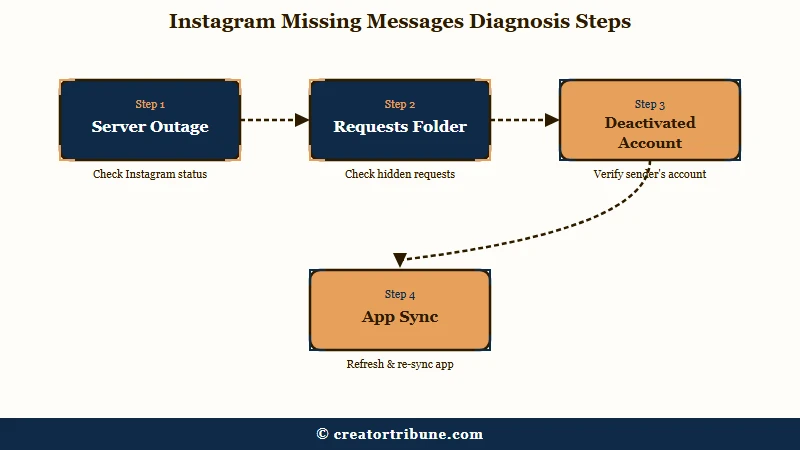
Four of those five have nothing to do with your app. If you jump straight to reinstalling Instagram, you are treating a server problem with a device fix, and in one of these cases you can make things permanently worse.
Here is the diagnostic I would run, in order, before changing anything.
| Symptom | Likely cause | What to do |
|---|---|---|
| Whole thread gone, other profile shows as “Instagram User” | Account deactivated or deleted | Nothing to recover, the thread went with the account |
| Whole thread gone, other profile looks normal to a friend but not you | You were blocked | Confirm from a second account before assuming data loss |
| Older messages missing, recent ones fine, “unable to load older messages” | Server outage or sync failure | Wait it out, check status first, do not reinstall |
| Messages missing from a chat you had encrypted before May 2026 | End of encrypted chat support | Request your data download, see below |
| Message gone with “unsent a message” showing | Sender revoked it | Not recoverable, it is purged from the servers |
| Thread never appeared in the main inbox at all | Filtered to Requests or Hidden Requests | Check the Requests tab, it was never in your inbox |
I would work top to bottom. The cheapest checks are the ones that cost you nothing and rule out the largest causes.
Did You Have Encrypted Chats Before May 8, 2026
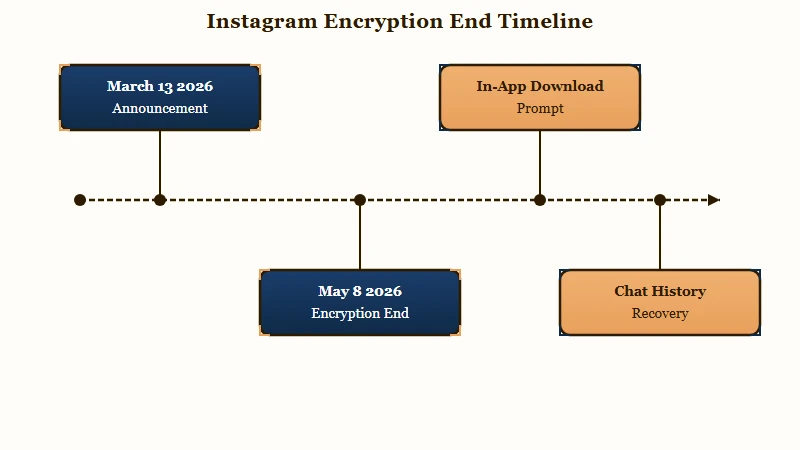
Meta ended support for end-to-end encrypted messaging on Instagram after May 8, 2026, and prompted affected users to download any chat history they wanted to keep.
If you had encrypted conversations and missed that prompt, or changed phones around then, that is the first thing to check.
This is the cause I see missed everywhere, and it is missed for a structural reason. Most of the troubleshooting guides you will find were written as evergreen explainers about vanish mode and unsending, then lightly refreshed. None of them account for a platform change that landed in the middle of 2026.
The timeline is short. Meta updated its documentation on March 13, 2026 announcing the change, and encryption came off Instagram direct messages on May 8.
Encrypted DMs had been an opt-in feature since December 2023, buried in a per-conversation setting, after earlier tests in 2021 and a wider rollout to adult users in Ukraine and Russia in February 2022.
Meta’s stated reason was low uptake. The company said that “very few people were opting in to end-to-end encrypted messaging in DMs, so we’re removing this option from Instagram in the coming months.”
What Meta did not do is explain what happens to encrypted history nobody downloaded. MacRumors noted at the time that the company had not said “what will happen to them afterwards.”
Reporting after the cutoff indicates those conversations were moved into storage Meta can read, rather than deleted outright.
For you, the practical consequence is narrower and more useful than the privacy debate. Encrypted chats used to come with secure storage, a backup you unlocked with a PIN on a new phone. That route is not the recovery path on Instagram anymore, so any guide still pointing you at it is pointing you nowhere.
Your remaining option is the official data download.
One more wrinkle matters here. Users on older app versions had to update before they could open affected conversations at all, which is a case where a thread looks missing and a single update brings it back.
The context behind the decision is contested. Encryption came off 11 days before the federal Take It Down Act took effect. That law requires platforms to remove non-consensual intimate imagery within 48 hours of notice, which is hard to do when a platform cannot see message contents.
Columbia Journal of European Law analysis argues the opt-in design conflicted with the data-protection-by-default principle in Article 25 of the GDPR. Reuters reporting has also documented that a Meta executive warned internally as far back as 2019 that expanding encryption would cripple automated detection of illegal content.
Was Instagram Having an Outage When Your Messages Vanished
Instagram DM outages regularly hide older messages and leave sent messages in limbo, and Meta’s own status page frequently does not report them.
Checking a third-party monitor before you troubleshoot your phone will save you an hour.
On July 22, 2026, Instagram direct messaging broke for roughly two hours. Reports peaked at around 4,000 on Downdetector for Instagram, with more than 1,000 for Facebook Messenger in the same window, then fell below 250 as service came back.
The symptom during that outage is the interesting part for anyone reading this. Messages sat undelivered in threads, and scrolling up produced an explicit “unable to load older messages” error. If you looked at your inbox during those two hours, your conversation history was genuinely not there.
Meta’s official status page displayed “No Known Issues” for the duration. That is the detail I would take away from the whole incident, because it means the obvious place to check is the least reliable one. DM-specific outages recurred within days of that one, again without acknowledgement.
What I would recommend is checking an independent monitor first and Meta’s status page last, which is the same order that our guide to whether Instagram is down walks through. If a monitor shows a spike in the last few hours, stop troubleshooting and wait.
Why the Unsent Placeholder Is Not a Reliable Test
Instagram does not always leave a visible “unsent a message” placeholder when a sender revokes a message, so its absence does not prove the message was lost some other way.
Treat the placeholder as useful when present and meaningless when absent.
Most guides state this the other way round. They tell readers that an unsent message always leaves a marker, which turns the missing marker into false evidence that something more serious happened. Behaviour has varied enough across app versions that I would not lean on it either way.
The contrast is worth seeing plainly.
Before: You open the thread and “Sarah unsent a message” sits in the gap where the text used to be, so you know exactly what happened and that it is gone for good.
After: You open the thread and the message is just gone, timestamps on either side running straight into each other, with nothing indicating anything was ever there.
The second case is the one that sends people down a recovery rabbit hole. It is also consistent with a sync failure, an outage, or a revoked message on a version that renders no placeholder, which is why it is a starting point rather than a conclusion.
If the missing messages came from an account you no longer see properly, our guide to telling whether someone blocked you separates that case from genuine data loss.
Where Instagram Puts Messages You Never Deleted
Instagram automatically routes messages from non-followers, flagged accounts, and messages containing external links into Requests or Hidden Requests, where they never appear in your main inbox.
Those messages were never deleted, they were filed.
This is the cause with the highest recovery rate and the lowest effort, so rule it out early. Tap Requests at the top of your inbox, then check the Hidden Requests folder inside it, which is where spam-flagged messages land.
I have seen creators assume a conversation vanished when it had been sitting one tab over for weeks. Link-heavy messages and messages from brand-new accounts are the two categories most likely to be filtered this way.
There is a mirror version of this that affects your outgoing messages instead. If your own sends are not arriving, that points at delivery restrictions rather than disappearance, and our breakdown of Instagram send failures covers what triggers them.
Should You Reinstall Instagram to Fix Missing Messages
Reinstalling Instagram should be your last step, not your first, because uninstalling clears locally cached message data before it has synced back to the servers. Force close the app and log out first.
The guides disagree sharply here, and the disagreement is not academic. Several of the top-ranking articles on this topic list uninstall and reinstall as an early fix. At least one warns directly against it on the grounds that it can cause permanent message loss.
The mechanism favours caution. Instagram keeps a local copy of recent conversation data on your device, and if the app is failing to sync, that local copy may be the only place some of it exists. Removing the app removes the copy.
The same caution applies to the cache instructions in most guides, which routinely blur two different Android options. Clearing the cache removes temporary files and is low risk. Clearing data wipes the app’s local database and logs you out, and our walkthrough of clearing the Instagram cache covers the distinction.
Here is the order I would work through, safest first.
- Force close Instagram completely and reopen it.
- Toggle airplane mode on and off to reset the connection.
- Check an independent outage monitor before assuming the problem is yours.
- Log out and back in, which forces a fresh sync without touching local data.
- Clear the cache only, never app data.
- Update the app, which matters specifically for legacy encrypted threads.
- Reinstall only after everything above has failed.
How Do I Recover Disappeared Instagram Messages
The only legitimate recovery route is Meta’s official data download, and it returns only messages still stored on Instagram’s servers.
Anything purged is not in there, and no third-party tool changes that.
Request it through Settings, then Account Center, then Your Information and Permissions, then Download Your Information. Meta typically emails a link within about 48 hours, and that link expires after roughly four days.
I would treat the expiry as the real constraint. People request the download, get busy, and come back a week later to a dead link, which means starting the wait over. Request it when you can act on it within a few days.
What the export contains is where expectations need managing.
| What disappeared | In the data download | Realistic outcome |
|---|---|---|
| Thread hidden by a sync failure | Yes | Usually returns on its own once sync completes |
| History from a legacy encrypted chat | Sometimes | Worth requesting, this is the only route left |
| Message the sender unsent | No | Purged from the servers, not recoverable |
| Vanish mode or view-once content | No | Designed to be unrecoverable, no exceptions |
| Thread from a deleted account | No | Removed with the account itself |
One partial workaround helps if you had email or push notifications switched on. Notification previews often preserve the opening line of an incoming message in your email history, which will not restore a conversation but can confirm what was said.
Our guide to reading messages someone else unsent goes deeper on that specific case.
Do Instagram Message Recovery Tools Work
No third-party tool can recover Instagram messages that Meta has purged from its servers, because the data was never stored on your device in a form a scanner can reach.
Products claiming otherwise are selling a scan that cannot find anything.
The reason is mechanical. Instagram conversations live on Meta’s infrastructure, and a desktop tool scanning your phone’s memory has no access to a server-side database. When a message is gone from those servers, there is no local copy for a recovery product to surface.
What I would watch for is the pattern rather than any single product. Anything that asks for your Instagram password, requires installing a profile or certificate, or charges before showing a result is a category to avoid entirely. The guides in this space contradict each other on this point, with some recommending recovery software and others explicitly warning that these tools are phishing fronts.
Contacting support is the other common suggestion that overpromises. Instagram does not run a manual database restoration service for individual lost DMs, so reporting a problem is worth doing as a signal but is not a recovery route.
Frequently Asked Questions
Why did my Instagram messages disappear if I did not delete them?
The most likely causes are a server outage hiding older messages, filtering into the Requests folder, or the other account being deactivated. Legacy encrypted chat history is the overlooked one, since Meta ended encryption support on May 8, 2026.
Can I get my Instagram messages back after they disappear?
Sometimes. Messages still on Meta’s servers appear in an official data download, requested through Account Center. Messages that were unsent, sent in vanish mode, or attached to a deleted account are purged and cannot be recovered by any method.
Does the Instagram data download include deleted messages?
No. The export contains only what Instagram currently stores. Unsent messages and vanish mode content are removed from Meta’s servers shortly after they disappear, so they never appear in the file.
Why did my whole Instagram conversation disappear at once?
A whole thread vanishing usually means the other account was deactivated, deleted, or blocked you, rather than individual messages being removed. If their profile still looks normal, check for an outage before assuming the thread is gone.
Is it safe to reinstall Instagram when messages are missing?
Reinstalling should be the final step. Uninstalling clears locally cached conversation data that may not have synced to Meta’s servers yet, which can turn a temporary display problem into permanent loss. Force close and log out first.
Do Instagram message recovery apps work?
No. Instagram messages are stored on Meta’s servers, so a tool scanning your device cannot retrieve anything Meta has already purged. Products promising otherwise commonly request account credentials, which is a security risk with no upside.
Quick Takeaways
- Check for an outage before you touch your phone, and treat Meta’s status page as the least reliable source since it showed “No Known Issues” throughout the July 22, 2026 DM failure.
- If you used encrypted chats before May 8, 2026, that platform change is the most overlooked explanation for missing history and the PIN restore route no longer applies.
- A missing “unsent a message” placeholder proves nothing, because the marker does not appear consistently across app versions.
- Request the official data download through Account Center, act on the link within about four days, and expect unsent and vanish mode content to be absent.
- Reinstall the app last, never first, since uninstalling clears local message data that may not have synced yet.