How to Change Your TikTok Username Without Breaking Your Links
How to Change Your TikTok Username Without Breaking Your Links
Changing your TikTok username sounds simple until it breaks your links. Here is how to do it right, the 30-day rule, and what nobody warns you about.
- 1How Do You Change Your TikTok Username
- 2How Often Can You Change Your TikTok Username
- 3Why Won’t TikTok Let You Change Your Username
- 4Can You Change Your TikTok Username Before 30 Days
- 5What Breaks When You Change Your TikTok Username
- 6Can You Get a TikTok Username That Is Already Taken
- 7Frequently Asked Questions
- How often can I change my TikTok username?
- Will I lose my followers or likes if I change my username?
- Why is my TikTok username change greyed out?
- Can I really change my TikTok username before 30 days?
- What happens to my old TikTok username after I change it?
- 8Quick Takeaways
The Short Answer: You can change your TikTok username once every 30 days under Edit profile, using only letters, numbers, underscores, and periods. The part most guides skip is that the change instantly rewrites your profile URL and breaks every old link and tag pointing at you. If you need a new look sooner than 30 days, change your nickname instead, which TikTok allows every 7 days.
Learning how to change your TikTok username is the easy part. It is two taps under Edit profile. The hard part is everything that happens the second you hit save, and that is where most guides go quiet.
I have helped enough creators rebrand to know the regret pattern. They swap the handle, feel good for an hour, then notice their old links are dead, their pinned bio tool points nowhere, and the clean handle they gave up got snatched before they could grab it back. None of that is obvious from TikTok’s tidy little edit screen.
Here is what you will walk away knowing: the exact steps on mobile and desktop, the 30-day rule and the 7-day workaround almost nobody uses, why the change option greys out, whether those before-30-days bypass tricks work at all, and the full list of what breaks so you can fix it before it costs you followers.

How Do You Change Your TikTok Username
You change your TikTok username under Profile, then Edit profile, then Username, where you type a new handle and tap Save once it shows as available.
The Save button stays greyed out until the handle is both valid and unclaimed.
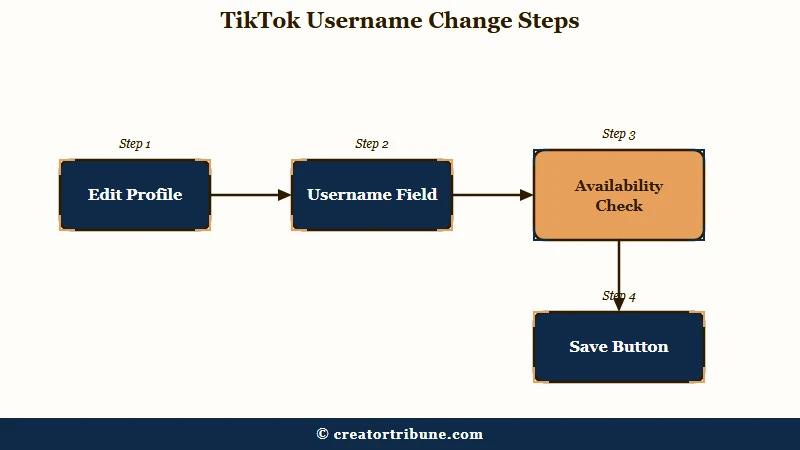
The way I see it, the mechanics are the least interesting part, so let me get them out of the way. On the mobile app, here is the sequence I would follow:
- Open TikTok and go to your Profile, then tap Edit profile.
- Tap Username (not Name, which is a different field covered below).
- Type your new handle. TikTok checks availability live and flags format problems.
- Tap Save once the handle is accepted.
On desktop it is nearly identical: click your profile picture, then Settings, then Edit Profile, click your current username, type the new one, and save. Whichever device you use, the rules for the handle itself do not change.
Your username can only contain letters, numbers, underscores, and periods, and it cannot end in a period. No spaces, no emojis, no other symbols. Most “why won’t it save” moments come down to a stray character or a name someone else already holds.
How Often Can You Change Your TikTok Username
TikTok lets you change your username once every 30 days, but your nickname (the display name people see) can be changed once every 7 days.
That gap is the most useful thing in this whole article.
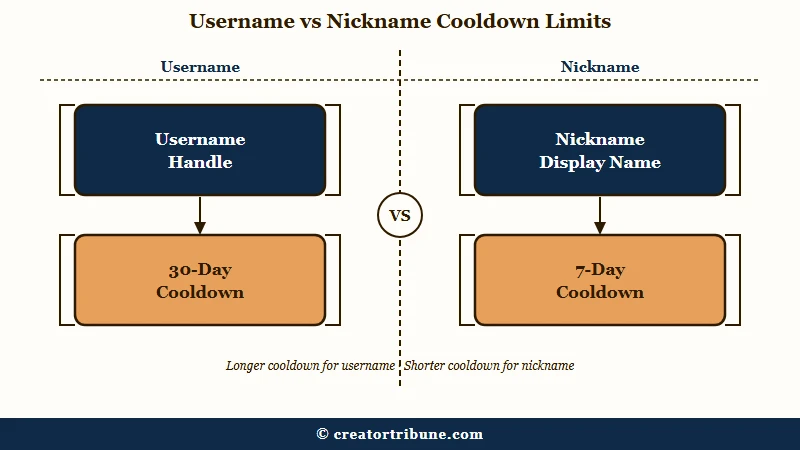
Here is why it matters. Your username is the unique @handle in your profile URL. Your nickname is the larger name at the top of your profile that also shows in the For You feed, comments, and direct messages, and it does not have to be unique.
What is your nickname: The display name shown above your @username, up to 30 characters, which can include spaces and emojis and can be changed every 7 days instead of 30.
So if you are mid-rebrand and the 30-day username clock is still ticking, you are not stuck. I would change the nickname first to signal the new brand everywhere people see you, then update the @handle when the cooldown clears. Most creators never realize the two names run on separate timers.
| Field | What it is | Change frequency | Rules |
|---|---|---|---|
| Username (@handle) | Unique handle in your profile URL | Once every 30 days | Letters, numbers, underscores, periods only; no ending period |
| Nickname (display name) | Non-unique name in feed, comments, DMs | Once every 7 days | Up to 30 characters; spaces and emojis allowed |
Why Won’t TikTok Let You Change Your Username
TikTok blocks a username change for four main reasons: you changed it in the last 30 days, the handle is already taken, it contains an invalid character, or your account type is locking the field. Each has a different fix.
I have watched people reinstall the app three times over what turned out to be a name ending in a period. Before you troubleshoot anything technical, rule out the simple causes with the table below.
| Symptom | Likely cause | Fix |
|---|---|---|
| Save button stays greyed out | Handle is taken or contains a space, emoji, or trailing period | Try a new handle; strip symbols and any period at the end |
| Error says you changed it recently | You are inside the 30-day cooldown | Wait it out, or change your nickname now instead |
| Username field will not open at all | Business or TikTok Shop account restriction | Switch to a personal account first, then change the handle |
| Everything looks fine but nothing saves | App bug or outdated version | Update the app, clear cache, then retry |
The account-type trap catches a lot of small businesses. Some creators get stuck unable to edit settings after switching to a Business account, and the fix is to switch the account type back to personal before touching the username. If your handle still will not save on a personal account with a clean name, it is almost always an app-version bug, and updating clears it.
One more thing worth ruling out early: if you are hunting a handle that shows as taken, it may belong to an account that changed away from it recently. TikTok holds a released handle in limbo before freeing it, which I cover further down.
Can You Change Your TikTok Username Before 30 Days
For a regular account, you almost certainly cannot change your username before 30 days, despite the many videos claiming otherwise.
The officially sanctioned early change exists only for verified accounts through TikTok’s reporting form.
This is where the sources openly disagree, and I would rather tell you the truth than sell you a trick. A wave of tutorials promises a “before 30 days” bypass through Report a Problem or by changing your phone’s date. TikTok’s own guidance and several straight-talking guides say the opposite, that in most cases you wait the full 30 days because the cooldown is a strict platform rule.
Here is my read after weighing both sides. The Report a Problem route is real, but it is built for verified accounts and genuine edge cases, not for a regular user who wants a do-over on Tuesday. The phone-date trick is not something TikTok documents anywhere, and feeding third-party “username changer” apps your login is how accounts get compromised.
Before: You saw a video titled “change your username before 30 days” and you are about to install an app that promises to do it.
After: You skip the app, change your nickname today for the visible rebrand, and let the 30-day username clock run out safely.
If you are genuinely verified, use the official reporting form instead. If you run a brand account, our guide to recovering a TikTok account covers the support channels that reach a human.
What Breaks When You Change Your TikTok Username
Changing your username rewrites your profile URL, so every old link, shared video, and bio-tool pointing at your handle breaks the moment you save.
Your followers, likes, and videos stay put, but your outside traffic can crater if you do not prepare.
This is the part that turns a quick edit into a real headache, so I want to be specific about what breaks and what does not. Your account keeps every follower and every video. What snaps is anything referencing the old handle from outside the app.
- External links to your old profile URL go dead, and one estimate puts the cross-platform traffic drop from broken links as high as 70 percent.
- Your link in bio and third-party tools like Linktree keep working, but any place YOU pasted your old TikTok URL (other socials, a website, an email signature) now points nowhere.
- People searching your old handle will not find you, since TikTok does not auto-redirect the old name to the new one.
- The old handle you just vacated is not instantly reusable; TikTok parks it for a “short period” that users report lasting anywhere from a day to several weeks.
The way I would handle a rebrand is to fix the outside world before I touch the handle. Update your TikTok bio link and any link-in-bio tool first, warn your audience the handle is changing, and keep your old name in your nickname for a couple of weeks so searchers still land on you.
That handoff window is why owning a direct line to your audience matters so much. Our Creator Money Page walks through building one so a URL change never costs you a fan.
Can You Get a TikTok Username That Is Already Taken
You can sometimes claim a taken TikTok username through the 180-day inactivity reset or a trademark report, but buying one or using a claim app violates TikTok’s terms. There is no simple “request this handle” button.
I get asked this constantly by people rebranding into a name a dead account is squatting on. Your realistic options are narrower than the internet suggests, and a couple of them can get your account banned.
| Method | How it works | Reality check |
|---|---|---|
| 180-day inactivity reset | TikTok may reset an account inactive for 180 days or more to a random numeric handle | Slow and not guaranteed; you still have to grab the handle the moment it frees |
| Trademark report | File an intellectual property claim if you own the registered mark | Legitimate but requires a real trademark and a clear case of confusion |
| Buying the handle or claim apps | Pay the owner or a service to hand it over | Against TikTok terms; risks a ban, and PR firms charge thousands |
If none of those fit, I would stop fighting for the exact handle and use a clean modifier instead. Adding a short, professional tag like “hq” or “app” reads far better than a string of numbers, and it saves you from a bidding war with a squatter.
TikTok itself is one of the largest apps in the world, with more than a billion monthly users according to Statista, so the good exact-match handles went years ago and a smart variant is usually the faster win.
Frequently Asked Questions
How often can I change my TikTok username?
You can change your TikTok username once every 30 days. There is no lifetime cap on total changes, but the 30-day cooldown between them is strict. Your nickname, the display name people see, can be changed every 7 days instead.
Will I lose my followers or likes if I change my username?
No. Your followers, likes, and every published video stay exactly where they are after a username change. What can drop is outside discoverability, because old links break and people searching your former handle will not find you until they learn the new one.
Why is my TikTok username change greyed out?
The Save button stays inactive until the handle is valid and available. The usual causes are the 30-day cooldown, a name someone else already uses, an invalid character like a space or a trailing period, or a Business account restriction. Switch to a personal account and strip symbols to clear most cases.
Can I really change my TikTok username before 30 days?
For a normal account, no. The 30-day limit is enforced, and the “bypass” videos mostly point to risky app tricks. Verified accounts can request an early change through TikTok’s official reporting form, but everyone else should just change their nickname in the meantime.
What happens to my old TikTok username after I change it?
It goes into a holding period rather than opening up right away. TikTok describes it as a “short period,” and users report the old handle staying locked anywhere from a day to a few weeks before it can be claimed again.
Quick Takeaways
- You can change your TikTok username once every 30 days, but your nickname changes every 7 days and is the faster way to signal a rebrand.
- Only letters, numbers, underscores, and periods are allowed, and the handle cannot end in a period.
- Changing the handle rewrites your profile URL, so update your bio links and outside links before you save.
- The “change before 30 days” tricks do not work for regular accounts, and login-based changer apps are a security risk.
- Taken handles can sometimes be freed after 180 days of inactivity or via a trademark claim, but buying one breaks TikTok’s rules.