Crayo AI Review and Why Your Faceless Videos Get Flagged
Crayo AI Review and Why Your Faceless Videos Get Flagged
Crayo AI builds faceless shorts fast, but those same videos risk getting flagged as unoriginal and demonetized. Here is the honest take before you pay.
- 1What Crayo AI Does and Who It Is Really For
- 2How Much Does Crayo AI Cost Per Month
- 3Why Crayo Videos Get Flagged as Unoriginal
- 4Is Crayo AI Output Good Enough to Post
- 5Crayo AI Pros and Cons
- 6Crayo AI vs OpusClip vs Submagic vs AutoShorts
- 7My Verdict and Who Should Skip Crayo AI
- 8Frequently Asked Questions
- Is Crayo AI free to use?
- Can you remove the Crayo AI watermark?
- Is Crayo AI safe for monetization?
- Does Crayo AI work for TikTok, Reels, and Shorts?
- How do you cancel Crayo AI?
- 9Quick Takeaways
Bottom Line: Crayo AI is a fast, cheap way to mass-produce faceless shorts, and the templates do exactly what they promise. The problem is that the same Reddit-story and default-voice videos it pumps out are the ones TikTok and YouTube are now purging for unoriginal content. It is worth it only if you treat the output as a starting point and add real originality on top.
This Crayo AI review starts where most of them stop. Almost every writeup walks you through the Reddit-story templates and the one-click captions, then hands you a 4-out-of-5 and an affiliate button.
What none of them connect is the timing. The exact format Crayo AI is built to mass-produce, verbatim Reddit narration over shared gameplay footage with a default text-to-speech voice, is the same format TikTok started disqualifying from its Creator Rewards Program in 2026 under the banner of unoriginal content.
I went deep on this one because the tool and the platforms it feeds are now pulling in opposite directions. So this is less a feature tour and more a straight answer to one question: if you pay for Crayo, will the videos make you money, or just make you content. Here is what I found on pricing, output quality, and the demonetization trap nobody is pricing in.
What Crayo AI Does and Who It Is Really For
Crayo AI is a browser-first faceless video generator that turns a text prompt into a vertical short in a few minutes.
It is built for one job: pumping out high-volume TikTok, Reels, and Shorts content without a camera, an editor, or your face.
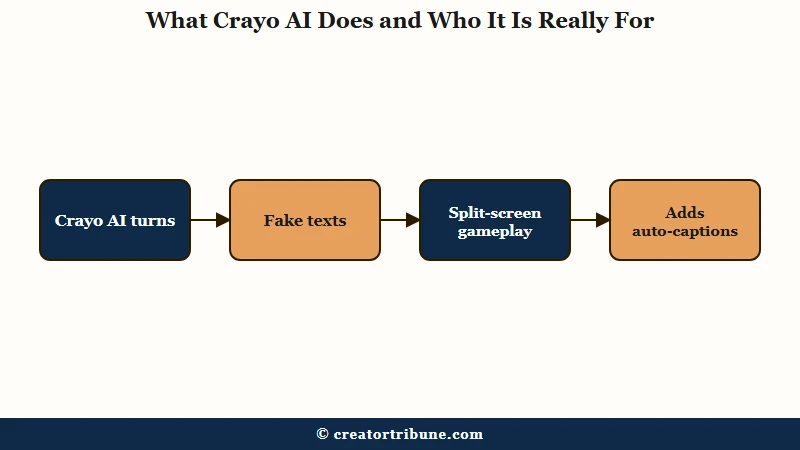
The core templates are the “brainrot” formats you have already scrolled past a thousand times. Reddit story readers, fake iMessage conversations, split-screen gameplay, streamer reactions, and ChatGPT-style scrolling text. It layers on auto-captions in trending styles, more than 50 AI voices across several languages, and a shared library of background gameplay clips.
There is also an Auto Clipper that chops long podcasts or streams into highlights, which is the one feature that overlaps with tools like Opus Clip. The way I see it, Crayo is genuinely good at the generation half of the job and weak at everything that makes a video yours.
If your plan is to publish ten near-identical clips a day and hope volume wins, it is built for you. If you are trying to build a recognizable channel, the defaults work against you.
How Much Does Crayo AI Cost Per Month
Crayo AI costs $19 a month for Hobby, $39 for Clipper, and $79 for Pro on the web, with cheaper annual billing, but the real price hides in the fine print.
There is no meaningful free plan, only a few standalone utilities like an audio balancer and a video compressor.
Three things stand out beyond the headline numbers. The mid-tier Clipper plan is mathematically the best value at about 26 cents per video, beating both the cheaper Hobby tier (38 cents) and the pricier Pro tier (32 cents).
The advanced Google Veo-3 generation engine needs separate top-up credits even on Pro, so the “everything included” tier is not. And the iOS app charges a completely different, inflated rate, up to $190 a year for what the web sells for $160.
| Plan | Monthly price | Videos per month | Real cost per clip |
|---|---|---|---|
| Hobby | $19 ($13 annual) | 50 | $0.38 |
| Clipper | $39 ($27 annual) | 150 | $0.26 (best value) |
| Pro | $79 ($55 annual) | 250 | $0.32 |
Here is the part that made me wince. Crayo runs a strict “all sales are final” refund policy, with the terms spelling out that no exceptions are made for dissatisfaction or accidental purchases. Pair that with a Trustpilot score sitting around 3.7 out of 5 where roughly a third of reviews are 1-star, many citing being charged after canceling, and you have a tool you genuinely cannot test risk-free.
Why Crayo Videos Get Flagged as Unoriginal
Crayo videos get flagged because platforms now treat default templates, copied Reddit text, and shared stock footage as the textbook definition of unoriginal content.
This is the single biggest risk no other review puts in front of you, and it is a money risk, not a quality one.
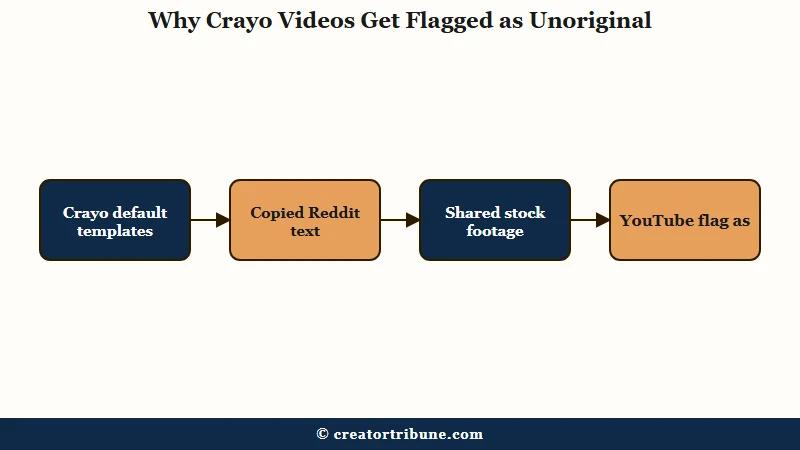
TikTok’s Creator Rewards Program defines unoriginal content as material copied from others or carrying minimal original input, and in 2026 it began disqualifying accounts in waves, often with no warning and a broken appeal path. Creators who film and write everything themselves are getting swept up.
Now picture an account built entirely on Crayo’s defaults: the same gameplay background thousands of others use, a robotic stock voice, and a Reddit thread read out word for word. That is not a gray area to an algorithm, it is the target.
I am not saying Crayo gets you banned on day one. I am saying the output sits on a collision course with where TikTok and YouTube are heading, and you need to understand that before you build a monetization plan on it.
If your account does get caught, the fix lives in our guides on a TikTok Creator Rewards rejection and what to do when YouTube monetization gets denied. Payouts are the engine of the creator economy, and a Goldman Sachs projection puts that market near $480 billion by 2027 even as platforms tighten who qualifies.
Is Crayo AI Output Good Enough to Post
Crayo AI output is fast and serviceable, but the AI voices sound robotic and the shared footage makes every video look the same.
The quality is fine for filler and a problem for anything you want to build a brand on.
The published reviews disagree sharply on this, which tells you a lot on its own. Crayo’s own marketing calls the voiceovers natural and the renders near-instant.
Independent testers tell a different story: flat, mechanical voices with no emotional range, and one hands-on test clocked a two-minute export at 25 to 35 minutes, not the “viral clips in seconds” the homepage promises. When the maker and the users describe two different products, I trust the users.
The deeper issue is sameness. Because everyone draws from the same gameplay and stock library, a Crayo video is visually interchangeable with ten thousand others, which is exactly the fingerprint platforms use to flag low-effort content.
The most maddening complaint is mechanical. Failed exports still deduct from your monthly credits, so you can pay for videos the software never delivered. If a unique look matters to you, you will spend more time fighting the defaults than you saved.
Crayo AI Pros and Cons
Crayo AI’s strengths are speed and price, and its weaknesses are originality, billing, and support.
Here is the honest split after weighing the research.
What Crayo gets right:
- Genuinely fast prompt-to-video generation for the core faceless formats.
- The cheapest entry point in the category, with Clipper landing near 26 cents a clip.
- A beginner-friendly, all-in-one interface with no editing skill required.
- Built-in captions, voices, and background footage in one place, so there is no tool-stack to assemble.
Where it falls down:
- The output maps directly onto what TikTok and YouTube flag as unoriginal content.
- A no-exceptions refund policy paired with frequent post-cancellation billing complaints.
- Robotic AI voices and render times that can run 10x longer than advertised.
- Failed exports still burn paid credits, and support often routes through a Discord where some users report being removed after refund requests.
Crayo AI vs OpusClip vs Submagic vs AutoShorts
Crayo wins on price and faceless templates, OpusClip and Submagic win on polish and repurposing, and AutoShorts competes on full automation.
None of them solve the originality problem for you, so the choice comes down to what you are optimizing for.
| Tool | Best for | Starting price | Watch out for |
|---|---|---|---|
| Crayo AI | Cheap faceless brainrot volume | $19/mo | Unoriginal-content flags, billing |
| OpusClip | Repurposing long video to clips | ~$15/mo | Credit limits on long sources |
| Submagic | Best-in-class captions | ~$20/mo | Add-ons priced separately |
| AutoShorts | Hands-off scheduled posting | ~$20/mo | Same template-sameness risk |
If your real goal is turning existing long videos into shorts, I would point you to a dedicated workflow over Crayo, and our walkthrough on repurposing YouTube videos into shorts covers the cleaner path. For a fuller look at the closest hands-off competitor, the AutoShorts AI review breaks down where automation helps and where it hurts.
Before: “Hobby is $19 a month for 50 videos, so each clip costs about 38 cents and that is the whole cost.”
After: “Factor in that failed exports still burn a credit, the iOS app charges $190 a year for what the web sells for $160, and a Creator Rewards disqualification drops every one of those 50 clips to $0 in payouts. The real number is cost per monetizable clip, and that is the figure the pricing page never shows you.”
My Verdict and Who Should Skip Crayo AI
Crayo AI is worth it only as a raw generator for creators who will add real originality on top, and a bad bet for anyone counting on platform payouts.
That is the line I would draw.
Use it if you are experimenting or making throwaway volume you will then re-voice and reframe with your own commentary. Skip it if you are a brand, a business that needs custom product footage, or a creator whose income depends on staying eligible for Creator Rewards or the YouTube Partner Program. The lack of a free trial plus the no-refund policy means you cannot afford to find out the hard way.
The broader lesson I keep coming back to is platform risk. Any business built entirely on one algorithm’s payout rules can be switched off without warning, which is why I would pair any faceless-video plan with a way to own your audience directly. If you do go ahead, build a thumbnail and branding layer with one of these AI tools for social graphics so your videos at least stop looking interchangeable.
Frequently Asked Questions
Is Crayo AI free to use?
Crayo AI has no real free plan for video generation. You must subscribe before creating clips, starting at $19 a month, though a few standalone utilities like an audio balancer are free. Given the no-refund policy, there is no risk-free way to test it.
Can you remove the Crayo AI watermark?
Yes. The watermark is removed on paid tiers, and Crayo also lets you add your own custom brand watermark. Free or limited outputs may carry the Crayo mark and capped export lengths.
Is Crayo AI safe for monetization?
It carries real risk. The default templates, copied text, and shared footage match what TikTok and YouTube flag as unoriginal content, and accounts are being disqualified from Creator Rewards in 2026. You must heavily customize the output to stay safe.
Does Crayo AI work for TikTok, Reels, and Shorts?
Yes. Crayo is purpose-built for vertical short-form video and exports in a 9:16 ratio ready to upload. The catch is that platform-ready and platform-safe are not the same thing once monetization rules apply.
How do you cancel Crayo AI?
You cancel from Settings in your dashboard, and access runs until the end of the billing cycle. Watch your statement closely, since multiple users report being charged after canceling and having to dispute it with their bank.
Quick Takeaways
- Crayo AI is the cheapest faceless-video generator, with Clipper the best value near 26 cents a clip.
- Its default output is exactly what TikTok and YouTube now flag as unoriginal content, so monetization is the real risk.
- Independent tests found robotic voices and 25-to-35-minute renders, far from the “seconds” marketing claim.
- The no-refund policy plus failed exports burning credits means you cannot test it safely, so customize heavily or skip it.