How to Add a Link in Your Instagram Bio
How to Add a Link in Your Instagram Bio
Add a clickable link to your Instagram bio, fit up to five links, fix a link that is not clickable, plus what to link to for growth.
- 1How Do You Add a Link to Your Instagram Bio
- 2How Many Links Can You Add to Your Instagram Bio
- 3Why Is Your Instagram Bio Link Not Clickable
- 4What Should You Link To in Your Instagram Bio
- 5Frequently Asked Questions
- How many links can you add to your Instagram bio?
- Do you still need 10,000 followers to add a link on Instagram?
- Why is my Instagram bio link not clickable?
- Can you add a link to your Instagram bio on desktop?
- What should you link to in your Instagram bio?
- 6Quick Takeaways
TL;DR: You add a link to your Instagram bio under Edit profile, in the Links section, not the bio text. Instagram now lets every account add up to five links with no follower requirement. The smart move is to spend that space on one destination you own that captures emails, not five that scatter your visitors.
A clickable link in your Instagram bio used to feel like a reward you unlocked at 10,000 followers. That gate is gone, and today any account can add a link, fit up to five of them, and point that traffic anywhere it wants.
The trick is that Instagram tucks the setting in a specific spot, and a URL pasted into the wrong field just sits there as grey, untappable text. I will walk through the exact steps, show how the five-link feature works, and clear up the usual reasons a bio link goes missing or refuses to turn blue.
Then I will get to the part the how-to videos skip: which links are worth your space, because five links nobody taps is worse than one link that grows your audience.
How Do You Add a Link to Your Instagram Bio
You add a link to your Instagram bio by opening Edit profile, tapping the Links section, and adding an external link, which is the only place a URL becomes clickable. The bio text field will not do it.
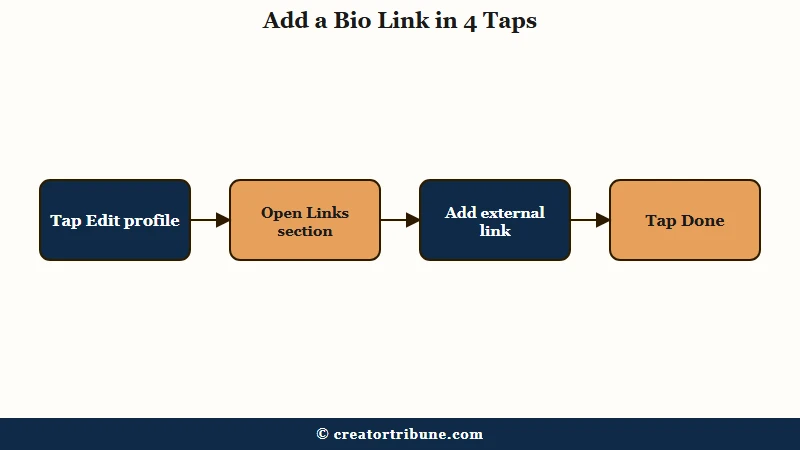
Here is the sequence I use in the app, where Instagram expects you to manage this:
- Open Instagram and tap your profile icon in the bottom right.
- Tap Edit profile.
- Tap Links, then Add external link.
- Paste your URL and add a short title like “My free guide” so people know where it goes.
- Tap Done, then Done again on the Edit profile screen to save.
One thing worth knowing upfront: Instagram is still a mobile-first app, so adding and editing bio links happens on your phone, not the desktop site. From what I have seen, that catches a lot of people who try to set this up from a laptop and assume the feature is broken.
How Many Links Can You Add to Your Instagram Bio
Instagram now lets every account add up to five links directly in the bio, with no follower requirement at all. The old 10,000-follower rule for links was retired back in 2021.
When you add more than one, the first link shows on your profile and a tap opens a small pop-up where visitors pick from the full list. That covers most creators without paying for a separate link hub, at least until you outgrow five destinations.
It helps to know the difference between a bio link and a Story link sticker, since they do different jobs. With more than two billion people on Instagram every month, using both well is how you turn passive viewers into traffic you control.
| Feature | Bio links | Story link sticker |
|---|---|---|
| Where it lives | Permanent on your profile | One Story slide, then it is gone |
| How many | Up to 5 | One sticker per slide |
| Follower requirement | None | None since 2021 |
| Best for | Your evergreen destinations | Timely promos and Shop Now taps |
Why Is Your Instagram Bio Link Not Clickable
The most common reason an Instagram bio link is not clickable is that the URL was typed into the bio text instead of the Links section, so it renders as grey plain text. Move it into Links and it turns into a tappable blue link.
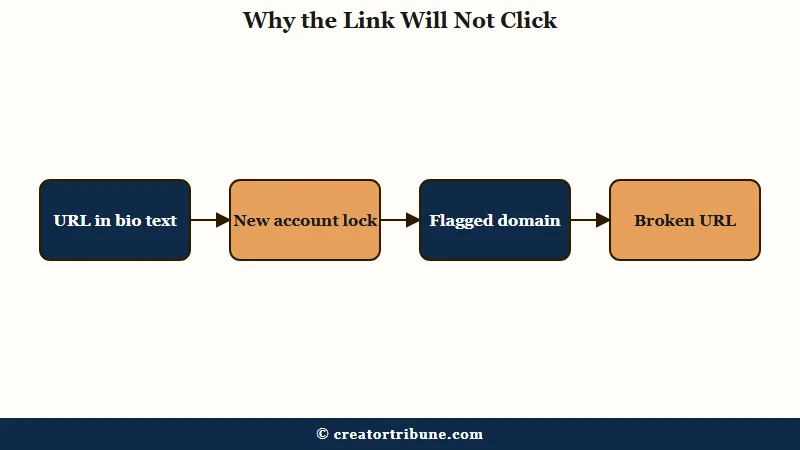
The way I see it, the rest of the failures come down to Instagram being quietly strict about what it lets out. A link can save and still get blocked if the domain trips a spam filter or sits on a restricted affiliate list, and you usually get no warning at all.
| Symptom | Likely cause | Fix |
|---|---|---|
| Link shows as grey plain text | URL is in the bio text, not the Links section | Move it to Edit profile, Links, Add external link |
| Links option missing entirely | Account under two weeks old or an outdated app | Update the app and wait out the new-account lock |
| Link saves but gets blocked | Spam-flagged domain or a restricted affiliate network | Try a clean domain or a short link |
| Link opens an error page | The URL is broken at the source | Test it in a mobile browser and fix the address |
If none of that explains it, a quick log out and back in, or a reinstall, refreshes your account’s feature access. The same blocklist rules apply across platforms, so if you are setting up TikTok too, our guide to adding a TikTok bio link covers the same traps there.
What Should You Link To in Your Instagram Bio
The strongest use of your bio links is one destination you own that captures an email, supported by a few focused links rather than a scattered dump. Five links sounds generous, but past about seven options most visitors freeze and tap nothing.
From what I have seen, the creators who grow treat the bio as a funnel, not a directory. A generic link list converts at only 1 to 3 percent, while a page built to capture emails converts several times better, because one clear next step beats a wall of equal choices.
Before: five links to your YouTube, TikTok, Pinterest, shop, and Discord, so visitors scatter across platforms you rent and you capture none of them.
After: one link to a page that trades a freebie for an email, with a couple of supporting links beneath it.
That email list is the only audience Instagram cannot throttle or take away, which matters when organic reach for many accounts now sits at 2 to 3 percent. We built a page you fully own for this exact job, a free link-in-bio template that captures emails instead of leaking taps.
If you want to compare it against the usual names first, our roundup of free link in bio tools breaks down where each one quietly costs you, and our guide on how to convert views to subscribers covers what to do once the emails start coming in.
Frequently Asked Questions
How many links can you add to your Instagram bio?
You can add up to five links directly in the Links section of your profile. The first one shows on your profile, and tapping it opens a menu with the rest. That covers most creators without a separate link-in-bio tool.
Do you still need 10,000 followers to add a link on Instagram?
No, that requirement was removed in 2021. Every account, regardless of follower count, can add bio links and use the Story link sticker. There is no follower threshold left for either feature.
Why is my Instagram bio link not clickable?
Almost always because the URL is in the bio text field instead of the Links section, where it stays grey and untappable. Move it into Edit profile, then Links, then Add external link. A flagged or broken domain can also block it.
Can you add a link to your Instagram bio on desktop?
Instagram is mobile-first, so adding and editing bio links is done in the phone app. The desktop site does not offer the full profile editing flow. Use your phone to set up or change the link.
What should you link to in your Instagram bio?
Lead with one high-value destination that captures an email, like a free guide or template. Add a few supporting links if you need them, but keep the total under seven so visitors do not freeze. A page you own beats a rented link list.
Quick Takeaways
- Add links under Edit profile in the Links section, never the bio text, or they stay grey and untappable.
- Every account can add up to five bio links now, with no follower requirement since the 10,000 rule was retired in 2021.
- A bio link is permanent while a Story link sticker lasts one slide, so use each for the job it fits.
- If the link is missing or blocked, check for a new-account lock, an outdated app, or a spam-flagged domain.
- Spend your bio on one owned, email-capturing link plus a few focused supports, since a list is the audience no platform can take away.