Why TikTok LIVE Keeps Getting Restricted for Suspicious Activity
Why TikTok LIVE Keeps Getting Restricted for Suspicious Activity
Why TikTok LIVE keeps getting restricted for suspicious activity, what the flag really means, how long it lasts, and how to appeal it. Get your stream back.
- 1What Does Suspicious Activity Mean on TikTok LIVE
- 2Why TikTok LIVE Studio Says Suspicious Activity Detected on Desktop
- 3Why Your TikTok LIVE Keeps Getting Cut Off Mid-Stream
- 4What LIVE Visibility Restricted Means on TikTok
- 5How Long a TikTok LIVE Restriction Lasts and How to Appeal It
- 6Can You Go Live With Under 1000 Followers in 2026
- 7Frequently Asked Questions
- What does suspicious activity mean on TikTok LIVE?
- Why does my TikTok LIVE keep getting cut off?
- How long does a TikTok LIVE ban last?
- What does LIVE visibility restricted mean on TikTok?
- Why does TikTok LIVE Studio say suspicious activity detected?
- Will a VPN fix my TikTok LIVE restriction?
- Why was my LIVE flagged when I did nothing wrong?
- How old do you have to be to go live on TikTok?
- Can I appeal a permanent TikTok LIVE ban?
- 8Quick Takeaways
What’s Changed: Suspicious activity on TikTok LIVE usually has nothing to do with what you streamed. It is a login, network, or device-trust flag, and it fires on the LIVE Studio desktop sign-in as readily as it does in the app. Switching VPN country will not reset it, because the restriction follows the account and the device rather than the IP address.
If your TikTok LIVE keeps getting restricted for suspicious activity, the flag is probably not about your content. It is about how your account logged in, what network it sits on, and whether your device looks trustworthy to TikTok’s automated systems.
Here is the part most creators never figure out. TikTok publishes no breakdown of what triggers these flags, but the pattern reported over and over is a shared VPN exit address, where your account inherits the behavior of strangers routed through the same server. Switching the VPN to a new country does not help, because the restriction is tied to your account and device rather than to the IP address you arrived on.
That changes how you fix it. Chasing your content for the violation is the wrong move when the trigger is a login pattern, a recycled IP, or one phone juggling too many accounts.
That last one gets stated as a hard number more often than it deserves. TikTok has never published a per-device account cap, and the figures circulating in 2026 disagree with each other, so treat the account switcher’s practical ceiling as a guideline and not a rule. Pushing past the daily follow, like and comment ceilings is the better-documented way to read as suspicious, and the full TikTok limits guide covers those.
This guide breaks down what suspicious activity means on TikTok LIVE, what the separate “LIVE visibility restricted” notice actually does to your stream, why the LIVE Studio desktop app throws the same flag, and the appeal path that still works in 2026.
What Does Suspicious Activity Mean on TikTok LIVE
Suspicious activity means TikTok’s system detected an unusual login, network, or device pattern it reads as account abuse, not necessarily a content violation.
Common triggers are repeated failed logins, VPN IP switching, and one device managing several accounts.
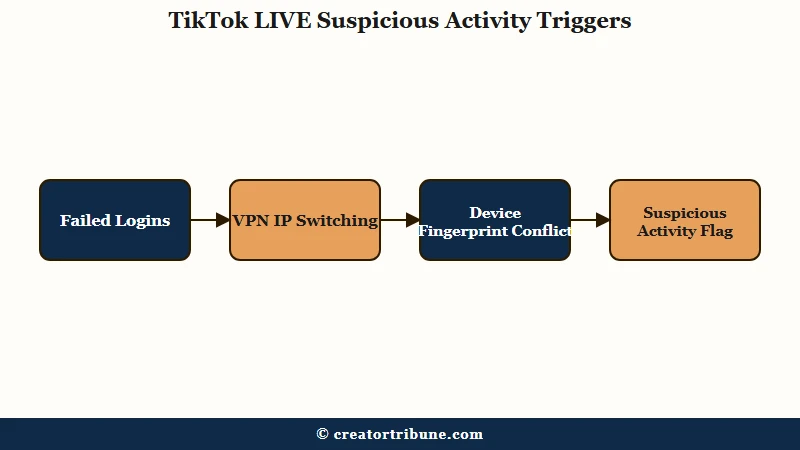
The “Maximum Number of Attempts Reached” version fires after a run of failed sign-in, registration or verification attempts in a short window. TikTok does not publish the threshold, so the number of tries quoted around the web is guesswork, but the system treats the run as a brute-force attempt and locks things down even when it was just you forgetting a password.
The way I read it, the device fingerprint is the piece people miss. TikTok builds a profile from your device ID, app data, and settings, so running several accounts off one phone gets flagged as automated behavior and can block LIVE on every account tied to that hardware.
The rules back this up. TikTok keeps account and network security as its own policy area in the official Community Guidelines, and it treats sharing access, automating actions, or masking your real network as violations in their own right, separate from anything you post. A login or device pattern alone can restrict LIVE while your videos stay perfectly fine.
| Symptom | Likely cause | Fix |
|---|---|---|
| Locked out after failed logins | Brute-force flag from repeated failed sign-in or code attempts | Use Recover your account, wait 24 hours |
| Flagged right after using a VPN | Shared or switching IP address | Turn off the VPN, log in on home network |
| Every account on your phone blocked | Device fingerprint conflict | Stop managing multiple accounts on one device |
| LIVE cut with an empty details box | Automated false flag | Appeal immediately, then file a manual ticket |
Why TikTok LIVE Studio Says Suspicious Activity Detected on Desktop
LIVE Studio signs you in through the same account security system as the phone app, so a failed run on the desktop counts against the same lockout and produces the same “Maximum Number of Attempts Reached” wall.
Two details make the desktop case worse than the mobile one. TikTok LIVE Studio is Windows only, with no Mac build, which is easy to miss because the separate TikTok Studio app does ship for Mac, and the desktop sign-in usually routes you through a verification code sent to your email or phone rather than a straight password entry.
That code step is where creators get stuck. Each failed or expired code counts as another attempt, so retrying the code three or four times in a row can trip the lockout even though the password was never wrong.
The practical unblock is to stop retrying on the desktop and confirm the account is healthy in the phone app first. If the app signs in cleanly and can start a LIVE, the problem sits with the desktop authentication run and clears on its own, usually within a day.
Streaming through OBS or Streamlabs instead runs into a different wall, and it is worth knowing that it is not a content judgment. A stream key is not issued to every account, as the July 2026 edition of Streamer Guide’s TikTok walkthrough puts it, “TikTok does not give to everyone automatically”, so a “not approved or revoked” message on a third-party service most often points at the key’s authorization state, which is worth checking before assuming your stream was penalized.
Why Your TikTok LIVE Keeps Getting Cut Off Mid-Stream
Streams get cut mid-broadcast when automated moderation flags static content, a third-party software rule, a minor-safety false positive, or off-platform promotion.
The notice usually cites “repeated violations of community guidelines” while the details box sits completely empty.
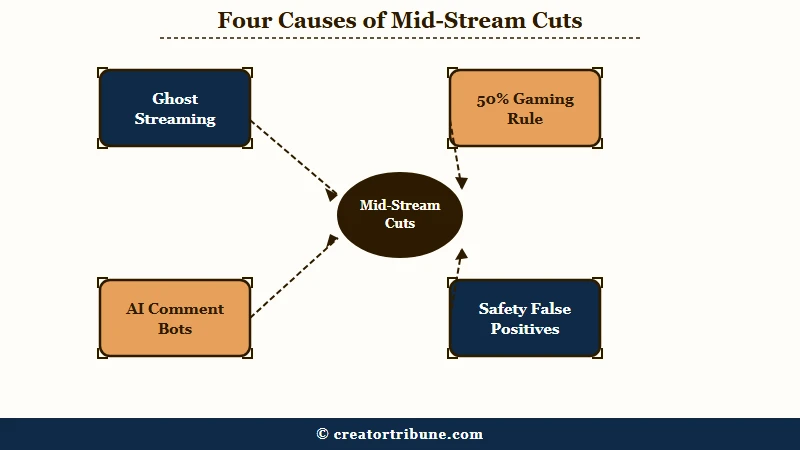
That empty details box is the most reported frustration of 2026, and it is why creators cannot tell what they did. A few specific triggers are behind most mid-stream cuts, so here is what I would rule out first.
- Static or ghost streaming, where you step away and leave a blank screen, a looped clip, or a slideshow running, now reads as low-quality content and gets pulled fast.
- Third-party software like OBS or Streamlabs depends on a stream key that TikTok does not hand out to every account, so a stream that will not start there is usually a key authorization problem and not a ruling on what you were broadcasting.
- AI voice-to-text bots that read viewer comments aloud put the strike on you, because TikTok moderates whatever your broadcast outputs and a bot reading a slur out loud is your broadcast saying it. TikTok also runs a separate AI-generated content policy that reaches LIVE, and while plain text-to-speech narration is exempt, a cloned or impersonated voice carries a labeling duty on top of the moderation risk.
- Off-platform promotion, like naming or linking Instagram or a shop, can quietly drop your stream from the For You feed so only existing followers see it.
- Minor-safety detection can misread an adult host as underage from face or voice alone, or read a wardrobe adjustment as a safety issue, and cut the stream instantly.
On the “authority score”: creator guides describe a hidden TikTok trust rating built from original content, watch time and a clean violation record. TikTok has never confirmed that such a score exists or published anything resembling one, so treat it as a way of describing why two similar accounts get treated differently, not as a number you can check.
Mass reporting belongs on this list too. A coordinated wave of viewer reports can trip an automatic temporary suspension even when nothing in your stream broke a rule, which is why a clean creator can still get cut.
If your reach has been sliding alongside the restrictions, the shadowban diagnostic helps separate a visibility throttle from a true LIVE block.
What LIVE Visibility Restricted Means on TikTok
A LIVE visibility restriction leaves your stream running but makes it ineligible for recommendation and restricted in search results, so it reaches followers and profile visitors only. Your stream keeps running while its reach is capped.
Creators confuse it with a ban because the numbers look identical from inside the stream. Viewer count sits near zero, gifts stop, and nothing in the interface says you were removed, because you were not.
The notice names its own reason, which is the part worth reading twice. The wording follows a fixed shape, “your LIVE is not eligible for recommendation and restricted in search results because”, followed by the trigger, and the reasons creators report seeing include unoriginal or reproduced content, low visual quality or static imagery, primarily directing people off the platform, fake engagement, and frauds and scams.
All of them close on the same line about the For You feed eligibility standards under the Community Guidelines. Some versions carry a duration in the text, such as the next 10 minutes, which is a useful signal that the restriction is a short automated one rather than an account-level judgment.
| What you see | What it is | What to do |
|---|---|---|
| Stream starts, almost nobody arrives | Visibility restriction, you are out of recommendation | Read the reason in the notice, appeal if the option is offered, then stream clean for a few sessions |
| Stream ends by itself with a guidelines notice | Mid-stream enforcement on something detected live | Appeal from the notice while the details are fresh |
| The Go LIVE button will not start at all | LIVE access blocked at account level | Check for a violation notice first, then appeal or wait it out |
One trigger worth naming, because it catches people who broke no rule they recognise, is reproduced content. A stream built on someone else’s footage, a looping clip, or licensed material such as a broadcast sports match can read as unoriginal, and the same detection sits behind the wider problem covered in the account not recommended guide.
How Long a TikTok LIVE Restriction Lasts and How to Appeal It
Temporary LIVE restrictions expire on their own, and creator reports cluster around 24 hours, 48 hours, 7 days and 30 days, though TikTok publishes no schedule. Permanent bans carry no end date and reverse far less often.
Minor-safety flags are the exception, since they do not expire until you verify your age with ID.
Appeals are where expectations need managing. Most first-pass reviews are automated, the reply arrives as a template, and creators widely report that a rejection at that stage tells you very little about whether a human ever looked. Appeals do still overturn clean automated misreads, so the way you write the first one matters.
Here is the sequence I would run the moment a restriction lands.
- Tap Appeal on the ban notice right away and state plainly why the removal was a mistake, since fast appeals catch automated errors best.
- If the ban notice has no Appeal button, look in your Inbox under System notifications for an Account updates entry naming the LIVE violation, which is where the appeal option usually sits. Failing that, use Settings and Privacy, then Report a Problem, then LIVE, and submit a manual ticket.
- For a minor-safety flag, verify your age with a government ID, an ID selfie, or facial age estimation to clear the block.
- For a maximum-attempts lockout, use Recover your account on the error screen to confirm your identity by email or username.
- For network-related blocks, switch from Wi-Fi to mobile data or wait a 24 to 48 hour cooldown before trying again.
The wording of that first appeal matters more than people think. Here is the difference.
Weak appeal: “Please give me my live back, I did nothing wrong, this is unfair.”
Strong appeal: “My LIVE was removed for suspicious activity during a normal stream on my home network with no third-party tools running. I believe this was an automated error and request a manual review.”
For the broader account-level version of this, the TikTok ban appeal walkthrough covers strikes that hit the whole account, and the shadowban recovery guide helps if your reach never returns after the block clears.
Moderation at TikTok’s scale is mostly machine work before it is anything else. The platform’s own Q1 2026 enforcement report records 178,014,154 of 184,012,576 removed videos as caught by automated detection, which is 96.74 percent, and 8,838,710 removals later reinstated. Pattern detection at that volume produces false positives, and LIVE gets the same treatment.
Can You Go Live With Under 1000 Followers in 2026
Usually not. The standard requirement is 1,000 followers and a host aged 18 or over, and reports of access below that threshold are rare and cannot be triggered on purpose.
Treat the follower threshold as the working requirement rather than a number with a known workaround.
In practice a clean record and original, high-retention content improve the odds of an early grant, while a history of violations keeps the feature locked even past 1,000 followers. Note that 18 is also the floor for sending and receiving gifts and for the PC streaming features, so an under-18 account is not getting LIVE Studio regardless of reach. LIVE Studio also requires an account that can already go LIVE, so the desktop app is not a way around the follower bar.
If LIVE access matters to you, account standing is worth protecting more carefully than raw follower count, the same way creator monetization eligibility turns on standing rather than size alone.
Frequently Asked Questions
What does suspicious activity mean on TikTok LIVE?
It means TikTok’s system spotted an unusual login, network, or device pattern it reads as account abuse. Common triggers are repeated failed logins, VPN IP switching, and one device running several accounts, rather than anything in your actual stream.
Why does my TikTok LIVE keep getting cut off?
Automated moderation flags static or ghost streaming, reproduced or licensed content, minor-safety false positives, and off-platform promotion. The notice often cites community guidelines while leaving the details box empty, so the real trigger stays hidden. A stream that will not start through OBS at all is a separate problem, usually stream key authorization.
How long does a TikTok LIVE ban last?
Temporary restrictions expire automatically, and creator reports cluster around 24 hours, 48 hours, 7 days and 30 days, but TikTok publishes no schedule so none of those are guaranteed. Minor-safety flags last until you verify your age with ID, and permanent bans have no end date and reverse far less often.
What does LIVE visibility restricted mean on TikTok?
It means your stream is allowed to run but has been made ineligible for recommendation and restricted in search results, so it reaches followers and profile visitors only. Viewer counts collapse and gifts stop, which reads like a ban from inside the stream, but the Go LIVE button still works. Appeal the notice, then stream clean for several sessions.
Why does TikTok LIVE Studio say suspicious activity detected?
LIVE Studio authenticates through the same account security system as the phone app, so failed sign-ins and expired verification codes on the desktop count toward the same lockout. Retrying the emailed code repeatedly is the most common way creators trip it. Stop retrying, confirm the account signs in cleanly on your phone, and the desktop side usually clears within a day.
Will a VPN fix my TikTok LIVE restriction?
No. LIVE restrictions track your account and device fingerprint, not your IP address, so switching VPN locations will not reset the timer. A shared VPN often makes things worse by linking you to other users’ suspicious activity.
Why was my LIVE flagged when I did nothing wrong?
Automated systems misread background copyrighted audio, a wardrobe adjustment, or your appearance as underage, and mass reporting by viewers can trip an automatic suspension. These false positives are common because moderation runs on pattern detection at scale.
How old do you have to be to go live on TikTok?
You must be at least 18 to host a TikTok LIVE, and 18 to send or receive gifts, which TikTok checks against your registered birthday and, increasingly, facial age estimation. That age-estimation layer is also why an adult host can be misread as a minor and cut mid-stream, so clearing a minor-safety flag with a government ID usually works faster than a plain appeal.
Can I appeal a permanent TikTok LIVE ban?
Yes, but the success rate is much lower than for temporary restrictions. Tap Appeal on the notice, or use Report a Problem in Settings if no button shows, and frame your appeal as a likely automated error with specific details.
Quick Takeaways
- Suspicious activity on TikTok LIVE is usually a login, network or device flag rather than a content violation.
- LIVE Studio counts against the same lockout as the app, and repeated verification-code retries on the desktop are the quickest way to trigger it.
- A VPN will not reset a restriction, since it follows the account and device, and a shared exit address makes matters worse.
- LIVE visibility restricted keeps the stream running but drops it from recommendation and search, which caps reach without blocking access.
- A stream that will not start through OBS is usually stream key authorization, since TikTok does not issue keys to every account.
- Appeal fast and specifically. TikTok publishes no duration schedule, and 96.74 percent of its Q1 2026 video removals were made by automated detection.