Fix Your Instagram Explore Page Gone Generic
Fix Your Instagram Explore Page Gone Generic
Instagram Explore page changed to generic content? Learn why it reset, how to retrain it in 24 to 48 hours, and the exact steps that fix it.
- 1Why Did My Instagram Explore Page Change
- 2Is It a Reset, a Bug, or a Shadowban
- 3How to Reset and Retrain Your Explore Feed
- 4What to Do If the Feed Stays Stuck
- 5Frequently Asked Questions
- Why did my Instagram Explore page suddenly change?
- How do I reset my Instagram Explore page on purpose?
- How long does it take to retrain the Instagram algorithm?
- Does a generic Explore page mean I am shadowbanned?
- Why is my Explore page showing nature and animals?
- Will clearing my cache fix the Explore page?
- 6Quick Takeaways
What’s Changed: When your Instagram Explore page changed to generic nature photos and memes, the algorithm lost your personalization signals and dropped into a cold-start state. It is usually a bug or a reset, not a ban, and it rebuilds in 24 to 48 hours if you feed it the right signals. The fixes and the retraining method are below.
You open Explore expecting your usual niche, the fandom edits, the specific corner of Instagram you really care about, and instead you get generic nature shots, animals, and memes. Liking posts does nothing. Closing and reopening the app does nothing.
It feels like the algorithm forgot who you are, and in a sense it did. When your Instagram Explore page changed to generic content overnight, the system lost the personalization signals it had built up and reverted to a neutral, broad feed. I have seen this hit creators in waves, and the panic is always the same: did I get shadowbanned?
Almost always, no. This is a cold-start problem, not a punishment, and it is fixable on a predictable timeline. Here is what really happened under the hood, how to tell it apart from a real reach problem, and the exact sequence I would use to retrain the feed back to your niche.
Why Did My Instagram Explore Page Change
Your Instagram Explore page changed because the algorithm lost your personalization data and fell back to generic recommendations, usually from a bug, an accidental reset, or signal loss.
When it has nothing to rank on, it shows broad, safe content like nature and animals.
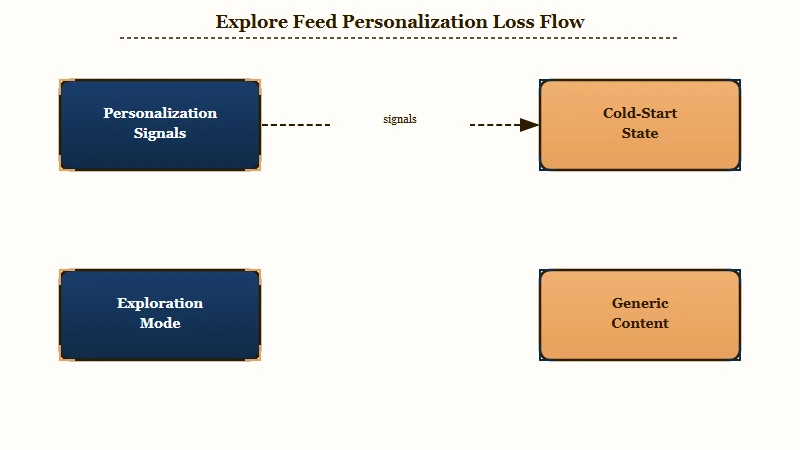
What is a cold start: A cold start is when a recommendation system has no recent personalization signals for you, so it shows generic popular content until your interactions teach it your interests again.
The mechanic behind this is worth understanding because it tells you how to fix it. Instagram’s recommender balances exploration, showing you new broad content, against exploitation, showing you known interests.
When your history gets wiped or stuck, the system flips into exploration mode and feeds you the generic pool.
There is real scale behind that generic feed. Instagram serves more than 2 billion monthly active users, per Statista’s Instagram user count, and its architecture narrows roughly 70,000 candidate posts down to about 500 for deep ranking before anything reaches you.
From what I have seen, a generic Explore page means the system discarded its deep-ranking history and is showing you the raw, unweighted broad pool instead.
For the reach-side version of this problem, our dropped Instagram reach guide covers when the issue is distribution rather than recommendations.
Is It a Reset, a Bug, or a Shadowban
A reset or bug changes the type of content you see, while a shadowban changes who sees your content; they are different problems with different fixes.
Check Account Status before you assume the worst.
The cleanest way I have found to tell them apart is to ask what changed. If your Explore feed went generic but your own posts still reach your followers normally, this is a recommendation reset or bug, not a ban. A shadowban shows up as your content failing to reach non-followers.
To confirm, open Settings and go to Account Status. It tells you whether your content is currently eligible to be recommended to non-followers. If Account Status is clean and only the content you see has changed, you are dealing with a feed reset, and the retraining method below is your fix.
Use this table to match what you are seeing to the real cause before you change any settings.
| Symptom | Likely cause | Fix |
|---|---|---|
| Explore full of generic nature and memes | Cold-start reset, lost signals | Retrain with 8 to 10 niche interactions |
| Feed went bland after using Reset suggested content | Deliberate recommendations reset | Wait 24 to 48 hours, interact heavily |
| Niche content gone, lots of sanitized posts | Sensitive Content Control set to Less | Switch it to Standard in settings |
| Your posts not reaching non-followers | Shadowban or eligibility penalty | Check Account Status, fix flagged content |
| Feed frozen or glitchy on one device | App cache bloat | Clear cache on Android, Offload on iPhone |
How to Reset and Retrain Your Explore Feed
To fix a generic Explore page, confirm your settings, optionally use the official Reset suggested content tool, then feed the algorithm 8 to 10 strong niche interactions within the first 24 to 48 hours.
The first interactions after a reset carry the most weight.
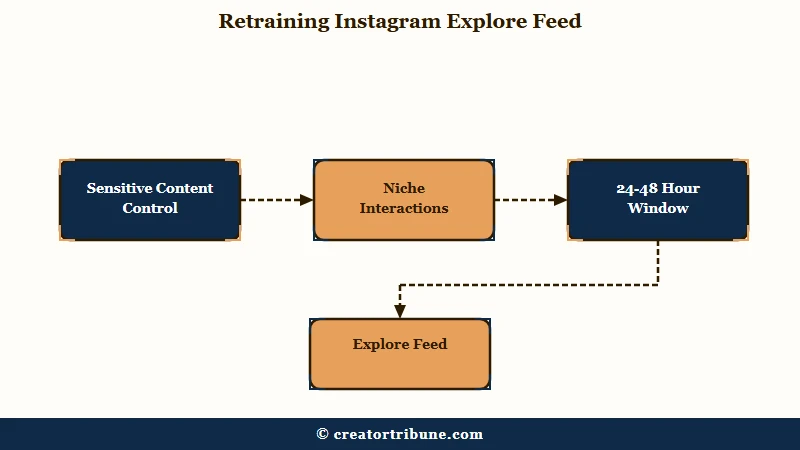
Before you retrain, rule out the two settings that quietly sanitize Explore. Sensitive Content Control set to Less filters out anything Instagram considers upsetting, which can strip your feed down to bland content, so set it back to Standard. Then check whether you accidentally triggered the official reset.
Here is the retraining sequence I would run, in order:
- Open your profile, tap the menu, go to Content preferences under What you see, and decide whether to use Reset suggested content for a clean slate.
- Set Sensitive Content Control to Standard so real niche content is allowed back into Explore.
- Make 8 to 10 high-value interactions in your niche right away: save posts, share them, watch Reels to completion, and search your core keywords.
- Use Not Interested on generic posts by tapping the three dots, which actively tells the system what to drop.
- Give it 24 to 48 hours of consistent behavior before judging the result.
The reason this works comes down to a hard number. Recommendation precision drops about 37 percent for accounts with fewer than 5 interactions, and the feed needs roughly 8 to 10 meaningful interactions before it locks back onto your niche. The way I see it, the worst thing you can do in that first window is mindless scrolling, because the algorithm weighs those two days most heavily.
Before: You panic, scroll Explore for an hour liking random generic posts, and the feed gets more generic because you fed it broad signals. After: You set Sensitive Content Control to Standard, save and fully watch 10 Reels in your niche, mark generic posts Not Interested, and wait two days while the feed re-personalizes.
What to Do If the Feed Stays Stuck
If your Explore page stays generic after two days of retraining, clear the app cache and check for a device-level bug, since a bloated cache can freeze the feed in place. The cache fix differs by phone.
On Android, go to Settings, then Apps, then Instagram, then Storage, and tap Clear Cache. On iPhone there is no native cache button, so use the Offload trick: Settings, iPhone Storage, Instagram, Offload App. From what I have seen, Offload is the move because it clears temporary data without wiping your login or your Reels drafts, which a full delete-and-reinstall would put at risk.
If some regions have it, the Your Algorithm feature in Reels settings lets you toggle specific topics like skincare or AI tools on and off. That gives you a surgical option: if a reset floods Explore with one generic topic, toggle it off directly instead of resetting everything again.
If your reach is genuinely down rather than just your feed, our shadowban self-test and why reels reach drops cover that separate problem, and our Instagram shadowban guide walks through recovery.
Frequently Asked Questions
Why did my Instagram Explore page suddenly change?
Your Explore page changed because the algorithm lost its personalization signals and fell back to generic content. It is usually a bug or a reset rather than a ban, and it rebuilds once you feed it fresh niche interactions over 24 to 48 hours.
How do I reset my Instagram Explore page on purpose?
Open your profile, tap the menu, go to Content preferences under What you see, and select Reset suggested content. This clears past signals across Explore, Reels, and Feed, then rebuilds suggestions over the next 24 to 48 hours based on new behavior.
How long does it take to retrain the Instagram algorithm?
The feed typically starts showing personalized content again within 24 to 48 hours after a reset. Precision improves sharply after your first 8 to 10 meaningful interactions, such as saves, shares, and watching Reels to completion.
Does a generic Explore page mean I am shadowbanned?
Not usually. A reset changes the type of content you see, while a shadowban changes who sees your content. Check Settings, then Account Status, to confirm your posts are still eligible to reach non-followers.
Why is my Explore page showing nature and animals?
Nature, animals, and memes are the neutral fallback content Instagram shows when it has no personalization data. The system is in exploration mode and needs your interactions to rebuild a niche profile.
Will clearing my cache fix the Explore page?
It can if the feed is frozen by a device-level bug. On Android, clear the cache in app storage settings. On iPhone, use Offload App so you keep your login and drafts while refreshing the app.
Quick Takeaways
- A generic Instagram Explore page is almost always a cold-start reset or bug, not a shadowban; it changes what you see, not who sees you.
- Check Settings then Account Status to rule out a reach penalty before assuming the worst.
- Retrain the feed with 8 to 10 niche interactions in the first 24 to 48 hours, and set Sensitive Content Control to Standard.
- If it stays stuck, clear the cache on Android or Offload the app on iPhone, and use Not Interested to drop generic posts.