Fix TikTok Engagement Numbers Not Showing
Fix TikTok Engagement Numbers Not Showing
TikTok engagement numbers not showing? Learn why likes, comments, and views disappear, how to tell a glitch from a ban, and the fixes that work.
- 1What’s Happening With TikTok Engagement Numbers
- 2Why TikTok Likes and Comments Disappear
- 3How Do I Know If It Is a Glitch or a Ban
- 4How to Fix TikTok Numbers Not Showing
- 5What a Zero Counter Does Not Mean
- 6Frequently Asked Questions
- Why are my TikTok likes and comments not showing?
- How long does a TikTok view glitch last?
- Does zero views mean I am shadowbanned?
- How do I check my TikTok account status?
- Should I delete a video stuck at zero views?
- Why do my view counts go down on TikTok?
- 7Quick Takeaways
What’s Changed: When your TikTok engagement numbers stop showing, it is almost always a display glitch or a server-side lag, not a punishment. The counter can read zero while likes and comments keep rolling in, which means the video is still being pushed. Check your account status first, then work through the cache and network fixes below.
You open TikTok, look at a video that was doing fine yesterday, and the like, comment, share, and favourite counts are just gone. Maybe the view counter is frozen at zero too. The first thought is always the worst one: shadowban, suppression, the algorithm quietly killing your account.
Most of the time, that panic is misplaced. TikTok engagement numbers not showing is one of the most common display bugs on the platform, and it usually means the counter failed to refresh, not that your reach died. I have watched this exact glitch roll through creator feeds more than once, and the pattern is almost always the same.
Here is what I want you to walk away with: how to tell in 60 seconds whether this is a harmless glitch or a real account problem, the fix sequence that clears the display bug, and why a zero counter does not mean a dead video. Let me show you the difference.

What’s Happening With TikTok Engagement Numbers
TikTok engagement numbers not showing is usually a server-side display lag or outage, where the counter stops updating even though your video keeps getting likes, comments, and views.
The data still exists; the app just is not painting it on screen.
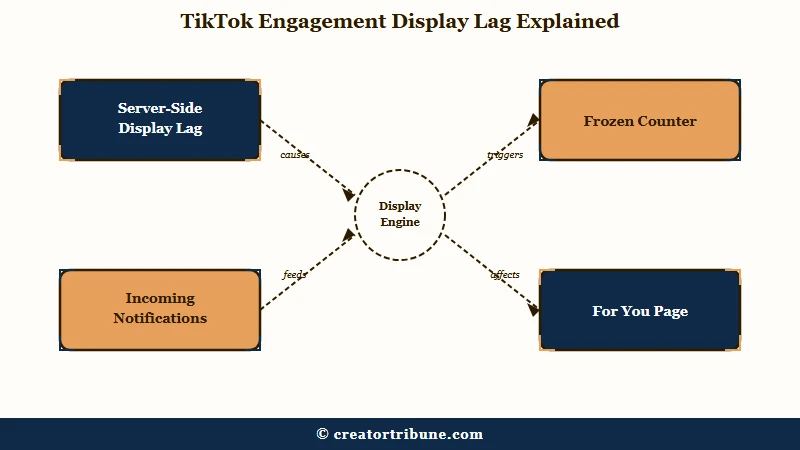
What is a display lag: A display lag is when TikTok’s servers are still recording your likes, comments, and views, but the number shown in the app fails to refresh, so it appears frozen or at zero.
The clearest tell is what I call the notification paradox. Your counter sits at zero, but your notifications keep buzzing with new likes and comments, sometimes 25 likes and 5 comments a minute. From what I have seen, that combination is proof the video is alive and on the For You Page; only the display is broken.
This is not rare, and it is not always your account. In late January 2026, a winter storm knocked out an Oracle data center and left U.S. users stuck at zero views on new posts for roughly two days, with the algorithm itself broken.
A separate partner data center power outage hit days later. When the whole region goes dark, no amount of cache clearing fixes it, and waiting is the only move. For the related “my views tanked” version of this, our guide to low FYP views covers the reach side.
Why TikTok Likes and Comments Disappear
TikTok likes and comments disappear for five main reasons: a platform outage, normal metric lag, an outdated app or full cache, a new-account trust window, or an actual account restriction. Only the last one is something you did.
The 2026 algorithm made this more confusing. TikTok now runs new videos through a follower-first test phase, showing them mostly to your existing followers for the first few days before deciding whether to push them wider.
During that window, numbers update slowly and unevenly, which reads like a glitch even when nothing is wrong.
There is also a trust window on fresh accounts. For the first 2 to 24 hours after you create an account, TikTok suppresses metrics while it verifies you, so new creators often see zero engagement and assume the worst. The way I see it, the smartest thing a new creator can do is wait that window out instead of deleting the post.
Use this table to match your symptom to the likely cause before you start changing settings.
| Symptom | Likely cause | Fix |
|---|---|---|
| Counter at zero but notifications rolling in | Server-side display lag | Wait it out, force-close and reopen the app |
| Whole region stuck at zero on new posts | Platform outage | Wait, check a status tracker, do not delete the video |
| Numbers frozen only on your device | App cache or outdated version | Clear cache, update the app, restart the phone |
| Brand new account, no views for hours | 2 to 24 hour trust window | Wait, keep posting normally |
| Warning sign in Account Check | Account restriction or strike | Review the flagged content, appeal if wrong |
How Do I Know If It Is a Glitch or a Ban
You tell a glitch from a ban by checking Account Check in TikTok Studio: a green checkmark means a harmless glitch, while a warning sign means a real restriction on your account or a specific post.
This 30-second check settles the panic faster than anything else.
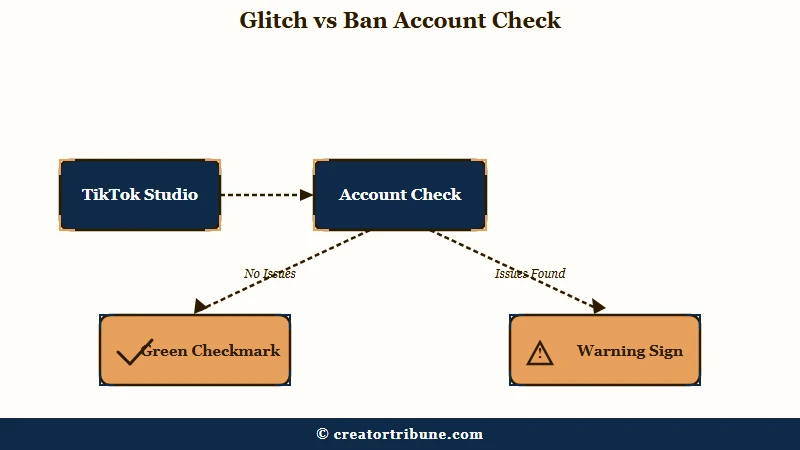
Here is the exact path I run before assuming the worst:
- Open TikTok and tap Profile at the bottom.
- Tap the menu button at the top and open TikTok Studio.
- Under More tools, tap Account check.
- Read the results. A checkmark next to each feature means no issue. A warning sign means a restriction on your standing or a post’s performance.
If Account Check is all green and your notifications are still active, you are looking at a display glitch, full stop. A genuine restriction shows up as a warning here, and videos with sensitive content can sit “under review” for 24 hours or longer.
For the deeper version of that diagnosis, our shadowban self-test walks through every signal, and the shadowban recovery guide covers what to do if the test comes back bad.
How to Fix TikTok Numbers Not Showing
To fix TikTok numbers not showing, clear the app cache, update the app, and toggle your network, in that order, after confirming your account status is clean.
These steps fix the local display bugs that cache and stale app versions cause.
When Account Check is green, the culprit is almost always cache, an old app version, or a flaky connection. From what I have seen, cache is the offender more often than people expect, so that is where I start.
- Toggle between Wi-Fi and mobile data to rule out a weak signal blocking the refresh.
- Force-close TikTok, then restart your phone to clear stuck processing.
- Update TikTok and your phone’s operating system to the latest version.
- Clear the cache: Profile, then the menu, then Settings and privacy, then Free up space, then Clear next to Cache.
- If a specific video is stuck in processing, switch it from public to private and back, or share the link directly, to kick-start it.
One thing I would avoid: untrusted VPNs. A suspicious-looking connection can make TikTok throttle a video’s traction, so if you turned a VPN on right before the numbers vanished, turn it off and check again.
Before: You see zero likes and zero views, assume a shadowban, and delete the video out of frustration. After: You check Account Check (all green), notice the like notifications still arriving, clear your cache, and the real numbers reappear an hour later with the video intact.
What a Zero Counter Does Not Mean
A zero counter does not mean your reach is dead or your account is banned; during a glitch the video often keeps spreading while the number stays frozen. Deleting it is the one move that can cost you.
The reason patience wins here is the post-glitch catch-up. Once the display lag clears, the counter usually jumps from zero to its real number all at once, sometimes thousands of views in one update. That jump is the proof the engagement was real the whole time.
There is one honest caveat worth knowing. In a few cases, creators report that once the counter finally catches up after a long outage, the video’s momentum stalls, as if the algorithm stopped pushing it mid-glitch.
It is not common, but it is why I would never delete and re-upload during an active outage, you risk losing a video that was performing. Short-form video is still where the audience is, with Statista’s TikTok user data counting over 1.5 billion monthly active users, so a single glitched counter is rarely worth a panic.
If your views truly collapsed after a viral spike rather than just glitching, our post-viral collapse breakdown explains that separate pattern.
Frequently Asked Questions
Why are my TikTok likes and comments not showing?
Your likes and comments are usually still being counted on TikTok’s servers, but a display lag or outage is stopping the number from refreshing. If notifications keep arriving while the counter sits at zero, it is a glitch, not a ban.
How long does a TikTok view glitch last?
Most TikTok outages and view glitches last between one hour and two days. If the numbers are still missing after 48 hours and your Account Check is clean, the cause is more likely local, so clear your cache and update the app.
Does zero views mean I am shadowbanned?
Not on its own. Check Account Check in TikTok Studio first. A green checkmark with active like and comment notifications points to a display glitch, while a warning sign points to a real restriction.
How do I check my TikTok account status?
Open TikTok Studio from your profile menu, then tap Account check under More tools. A checkmark next to each feature means no issue, and a warning sign means a restriction on your account or a specific post.
Should I delete a video stuck at zero views?
No. Deleting a video during a glitch or outage can cost you a post that was performing. Wait for the counter to catch up, and only consider re-uploading once your account status is confirmed clean.
Why do my view counts go down on TikTok?
View counts can drop retroactively when TikTok removes views it flags as invalid during instability. One reported case saw a video fall from 15,000 to 9,000 views overnight, which is a verification correction rather than a penalty.
Quick Takeaways
- TikTok engagement numbers not showing is usually a display lag or outage, not a shadowban; if notifications still arrive while the counter reads zero, the video is alive.
- Check Account Check in TikTok Studio first: green checkmark means glitch, warning sign means a real restriction.
- Fix local display bugs in order: toggle network, restart, update the app, clear the cache, then toggle a stuck video public to private and back.
- Do not delete a video stuck at zero during an outage; the counter usually catches up and deleting can kill a post that was performing.