How To Prove Your Video Is Not AI Generated In 2026
How To Prove Your Video Is Not AI Generated In 2026
Honest creators are getting hit by YouTube's AI crackdown. Five proven tactics to prove your video is human-made and recover from a false flag.
- 1Why Are Honest Creators Being Flagged As AI?
- 2What Counts As AI Content That Needs Disclosure?
- 3How Do You Build On-Video Proof You Are Human?
- 4What Should You Put In Your Video Description?
- 5How Do You Build Channel-Level Authenticity Signals?
- 6How Do You Handle AI Accusation Comments?
- 7How Do You Appeal A False AI Demonetization?
- 8Frequently Asked Questions
- Does YouTube penalize creators who use AI for scripts or thumbnails?
- Can I prove my video is human-made without showing my face?
- How long does a YouTube AI demonetization appeal take?
- Should I delete AI accusation comments on my videos?
- What is the “altered or synthetic content” label and do I need it?
- Will adding a “human-made” disclaimer hurt my thumbnail or title performance?
TL;DR: YouTube removed 16 major channels worth $10 million in annual revenue in January 2026 for inauthentic AI content, and the dragnet is catching honest creators too. Five proven tactics let you prove your video is human-made: integrated process shots, a positive disclosure block, channel-level signals, smart comment handling, and an appeal template with raw project files.
Most creators I talk to right now are spending more time defending their videos from AI accusations than making the next one. The dragnet is real, and it does not always sort honest humans from AI farms before it hits.
YouTube removed 16 major channels from the Partner Program in January 2026, channels that represented 4.7 billion views and $10 million in annual revenue. Some of those were AI slop farms. Several were not.
The algorithm now scores entire channels for a “human creative fingerprint” rather than judging videos one at a time, and the false-positive rate has climbed with it.
This guide walks through five tactics to build proof your video is human-made into the work itself: on-video labor signals, a positive description block, channel-level authenticity, comment-section handling, and a clean appeal template you can adapt the moment a strike lands.
Why Are Honest Creators Being Flagged As AI?
Honest creators are being flagged because YouTube switched in 2026 from scoring videos to scoring whole channels for a “human creative fingerprint.”
A channel that posts 12 times a day, uses template clones, or skips on-camera presence triggers the same risk score as an actual AI slop farm.
In my experience the new system is less about catching AI than about catching cheap-looking output. If your channel hits any of the high-risk patterns below, the algorithm assumes nobody is in the driver’s seat, regardless of how much human labor went into each video:
- Overposting: more than 6 uploads a day on a small channel reads as bot-paced.
- Template clones: every video using the same hook structure, same caption position, same B-roll cadence.
- AI slideshows: stock images cut to music with no original footage or commentary.
- No on-camera presence: zero seconds of a human face, hands, or voice across the whole channel.
- Metadata updates over 10 videos a day: mass title and thumbnail edits look like automation.
A greenscreen-meme creator from one of the bigger creator communities recently put 100 hours into a single video and still got accused of using AI. The problem is not the labor, it is that the labor is invisible to the viewer and the algorithm. The fix is to make the labor visible.
What Counts As AI Content That Needs Disclosure?
YouTube requires disclosure when realistic content is altered or synthesized in ways a viewer could mistake for reality.
Beauty filters, color grading, AI scripts, AI thumbnails, and your own cloned voice do NOT require disclosure. Faked footage of real people, places, or events DOES.
The policy lives at YouTube’s altered content disclosure, and the line is clearer than most creators realise. The three things that always require the “altered or synthetic content” label:
| Trigger | Example | Disclosure required |
|---|---|---|
| Real person says or does something they did not | AI dub putting words in a celebrity’s mouth | Yes |
| Real place or event altered to look different | Modifying real disaster footage | Yes |
| Realistic synthetic scene that did not happen | AI-generated “footage” of a fake event | Yes |
| Beauty filter, color grade, lighting filter | Standard editing | No |
| AI-generated script or outline | LLM-assisted writing | No |
| AI-generated thumbnail or B-roll image | Midjourney or Stable Diffusion | No |
| Your own voice cloned for dub or voiceover | ElevenLabs of your own recording | No |
Greenscreen meme videos like “Sopranos in Skyrim” fall under the “altered or synthetic content” label even though no AI was involved. That traps any creator who relies on hand-cut composites, since the label is required for any composited reality, and viewers read the label as “this is AI.” It is not. The label is shorthand for “this is not literal,” and the creator’s job is to clarify the rest.
How Do You Build On-Video Proof You Are Human?
The strongest on-video proof is a 5-to-10-second process shot in the first 20 seconds of the video, before the haters scroll.
Behind-the-scenes timelapse, on-camera narration, raw editing-suite screenshots, and a “human-made” overlay each carry weight. Stack two or three.
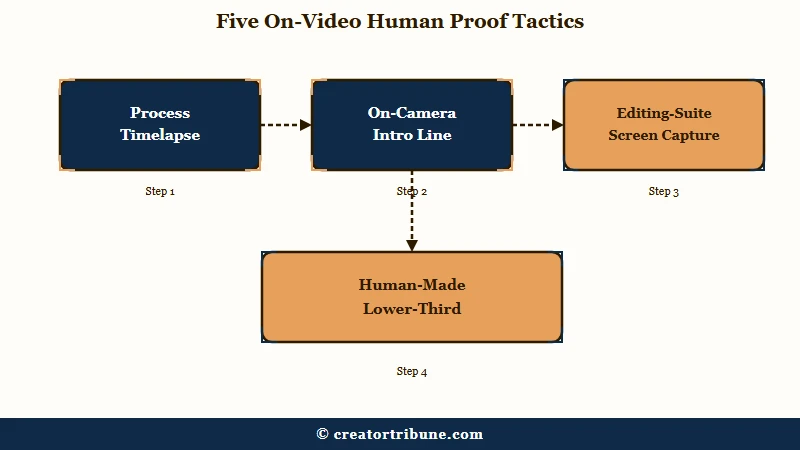
What I would prioritize, in order:
- Process timelapse at the start. A 5-second clip of your hands, your camera, or your editing timeline plays before the first scene. The viewer sees the labor before deciding to bail.
- On-camera intro line. Two seconds of your face saying “thanks for watching” or “here is what I made this week.” Voice and face are the most expensive things for AI farms to fake at scale.
- Raw editing-suite screen capture. A 3-second cut of Premiere or After Effects with your project file visible. The timeline structure is unmistakeable.
- “Human-made” lower-third for the first 10 seconds. Plain text in the bottom-left, no flair. This works without cluttering the thumbnail and survives the first-second scan that decides whether haters scroll.
- Intentional imperfections. A visible boom mic, a minor stumble in the narration, an off-frame light flare. AI tends to produce uncannily clean output; small artefacts of a real shoot signal a real shoot.
Before: A clean cinematic intro that drops straight into the polished video with no on-screen presence.
After: Three-second timelapse of the editing timeline, then a one-second cutaway to your hands on the keyboard, then the polished video. The hater scrolls past 4 seconds of proof before deciding it is AI.
The process timelapse does double duty as engagement. Process content consistently outperforms pure-output content for retention in the first 30 seconds, which is also the window the algorithm weights heaviest for reach signals.
What Should You Put In Your Video Description?
A positive disclosure block in the description tells both viewers and YouTube exactly what was human-made.
Treat it like a credits roll, not a defense.
The way I would structure the bottom of every description for the next six months:
HOW THIS VIDEO WAS MADE
Filmed on: [Camera or capture model]
Edited in: [Premiere / DaVinci Resolve / Final Cut / CapCut]
Script written by: [Your name, no LLM assistance]  OR  [Your name with LLM outline assistance]
Voice: [Your own / your own cloned via ElevenLabs / no voiceover]
B-roll source: [Personal footage / licensed Storyblocks / labeled AI image where applicable]
Time invested: [Approximate hours]
That block is the cheapest insurance available. It costs 30 seconds per video and gives a human reviewer at YouTube a complete provenance map if your channel ever lands in the appeal queue.
The other reason it works: viewers who arrive ready to accuse “AI” scroll the description out of curiosity. Naming the camera and editor turns the comment thread argument into a one-line answer, and the people who were on the fence usually drop the accusation. The same logic that drives native-vs-reupload preference on Instagram applies here: the platform rewards verifiable origin signals.
How Do You Build Channel-Level Authenticity Signals?
Channel-level authenticity is built before any flag happens, not after.
The five signals YouTube weights heaviest are upload consistency, voice and face presence, unique format, original commentary, and a believable cadence.
In my experience these are the moves that matter most over a 90-day window:
- Upload cadence of 2 to 5 videos a week, not 12 a day. Bot-paced uploads are the loudest signal that nobody human is at the wheel.
- At least one piece of on-camera presence per video. Face, hands, voice, or all three. Even a 3-second cutaway counts.
- One unique format element per channel. A recurring segment, a signature visual, a catchphrase, anything that would be hard to clone in five minutes.
- Original commentary on every piece of B-roll. Not just “what is shown” but “what you think about what is shown.” That is the layer AI farms skip.
- A predictable persona across videos. Same voice, same opinions, same vocabulary patterns. Inconsistency reads as multiple AI prompts running the channel.
Run a quick channel-level audit by asking: if a human reviewer watched 30 seconds of 5 random videos on my channel, would they conclude one specific person made them? If the answer is no, you have an authenticity gap. That gap is also what makes the channel vulnerable to a false demonetization flag in the first place.
How Do You Handle AI Accusation Comments?
Engage with the highest-engagement accusation, ignore the long tail, and use one good accusation as material for a behind-the-scenes Short.
Defensive replies under every accusation make the channel look unsure of itself.
From what I have seen, three responses work and the rest backfire:
- A pinned comment at the top of the video with a one-paragraph “how this was made” note and a link to a 30-second BTS Short. Solves the question for everyone scrolling.
- A 30-to-60-second BTS Short posted to the same channel within a week. The accusation becomes content. The Short usually outperforms the average upload because it satisfies process-curious viewers across the channel.
- A single direct reply on the most upvoted accusation thread, written in your normal voice with one specific detail (the software, the hours, the file size). One reply is enough. Replying to every accusation looks defensive and trains the comment section to keep accusing.
What does not work: deleting accusation comments, mass-blocking accounts, or arguing with every commenter. Those moves drop the channel’s engagement quality score and read as algorithmic gaming.
How Do You Appeal A False AI Demonetization?
Treat the appeal like a court filing. Submit a 2-to-3-minute screen recording of your full production workflow plus raw project files within 72 hours of the strike.
YouTube’s appeal-recovery timeline ranges from 3 to 6 weeks, but creators who submit complete proof on the first try often get reinstated within days.
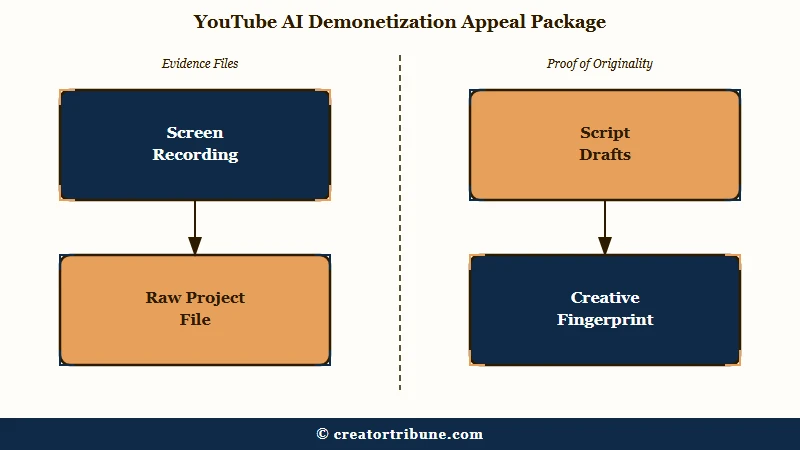
The Dusklight Radio case is instructive. The creator was caught in a mass demonetization wave, submitted a behind-the-scenes recording showing exactly how he creates content, and was remonetized three days later. That recording is the unlock.
The exact appeal package I would send:
- A 2-to-3-minute screen recording showing your editing timeline mid-edit, your project file open, and your voiceover or shot list visible. Narrate over the recording in your own voice.
- The raw project file in its native format (.aep, .prproj, .drp, .fcpxml). Compress to a ZIP and attach.
- Script drafts or shot lists, ideally with file timestamps showing they were created before the publish date.
- A short written statement describing your “unique creative fingerprint” and where human value is added: original commentary, lived perspective, specific niche knowledge.
- A list of 3 to 5 specific videos on your channel that demonstrate the same fingerprint, so a reviewer can sample without watching the full catalogue.
- Cease all uploads for at least 72 hours after submitting. Continuing to publish during the review tells the algorithm to keep classifying the channel as bot-paced.
A short template you can adapt for the written statement:
Dear YouTube reviewer,

I am the sole creator of [channel name]. My videos are produced by hand using [software list], filmed on [camera], with original commentary in my own voice. I do not use generative AI for any element a viewer could mistake for reality.

This video was produced over [hours invested]. The attached screen recording and project file demonstrate the manual editing process. The unique creative fingerprint of my channel is [one specific recurring element, e.g. "a niche perspective on classic film analysis" or "hand-cut greenscreen composites of TV scenes into video games"].

I respectfully request reinstatement to the Partner Program.

Signed,
[Your name]
[Channel URL]
Channels that ship this package within 72 hours and stop uploading during the review typically get a faster decision than those that argue without proof.
Frequently Asked Questions
Does YouTube penalize creators who use AI for scripts or thumbnails?
No. YouTube’s official policy explicitly carves out AI used for production assistance, including scripts, outlines, captions, and thumbnails. Disclosure is only required when realistic content of real people, places, or events is altered or synthesized.
Can I prove my video is human-made without showing my face?
Yes, but you need a substitute signal. Hands on the keyboard, your voice on the narration, a screen recording of your editing timeline, or a unique recurring visual element all work as channel-level authenticity signals.
How long does a YouTube AI demonetization appeal take?
The official timeline is 3 to 6 weeks for a full review, but creators who submit a complete appeal package (screen recording, project files, written statement) within 72 hours of the strike often get reinstated within 3 to 5 days.
Should I delete AI accusation comments on my videos?
No. Deleting accusations or mass-blocking accounts drops your engagement-quality score and can read as algorithmic gaming. Pin one good response with a behind-the-scenes link and ignore the long tail.
What is the “altered or synthetic content” label and do I need it?
It is the disclosure YouTube requires when realistic content of real people, places, or events is altered or generated. Greenscreen composites of a real person into a different scene need it; AI-generated thumbnails, scripts, or your own cloned voice do not.
Will adding a “human-made” disclaimer hurt my thumbnail or title performance?
Not if you keep it off the thumbnail and put it in the first 10 seconds of the video as a lower-third overlay. That placement is invisible to thumbnail viewers but reaches everyone who clicks, which is where the accusation problem really lives.