Submagic Review and the Extra Credits Every AI Tool Costs
Submagic Review and the Extra Credits Every AI Tool Costs
Submagic review from a real trial. Captions got 136 of 139 words right, the trial cannot export, and every AI tool costs extra credits.
- 1What Do Submagic Reviews on Trustpilot and G2 Say?
- 2How Accurate Are Submagic Captions on a Real Clip?
- 3What Does Submagic Do Besides Captions?
- 4How Much Does Submagic Cost?
- How Many Videos Do Submagic Credits Really Cover?
- What Does the Submagic Free Trial Include?
- Can You Get a Refund From Submagic?
- 5What Are the Pros and Cons of Submagic?
- 6Who Is Submagic Best For?
- Is There a Submagic App for iPhone or Android?
- 7What Is a Good Submagic Alternative?
- 8Is Submagic Worth It?
- 9Quick Takeaways
Bottom Line: Submagic makes accurate, styled captions fast. A 57-second test clip came back in about 20 seconds with 136 of 139 words right. The catch is cost: every AI tool spends extra credits per video, the $19 Starter plan leaves out silence removal, and the free trial will not export anything.
Submagic’s caption panel rated its own transcript of a 57-second test clip at 99.9% accuracy. Checked word by word for this Submagic review, the real figure was 97.8%, still a very good result. Submagic is a browser editor that adds animated captions to TikTok, Reels and Shorts videos, cuts pauses and drops in stock footage.
What bothered me more was the price of everything around the captions. Each AI tool in the editor has its own credit cost, from 1 to 3 credits per video, on top of the 3 credits every video uses.
The pricing card says $19 a month buys 15 videos. That holds only if you add captions and nothing else.
Creator Tribune earns a commission if you subscribe through the Submagic links on this page. That does not change the verdict.

What Do Submagic Reviews on Trustpilot and G2 Say?
Submagic reviews average 4.5 out of 5 from 857 reviews on Trustpilot and 4.6 from 85 reviews on G2, as of October 28, 2026. The recent praise is mostly about the support team, and the recent complaints are mostly about money.
If Google’s AI summary showed you 4.7 on G2, that matches the “4.7/5 on G2” badge on Submagic’s own Magic Clips page. The live G2 page shows 4.6 from 85 reviews, and Trustpilot shows 4.5 from 857.
The 20 newest English-language Trustpilot reviews on October 28, 2026 split into 17 five-star and 3 one-star. All 17 five-star reviews thank the support team, and several name the same agent.
I count those five-stars as proof that the support desk answers fast. They say much less about the editor, so I gave the three one-star reviews more weight. All three involve billing, and one also says the app barely works:
- A Pro subscriber who never used the service saw about ten attempts to charge €46 and could not reach the cancel settings behind a card-update message (October 12). Submagic replied that the retries came from Stripe, its payment processor, and that the subscription was cancelled and the matter made right.
- A US customer says an upgrade prompt for a file too large for their plan charged almost $500 with no chance to back out (October 10). Submagic’s reply offered to correct the billing through live chat.
- A third customer calls the app “frequently inaccessible” and wanted a refund on a year of use (August 2026). Submagic’s reply calls that “our users own responsibility to properly manage their own subscription.”
Read the one-star reviews before you choose yearly billing. They describe the exact mistakes the refund rules below do not promise to undo.
How Accurate Are Submagic Captions on a Real Clip?
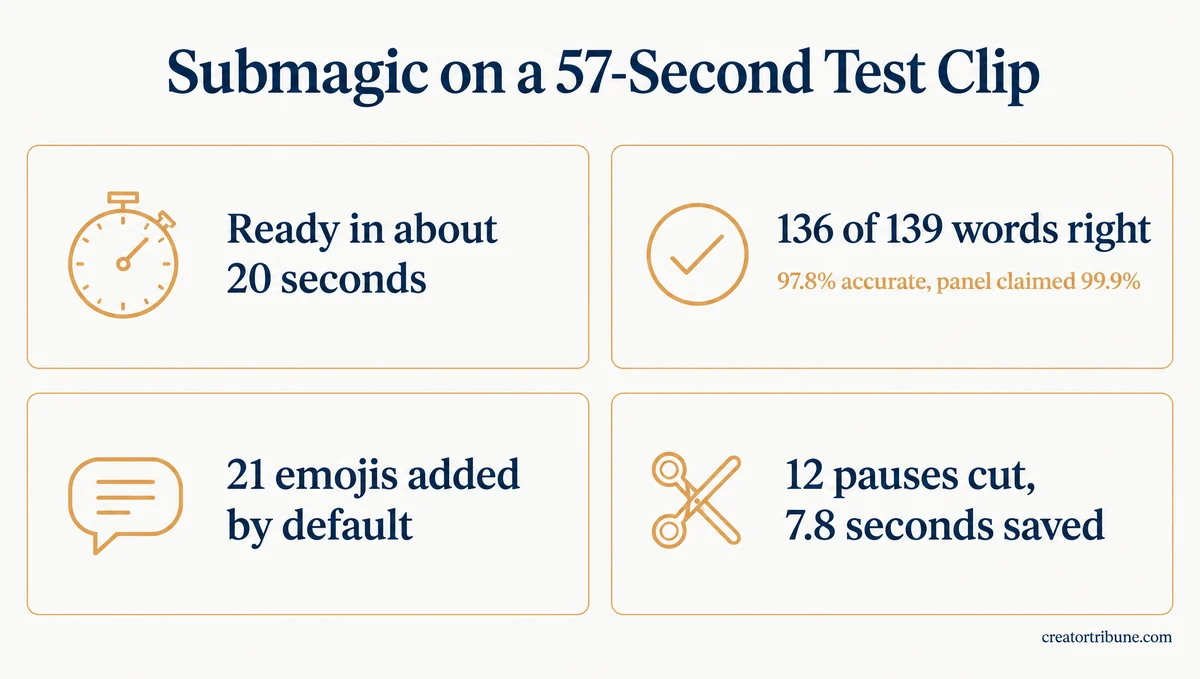
Submagic’s captions were 97.8% accurate on a 57-second test, 136 of 139 words, and ready in about 20 seconds. The panel’s own label said 99.9%, so treat that number as marketing and plan a quick read-through.
The test clip was a public-domain LibriVox recording of the Gettysburg Address, read by volunteer Drew Johnson in 2013. For the test it was cut to 57 seconds in a vertical frame.
LibriVox names the text he read from, Project Gutenberg’s edition, so every word can be checked. Lincoln’s handwritten drafts differ somewhat from the version usually printed, so the scoring below uses Gutenberg’s text, the one the narrator read.
On a trial account opened October 28, 2026, the upload turned into an editable transcript in about 20 seconds. It used 3 of the trial’s 15 credits at that point, before any export.
Against Gutenberg’s text, from “Four score” to “add or detract,” the transcript missed three words. “Battlefield of that war” came out as “battlefield at war,” and the “It” in “It is altogether fitting” disappeared. It got “upon this continent” right, a line the better-known printed version words differently.
Here is the one line worth fixing before you post:
Before: We are met on a great battlefield at war
After: We are met on a great battlefield of that war
Each caption row can be edited in place, and the editor has a Find and replace tool for names it keeps getting wrong.
The emoji pass surprised me more than the misses. With the default settings, Submagic added 21 emojis to 57 seconds of a speech that dedicated a war cemetery.
They included a slice of cake beside “a portion of that field,” an explosion on “poor power” and a superhero on “the brave men.” Each caption row has a Remove emoji button, so cleaning up a serious video takes one click per row.
Remove Silence did its job cleanly. For 2 credits it reported “12 silences have been removed. About 8s shorter,” and the clip dropped from 56.8 to 49 seconds without losing a single word.
If your videos are clear talking-head clips, plan on fixing a word or two per minute.
What Does Submagic Do Besides Captions?
Submagic is a short-form editing kit: captions, pause and bad-take removal, b-roll, zooms, hook titles, clean audio, eye contact correction, translation and Magic Clips for long videos. Most of the editing tools sit on the $39 Pro plan, and each one costs credits per video.
Here is what each group of tools does to a clip:
- Captions: more than 20 animated caption styles, plus Find and replace and Regenerate Emojis for quick fixes.
- Cuts: Remove Silence and Remove Bad Takes on Pro, plus text-based trimming on every plan.
- B-roll: standard stock clips on Starter, and Storyblocks footage, music and sound effects from Pro up.
- Polish: Auto Zooms, an AI hook title, Clean Audio and eye contact correction.
- Translation: translated captions and voice dubbing, from Pro up.
- Magic Clips: the upload screen takes a long video of up to 180 minutes or 10 GB and returns short clips.
- Extras: AI Thumbnails, posting to social accounts from Pro up, and a beta agent called Iris that promises to edit a raw video “from A to Z.”
Remove Silence is the tool I’d pay for first, because trimming pauses by hand is the slowest part of a talking-head edit. On the test clip it cut 7.8 seconds of dead air, about 14% of the runtime.
Magic Clips is the tool for turning long videos into shorts. The in-app pricing page on October 28, 2026 counted it against the same credits as everything else: 45 credits buy 15 videos or 5 Magic Clips runs on Starter.
Submagic’s own pages disagree on languages. Its languages page says “50+ languages,” while its Magic Clips page says “123 supported languages.” Check that your language works on the trial before you pay.
How Much Does Submagic Cost?
Submagic costs $19, $39 or $69 per member per month, or $12, $23 and $41 a month billed yearly, with 45, 120 or 300 credits. Every video uses 3 credits, and each AI tool you run on it costs 1 to 3 more.
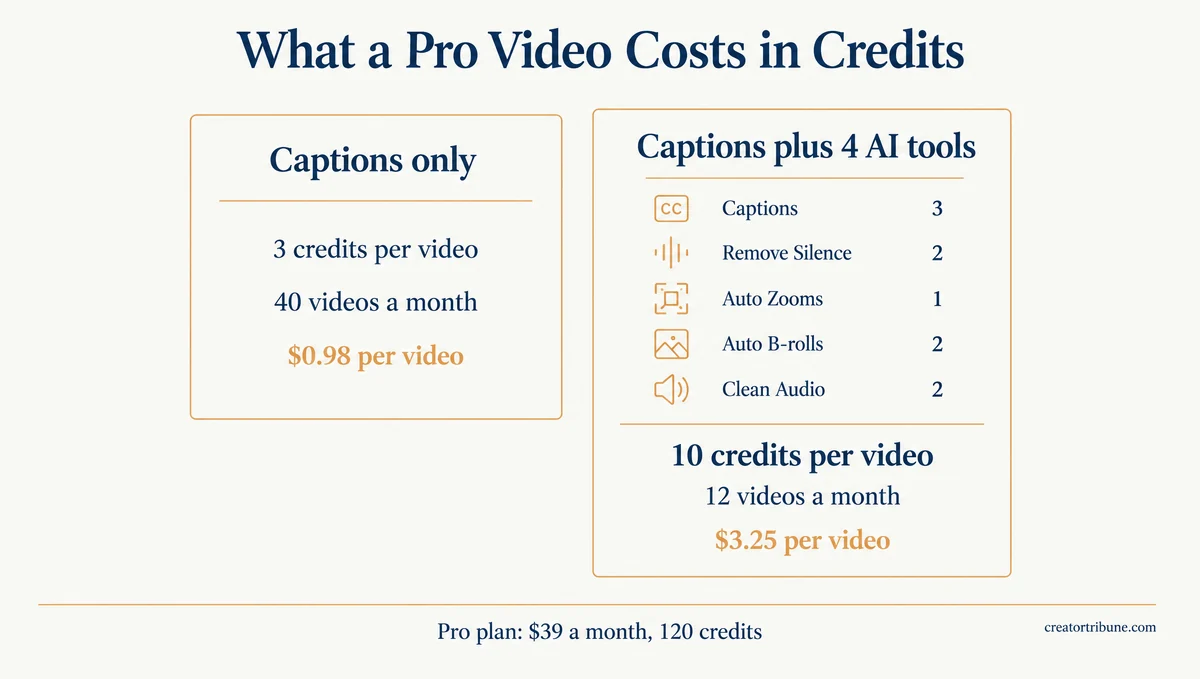
My rule for this pricing page is to count credits per video, because the video counts on the plan cards assume captions only. If Google showed you roughly $23 to $39 for Starter and Pro, note that $23 is Pro billed yearly, and Starter is $19 monthly or $12 yearly.
| Plan | Monthly or yearly | Credits a month | Longest video |
|---|---|---|---|
| Starter | $19, or $12 a month billed yearly | 45 | 2 minutes |
| Pro | $39, or $23 a month billed yearly | 120 | 5 minutes |
| Business | $69, or $41 a month billed yearly | 300 | 30 minutes |
Prices checked on Submagic’s pricing page and in the app on October 28, 2026. Every price is per member, and paid plans export without a watermark. Starter exports 1080p at 30 fps, Pro adds 2K, and Business adds 4K at 60 fps.
Starter’s 1080p at 30 fps is enough for TikTok, which recompresses every upload anyway. The 2-minute cap on Starter matters far more than the missing 2K and 4K options.
How Many Videos Do Submagic Credits Really Cover?
Submagic credits cover the advertised 15, 40 or 100 videos only when you add captions and nothing else. The editor shows a credit price next to every AI tool, and you pay it per video.
| AI tool | Credits per video | Lowest plan with it |
|---|---|---|
| Captions (every video) | 3 | Starter |
| AI Auto B-rolls | 2 | Starter |
| AI Auto Zooms | 1 | Pro |
| AI Hook Title | 2 | Pro |
| Clean Audio | 2 | Pro |
| Remove Silence | 2 | Pro |
| Remove Bad Takes | 2 | Pro |
| Correct Eye Contact | 3 | Pro |
Credit prices were read from the editor’s AI Tools panel on October 28, 2026, and Remove Silence took exactly 2 credits on the test clip. Magic Clips draws on the same pool, since the in-app pricing page converts 45, 120 and 300 credits into 5, 15 and 37 Magic Clips runs.
A Pro video with captions, Remove Silence, Auto Zooms, Auto B-rolls and Clean Audio costs 10 credits. That turns Pro’s 120 credits into 12 videos, about $3.25 each on monthly billing, against the $0.98 per video the plan card implies.
What Does the Submagic Free Trial Include?
The Submagic free trial gives 15 credits, needs no card and lets you edit, but it will not export any video. Clicking Export on a trial account opens a paywall that reads “Your video is ready. Choose a plan to export it.”
The trial also lets you run Pro tools such as Remove Silence, which the $19 Starter plan crosses out on that same paywall. What you try is the Pro editor, so budget for Pro if those tools are what sold you.
That paywall opened with yearly billing already selected, next to a “41% OFF!” badge. I always switch an unfamiliar editor to Monthly for the first month, and the refund rules below are the reason.
Can You Get a Refund From Submagic?
Submagic’s terms say all monthly and annual fees are non-refundable, except that consumers get a 14-day right of withdrawal from the subscription date, unless the service has already been fully performed with their consent. Support does refund some mistakes, but only at its own discretion.
That is clause 12 of Submagic’s Terms of Use and Sale, published by its French operator, Turbo Studio SAS. The 14-day right covers individuals buying outside their professional activity, so a creator paying for client work may not qualify.
To cancel, the terms point to Control Panel, then Billing, then Cancel Subscription. Cancelling stops the next renewal, and an annual plan renews for another 12 months unless you cancel before its anniversary date.
A five-star review from October 15 describes paying for Starter and then Pro within 15 minutes and getting the Starter charge back. I wouldn’t count on that kind of goodwill, which is why monthly billing is the safer first month.
What Are the Pros and Cons of Submagic?
Submagic’s biggest strengths are fast, accurate captions and clean pause removal, and its biggest weaknesses are credit costs, a trial that cannot export and a no-refund policy. The cons list came out longer than I expected for a tool rated 4.5.
Pros:
- Fast: a 57-second clip went from upload to editable captions in about 20 seconds.
- Accurate: 136 of 139 words right on a real human reading.
- Clean pause removal: 12 pauses and 7.8 seconds cut with no words lost.
- No watermark on any paid plan, and Starter’s 1080p export fits TikTok’s specs.
- A support team that answers: all 17 five-star reviews among the 20 newest English-language ones on Trustpilot praise it.
Cons:
- The trial cannot export anything, watermarked or not.
- Every AI tool costs 1 to 3 extra credits per video, so “15 videos” means captions only.
- Starter leaves out Remove Silence, Remove Bad Takes, Clean Audio and Storyblocks footage, and caps videos at 2 minutes.
- The automatic emojis ignore tone, like a slice of cake in the Gettysburg Address.
- Fees are non-refundable, annual plans renew on their own and the paywall opens on yearly billing.
- Submagic’s own pages contradict each other, listing Business custom templates as 10, 5 and unlimited on the public pricing page and 30 inside the app.
- Export speed went untested, because the trial blocks export, and one of the newest five-star reviews thanks support for fixing an export problem.
- Customization is thin on Starter, which gets no custom caption templates, and one long-time five-star reviewer still misses a full timeline for overlaying text and images.
Who Is Submagic Best For?
Submagic is best for creators who post short talking-head clips several times a week and want styled, burned-in captions without editing by hand. It is a poor fit for phone-only editors, anyone whose videos run past 2 minutes on a $19 budget, and anyone who posts only a few videos a month.
I’d point one kind of creator to Submagic: someone with a weekly talking-head schedule who hates trimming pauses. Burned-in captions, the kind baked into the video file, also help on TikTok, where TikTok’s own caption switch depends on a setting that some viewers have lost.
| Your situation | What to pick |
|---|---|
| Clips under 2 minutes, captions only | Starter, $19 monthly |
| Talking-head videos that need pauses cut | Pro, $39 monthly |
| Long videos cut into many clips | Pro or Business, counting Magic Clips credits |
| Editing only on your phone | A native phone app instead |
| A few videos a month | Free tools first |
Is There a Submagic App for iPhone or Android?
Submagic has no official phone app; it runs in a browser and offers an “Import from my phone” upload option. The apps using the Submagic name in the App Store and on Google Play come from other developers.
On October 28, 2026, the App Store listed an app called “Submagic ai” from a developer named Zohaib Khan, plus a second Submagic-named app from another developer, both released in August 2026. Google Play showed two more apps using the name, neither from Submagic. Submagic’s homepage, pricing page and Magic Clips page link to no app store.
Skip the lookalikes and upload from your phone through the browser instead.
What Is a Good Submagic Alternative?
A good Submagic alternative depends on the job: CapCut for full manual control, Opus Clip for cutting long videos into clips, and Captions for editing on an iPhone. None of them is a straight swap, so pick by the job you do most.
CapCut gives you control over every caption and cut, with the trade-off that you do the styling and trimming by hand. Opus Clip is built around one job, cutting long videos into short captioned clips, which is the job Submagic’s Magic Clips covers.
For phone-only editing, I point people to Captions instead, because a browser editor on a phone is a chore. Captions is a native iPhone app rated 4.7 from about 38,800 App Store ratings on October 28, 2026.
For faceless story videos, the Crayo AI review covers a tool built for that format.
Is Submagic Worth It?
Submagic is worth it on the Pro plan, billed monthly, if you post short talking-head videos every week and want accurate styled captions with the pauses cut. Starter is the weak plan, because it drops the silence remover the trial shows off.
My verdict leans on two results from the test: 97.8% caption accuracy and 7.8 seconds of dead air removed from a 57-second clip. Typing captions and trimming pauses are the two jobs I find slowest in a talking-head edit, and Submagic handles both well.
If that describes your week, start Submagic on monthly billing and run your real videos through it. Give it a full month and count the credits each video uses before you consider yearly, since the fees are non-refundable.
Phone-only editors and occasional posters should skip it and keep the free tools they already use.
Quick Takeaways
- Submagic’s captions got 136 of 139 words right on a 57-second test, against a 99.9% label in its own panel.
- Every video costs 3 credits, and each AI tool adds 1 to 3, so Pro’s 40 videos can shrink to 12.
- The free trial gives 15 credits and edits fine, but it cannot export anything.
- Fees are non-refundable and annual plans renew on their own, so start on monthly billing.
- Pro at $39 a month is the plan that makes sense for talking-head creators, since Starter leaves out silence removal.