YouTube Monetization Denied and What to Fix First
YouTube Monetization Denied and What to Fix First
YouTube monetization denied? Identify your rejection category, fix the exact issue, and reapply with a stronger application.
- 1How to Tell Which YouTube Monetization Denial Reason You Have
- 2How to Fix Reused Content Rejections on YouTube
- 3What to Do About Community Guidelines Strikes Before Reapplying
- 4How to Fix Misleading Metadata Before Your Reapply
- 5How the YouTube Monetization Reapply Process Works
- 6How YouTube Shorts Monetization Works Separately
- 7What to Do If YouTube Keeps Denying Your Monetization
- 8How to Prevent Future YouTube Monetization Issues
- 9Frequently Asked Questions
- How long do I have to wait to reapply after YouTube monetization denied?
- Do YouTube Shorts views count toward the 4,000 watch hour requirement?
- What is the most common reason for YouTube monetization denial?
- Can I appeal a YouTube monetization rejection?
- Does AI-generated content get rejected from YouTube monetization?
- What is the YouTube Fan Funding tier?
TL;DR: YouTube monetization denied applications fall into four categories: reused content, community guidelines violations, misleading metadata, and advertiser-unfriendly content. Each category has a different fix path and a different reapply strategy. Most creators waste their 30-day reapply window because they fix the wrong thing. Identify your rejection category first, then follow the matching fix below.
YouTube monetization denied is the email nobody wants to open. You hit 1,000 subscribers, cleared 4,000 watch hours, applied to the YouTube Partner Program, and got a generic rejection that tells you almost nothing about what went wrong.
The rejection email points you to YouTube’s monetization policies page, which is a wall of text covering everything from hate speech to spam without telling you which policy applies to your channel. Most creators read it, feel overwhelmed, and either give up or reapply immediately without changing anything.
What I want to walk through here is each rejection category, the specific diagnostic for identifying which one you have, the fix path for each, and the exact reapply strategy that gives you the strongest second application. You will know which category your rejection falls into and what to change before your 30-day window opens.
If your channel was terminated entirely rather than denied monetization, the YouTube channel termination guide covers the separate and more severe problem of full account loss.
How to Tell Which YouTube Monetization Denial Reason You Have
YouTube monetization denials cite one of four policy categories, and each one requires a completely different fix before reapplying.
Fixing the wrong category wastes your 30-day reapply window.
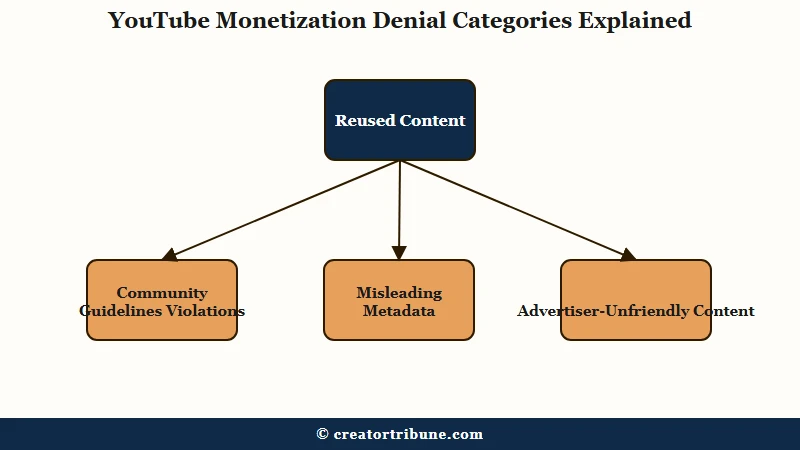
In my experience, the rejection email is deliberately vague. YouTube tells you the policy area but not which specific videos triggered the flag. Here is how to identify your reason.
| Rejection Category | What the Email Says | What It Means | Where to Check |
|---|---|---|---|
| Reused content | “Content that doesn’t meet originality requirements” | Videos lack significant original commentary or transformative editing | YouTube Studio Content tab, check for reupload flags |
| Community guidelines | “Active Community Guidelines strikes” | One or more strikes within the past 90 days | Studio Settings, Channel, Community Guidelines status |
| Misleading metadata | “Misleading titles, thumbnails, or descriptions” | Clickbait that does not match the video content | Review titles vs first 30 seconds of each video |
| Advertiser-unfriendly | “Content not suitable for all advertisers” | Videos contain topics advertisers avoid | Studio Monetization tab, yellow dollar sign icons |
Reused content is the most common rejection reason for creator channels. YouTube’s automated system looks for videos that are compilations, re-uploads of other creators’ work, or content with minimal editing over stock footage.
The fix is not deleting those videos. The fix is adding enough original material that the balance shifts.
Community guidelines strikes are the easiest to diagnose and the hardest to speed up. If you have an active strike within the past 90 days, YouTube will not approve monetization regardless of content quality. The only path is waiting for the strike to expire.
Misleading metadata catches creators who use aggressive thumbnails or titles that promise something the video does not deliver. From what I’ve seen, this rejection is more common in the entertainment and gaming niches where clickbait thumbnails are the norm.
Advertiser-unfriendly content is the most confusing rejection because the content does not violate community guidelines. It covers topics that brands do not want their ads placed next to, including graphic medical content, controversial social issues, and detailed discussion of weapons or drugs in educational contexts.
What I’d recommend as your first step is opening YouTube Studio, navigating to Content, and sorting by the monetization column. Yellow dollar signs indicate videos the system flagged. That diagnostic alone narrows your rejection category.
How to Fix Reused Content Rejections on YouTube
The reused content fix requires adding original commentary, face-to-camera segments, or transformative editing to at least 70 percent of your video library before reapplying. Deleting flagged videos alone does not work because YouTube evaluates the channel as a whole.
What surprised me about this rejection category is how broadly YouTube defines “reused.” Compilation channels, reaction channels without meaningful commentary, channels that use text-to-speech over stock footage, and channels that repost clips from podcasts or streams all fall into this bucket.
YouTube requires “significant original commentary, educational value, or transformative editing.” That phrase is the standard their reviewers apply during monetization review.
Here is the fix path I’d walk through.
- Open YouTube Studio and navigate to the Content tab. Sort all videos by view count.
- Review your top 20 videos. For each one, ask whether this video contains original face-to-camera or voice-over commentary that adds perspective the source material does not have.
- For any video that is a straight reupload, compilation, or minimal-edit clip, either add a 60-second original commentary intro and outro or set the video to private.
- For new uploads going forward, ensure every video has at least 30 percent original on-camera or narrated content by runtime.
- Upload at least 5 new fully original videos before reapplying.
Before: A compilation of trending TikTok clips with background music and text overlays, no narration, no original perspective.
After: The same clips reframed as a commentary video where the creator watches each clip, reacts on camera, and explains what makes the editing technique work or fail. The clips become supporting evidence for an original argument.
The difference between these two is the difference between rejection and approval. YouTube’s reviewers are not checking whether the footage is yours. They are checking whether you added something the viewer cannot get from the original source.
YouTube also now classifies undisclosed AI-generated content as a reused content violation. If you use AI voice, synthetic faces, or fully AI-generated visuals, you must check the AI disclosure box during upload. Disclosed AI content is eligible for monetization. Undisclosed AI content is not, regardless of quality.
What to Do About Community Guidelines Strikes Before Reapplying
Community guidelines strikes must fully expire before YouTube will approve a monetization application, and each strike takes 90 days to clear with no way to accelerate the process.
Appealing a strike is the only path to early removal.
In my experience, this is the most frustrating rejection category because the fix is time. You cannot content-audit your way out of an active strike. The 90-day clock runs from the date the strike was issued, not from the date you applied for monetization.
Here is how the strike timeline affects your reapply window.
| Strike Status | Monetization Eligible | What to Do |
|---|---|---|
| 1 active strike, less than 90 days old | No | Wait for expiry or appeal |
| 1 active strike, appeal pending | No | Wait for appeal result |
| Strike expired, no active strikes | Yes | Reapply immediately |
| 2 active strikes | No | Both must expire or be overturned |
| 3 strikes (channel terminated) | Not applicable | Channel removed from platform |
If you believe a strike was applied incorrectly, file an appeal through YouTube Studio under Settings, Channel, then Community Guidelines. The appeal is reviewed by a human, not the automated system that issued the original strike.
What I’d recommend is filing the appeal first, waiting for the result, and then applying for monetization only after the strike is resolved. Applying while a strike appeal is pending accomplishes nothing because the automated system checks strike status at the time of review, not at the time of application.
If your channel was terminated with three strikes rather than denied monetization, the recovery path is entirely different. The channel termination recovery guide covers the appeal process for full account loss, including the Second Chances program that YouTube launched in October 2025.
How to Fix Misleading Metadata Before Your Reapply
Misleading metadata rejections require auditing every video title, thumbnail, and description to ensure the first 30 seconds of the video delivers what the metadata promises.
YouTube’s reviewers specifically check the gap between what was promised and what was delivered.
The way I see it, this rejection category punishes a practice that most creators consider normal. Exaggerated thumbnails and curiosity-gap titles are standard on YouTube. The difference between what YouTube allows for regular creators and what YouTube requires for monetized creators is a higher accuracy standard.
Here is the audit I’d walk through before reapplying.
- Open a spreadsheet and list every video title alongside a one-sentence summary of what the first 30 seconds of the video contain.
- For any video where the title promises a specific outcome, transformation, or event, verify that the video shows or discusses that specific thing within the first minute.
- Replace thumbnails that show fake screenshots, fabricated numbers, or misleading before-after comparisons with accurate visual representations of the content.
- Remove any ALL CAPS words from titles. YouTube’s metadata policy flags excessive capitalization as a misleading signal.
- Check descriptions for unrelated keywords stuffed for search purposes. Remove any keywords that do not appear in the video content.
From what I’ve seen, the most common metadata violation is reaction thumbnails that use exaggerated facial expressions alongside text implying something happened that did not happen in the video. “SHE QUIT?!” next to a shocked face, when the video is a 10-minute discussion of someone considering a career change, is the exact pattern YouTube flags.
How the YouTube Monetization Reapply Process Works
YouTube allows rejected creators to reapply after 30 days for a first rejection and 90 days for subsequent rejections, and the reapply should include documented evidence of the changes you made.
Most creators reapply without changing anything and trigger the longer 90-day window.
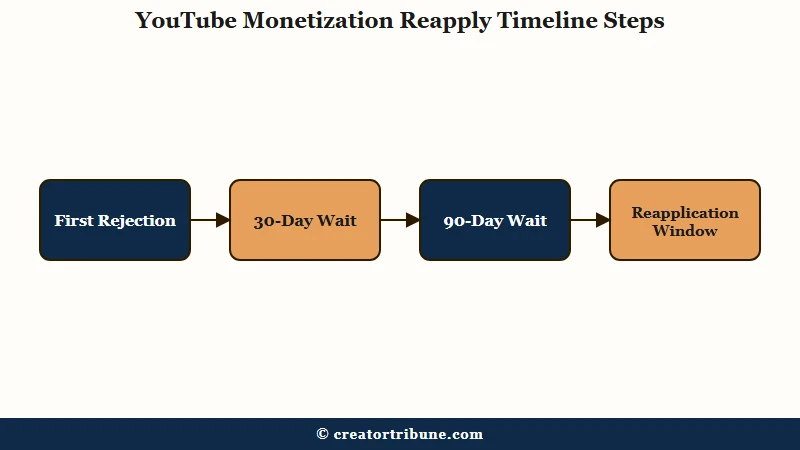
What caught me off guard about the reapply process is that the second review is not a fresh start. YouTube’s reviewers can see your previous application, the rejection reason, and whether the flagged content was addressed. A reapply that shows no changes signals that the creator did not take the feedback seriously.
Here is how the reapply timeline works in practice.
| Rejection Count | Wait Period | Review Time | Success Trend |
|---|---|---|---|
| First rejection | 30 days | 1 to 4 weeks | Moderate if issues fixed |
| Second rejection | 90 days | 2 to 4 weeks | Lower without major changes |
| Third rejection | 90 days | 2 to 4 weeks | Very low without channel overhaul |
The appeal window for a monetization rejection is 21 days from the rejection date. After 21 days, the appeal option closes and you must wait the full 30 or 90 days to submit a new application from scratch.
In my experience, a strong appeal or reapply follows a specific pattern.
Before: “I believe my channel was wrongly rejected. My content is original and I follow all the rules. Please review my channel again.”
After: “My channel was rejected on [date] citing [specific policy category]. I have since removed 12 compilation videos, added face-to-camera commentary to remaining 23 videos, and uploaded 6 new fully original tutorials. My channel’s content mix is now 85 percent original by runtime. I have reviewed the current monetization policies and confirm compliance.”
The first version gives the reviewer nothing to work with. The second version demonstrates specific awareness of the issue and measurable corrective action.
The same appeal psychology applies across every major platform, and the TikTok ban appeal guide documents the identical pattern where specific, evidence-based appeals outperform generic complaints.
How YouTube Shorts Monetization Works Separately
YouTube Shorts have a separate monetization pathway that does not count toward the 4,000 watch hour requirement, and creators denied through the watch hours path can qualify through 10 million Shorts views in 90 days instead.
The two paths are independent. The full Shorts monetization rules guide breaks down every threshold and payout tier.
The way I see it, this is the most misunderstood part of YouTube monetization. Creators who build Shorts-first channels hit 1,000 subscribers quickly but never accumulate watch hours because Shorts are typically under 60 seconds. The watch hour counter barely moves.
What is the Shorts monetization path: An alternative YPP qualification route requiring 10 million public Shorts views in the most recent 90 days, instead of 4,000 watch hours of long-form content.
| Monetization Path | Subscribers | View Requirement | Revenue Model | Typical CPM |
|---|---|---|---|---|
| Long-form | 1,000 | 4,000 watch hours in 12 months | Pre-roll, mid-roll, display ads, Premium | $1 to $15 by niche |
| Shorts | 1,000 | 10M Shorts views in 90 days | Shorts ad revenue share | $0.03 to $0.08 per 1K |
| Fan Funding (long-form) | 500 | 3,000 watch hours in 12 months | Super Chat, memberships, merch shelf | Varies by audience |
| Fan Funding (Shorts) | 500 | 3M Shorts views in 90 days | Super Chat, memberships, merch shelf | Varies by audience |
What I’d recommend for creators who got denied through the watch hours path is checking whether the Shorts path is more realistic for their channel. If you publish Shorts daily and your long-form upload frequency is low, the 10 million Shorts views path might clear faster than grinding watch hours on occasional uploads.
According to Statista’s social media data, YouTube has over 2.5 billion monthly active users globally, with over 3 million channels in the YouTube Partner Program. The review system handling that volume relies on a combination of automated scanning and human review, which means false positives happen and appeals are a legitimate recovery path.
If your Shorts are getting low views independent of monetization, the Shorts views recovery guide covers the algorithm-level diagnostic for why Shorts stop getting distributed after the first 24 hours.
What to Do If YouTube Keeps Denying Your Monetization
Creators denied multiple times should consider the Fan Funding tier at 500 subscribers as a stepping stone, alternative monetization through affiliate marketing and sponsorships, and a complete channel audit before the next application.
Waiting passively for YouTube to change its mind is not a strategy.
What I’d recommend for creators stuck in a rejection cycle is stepping back and treating the channel as a business that can generate revenue without YouTube’s ad system.
- Apply for the Fan Funding tier first. It requires only 500 subscribers and 3,000 watch hours or 3 million Shorts views. This unlocks Super Chat, Super Thanks, memberships, and the merchandise shelf without requiring full ad monetization. YouTube reviews this tier with a lower content bar.
- Set up affiliate marketing for products relevant to your niche. You already have 1,000 subscribers and traffic. A description link to an affiliate product can generate revenue immediately.
- Reach out to brands in your niche for sponsored content. Channels with 1,000 subscribers and consistent upload schedules are viable for micro-sponsorships.
- Audit your entire video library. Remove or set to private any video that weakens your application. A smaller, higher-quality library is better for monetization review than a large library with inconsistent quality.
- Upload 10 to 15 new fully compliant videos before reapplying. This shows the reviewer that your content direction has shifted.
The reality is that rejected creators have already accomplished the hardest part. Getting to 1,000 subscribers and 4,000 watch hours is the bottleneck most channels never clear.
The monetization rejection is a content-quality filter, not a growth filter. The audience is already there.
If you are looking at monetization paths across other platforms, the TikTok Creator Rewards guide and the Instagram bonuses breakdown cover what each platform pays and requires for creator programs. Creators hitting the same wall on Meta should also check the Facebook monetization denied diagnostic.
How to Prevent Future YouTube Monetization Issues
The most reliable prevention strategy is maintaining at least 70 percent original content by runtime, disclosing all AI-generated content, and checking the monetization status column in YouTube Studio weekly.
Most monetization losses could have been caught early with one weekly check.
In my experience, prevention on YouTube comes down to understanding what the automated system watches for. The triggers are specific and avoidable.
- Maintain at least 70 percent original content by runtime across your channel. The remaining 30 percent can include reaction content, clips, or compilations as long as the original majority is strong.
- Disclose AI-generated content using YouTube’s built-in disclosure tool. Undisclosed AI voice, synthetic faces, or AI-generated visuals are now classified as reused content violations regardless of production quality.
- Check the monetization column in YouTube Studio’s Content tab weekly. Yellow dollar signs appear on individual videos before they trigger a channel-level review.
- Keep titles and thumbnails accurate. The first 30 seconds of every video must deliver on what the title and thumbnail promise.
- Stay below the community guidelines threshold. A single strike within 90 days blocks monetization applications. Two strikes restrict channel features. Three strikes terminate the channel entirely.
- Space content uploads consistently rather than publishing in bursts. YouTube’s system favors channels with regular upload schedules over channels that dump 20 videos in a week and then disappear.
What I’d recommend above all else is checking the Channel Dashboard in YouTube Studio once per week even when everything seems fine. Monetization warnings can appear without triggering an email notification, and catching a flag early before it accumulates into a rejection is far easier than fixing it after a denial.
If your channel’s reach has been declining without a formal rejection, the issue may be algorithmic distribution rather than monetization policy. The YouTube limited distribution guide covers the separate problem of reduced visibility that affects channels with no active policy violations.
Frequently Asked Questions
How long do I have to wait to reapply after YouTube monetization denied?
First rejections require a 30-day wait. Subsequent rejections extend to 90 days. The appeal window is 21 days from rejection. After 21 days, the appeal closes and you must wait the full period to submit a new application.
Do YouTube Shorts views count toward the 4,000 watch hour requirement?
No. Shorts views and watch hours are separate pathways. The Shorts path requires 10 million public Shorts views in 90 days. The long-form path requires 4,000 watch hours in 12 months. You can qualify through either path independently.
What is the most common reason for YouTube monetization denial?
Reused content is the most frequent rejection category. YouTube requires videos to have significant original commentary, educational value, or transformative editing. Compilation channels, re-upload channels, and text-to-speech channels are most frequently flagged.
Can I appeal a YouTube monetization rejection?
Yes, within 21 days of the rejection date. Write a 300 to 500 word appeal naming the specific policy, listing concrete changes made, and committing to a compliant content plan going forward.
Does AI-generated content get rejected from YouTube monetization?
Undisclosed AI-generated content is treated as a reused content violation. If you use AI voice, synthetic faces, or fully AI-generated visuals, you must check the AI disclosure box during upload. Disclosed AI content is eligible.
What is the YouTube Fan Funding tier?
The Fan Funding tier requires 500 subscribers plus 3,000 watch hours or 3 million Shorts views in 90 days. It unlocks Super Chat, Super Thanks, memberships, and the merchandise shelf without requiring full ad monetization approval.