What Is a Meta Account on Instagram and Can You Opt Out of It
What Is a Meta Account on Instagram and Can You Opt Out of It
A Meta Account now runs your Instagram login, email and two-factor settings. See what changed, why your login switched and how to keep Instagram separate.
- 1What Is a Meta Account on Instagram?
- Why Is There a Meta Account on My Instagram?
- 2Why Did Instagram Change My Login to My Facebook Email?
- How Do You Change Your Instagram Email Back?
- Why Did My Instagram Profile Picture Change to My Facebook One?
- Is the Instagram Meta Account Notice a Hack?
- 3Can You Opt Out of a Meta Account on Instagram?
- How Do You Move Instagram Out of a Meta Account?
- 4Is a Meta Account the Same as Your Instagram Account?
- 5If Facebook Bans You, Does Your Instagram Get Banned Too?
- 6Quick Takeaways
TL;DR: A Meta Account on Instagram is the single login and settings hub replacing Accounts Center across Meta’s apps and devices, rolling out gradually since April 2026. You cannot turn it off, but you can give Instagram a Meta Account of its own from Manage account in your Meta Account settings. If your login email or profile photo switched to your Facebook one, change them back yourself, because Meta says merged settings do not revert after you split.
If you are asking what a Meta Account on Instagram is, you probably saw the same notice that reached a wave of accounts on October 22, 2026: “We updated you to a Meta Account.”
For some people nothing visible changed. One poster found their Instagram login switched to a Facebook email from 2012 they can no longer open, and another poster lost their Instagram profile photo to their Facebook one.
What is Accounts Center: The settings hub Meta has used since 2020 to link Facebook, Instagram and other profiles so they can share logins, ad settings and cross-posting.
Meta’s own help pages show what changed underneath. The old Accounts Center already made your birthday and five ad settings match across linked profiles, and it connected your saved payment details unless you disconnected them.
Under a Meta Account, ten settings must match, adding your contact information, two-factor authentication and your activity off Meta technologies, and Meta says it will “adjust these settings to match” for you.
That rule sits badly next to Meta’s email help page, which promises “we won’t change your Instagram email address without your permission.” I trust the settings page over the promise, because an email you cannot open is how people lose accounts for good.
Every menu path below matches Meta’s help center as of October 23, 2026.

What Is a Meta Account on Instagram?
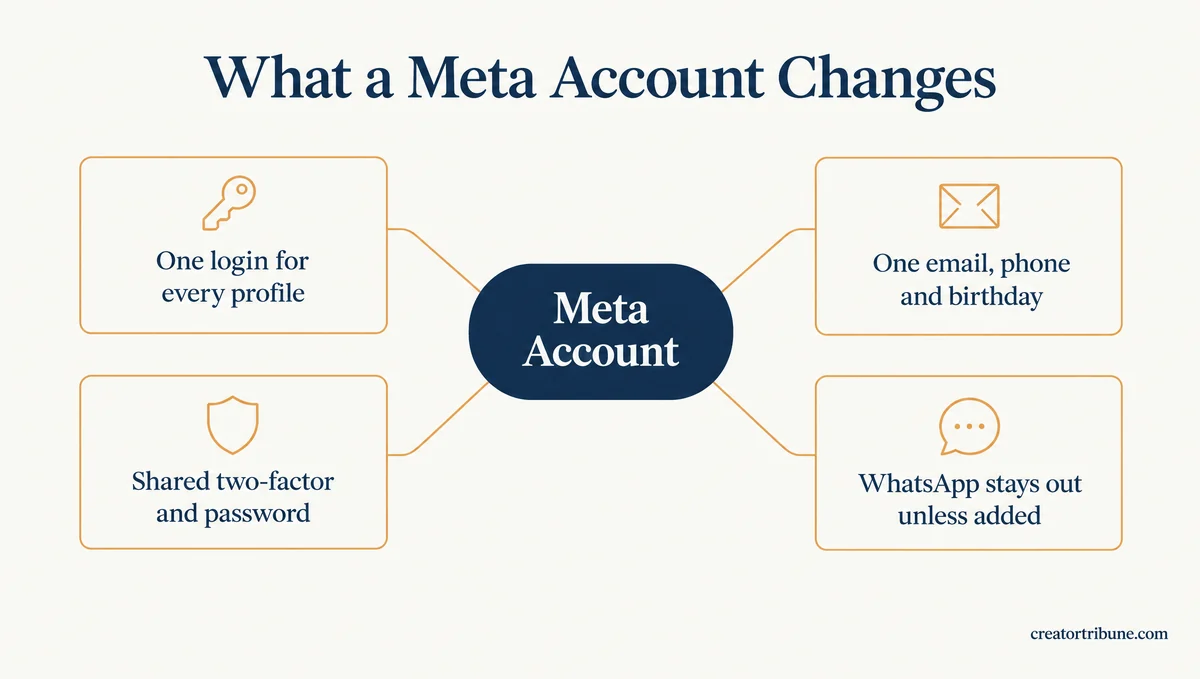
A Meta Account on Instagram is the login and settings hub that replaces Accounts Center. It holds one sign-in, an optional single password, your contact details and your two-factor authentication for Instagram, Facebook, Threads, Messenger, Meta AI and Meta’s glasses and headsets.
Nobody signs up for one. Meta’s announcement on April 23, 2026 says “Accounts Center will automatically be updated to a Meta Account” and that “this rollout will happen gradually over the next year.”
It also says “you’ll be notified when this happens,” and that notification is the one that landed on October 22.
The pitch is convenience: passkeys on Instagram (sign-in with your fingerprint, face or device passcode instead of a password), one Security Checkup, and fewer settings to update app by app. The cost of that convenience is that a few settings stop belonging to Instagram alone.
Three things behave differently once your profiles share a Meta Account:
- One login reaches every linked profile. Since early 2026, every account in the same Accounts Center can log into the others by default, after Meta retired the “Logging in with accounts” option.
- Security settings become shared. Two-factor authentication applies across every profile in the same Meta Account, and a password change applies to every profile that uses a password.
- Your contact details must match. Your email, phone number and birthday become one set for every profile inside that Meta Account.
WhatsApp stays out unless you had already added it to Accounts Center, and even then Meta says you “can still remove it at any time.” Meta Quest owners who already had a Meta Account keep the same one, now stretched across the social apps.
My read is that Meta’s promise that “your day-to-day experience stays the same” covers your feed and posts, and that the sign-in screen is where people notice the switch.
Open your profile menu and look for Meta Account where Accounts Center used to be, because seeing it there means you have been updated.
Why Is There a Meta Account on My Instagram?
A Meta Account appears on your Instagram because Meta converted the Accounts Center your profile already sat in. Meta says profiles end up in one Accounts Center when you create one profile from another or share posts or stories across them.
Your new Meta Account “will only include the profiles and devices that you previously added to the same Accounts Center,” according to Meta’s About Meta Accounts page.
Both of those can happen years before any Meta Account exists, which is one likely way a 2012 Facebook email ends up on a 2026 Instagram login.
That is also why one of your accounts can update while another does not. Meta Accounts “are becoming available to people on an individual basis,” and accounts sitting in different Accounts Centers can switch on different days.
They are also “only available in some locations,” so a menu that still says Accounts Center means yours has not switched yet.
Why Did Instagram Change My Login to My Facebook Email?
Your Instagram login most likely switched to your Facebook email because a Meta Account keeps one set of contact information for every profile inside it. Meta says it will adjust settings to match when profiles with different settings share one Meta Account.
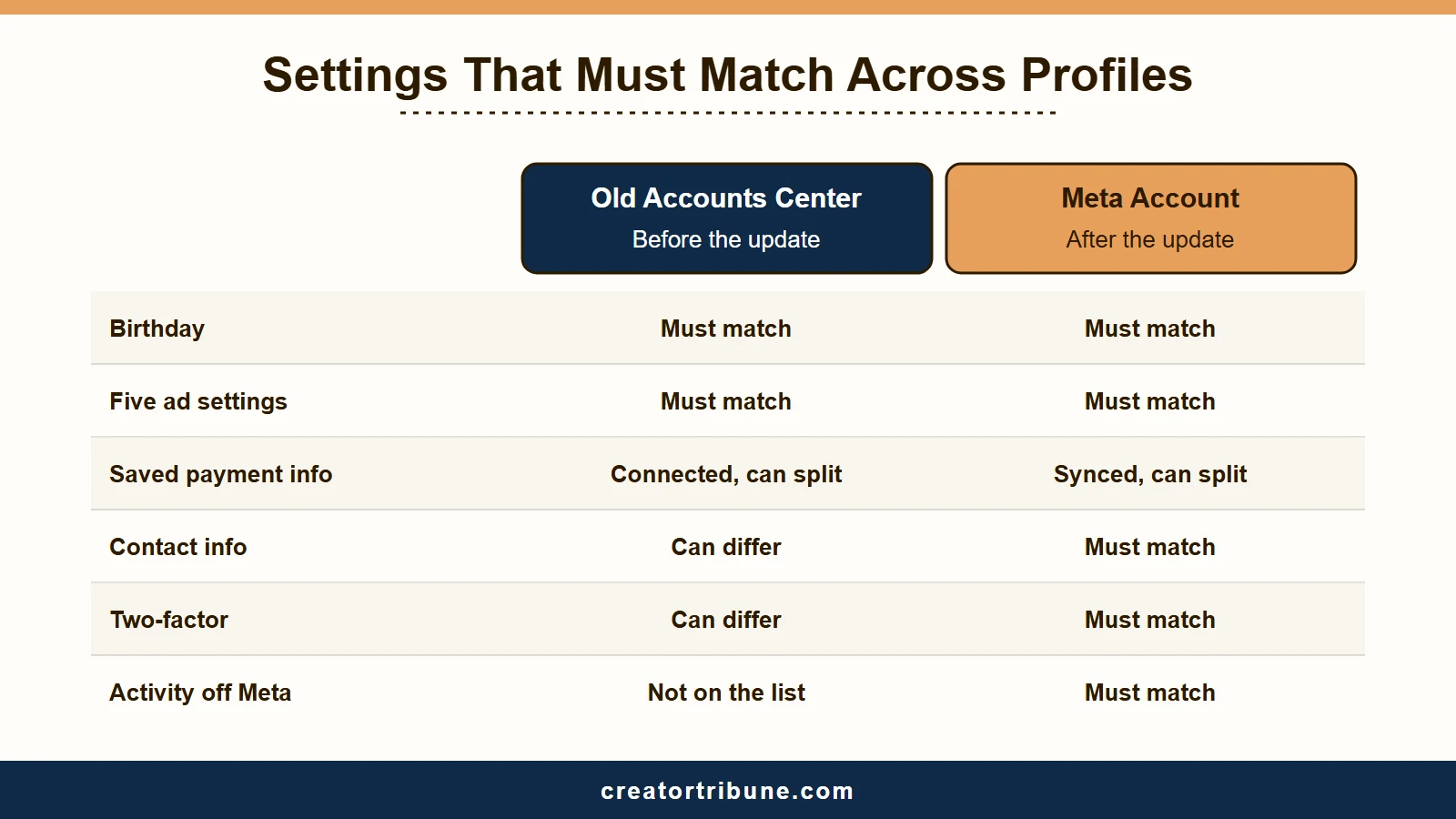
Meta has not published an explanation for the October 22 switches. Its two settings pages do describe the mechanism, and comparing the Accounts Center version with the Meta Account version shows which settings moved onto the “must be the same” list. When I read the Accounts Center page on October 26, 2026, it hid one item, cookie preferences, from my location, so its list can look longer where you live.
| Setting | Old Accounts Center | Meta Account |
|---|---|---|
| Birthday | Must match | Must match |
| Ad preferences (five settings) | Must match | Must match |
| Contact information (email, phone) | Can differ per account | Must match |
| Two-factor authentication | Can differ per account | Must match |
| Saved payment information | Connected, though Meta lets you disconnect it | Synced, though Meta lets you separate it |
| Activity off Meta technologies (what businesses share with Meta) | Not on the must-match list | Must match |
Contact information is the change that touches your login, because the Meta Account settings page defines it as “your mobile numbers and emails that you can use to log in.”
Two-factor authentication now covers every profile too, whereas Accounts Center let you “choose different passwords for your Facebook, Instagram or Meta accounts.”
Before: Instagram signs in with the email you gave it, a password only Instagram uses, and a two-factor method that protects Instagram alone.
After: Instagram signs in with the contact email your Meta Account holds, which can be the address on your Facebook profile. One two-factor setup covers Facebook and Instagram together, and a password change reaches both.
The first thing I check after any change like this is the contact email on my own accounts, because Meta sends security codes and reset links to that address.
Meta’s email help page also says its safety net, a deny link from [email protected], only starts “after an email address has been changed from the Instagram profile page.” Do not wait for a revert link after a Meta Account merge.
| Symptom after the update | Likely cause | Fix |
|---|---|---|
| Instagram login now uses an old Facebook email | Contact information must match across one Meta Account | Add an email you can open under Personal details, then confirm it |
| Instagram profile photo replaced by the Facebook one | Profile picture syncing between profiles in one Meta Account | Turn off syncing or give Instagram its own Meta Account, then reset the photo |
| Security codes go to an inbox you no longer use | The shared contact email changed | Update Contact information first, then check Recent emails |
| Only one of your Instagram accounts got the notice | Meta updates each Accounts Center on its own schedule | Nothing to fix; the others update later |
| An email change to an address you have never seen | A takeover, not the rollout | Use the [email protected] link and start recovery |
How Do You Change Your Instagram Email Back?
You change your Instagram email back under Personal details in your Meta Account settings, by adding an address you can open and confirming it while you are still logged in.
Once you are locked out, this fix is gone. Instagram’s lost-access help page says “if you can’t access Instagram and reach your Instagram profile settings, you won’t be able to continue.” It also warns that an old address lets “someone else” in through “an email or phone number you no longer use.”
- Open your Instagram profile and tap the menu in the top right.
- Tap Meta Account, or Accounts Center if your app still shows it.
- Tap Personal details, then Contact information. In the older Accounts Center menu, the same option sits under Profiles and personal details.
- Add an email address you can open. Instagram sends requests to confirm or deny the change to both the new address and the old one.
- Check that the address you cannot reach no longer appears under Contact information.
Because contact details are shared, one change covers every profile in that Meta Account. If you plan to give Instagram its own Meta Account, do the move first and then set Instagram’s email, so Facebook keeps the address it had.
Why Did My Instagram Profile Picture Change to My Facebook One?
Your Instagram profile picture changed to your Facebook one because profile picture syncing is a cross-profile feature of Meta Accounts, and a synced photo changes on every linked profile at once.
Meta’s cross-profile help page says changes to a synced picture “will appear across all of these profiles,” which is how a new Facebook photo ends up on Instagram.
Names and usernames no longer sync, so your Instagram handle stays your own.
Two fixes stop it. Turn off profile picture syncing where your settings list connected or cross-profile experiences, or give Instagram its own Meta Account, since Meta says “your profile pictures will no longer sync” once a profile sits alone. Then upload your Instagram photo again from Edit profile.
Is the Instagram Meta Account Notice a Hack?
The Instagram Meta Account notice is not a hack, since Meta announced the update in April 2026 and describes it across its help pages. A login change to an email you have never owned points to a takeover.
I read an address you recognize, such as your own old Facebook email, as the update, and an address you have never seen as an attack. Run these checks before you trust either answer:
- Open the menu, tap Meta Account, then Login and security, then Recent emails, and pick your profile. Instagram’s recent emails page says this lists official emails sent in the last 14 days.
- Compare any email about the change with Instagram’s official senders: @mail.instagram.com, @support.instagram.com, @facebookmail.com, @support.facebook.com and @global.metamail.com.
- Open Where you’re logged in under Login and security (Password and security in Accounts Center) and remove any device you do not know.
- If the new address belongs to a stranger, use the deny link in the [email protected] email and follow the hacked account recovery steps.
While recovery runs, Inflact can save your posts by username with no Instagram login, so you keep a copy if the attacker deletes them. It works only while the profile is still public.
A direct message claiming to be Instagram’s security team is a scam by definition. Instagram says it “will never reach out to you about profile security through Direct Messaging.”
Can You Opt Out of a Meta Account on Instagram?
You cannot opt out of a Meta Account on Instagram, because every profile has to sit in one. You can move Instagram into a Meta Account of its own, so it stops sharing a login, contact details and security settings with Facebook.
There is no off switch to find, because a Meta Account “must contain at least one profile or device,” according to Meta’s About Meta Accounts page. The split, on the other hand, is official.
Meta’s April announcement says “you can have a Meta Account for your Facebook and another Meta Account for your Instagram profile.” TechCrunch reported at launch that the setup “doesn’t force users into linking all of their accounts.”
Deleting the account is the advice I push back on hardest, since it trades a settings problem for every post and follower you have. A separate Meta Account costs nothing and takes three taps once you are in the right menu. Split if Instagram is your business or your audience, and stay merged only while you control the shared email and two-factor method.
If you meant Meta AI, the assistant in your DMs and search, that is a separate product with its own controls, covered in our guide to turning off Meta AI.
How Do You Move Instagram Out of a Meta Account?
You move Instagram out of a Meta Account from Meta Account settings by tapping Manage account, then Manage next to the profile you want to separate, then Move out of this Meta Account.
Profiles can move “into and out of the same Meta Account anytime,” according to Meta’s move-out help page. The steps from Instagram:
- Open your Instagram profile, tap the menu, then tap Meta Account.
- Tap Manage account.
- Tap Manage next to the profile you want to separate, Instagram or Facebook.
- Tap Move out of this Meta Account and follow the prompts.
Moving a profile out does not reset anything. Meta’s settings page says the merged settings “will not revert,” so set Instagram’s own email, password and two-factor method straight after the move.
Expect shared features to stop after the split. Meta’s connected experiences page says accounts can use features such as sharing stories across apps only “if they’re in the same Accounts Center.”
If Instagram is the only profile listed under Manage account, it already has a Meta Account to itself. That would explain why one Instagram user saw only options to deactivate, delete or memorialize the profile, with no unlink button.
Not updated yet? In Accounts Center the same split means removing an account: tap Accounts, then Remove next to the account you want out. Meta’s Accounts Center help notes that this also removes “any profiles associated with that account.”
Is a Meta Account the Same as Your Instagram Account?
A Meta Account is not the same as your Instagram account: the Meta Account is the login and settings layer, while your Instagram profile keeps its own username, followers, posts and messages.
Even with several profiles in one Meta Account, “your messages, friends, and followers will not change,” according to Meta’s About Meta Accounts page.
Here is what stays Instagram’s own:
- Your username and display name, which Meta says no longer sync between profiles.
- Your followers, the accounts you follow, and your DMs.
- Your posts, reels and stories, unless you choose to share them across apps.
- Instagram-only settings such as who can tag you in photos, which Meta’s April announcement says “will not change.”
What becomes shared is the layer underneath: the login, two-factor authentication, contact details, birthday, ad preferences and saved payment details. What surprised me is how little of the profile itself merges, since nearly all of the risk sits in that shared login.
Profiles in one Meta Account share ad settings too, since some ad preferences apply to every profile at once. In Meta’s own example, choosing “see less” for alcohol ads on Facebook and gambling ads on Instagram means seeing less of both “across all profiles in that Meta Account.”
A synced profile picture can also surface you in friend and follow suggestions on Facebook, Instagram and Meta Horizon, Meta’s virtual reality platform.
If you want Instagram kept apart from your real-name Facebook profile, a separate Meta Account is the setting that does it.
If Facebook Bans You, Does Your Instagram Get Banned Too?
A Facebook ban can reach your Instagram, because Meta’s Account Integrity policy says it may restrict or disable accounts “owned by the same person or entity as an account that has been disabled.” That holds whether or not the two share a Meta Account.
The Account Integrity policy ties that rule to ownership. Nothing in it depends on Meta Accounts, so a separate Meta Account changes your login and settings without hiding that both profiles are yours.
I would not treat a separate Meta Account as ban insurance. The shared login is a better reason to split, because profiles in one Meta Account can log into each other, so a stranger who gets into your Facebook can walk into your Instagram.
Four habits limit the damage either way:
- Give Instagram its own Meta Account if you want a Facebook problem kept away from Instagram’s login.
- Set an email and phone number you control, then turn on two-factor authentication with an authenticator app.
- Download a copy of your Instagram data now, from Your information and permissions in your Meta Account settings. Meta lists downloading or exporting your information among the settings each profile manages on its own.
- Keep a way to reach your audience off Instagram, such as an email list.
The only audience a ban cannot touch is one you own, which is why a simple creator money page with an email signup is worth setting up before you need it. If a ban has already landed, the disabled account recovery path covers the appeal.
Quick Takeaways
- Ten settings must match inside one Meta Account, and your contact email, two-factor authentication and activity off Meta technologies are the three new ones on that list.
- You cannot switch a Meta Account off, but Manage account, then Manage, then Move out of this Meta Account gives Instagram its own.
- Moving out does not undo merged settings, so reset your Instagram email, password and photo afterwards.
- A login change to an address you have never seen is a takeover, so check Recent emails under Login and security before trusting any message.
- If Instagram matters more to you than one login for every app, give it its own Meta Account today.