How to Delete a TikTok Account and What Really Happens Next
How to Delete a TikTok Account and What Really Happens Next
Deleting your TikTok account starts a 30-day countdown, and a few things outlive it. Here is the exact process, the blockers, and what to save first.
- 1What Happens When You Delete a TikTok Account
- 2How Do You Delete a TikTok Account Step by Step
- 3Why Won’t TikTok Let Me Delete My Account
- 4Should You Deactivate Instead of Delete
- 5What to Save Before You Delete Your Account
- 6How to Delete a TikTok Account You Cannot Log Into
- 7Frequently Asked Questions
- Can I recover my TikTok account after deleting it?
- Will my videos disappear immediately when I delete?
- Can someone use my username after I delete my account?
- Why does my delete button fail or grey out?
- Does deleting the TikTok app delete my account?
- 8Quick Takeaways
The Short Answer: To delete a TikTok account, open Settings and privacy, tap Account, then Deactivate or delete account, and confirm with your password. Deletion is not instant. It starts a 30-day grace period, after which your videos and username are gone for good, though your sent messages and other people’s Duets can survive.
Here is something nobody warns you about before you try to delete a TikTok account: the bigger your following, the harder the app fights you on the way out.
Creators sitting at 16,000, 30,000, even 155,000 followers keep hitting a stubborn “Delete Failed” error, while a brand-new account on the same phone disappears in seconds.
This guide walks through the exact steps on your phone and on desktop, what survives the deletion even after your profile is gone, and the blockers that trap creators specifically. I have kept it practical, because the official help pages skip the parts that matter most to anyone who built something real on the platform.
Deleting is not one button and done. It starts a 30-day clock, it burns your username for good, and it leaves a few things behind that you might assume vanish with everything else.
You will come away knowing precisely what to save, what to expect, and how to get out without regretting it a month later.

What Happens When You Delete a TikTok Account
Deleting a TikTok account starts a 30-day deactivation window, then permanently erases your videos, comments, drafts, and follower list.
During those 30 days the account is hidden but recoverable. After day 30 it is gone, and no support agent or third-party tool can bring it back.
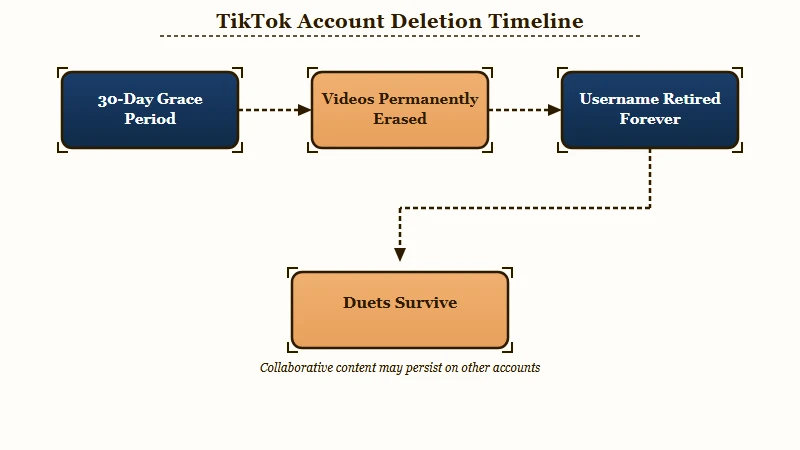
The part that surprises people is what does not disappear. Direct messages you sent stay visible in the other person’s inbox, because on TikTok a message belongs to both people in the thread. Any Duet or Stitch another creator made from your video can also keep living on their profile, since that content is theirs now.
Your username is the harshest surprise. Once deletion finalizes, that handle is retired permanently, so neither you nor anyone else can ever claim it again. I have watched creators assume they could grab their old @name back after a break, and that is not how it works.
What is the 30-day grace period: A cooling-off window after you request deletion, during which logging back in and tapping Reactivate cancels the whole process and restores everything.
Here is the full breakdown of what lives and what dies, which most guides gloss over:
| What you have | After the 30 days | What to know |
|---|---|---|
| Videos and drafts | Permanently deleted | Anyone who saved them keeps their copy off-platform |
| Sent direct messages | Still visible to recipients | You cannot delete them from the other person’s side |
| Duets and Stitches of your work | Can remain live | They belong to the creator who made them |
| Username | Retired forever | Never reusable by you or anyone |
| Email and phone number | Freed after 30 days | Reusable for a fresh account once the clock ends |
How Do You Delete a TikTok Account Step by Step
You can delete a TikTok account from the mobile app or from any desktop browser, and the menu path is nearly identical on both.
The app is fastest, but I steer creators toward desktop when the app throws errors or keeps interrupting with terms-of-service popups.
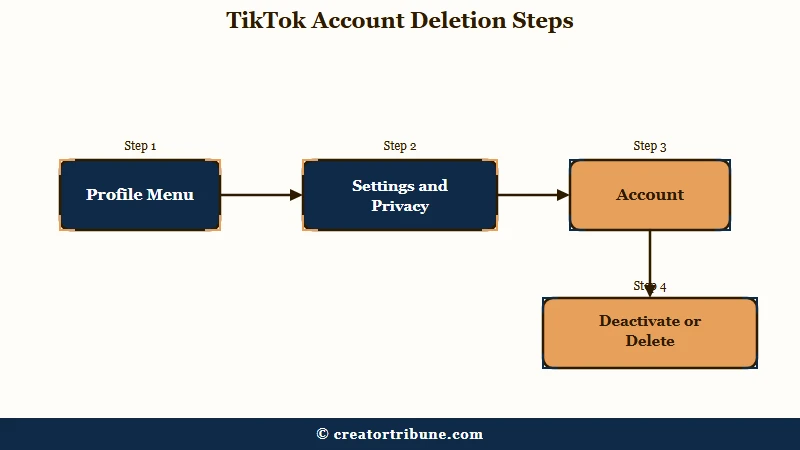
On the phone, here is the sequence I would follow:
- Open your Profile in the bottom right, then tap the Menu icon (three lines) in the top corner.
- Go to Settings and privacy, then Account.
- Tap Deactivate or delete account.
- Choose Delete account permanently, then confirm with your password or a verification code.
On a desktop browser, log in at tiktok.com and follow this path:
- Click your profile picture, then open Settings.
- Find Account control or Manage account.
- Click Delete, then Continue.
- Enter your password and confirm the deletion.
One thing worth clearing up: uninstalling the app does nothing to your account. Your profile, videos, and messages stay fully live and searchable even after you drag the app to the trash. Deletion only counts when you submit the request inside settings.
What is deactivation: A reversible pause that hides your profile and videos indefinitely while keeping all of your data intact, so you can return whenever you want.
Why Won’t TikTok Let Me Delete My Account
A blocked deletion usually comes down to identity verification, a large follower count, or an unresolved balance, not a bug you can force through.
This is the section creators need most, because the standard advice of “clear your cache” does nothing for these specific walls.
The follower-count wall is the strangest one. Creators report that accounts with big audiences get stuck in a “Delete Failed” or “too many attempts” loop, while a fresh zero-follower account on the same device deletes on the first try.
The platform is measurably less willing to let established accounts walk away, and the workaround floating around forums, manually removing thousands of followers one by one, is not realistic for anyone above a few hundred.
The sources I trust also flatly disagree on two fixes, so I will give you both sides honestly rather than pretend there is one clean answer:
| Symptom | Likely cause | What to try |
|---|---|---|
| “Delete Failed” on a large account | Security hold on high-follower profiles | Retry on desktop web, wait 24 hours between attempts, then email support if it persists |
| Deletion blocked at verification | Outdated or missing email or phone | Add and confirm a current email and phone first, since verification is required |
| One guide says remove your phone number | Conflicting community reports | Some creators fixed “Delete Failed” by removing the linked number, others by adding one, test in that order |
| Cannot change region to delete | Funds or credits stuck in your Wallet | Spend or withdraw the balance, and note it can persist even when the Wallet reads zero |
TikTok’s own documentation says you must be logged in to delete, which implies you need your password. Yet the security vendors AVG and Avast both describe deleting without logging in by emailing support with your username, birth date, and linked contact details.
The truth is that both paths exist depending on your situation, and I will cover the no-login route below.
Should You Deactivate Instead of Delete
Deactivation is the smarter move for most creators, because it hides your presence without burning your username or destroying your archive.
The way I see it, delete is a decision you cannot walk back, and deactivate buys you time to be sure.
There is a middle path worth naming that the help pages never mention. Instead of nuking the account, you can turn it into a quiet placeholder: set it private or pin a single video that points followers to your other platforms, then stop posting. You keep the handle, you block impersonators from grabbing your name, and you leave the door open.
Watch the calendar if you go the deactivate-and-walk-away route. After 180 days of inactivity, TikTok can strip your username and reset it to a random string of numbers, which quietly hands your brand name to the void. A short break is fine; a half-year of silence is not.
| Factor | Deactivate | Delete |
|---|---|---|
| Reversible | Yes, anytime | Only within 30 days |
| Keeps your username | Yes | No, retired forever |
| Preserves videos and analytics | Yes | No, erased after 30 days |
| Risk over time | Username reset after 180 days idle | Permanent once finalized |
What to Save Before You Delete Your Account
Before you delete, download your data and screenshot the analytics that prove your value to future sponsors.
What I always flag to creators is that TikTok’s export tool hands you a file of your profile and videos, but it does not preserve the demographic and performance history that makes up a media kit, and that history dies with the account.
To pull your archive, go to Settings and privacy, then Account, then Download your data, pick TXT or JSON, and request it. The file takes up to three days to prepare and then stays available to download for only about four days, so do not request it and forget about it.
Here is the difference between leaving clean and leaving with regret:
Before: You hit delete on a Friday, and three years of watch-time trends, your top-performing video list, and your audience age breakdown are gone by the next month with no way to reference them in a brand pitch.
After: You spend 20 minutes first, screenshotting your Analytics tabs (Overview, Content, Followers), exporting your data file, and saving your best videos to your camera roll, so your whole track record survives the account that held it.
The creators who leave without drama are the ones who never leaned on a single app to reach their people. If that describes a gap in your setup, our Creator Money Page walks through owning your audience directly, so no platform ever holds your reach hostage again.
It pairs well with the habit of turning viewers into subscribers before you ever need an exit.
How to Delete a TikTok Account You Cannot Log Into
If you are locked out or hacked, secure the account or email support to request deletion, since you cannot delete what you cannot open.
This is where people panic, but there is a defined path, and I have walked creators through it more than once.
If the account was hacked, run TikTok’s account recovery first to regain control, then delete normally once you are back in. If you genuinely cannot recover access, you can email support with your exact username, date of birth, and the phone number and email that were linked, and request removal that way.
Two money-related traps stop deletions cold, and both need clearing first:
- TikTok Shop: You cannot close a shop until all orders have been completed or closed for 90 days with no new orders, every listing is deactivated, disputes and fees are settled, and a 30-day public closure notice has run.
- Wallet coins and ad spend: Spend or withdraw any coins and rewards, since they are non-refundable, and stop any active campaigns in TikTok Ads Manager so you are not billed after you leave.
One privacy note creators overlook: if you verified your age with a selfie or ID through TikTok’s third-party partner, deleting your TikTok account does not erase that biometric data.
You have to request deletion from the verification provider separately, which most people never realize they need to do. For a sense of scale on why the platform guards these accounts so tightly, TikTok sits above 1.5 billion monthly users worldwide, per Statista.
If your real goal is a fresh start rather than a full exit, resetting your feed or changing your TikTok username may get you there without losing your history.
And if a ban is what pushed you toward deleting, the TikTok ban appeal process is worth trying first, or recovering a hacked account if that is the real issue.
Frequently Asked Questions
Can I recover my TikTok account after deleting it?
Yes, but only within the 30-day grace period. Log back into the app and tap Reactivate, and your account, videos, and followers return. After 30 days the deletion is permanent and nothing can restore it.
Will my videos disappear immediately when I delete?
No. Your profile and videos are hidden during the 30-day window and only permanently erased after it ends. Copies other users downloaded, plus Duets they made, can still exist off your account.
Can someone use my username after I delete my account?
No. A permanently deleted username is retired for good and can never be claimed again by you or anyone else. This is why deactivating is safer if you might return.
Why does my delete button fail or grey out?
The most common causes are an unverified email or phone, a very large follower count, or an unresolved Wallet balance. Try again on desktop web, confirm your contact details, and clear any coins or Shop obligations first.
Does deleting the TikTok app delete my account?
No. Uninstalling the app only removes it from your phone. Your account stays fully active until you submit a deletion request inside Settings and privacy on the app or website.
Quick Takeaways
- Deleting starts a 30-day countdown, and only after day 30 are your videos, drafts, and username erased for good.
- Your sent DMs and other people’s Duets of your videos can survive your account, so deletion is not a full clean sweep.
- Big accounts hit “Delete Failed” errors that fresh accounts never see, and the fix is usually desktop web plus verified contact details.
- Download your data and screenshot your analytics first, because your media-kit history dies with the account and cannot be recovered.
- If you might come back, deactivate instead, but log in before 180 idle days or TikTok resets your username to random numbers.