How to Add a Link in Your TikTok Bio
How to Add a Link in Your TikTok Bio
Add a clickable link to your TikTok bio in minutes, even under 1,000 followers, plus how to fix a greyed-out link and what to link to.
- 1How Do You Add a Link to Your TikTok Bio
- 2Do You Still Need 1000 Followers for a TikTok Bio Link
- 3Why Is Your TikTok Bio Link Not Clickable or Greyed Out
- 4What Should You Link To in Your TikTok Bio
- 5Frequently Asked Questions
- How many followers do you need to add a link to your TikTok bio?
- Why is my TikTok bio link not clickable?
- Do you need a Business account for a TikTok bio link?
- Can you put a clickable link in your TikTok bio text?
- How do you add more than one link to your TikTok bio?
- 6Quick Takeaways
TL;DR: You add a clickable TikTok bio link under Edit profile, in the Website field, and as of mid-2024 most personal accounts can do it with no follower minimum. If the field is missing, update the app or switch to a free Business account. Then link to one thing that captures emails, not a wall of buttons.
Adding a link in your TikTok bio used to be locked behind a 1,000-follower wall, and that one rule sent a lot of small creators chasing follower counts before they could send anyone anywhere. The good news is that wall mostly came down in 2024, and most accounts can add a clickable link today.
The catch is that TikTok hides the setting in one specific spot, and a URL pasted anywhere else just sits there as dead text. I will walk through the exact taps, clear up the follower-rule confusion that half the guides online still get wrong, and fix the usual reasons the link goes missing or greyed out.
Then I will cover the part almost nobody explains: what to point that single link at, because one link used well is worth more than ten links nobody taps.
How Do You Add a Link to Your TikTok Bio
You add a link to your TikTok bio by opening Edit profile and pasting the URL into the Website field, which is the only field on your profile that renders a clickable link. It takes about thirty seconds.
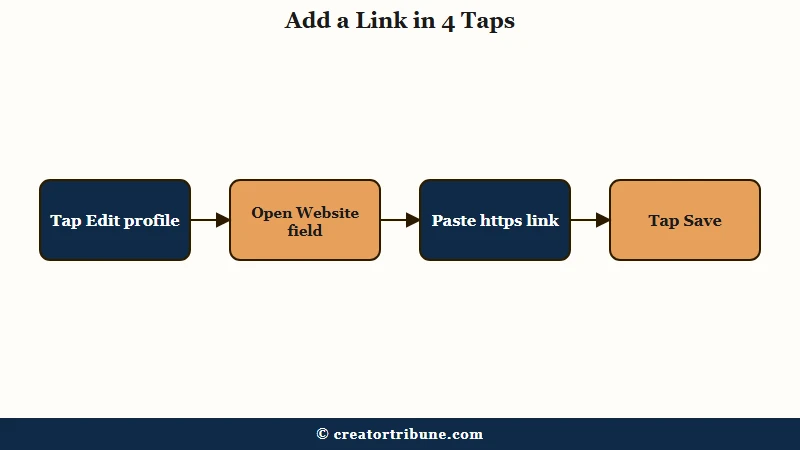
Here is the exact sequence I use on the phone app, which is where most people manage this:
- Open TikTok and tap the Profile icon in the bottom right.
- Tap Edit profile.
- Scroll to the Website field, which sits just below the Bio box.
- Paste your URL, starting with https:// so it saves cleanly.
- Tap Save.
One thing that tripped people up for years has quietly changed. You can now edit the Website field from tiktok.com on a desktop browser too, which is far easier when you are pasting a long tracking URL or a link-in-bio address you do not want to fat-finger on a phone.
Do You Still Need 1000 Followers for a TikTok Bio Link
No, most personal accounts no longer need 1,000 followers, because TikTok scrapped that threshold in mid-2024 for accounts in good standing. A lot of older guides still repeat the old rule, which is why this stays confusing.
From what I have seen, the honest version is this: the 1,000-follower gate is gone for most personal accounts, but rollout has been uneven, so a few regions and newer accounts still hit the old requirement. If yours does, switching to a free Business account unlocks the Website field instantly with no follower minimum.
There is a real trade-off to that switch, and the tutorials pushing it rarely mention it. A Business account limits you to TikTok’s Commercial Music Library of pre-cleared songs, so you lose access to many trending sounds that drive reach. Creator and Personal accounts keep the full music library.
| Account type | Clickable link | The catch |
|---|---|---|
| Personal | Yes, no follower minimum since mid-2024 | A few regions and new accounts still see the old gate |
| Business | Yes, instant, no minimum | Limited to the Commercial Music Library, fewer trending sounds |
| Creator | Yes | Keeps the full sound library, good middle ground |
Why Is Your TikTok Bio Link Not Clickable or Greyed Out
The most common reason a TikTok bio link is not clickable is that the URL was typed into the Bio text instead of the Website field, where it shows as plain text nobody can tap. The rest of the causes are quick fixes once you know them.
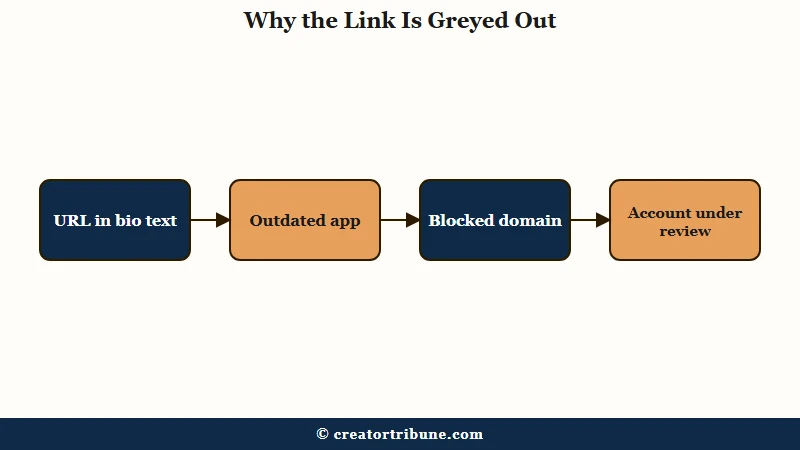
The way I see it, this is less about bugs and more about TikTok being picky in ways it never explains. A link can save and still refuse to appear because the domain is on a blocklist, and you get no error at all, just a link that silently never shows up.
| Symptom | Likely cause | Fix |
|---|---|---|
| No Website field at all | Outdated app or a brand-new account | Update the app; new accounts wait 24 to 72 hours |
| Link saved but not clickable | URL is in the Bio text, not the Website field | Move it into the Website field |
| Link disappears after saving | Blocked domain such as adult, crypto, or phishing | Use a clean domain or a page you control |
| Field greyed out | Account under review or a recent guideline strike | Resolve the strike and wait for good standing |
| Only edits on the phone | An old assumption that no longer holds | Edit it at tiktok.com on desktop instead |
If you have ruled all of that out and the option still will not appear, a slow regional rollout is the usual culprit. You can test that theory by checking your profile on a personal hotspot or a VPN set to another country. If our wider guide to free link in bio tools is your next stop, the same blocklist rules apply to whatever hub link you paste in.
What Should You Link To in Your TikTok Bio
The smartest single link points to a page you own that captures an email, because TikTok only gives you one slot and a follower you can email is worth far more than one who just scrolls past. Most people waste the slot on a link that leaks traffic straight back out.
TikTok allows exactly one clickable link, and with over a billion monthly users on the app, that single slot is the only owned-traffic bridge you get. So the real question is simply which link earns that slot. Generic link-list pages convert at only 1 to 3 percent, while a focused page that captures emails tends to convert three to five times better, mostly because one clear choice beats a dozen competing buttons.
Before: your bio link goes to your Instagram, so the audience you worked for on TikTok just bounces to another feed you rent.
After: your bio link goes to a page that trades a freebie for an email, so a one-time viewer becomes a subscriber you can reach any time.
That email list is the only audience a platform cannot take from you overnight. We built a page you fully own for exactly this, a free link-in-bio template that captures emails instead of leaking taps, and it sits behind a single TikTok link cleanly. Once people are on the list, our guide on how to convert views to subscribers covers the follow-up, and if music access is why you are weighing a Business account, adding your own sound is worth a read first.
Frequently Asked Questions
How many followers do you need to add a link to your TikTok bio?
Most personal accounts need none, since TikTok dropped the 1,000-follower requirement in mid-2024 for accounts in good standing. A few regions still apply the old gate. Switching to a free Business account unlocks the link instantly with no minimum.
Why is my TikTok bio link not clickable?
Almost always because the URL is in the Bio description instead of the Website field. Only the Website field renders a clickable link. Move the URL there, make sure it starts with https://, and save again.
Do you need a Business account for a TikTok bio link?
No, a Personal account in good standing can add the link without one. A Business account is just the fastest guaranteed unlock if your Website field is missing. Be aware it limits you to TikTok’s Commercial Music Library.
Can you put a clickable link in your TikTok bio text?
No, a URL typed into the bio description shows as plain text that visitors must copy and paste. Only the dedicated Website field produces a tappable link. Keep promo URLs out of the bio body.
How do you add more than one link to your TikTok bio?
TikTok allows only one clickable link, so you point it at a single landing page that holds your other destinations. Keep that page short, three to seven links at most, and lead with one email-capture offer.
Quick Takeaways
- Add the link under Edit profile in the Website field, the only spot on TikTok that makes a URL clickable.
- The 1,000-follower rule is mostly gone since mid-2024, so most personal accounts can add a link today.
- A free Business account unlocks the link instantly but limits you to the Commercial Music Library, costing you trending sounds.
- If the link is greyed out or not clickable, check for an outdated app, a bio-text URL, or a blocked domain.
- Spend your one link on a page you own that captures emails, since a list is the audience a platform cannot take away.