Why You Cannot Boost Your Instagram Post and How to Fix It
Why You Cannot Boost Your Instagram Post and How to Fix It
Instagram will not let you boost your post? Here is every documented cause, the exact error message, and the fix that cuts 30% off your cost.
- 1Why Can I Not Boost My Post on Instagram?
- 2Does Your Account Really Need to Be 30 Days Old?
- 3What Do Instagram’s Boost Error Messages Mean?
- 4Why Does It Say Boosting Is Currently Unavailable in the App?
- 5How Much Does It Cost to Boost an Instagram Post?
- 6Why Will My Reel or Carousel Not Boost?
- 7How Do You Fix a Stuck Balance or a Rejected Promotion?
- 8Does Boosting Hurt Your Organic Reach Afterward?
- 9Should You Boost This Post at All?
- 10Frequently Asked Questions
- Why is my post not eligible to boost?
- Does my Instagram account have to be 30 days old to boost?
- Why does Instagram say boosting is currently unavailable in the app?
- Is boosting a post on Instagram free?
- Does boosting a post reduce your organic reach later?
- Why will my Reel not boost when my photos will?
- 11Quick Takeaways
The Short Answer: Instagram blocks a boost for a small set of documented reasons: the account is not professional, the person is under 16, the media breaks an ad rule, or the ad account has a payment hold. Meta publishes an exact error string for each one, and the string tells you which fix applies. The widely repeated rule that your account must be 30 days old is not in Meta’s documentation.
If you cannot boost your post on Instagram, the button is rarely the real problem. You tap Boost and nothing happens, or it sits there greyed out, or a message appears that explains nothing.
Most guides answer this with the same ten-item list, and one item on that list will cost you a month for no reason. The fix I reach for first is not on it.
Instagram and Meta publish the exact wording of the errors they show you, plus the exact conditions for each one. That documentation is where this article comes from, and it disagrees with the popular advice in two places that matter.
Why Can I Not Boost My Post on Instagram?
You cannot boost a post on Instagram for one of four reasons: the account is not a professional account, the person running it is under 16, the post itself breaks an ad rule, or the ad account has a billing or permission problem.
Everything else is a specific case of one of those four.
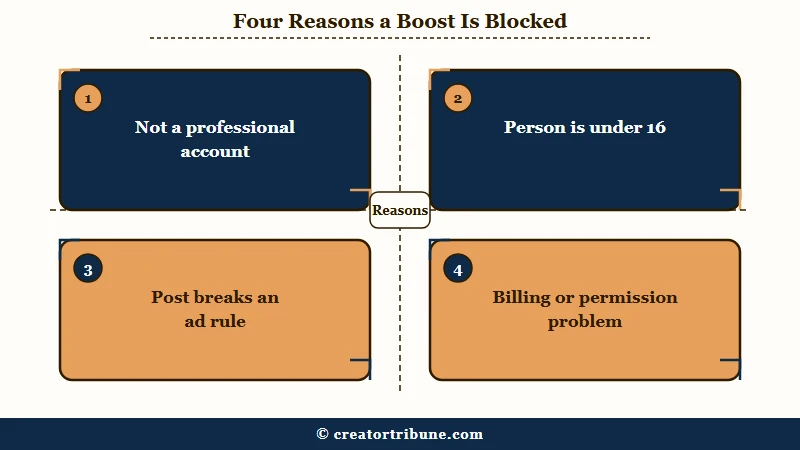
The first one catches most people. A personal or private profile has no Boost button at all, so the fix is to switch to a professional account, meaning Creator or Business.
The second is the one I check next, because it is invisible. Meta’s help documentation states that to create ads on Instagram you must “switch your personal or private account to a professional account and be over 16 years old.”
The third and fourth are where the error messages start, and those are worth reading literally rather than guessing at.
| Symptom | Likely cause | Fix |
|---|---|---|
| No Boost button anywhere | Personal or private account | Switch to a Creator or Business account |
| Boost button greyed out | Not an admin on the linked Facebook Page | Request admin access from the Page owner |
| “Boosting is currently unavailable in the app” | iOS in-app ad creation is off | Boost from instagram.com or Ads Manager |
| “Reels containing tappable elements cannot be boosted” | Location, hashtag or mention sticker | Remove the stickers and repost |
| “This video’s resolution is too low” | Under 720p source file | Re-upload at 1080 by 1920 |
| “Ad payment info is unavailable” | Billing hold or unpaid balance | Settle the balance from a desktop browser |
| Carousel will not promote | Mixed aspect ratios or a full-screen image | Rebuild the carousel in one square ratio |
Does Your Account Really Need to Be 30 Days Old?
Meta’s own boost troubleshooting documentation does not state a 30-day account age requirement anywhere. The requirement it does state is a professional account and a person over 16 years old.
This matters because the 30-day rule is repeated as settled fact across the guides ranking for this question.
Hootsuite’s guide puts it as plainly as it can be put: “Your account hasn’t existed for 30 days. Solution: Wait until the 30-day minimum has been reached. There’s no way around this one.”
I would not sit out a month on that. It is the single most expensive instruction in this search result, and Meta’s own page contradicts it by omission.
Two honest caveats, because this cuts both ways. A page not stating a rule is not the same as Meta promising that new accounts always sail through, and new ad accounts do get held for review more often than established ones.
What you should not do is stop troubleshooting and wait, when the real block is a Page permission or a payment method you could fix in four minutes.
What Do Instagram’s Boost Error Messages Mean?
Each Instagram boost error maps to one cause, and the wording tells you which.
Meta lists these strings verbatim in its troubleshooting documentation, so the message on your screen is a diagnostic, not a generic failure.
The exact string is the first thing I read, before touching a single setting. Here is what each one is telling you:
- “Something went wrong. There’s an issue on our end and we can’t boost your post right now. Please try again later.” This one is Meta’s, not yours. Wait and retry, and if it persists past a day, build the campaign in Ads Manager instead.
- “Something went wrong. Ad payment info is unavailable. Please try again later.” Your payment method or billing profile is the block. Go to the ad account billing settings on a computer.
- “We’re unable to connect to your Meta ad account.” The link between your Instagram profile and the ad account has broken. Sign into Facebook and confirm you are on the right ad account.
- “Boosting is currently unavailable in the app.” In-app ad creation is switched off for you. This is the Apple fee issue, covered below.
- “Boost Unavailable. Reels containing tappable elements cannot be boosted.” A sticker is the problem. Strip location, hashtag and mention stickers.
- “Boost Unavailable. This video’s resolution is too low and can’t be used.” Your source file is too small. Re-export and repost.
One cause never appears as an error at all, and it catches people who have checked everything else. If your account sits in an Accounts Center with a paid subscription to use Meta products without ads, that subscription restricts its ability to run ads. It is the least documented item on this list.
Why Does It Say Boosting Is Currently Unavailable in the App?
That message means Instagram has turned off ad creation inside the iOS app for your account, and the fix is to boost from instagram.com, Meta Business Suite, or Meta Ads Manager instead.
Meta’s full string is “Boosting is currently unavailable in the app. Creating ads in the Instagram iOS app is unavailable. You can still use other Meta tools to create ads.”
The cause sits underneath it, and it is money. When you pay for a boost inside the iOS app, the charge runs through the App Store, so Apple takes a cut.
Instagram states the size of that cut without hedging. An Apple service fee of 30% of your total ad payment “may apply when you add available funds to your ad account in the Instagram iOS app,” and that fee “is retained by Apple, not Instagram or Meta.”
This is the fix I care most about, because it does two jobs at once. Moving off the app clears the error, and Instagram’s own help page says doing so “allows you to save 30% on your total ad payment, before any applicable taxes and local fees.”
The obvious worry is that a cheaper route buys you a worse ad. It does not. Instagram states that once you boost from instagram.com, Meta Business Suite or Ads Manager, “your ad will be delivered to your audience in the same way as when boosting from the Instagram app.”
How Much Does It Cost to Boost an Instagram Post?
A boost costs whatever daily budget you set, but the same boost costs 30% more if you pay for it inside the iOS app.
The budget is your choice; the surcharge is not, unless you change where you pay from.
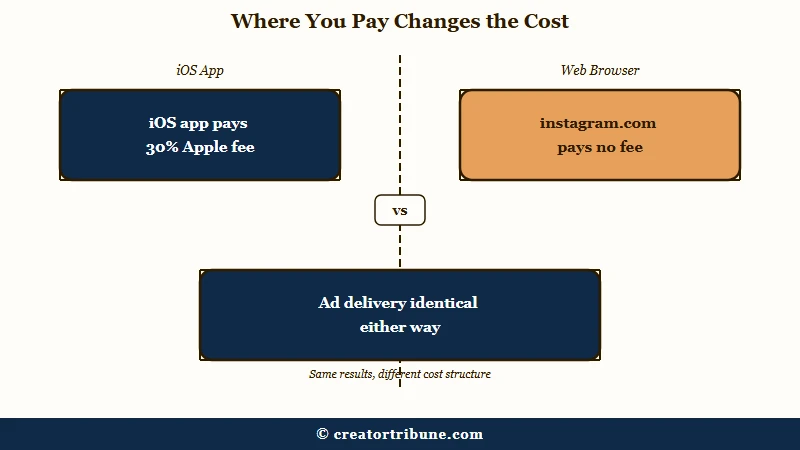
That gap is the whole ballgame on a small budget. Three hundred dollars of ad spend routed through an iPhone buys what roughly two hundred and ten dollars buys from a browser.
There are two documented ways around it, and I use the first:
| Where you pay | Apple fee | Ad delivery |
|---|---|---|
| Instagram iOS app | 30% of total payment | Same |
| instagram.com in a browser | None | Same |
| Prepaid balance added on desktop | None | Same |
The second route is worth knowing if you genuinely prefer boosting on your phone. Add funds to your ad account’s prepaid balance from a computer or the Ads Manager app, then spend those funds inside the iOS app with no Apple fee attached.
Why Will My Reel or Carousel Not Boost?
A Reel will not boost if it carries tappable stickers or falls below the resolution minimum, and a carousel will not boost if it mixes aspect ratios or contains a full-screen image.
These are media rules, so no amount of account fixing clears them.
On Reels, the interactive elements are the usual culprit. Location stickers, hashtag stickers and mention stickers all block a boost, and the documented exceptions are the polling sticker and the swipe-up call to action.
Resolution is the other half. Target 9 by 16 at 1080 by 1920, and treat anything exported under 720p as unusable for promotion.
Carousels have a rule almost nobody knows. Instagram now lets you mix image ratios inside one organic carousel, but it restricts promotion of those carousels, so a carousel containing a full-screen image cannot be boosted.
Music is the last common blocker, and it trips up business accounts specifically. A professional account cannot use the general music library commercially, so boosting a post built on a trending track can get the audio stripped or the promotion rejected outright. Checking the audio is now the first thing I do before building any Reel I intend to promote.
Before: A Reel with a location sticker, a hashtag sticker, a trending chart track, and a 720 by 1280 export.
After: The same Reel re-cut at 1080 by 1920, audio replaced with a track from Meta’s Sound Collection, and every sticker removed except a poll.
The second version boosts. The first will not, and the error will name only one of the four problems at a time, which is why people fix one thing and try again five times.
How Do You Fix a Stuck Balance or a Rejected Promotion?
A small unpaid balance can lock an ad account in a loop where the payment screen reports success but never charges the card, and the fix is to settle it somewhere other than the Instagram app.
Amounts as low as a few cents have been enough to freeze an account this way.
The loop is maddening because it looks like it worked. You pay, the screen confirms, the balance stays, and the boost stays blocked.
Three routes clear it, in the order I would try them:
- Settle the balance from the billing section of Meta Business Manager on a desktop browser, not from your phone.
- Add the payment method under Settings, then Accounts Centre, then Meta Pay, and verify the ad account in Ads Manager afterward.
- Separate the linked Facebook and Instagram accounts in Accounts Center, which forces the payment system to reset.
A rejected promotion is a different problem with a cleaner path. Meta names the specific advertising standard you breached, so edit the post to remove the cause and resubmit it for automatic review, or request a manual review in Account Quality if you think the rejection was wrong.
One more failure worth naming: if you deleted a boosted post and then restored it, the re-boost often breaks with a network or restricted error, because rapid deletion and restoration reads as suspicious activity.
Rebuilding the campaign in Ads Manager against the existing post is usually faster than fighting the app.
Does Boosting Hurt Your Organic Reach Afterward?
There is no evidence that boosting a post suppresses your later organic reach, and the statement most guides cite as proof is about something else entirely.
Both halves of that sentence are load-bearing, and the second one has gone unchecked since late 2024.
The belief is everywhere, and the people holding it are refreshingly honest about its basis. Per a boost thread on r/InstagramMarketing: “I refuse to use it because I feel like they limit reach once we try it and then make us pay. I don’t have data or proof.”
The standard rebuttal quotes Adam Mosseri. It is real, and Social Media Today reported it as “We don’t downrank posts that you mark as sponsored. It helps us understand Instagram to know what is sponsored,” posted on 11 November 2024.
Now read what that sentence covers. It is about posts you mark as sponsored, meaning branded content and paid partnership disclosure labels, which is a creator declaring a brand deal. Boosting is a different thing: paying Meta to push your own post.
So the rebuttal everyone reaches for does not answer the question. It gets misdated to January 2025 on top of that, which suggests most of the guides repeating it are copying each other rather than checking. My position is that both sides here are quoting evidence they do not have.
What does hold up is a mechanism that produces the same symptom without any penalty. A loosely targeted boost brings in cold followers who never engage with your normal posts, your account-wide engagement rate falls, and distribution drops with it.
That changes the advice in a way the myth does not. Target the boost narrowly at people who resemble your existing audience, and do not buy the widest reach your budget allows, because reach collapsing after a spike is often an audience quality problem rather than a punishment.
The same dynamic sits behind low Reels reach. It is also what makes bot follower floods so damaging, since the account picks up followers who will never engage.
Should You Boost This Post at All?
If the post already flopped organically, boosting it is usually the wrong move, and deleting and reposting it is the better one.
Paying to distribute something the feed has already declined to distribute rarely fixes the underlying problem.
The Boost button is at its best on a post that is already performing. A piece of content with genuine engagement behind it responds to budget; a flat one mostly gets you cheap impressions and cold followers.
My honest read is that most boost frustration is really a targeting question wearing a technical costume. People reach for the button when reach drops, which is the exact moment it is least likely to help.
If your goal is followers who stay, keep the budget in your pocket and repost the video at a better time instead. If your goal is traffic to a specific page this week, boost from a browser, target tightly, and keep the budget small enough that a bad result teaches you something cheap.
When a general Instagram error is blocking you rather than a boost rule, the Something Went Wrong fixes cover more ground.
Frequently Asked Questions
Why is my post not eligible to boost?
Your post is not eligible if it breaks an ad rule or your account does not qualify. The four documented causes are a personal rather than professional account, a person under 16, media that breaks a rule such as stickers or low resolution, or a billing hold on the ad account.
Does my Instagram account have to be 30 days old to boost?
Meta’s boost troubleshooting documentation does not state a 30-day account age rule. It requires a professional account and a person over 16. New ad accounts can still be held for review, but waiting a month is not a documented requirement.
Why does Instagram say boosting is currently unavailable in the app?
Ad creation is switched off inside the iOS app for your account. Boost from instagram.com, Meta Business Suite, or Meta Ads Manager instead. The ad delivers identically, and you avoid Apple’s 30% service fee on the payment.
Is boosting a post on Instagram free?
No. You set the daily budget, and the boost spends it. Paying inside the iOS app adds an Apple service fee of 30% of the total payment, which you avoid entirely by paying from a browser or a prepaid ad account balance.
Does boosting a post reduce your organic reach later?
No evidence shows that boosting suppresses later organic reach. A poorly targeted boost can lower it indirectly by adding cold followers who do not engage, which dilutes your engagement rate. Tight targeting avoids that.
Why will my Reel not boost when my photos will?
Reels have extra rules. Tappable stickers such as location, hashtag and mention tags block a boost, and only the polling sticker and swipe-up call to action are allowed. Videos under 720p are also rejected for being too low resolution.
Quick Takeaways
- Read the exact error string before changing anything, because Meta publishes one string per cause and it names your fix.
- The 30-day account age rule is not in Meta’s documentation, which requires a professional account and a person over 16.
- Boost from instagram.com rather than the iOS app and the same ad costs 30% less, with identical delivery.
- Nobody has evidence that boosting suppresses your organic reach, and the Mosseri quote used to debunk it is about sponsored-content labels instead.
- If a post already flopped, repost it rather than boosting it, and save the budget for content the feed is already moving.