What Does Restrict Mean on Instagram and How to Tell
What Does Restrict Mean on Instagram and How to Tell
Restrict is invisible by design. Here is the one test that confirms if someone restricted you on Instagram, and the false alarms that fool people.
- 1What Does Restrict Mean on Instagram?
- Does Restrict Still Hide Their Comments?
- How to restrict someone, and the one route the Lite app leaves you
- 2How Do You Know if Someone Restricted You on Instagram?
- 3What Is the Difference Between Restrict and Block?
- 4How Can You Test if Your Comments Are Restricted?
- 5What Do Your DMs and Their Activity Status Tell You?
- 6Which Restriction Signs Are False Alarms?
- 7Restrict vs Mute vs Deactivated, How to Tell Them Apart
- 8What Should a Creator Do if a Follower Restricts You?
- 9Frequently Asked Questions
- Does Instagram tell you if someone restricts you?
- What happens when you restrict someone on Instagram?
- What is the difference between Restrict and Limits on Instagram?
- Can someone who restricted me still see my posts and Stories?
- Why can I not see their green active dot anymore?
- Does being restricted hurt my reach or account?
- Will they know if I test whether they restricted me?
- 10Quick Takeaways
The Short Answer: Instagram never notifies you when someone restricts you, so you cannot know for certain from a single sign. The closest thing to proof is the comment test: leave a comment on their post, then check it from a second account or logged out. If it is invisible to everyone but you, your comments are being hidden, and a restriction is the likeliest reason.
Here is the frustrating part about trying to know if someone restricted you on Instagram: the feature was built so you cannot tell. Restrict is a silent one-way mirror. Your comments still look normal to you, your messages still say “Sent,” and no alert ever fires.
That design is the whole point. Instagram made Restrict a quiet alternative to blocking so a person can mute a troll without provoking them, which means every “obvious sign” you have read about is really just a hint, not proof.
I have watched people panic over a missing green dot that turned out to be nothing. The signs everyone lists (no “Seen” receipt, no “Active now” status) each have an innocent explanation that mimics a restriction perfectly. Only one test cuts through the noise, and I will show you exactly how to run it.
You will finish this knowing the single confirming test, how Restrict differs from a block, a mute, and a deactivated account, and the false alarms that fool people into a confrontation they did not need.
Instagram passed 3 billion monthly active users in September 2025, so the odds that a quiet moderation tool sits between you and someone you follow are higher than ever.
What Does Restrict Mean on Instagram?
Restricting someone keeps them following you while quietly cutting four things: they stop seeing your activity status and your read receipts, their comments stay hidden until you approve them, their messages land in your Message Requests, and you stop being notified about their comments.
It is Instagram’s quiet alternative to blocking. The restricted person keeps following you, keeps seeing your posts and Stories, and is never told that anything changed.
Instagram’s own help page puts two of those in a single list. If you restrict someone, “they won’t be able to see when you’re online or if you’ve read their messages”, and “you won’t receive any notifications for future comments from that person”.
A third effect sits further down the same page: “your chat with the restricted person will move from your main Direct inbox to Message Requests, and future messages from people that you’ve restricted will automatically move to Message Requests”.
Does Restrict Still Hide Their Comments?
Yes, and the answer needs a footnote, because the whole internet repeats wording Instagram itself has taken down. Instagram used to document the comment mechanic on its Restrict page and it deleted that line.
Read the archived captures and the change is dated. On February 27, 2022 the “if you restrict someone” list ran to three bullets, and the middle one said their new comments “will only be visible to that person, and you can choose to see the comment by tapping See comment. If you want others to be able to see their comment, you can tap Approve”.
By the December 28, 2022 capture that bullet was gone, and it has been absent from every readable capture since, including January and February 2025, September 2025, January 2026, June 2026 and the live page today. Two other bullets went with it, the group-chat warning and the line about reading a restricted person’s message without them knowing.
The mechanic itself is still real and Instagram still documents it, just on another page. The near-identical wording now sits on Instagram’s Limits page: “accounts you choose to limit can still comment on your posts and reels but their comments will be hidden unless you approve them”. That matters for the test below, and almost nobody writing about Restrict has noticed.
How to restrict someone, and the one route the Lite app leaves you
Instagram gives four ways in: from the chat thread, from one of their comments, from their profile, and from Settings under Restricted accounts, which is also where you restrict several people at once.
One quirk from the same help page that no competitor mentions: “if you’re using the Instagram Lite app, you can only restrict someone through their profile”. The other three routes are not there.
How Do You Know if Someone Restricted You on Instagram?
You cannot know from one sign alone, because Instagram never notifies a restricted user.
The reliable path is to combine a few silent clues with the one test that shows you something real. The clues raise suspicion, the comment test shows whether your comments are reaching anybody.
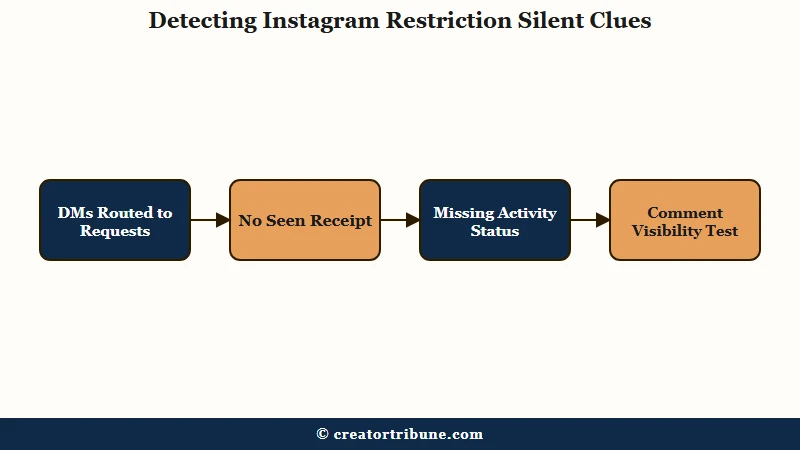
Restrict hides a person’s comments from the public, sends their DMs to your message requests, and strips their view of your activity status, all without telling them. From the restricted side, everything looks untouched, which is exactly why a single symptom proves nothing on its own.
The way I see it, the smart move is to treat the soft signals as a reason to run the real test, not as a verdict. A missing “Seen” and a vanished green dot together are suggestive. The comment check is what turns suspicion into evidence.
What is Restrict on Instagram: A quiet moderation tool that hides a person’s comments and reroutes their DMs to your requests folder, without blocking or unfollowing them and without any notification.
What Is the Difference Between Restrict and Block?
Restrict is invisible and partial, block is total and obvious.
A restricted person stays your follower, still sees your posts and Stories, and can still like your content. A blocked person is unfollowed, cannot find your profile, and loses all access.
That gap is where most people go wrong. They notice they can still see someone’s profile and Stories and conclude nothing is happening, when a restriction produces exactly that surface calm. In my experience, the “I can still see their profile” reasoning is what hides a restriction in plain sight.
It helps to line up all four states people confuse. Here is how Restrict, Block, Mute, and a deactivated account differ in practice.
| What you see | Restricted | Blocked | Muted or Deactivated |
|---|---|---|---|
| Their profile | Visible and normal | Cannot find it | Muted visible, deactivated gone for all |
| Your comment | Visible to you, hidden from others | Cannot comment at all | Fully public |
| Your DM | Goes to their requests, stays “Sent” | Cannot send | Delivers normally |
| You still follow them | Yes, unchanged | Auto unfollowed | Follow intact, deactivated shows blank |
If the profile is simply gone for you but loads when you are logged out, that is a block, and my guide on spotting an Instagram block walks through those signals in detail.
How Can You Test if Your Comments Are Restricted?
The comment test is the only check that proves your comments are being hidden, though it cannot tell you which tool is doing the hiding.
When you are restricted, your new comments on that person’s posts are visible only to you, sitting in a pending queue the owner must approve. A second pair of eyes exposes that instantly.
This is the check I trust over every other signal, because it has no innocent explanation the way a missing green dot does. Here is the sequence I run:
- Leave a fresh comment on one of the person’s recent posts.
- Open that same post in a private browser window while logged out, or on a second account.
- Look for your comment in the public view.
- If it shows to you but is missing for everyone else, you are restricted.
- If it appears publicly, you are not restricted, at least not on comments.
One caveat I always add: give it a minute and refresh, since a brand new comment can lag before it renders publicly. If the comment stays visible only to you across a couple of checks, your comments are being hidden.
What the test cannot do is name the cause, and this is where every other guide overreaches. Instagram documents the same hidden-until-approved behaviour for Limits, a separate tool that hides comments from everyone but close friends or recent followers for up to four weeks at a time.
A blanket Hidden Words filter produces it too. So a hidden comment tells you that you are on the wrong side of someone’s moderation settings, not that they picked you personally. Our breakdown of why Instagram comments stop loading covers the owner-side causes in full.
Before: You see no green dot and no “Seen” on your last message, so you assume you have been restricted and stew about it.
After: You post a quick comment, check it from a logged-out tab, watch it vanish for the public, and now you know for sure instead of guessing.
What Do Your DMs and Their Activity Status Tell You?
Your DMs and their activity status are supporting clues, not proof. A restricted message lands in the person’s requests folder and never shows a “Seen” receipt, and their “Active now” dot disappears for you. Both point toward a restriction, but both have other causes.
When I check a suspected restriction, the DM signal is the first thing I glance at. Send a short message and watch whether it ever moves past “Sent.” If the “Seen” receipt never appears and the green activity dot is gone, the case is building, though it is not closed yet.
Here the sources genuinely disagree, and it is worth being straight about it. Some guides say a restricted person cannot tag or mention you at all, others say they can tag you but you simply get no notification, and a few claim you still get the tag notification and can remove it.
The honest read is that tagging behavior has shifted across app versions, so I would not lean on it as a signal. The comment test does not wobble like that.
Which Restriction Signs Are False Alarms?
Most restriction “signs” have an innocent twin that fools people.
A missing green dot, an unanswered DM, or a message stuck on “Sent” can all happen for reasons that have nothing to do with you. Knowing the false alarms keeps you from starting a fight over nothing.
The one that catches people most often is activity status. Anyone can switch off “Show Activity Status” globally for every follower, which erases their green dot for the whole world, not just for you. What looks personal is often a blanket privacy setting.
Instagram’s own limits add more noise. New accounts get throttled on how many messages they can send before Instagram slows them down, and Instagram does not publish the number, so an unanswered DM can be a platform cap rather than a snub. Add outages, the Hidden Words filter, and the stricter default privacy on teen accounts, and you have several ways to mistake ordinary behavior for a restriction.
| Symptom | Looks like a restriction | Often really is |
|---|---|---|
| No “Active now” green dot | They restricted you | They turned off activity status for everyone |
| DM stuck on “Sent” | Routed to requests | An unpublished new-account sending limit, or they are just offline |
| Comment seems ignored | Hidden by a restriction | Caught by their Hidden Words filter |
| Cannot tag or mention them | Restricted | Teen-account default limiting tags to followers |
Restrict vs Mute vs Deactivated, How to Tell Them Apart
Each state leaves a different fingerprint, so one clean check separates them.
Mute changes nothing on the other person’s side, a deactivated account vanishes for everyone, and a restriction only shows up in the comment test. Match the symptom to the right cause before you react.
Mute is the easiest to rule out, because it is a control over your own feed. If you muted them, their posts just stop showing for you, and it has zero effect on their comments or messages to you. Nothing about a mute mimics a restriction from the restricted person’s side.
A deactivated or deleted account is the other clean case. Their profile disappears for everyone, your old chat relabels them as “Instagram User” with a blank avatar, and their past comments lose the clickable username.
When the profile is gone universally rather than just quiet, you are looking at deactivation, not a personal restriction, and the same “Instagram User” tell shows up if you check who viewed your profile and find ghosts in the list.
What Should a Creator Do if a Follower Restricts You?
If a follower or partner restricts you, do not escalate, and do not read it as a reach problem.
A restriction is one person hiding your comments from their audience, not a platform penalty, and it does not dent your overall reach or account standing. Handle it as a relationship signal, not a crisis.
Most guides only teach you how to restrict someone else. Almost none cover the reverse, which is the situation creators really land in when a collaborator or a cooled-off follower quietly limits them. The mechanics point to restraint, because confronting them usually pushes a quiet restriction into a full block.
If it is a brand partner or a collaborator, I would move the conversation off comments and into a channel you both control, like email or a scheduled call, rather than fighting for visibility in their comment section.
This is the deeper reason I keep pushing creators to build an audience you own. When your relationship with fans lives on a list you control instead of inside someone else’s app settings, a single Restrict toggle cannot quietly cut you off, and the same logic drives the habit of turning views into subscribers.
Frequently Asked Questions
Does Instagram tell you if someone restricts you?
No. Instagram never notifies a restricted user, and the feature is designed to be invisible, so your comments and messages look normal to you.
The closest thing to confirmation is the comment-visibility test, run from a second account or logged out.
What happens when you restrict someone on Instagram?
They stay following you and keep seeing everything you post, but they lose sight of your activity status and your read receipts, their messages move to your Message Requests folder, and you stop getting notified about their comments. Instagram never tells them any of it happened.
What is the difference between Restrict and Limits on Instagram?
Restrict targets one person indefinitely. Limits is a blanket, temporary tool you point at a group, either everyone outside your Close Friends or accounts that followed you in the last week, for up to four weeks at a time. Both can leave a comment hidden until you approve it, which is why a hidden comment does not prove a restriction.
Can someone who restricted me still see my posts and Stories?
Yes. Restricting does not hide your content, so the person who restricted you stays your follower and can still view your profile, posts, Reels, and Stories normally, and can even like them.
Restrict only limits their comments and messages to you.
Why can I not see their green active dot anymore?
It could be a restriction, but the more common cause is that they turned off “Show Activity Status,” which hides the green dot from everyone. Because it is a global setting, a missing dot alone never proves you were personally restricted.
Does being restricted hurt my reach or account?
No. Being restricted by someone is not a shadowban or a penalty, and it only hides your comments from that one person’s audience while rerouting your DMs to their requests.
Your reach, follower count, and account standing are unaffected.
Will they know if I test whether they restricted me?
No. Leaving a comment and checking it from another account is invisible to them. They receive no alert for the comment test, the DM check, or the activity-status check, so you can confirm a restriction without tipping anyone off.
Quick Takeaways
- Restricting someone keeps them following you while hiding your activity status and read receipts from them, keeping their comments hidden until you approve them, routing their DMs to your requests, and switching off your notifications for their comments.
- Instagram never notifies you about a restriction, so no single sign is proof on its own.
- The comment test is the only check worth running: comment, then view the post logged out or from a second account. It proves your comments are hidden, not which tool hid them.
- A restricted person still follows you and still sees your posts and Stories, which is why people miss it.
- Missing green dots and unseen DMs have innocent causes, including new-account sending limits and an activity status switched off for everyone.
- If someone restricts you, do not escalate, your reach is fine, and owning your audience keeps one toggle from cutting you off.