Fliki AI Review and Who Should Pay or Skip It
Fliki AI Review and Who Should Pay or Skip It
An honest Fliki AI review of the 2026 pricing, the credit burn, and the voice quality. See which plan faceless creators need and who should skip it.
- 1Why Fliki AI Burns Credits Faster Than You Think
- 2How Much Does Fliki AI Cost in 2026
- 3Does Fliki AI Make Real Video or Slideshows
- 4Is Fliki AI Good for TikTok Reels and Shorts
- 5Fliki AI Pros and Cons
- 6Who Should Use Fliki AI and Who Should Skip It
- 7The Verdict on Fliki AI
- 8Frequently Asked Questions
- Is Fliki AI free to use?
- What does one Fliki credit really cost?
- Can Fliki clone my voice?
- Does Fliki make real AI video or just slideshows?
- Are Fliki avatars as good as HeyGen or Synthesia?
- Can I get a refund on Fliki?
- 9Quick Takeaways
Bottom Line: Fliki AI is worth it for high-volume faceless creators who need fast script-to-video and a huge multilingual voice library, as long as you go straight to the Standard plan. It is the wrong pick if you want original AI-generated video, photorealistic avatars, or a forgiving credit system, because edits and regenerations quietly burn minutes and the annual plan is non-refundable.
This Fliki AI review is built for one decision: whether the tool earns a spot in a faceless video workflow, or whether your money goes further somewhere else. Fliki sells itself as a text-to-video and AI voiceover engine that turns a script, a blog post, or a single idea into a narrated vertical video.
The marketing is clean. The catch shows up on your second or third edit, when the minutes you thought you bought start draining far faster than the timer on your finished clip.
I have run enough of these AI video tools to know that the headline price is rarely the real price. This review covers the 2026 plans, the credit math that surprises people, the voice-quality trap on the cheap tier, and exactly who should pay versus skip.
Why Fliki AI Burns Credits Faster Than You Think
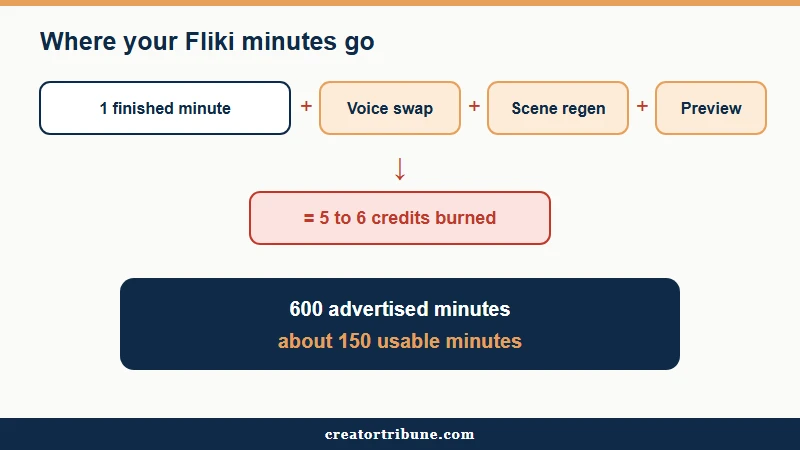
Fliki bills usage in minutes of content, but credits drain on every edit, voice swap, scene regeneration, and preview, not just the final export.
A one-minute clip you fuss over can quietly spend five or six minutes of credits.
That single mechanic reshapes the whole value question. The plans advertise a generous-sounding minute count, yet the number of finished, usable minutes you get is far lower once you account for iteration.
A creator who nails the first render gets close to the advertised total, while a perfectionist who regenerates mismatched stock scenes burns through the allowance in a fraction of the videos.
What I would tell anyone eyeing Fliki is to budget for the iteration, not the export. If a tool charges you to experiment, you either learn to commit on the first pass or you pay for the privilege of changing your mind.
Before: You buy the Standard plan for its 600 minutes and assume that means 600 finished minutes of video. You make a one-minute clip, swap the voice twice, and regenerate three stock scenes the AI mismatched.
After: That one-minute video has spent five or six minutes of credits. At that rate the 600-minute plan delivers closer to 150 usable minutes, so the real cost per finished minute is several times the sticker math.
How Much Does Fliki AI Cost in 2026
Fliki AI runs four tiers in 2026: a free plan, Basic around 8 dollars a month, Standard around 21 dollars a month annual, and Premium around 66 dollars a month annual.
The free plan watermarks everything and caps you at five minutes a month.
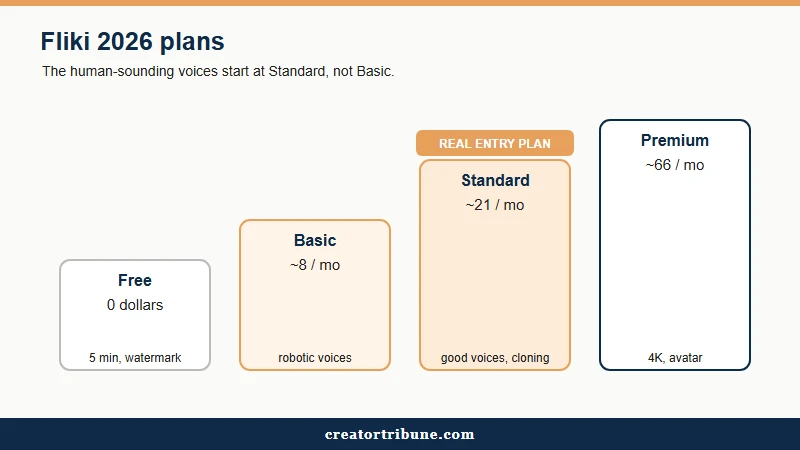
Here is the trap I would warn every new user about. The Basic plan looks like the budget entry point, but the human-sounding “ultra-realistic” voices are locked to Standard and above.
People sign up for Basic, discover the audio sounds robotic, and end up upgrading anyway, so Standard is the real floor for social content.
The free tier is genuinely useful for testing, not producing. It gives you about 300 voices, 720p output, a visible watermark, and no commercial rights, which is plenty to judge the workflow before you pay.
| Plan | Price (annual) | Minutes per month | Key unlocks |
|---|---|---|---|
| Free | 0 dollars | 5 minutes | 720p, watermark, about 300 voices, no commercial use |
| Basic | about 8 dollars per month | Limited monthly minutes | 1080p, no watermark, standard voices only |
| Standard | about 21 dollars per month (28 monthly) | 180 to 600 minutes | Ultra-realistic voices, voice cloning, 1080p |
| Premium | about 66 dollars per month (88 monthly) | Highest minute pool | 4K export, digital-twin avatar, first and last frame controls |
For a sense of how crowded this space is, short-form vertical video now drives most social engagement, and the video advertising market keeps climbing year over year, per Statista. That demand is why a dozen tools fight for the same creator dollar, which is good news for your negotiating power.
Does Fliki AI Make Real Video or Slideshows
Fliki does not generate original video frames; it searches royalty-free stock libraries and stitches existing clips to your script.
The output can look like a polished slideshow rather than custom footage.
This is the single biggest expectation gap I see. Tools like Sora and Kling generate new pixels from a prompt, while Fliki assembles pre-existing clips, so abstract topics often get oddly literal or mismatched stock. The time you save on summarizing a script can vanish into manually swapping the clips it picked.
There is also a 2026 quirk worth flagging. Some AI-generated visuals embed scrambled letters or pseudo-text artifacts directly into a scene, which means any output bound for a client or a brand channel needs a manual eyes-on pass before it ships.
If your niche leans on unique, branded visuals, the library-based approach will feel generic, and a roundup of AI tools for social graphics is a better starting point. Creators who want a similar full-pipeline generator can also compare it against my Revid AI review.
Is Fliki AI Good for TikTok Reels and Shorts
Fliki is a strong fit for high-volume faceless creators who pump out vertical TikTok, Reels, and Shorts content from scripts or ideas.
It is weaker the moment a human face needs to carry the video.
The voice library is the real draw here. You get more than 2,000 voices across 80-plus languages and 100-plus regional dialects, pulled from eight providers in one workspace, which makes localized versions of a clip fast. Voice cloning needs only a 30-second sample and can speak 30-plus languages, though that sits on Standard and up.
Where I would not reach for Fliki is talking-head content. Its avatars are functional but noticeably AI-generated, trailing HeyGen and Synthesia on lip-sync and realism. For repurposing long videos into clips it also competes with dedicated tools, so weigh it against my Opus Clip review and a broader guide to turning one upload into shorts.
| Use case | Fliki fit | Better alternative |
|---|---|---|
| Faceless script-to-video in many languages | Strong | None needed |
| Photorealistic talking-head avatar | Weak | HeyGen or Synthesia |
| Original generative video scenes | None | Sora or Kling style tools |
| Clipping a long video into shorts | Moderate | A dedicated repurposing tool |
| Blog post into a quick narrated video | Strong | None needed |
Fliki AI Pros and Cons
Fliki AI’s strengths are speed and a deep multilingual voice library; its weaknesses are the credit burn, the paywalled good voices, and a stock-footage look.
The balance tips on how much you iterate.
What I keep coming back to is that the upsides are real for one specific worker: the creator shipping volume in many languages. Here is how the trade-off breaks down.
Pros:
- A huge voice library of 2,000-plus voices across 80-plus languages and 100-plus dialects from eight providers in one place.
- Fast idea-to-video and blog-to-video that turns a script or URL into a narrated vertical clip in minutes.
- Voice cloning from a 30-second sample that can speak 30-plus languages on Standard and up.
- A genuine free tier plus the 2026 Playground, which lets you test models without spending your monthly credits.
Cons:
- Credits drain on edits, previews, and regenerations, so usable minutes run well below the advertised count.
- The ultra-realistic voices are locked to Standard and higher, leaving the cheap Basic plan sounding robotic.
- It assembles stock footage instead of generating original video, and 2026 builds sometimes embed scrambled pseudo-text in scenes.
- Avatars look visibly AI-made, the annual plan is non-refundable, and support over email can take weeks to reply.
Who Should Use Fliki AI and Who Should Skip It
You should use Fliki AI if you ship faceless, multilingual short-form at volume and can commit to first-pass renders; you should skip it if you need photorealistic avatars, original generative video, or a forgiving refund policy.
Match the tool to your workflow, not the marketing.
Two tips save real money if you do sign up. The Playground feature added in January 2026 lets you test voices and models without burning your monthly minutes, so do your experimenting there. For support, the Discord community tends to answer faster than the official email queue, which has a reputation for slow replies.
One hard warning before you pay annually. The yearly plan is strictly non-refundable once it starts, so run the free tier hard for a week first. An accidental annual renewal on a tool that does not fit your workflow is a sunk cost you carry for eleven more months.
| You are a | Use Fliki? |
|---|---|
| High-volume faceless creator in many languages | Yes, on Standard |
| Talking-head or personal-brand creator | No, use an avatar specialist |
| Brand or client work needing unique visuals | Mostly no, output looks generic |
| Budget creator testing the waters | Free tier first, then Standard |
| Heavy iterator who regenerates often | Caution, the credit burn hurts |
The Verdict on Fliki AI
Fliki AI earns a qualified yes for faceless, high-output, multilingual creators who go straight to the Standard plan and commit to first-pass renders.
For everyone else, the credit math and the stock-footage ceiling make it a hard sell.
The way I see it, Fliki is a workhorse, not a showpiece. It will not give you cinematic, original video or a convincing digital presenter, and it punishes indecision through its credits. What it does give a script-first creator is reach across dozens of languages at a speed that is tough to match.
If that is your lane, budget for Standard, do your testing in the Playground, and treat the advertised minute count as a ceiling you will never quite hit. If it is not your lane, your money buys more elsewhere.
Frequently Asked Questions
Is Fliki AI free to use?
Fliki has a free forever plan with no card required, but it caps you at five minutes of content per month, adds a watermark, limits output to 720p, and grants no commercial rights. It is built for testing, not producing.
What does one Fliki credit really cost?
Fliki prices credits in minutes of content, where one credit is roughly one minute. The catch is that edits, voice swaps, scene regenerations, and previews all spend credits too, so usable minutes run far below the plan’s headline number.
Can Fliki clone my voice?
Yes, voice cloning is available on the Standard and Premium plans. You record a 30-second sample, it is ready in under five minutes, and the clone can then narrate in more than 30 languages.
Does Fliki make real AI video or just slideshows?
Fliki assembles slideshow-style videos from royalty-free stock footage matched to your script. It does not generate original video scenes the way Sora or Kling-style tools do, so unique branded visuals are not its strength.
Are Fliki avatars as good as HeyGen or Synthesia?
No. Fliki’s avatars are functional but noticeably AI-generated, and HeyGen and Synthesia lead on lip-sync and realism. Treat Fliki avatars as a minor add-on, not the reason to subscribe.
Can I get a refund on Fliki?
Annual plans are strictly non-refundable once the billing cycle begins. Test the platform thoroughly on the free tier before committing to a yearly subscription, since support over email can be slow to respond.
Quick Takeaways
- Fliki bills in minutes, but edits and regenerations burn credits, so a 600-minute plan often yields closer to 150 usable minutes.
- The good ultra-realistic voices are locked to Standard, so skip Basic and treat Standard as the real entry plan.
- It stitches stock footage rather than generating original video, and 2026 builds can embed scrambled pseudo-text, so check every export.
- Test in the free tier and the Playground before paying, because the annual plan is non-refundable.