Why TikTok Folds Your Comments and How to Unfold Them
Why TikTok Folds Your Comments and How to Unfold Them
TikTok folded comments hide real engagement from your audience. Here is why it happens, which words trigger it, and how to fix it.
- 1What Are TikTok Folded Comments and Why Do They Happen?
- What the “may affect your well-being” folded comment message means
- 2How Do You Unfold Comments on Your TikTok Videos?
- 3Can You Turn Off Folded Comments on TikTok?
- 4Which Words and Phrases Trigger TikTok Comment Folding?
- 5Does Comment Folding Hurt Your TikTok Algorithm Performance?
- 6How to Prevent TikTok From Folding Comments in the First Place
- 7Frequently Asked Questions
- Can you see who folded your TikTok comments?
- Do folded comments count toward your engagement metrics?
- What is the difference between folded and deleted comments?
- How do you turn off comment folding on TikTok?
- Can you unfold TikTok comments permanently?
- Does TikTok fold comments for political reasons?
- What words get your TikTok comments folded?
- Does TikTok fold comments, or does the creator do it?
- Can creators see folded comments on TikTok?
- 8Quick Takeaways
TL;DR: TikTok folds comments when its AI flags them as spam, low-quality, or potentially offensive. Folded comments are hidden from other viewers but still count as algorithm activity. You can recover them by replying directly, adjusting your comment filters, or prompting longer responses from your audience.
TikTok folded comments are the platform’s way of quietly hiding engagement you earned. Someone leaves a genuine comment on your video, and TikTok’s algorithm decides it looks like spam. The comment disappears from public view. No notification. No explanation. Your comment count stays the same, but the visible conversation shrinks.
TikTok’s own Q1 2026 enforcement report counts 237,517,128 comments removed worldwide in a single quarter, up from 218,793,572 the quarter before. It puts TikTok’s overall proactive removal rate, across all content types, at 99.3 percent.
Removals are not folds, and TikTok publishes no folding figure anywhere. What the number does show is the scale at which comment decisions get made without a human reading them, and folding runs on the same machinery. If your comment sections look thinner than your notification count suggests, this is almost certainly why.
This guide covers what triggers folding, how to unfold comments on your own videos, and the specific settings that prevent it from happening in the first place. The settings paths in this guide were last checked against the TikTok app in July 2026.
What Are TikTok Folded Comments and Why Do They Happen?
TikTok folded comments are remarks hidden by the algorithm because they were flagged as low-quality, spam, or potentially offensive.
The person who wrote the comment can still see it, but nobody else can unless you manually unfold it.
What is comment folding: An automated moderation action where TikTok hides a comment from public view without deleting it. The comment still exists and still counts toward your engagement metrics internally.
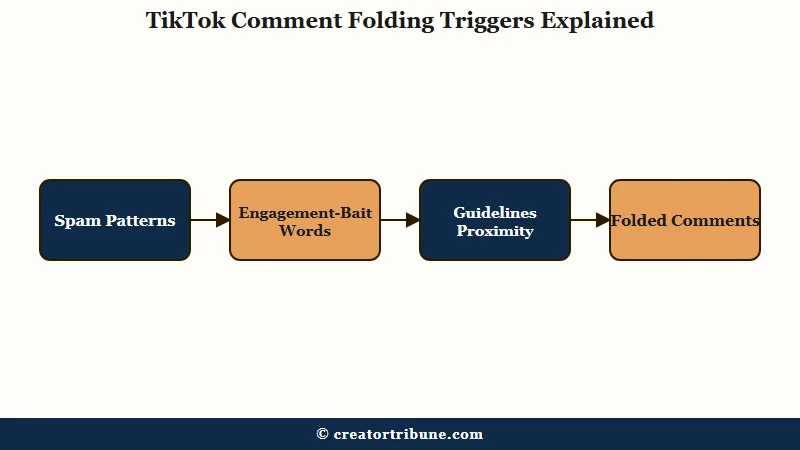
The algorithm folds comments for three main reasons:
- Spam patterns. Repetitive characters, single emojis, very short phrases like “thanks” or “nice,” and copy-pasted text across multiple videos all trigger the spam classifier.
- Engagement-bait language. Words like “follow,” “teamwork,” “engaging,” and phrases that mimic bot behavior get flagged even when a real person writes them.
- Community guidelines proximity. Comments that contain words close to policy violations, even if they do not cross the line, get folded as a precaution. TikTok’s AI errs on the side of hiding rather than showing.
What surprised me is how the system handles the gap between intention and detection. Creators have a name for it, the Emoji Paradox: TikTok hides substantive human comments (detailed tutorial notes, constructive feedback) while leaving single-emoji spam visible, because a lone emoji trips none of the patterns the spam filter looks for.
The result is a comment section that looks less engaged than it is. At a quarter of a billion comment removals in a quarter, automated moderation is unavoidable, and creators absorb the cost of the false positives.
What the “may affect your well-being” folded comment message means
When TikTok shows “Folded comments are similar to others flagged by our community and may affect your well-being,” it means the app matched that comment to a cluster of comments people previously reported, then hid it as a precaution before any human reviewed it.
Notice the word “similar.” TikTok is not claiming your specific comment broke a rule. It decided the comment resembles others its systems already learned to distrust, so it tucks yours behind the same “View folded comments” tap. That is how a supportive reply ends up under the same banner as genuine abuse.
You can still open these comments. Tap the greyed “View folded comments” line at the bottom of the thread, confirm the prompt, and the hidden replies expand. Creators see this control on their own videos, and any viewer can tap through to read what was folded.
How Do You Unfold Comments on Your TikTok Videos?
You can unfold hidden comments by replying to them from your creator account, which is the only route that acts on the fold itself.
Your filter settings are worth auditing at the same time, though they act on your own review queue, not on folding.
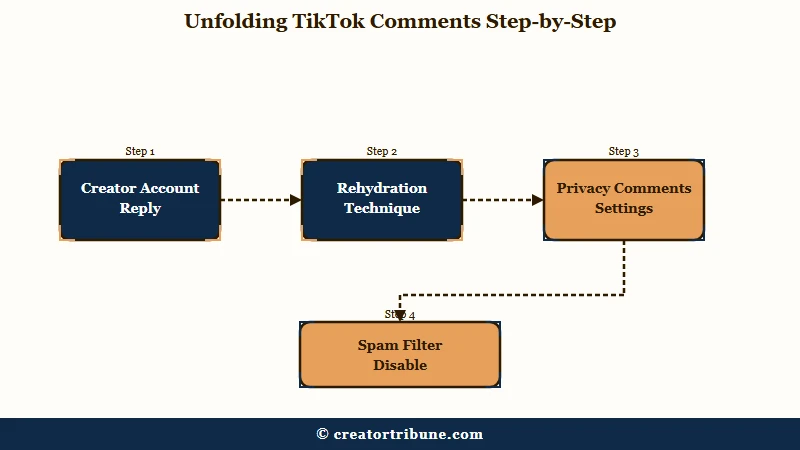
The “rehydration” technique is the one I would try first. When you reply to a folded comment from your own account, TikTok sometimes restores the original comment’s visibility. Your reply acts as a trust signal, telling the algorithm that this comment is legitimate. It does not work every time, but it costs nothing and takes seconds.
For the settings-based approach:
- Open TikTok and go to your profile.
- Tap the three-line menu in the top right and select Settings and privacy.
- Go to Privacy, then tap Comments.
- Look for the Filter all comments toggle. If this is on, every comment on your videos requires manual approval before it becomes visible. Turn it off unless you need strict moderation.
- Check Filter spam and offensive comments. This is your own filter, and it routes flagged comments into a review area for you to judge instead of collapsing them in public. Turning it off gives up that queue. TikTok does not document it as a folding control.
- Review Filter keywords. Remove any words from your custom list that might be catching legitimate comments.
Switching both filters off is what most people reach for, and it does less than they expect. I would not recommend it above about 10,000 followers because the spam volume becomes unmanageable, and the folding carries on regardless. Keep the spam filter on and use the rehydration technique to rescue false positives one at a time.
Can You Turn Off Folded Comments on TikTok?
No. None of TikTok’s comment controls is a folding switch. TikTok applies folding automatically. The controls in your privacy settings cover who can comment, your keyword list, and the spam filter.
Two separate things get called the same name here, which is where most of the confusion starts.
Filtering is yours. The Filter spam and offensive comments toggle and your keyword list pull flagged comments out of the thread and hold them in a review area, where you decide whether to publish or delete each one. You switched that on, and you can switch it off.
Folding belongs to TikTok. It collapses a comment behind the greyed “View folded comments” line on the public thread, with no queue and no notification, and TikTok documents no setting that governs it.
Plenty of guides tell you that switching off the spam filter stops comments being folded. TikTok’s own documentation describes that toggle as a control over your review queue and makes no claim that it governs folding.
You can still change the outcome. Reply to folded comments to rehydrate them, prune keyword filters that are catching ordinary language, and prompt the longer comments the spam filter reads as human. The rest of this guide covers each.
Which Words and Phrases Trigger TikTok Comment Folding?
The most common folding triggers are short generic phrases, repetitive emojis, engagement-bait words, and anything that mimics bot behavior.
TikTok does not publish an official trigger list, but pattern analysis across creator reports reveals consistent categories.
| Category | Examples | Why it triggers folding |
|---|---|---|
| Short generic phrases | “nice,” “thanks,” “wow,” “cool” | Classified as low-effort spam |
| Repetitive emojis | Five or more of the same emoji | Looks like bot behavior |
| Engagement bait | “follow,” “teamwork,” “engaging,” “support” | Associated with follow-for-follow schemes |
| Copy-paste text | Same comment on multiple videos | Spam classifier flags duplicates |
| Near-violation words | Context-dependent slang, political terms | AI precautionary folding |
The way I see it, the most frustrating category is engagement bait. A genuine viewer who types “your editing teamwork is so good” gets folded because “teamwork” is on the engagement-bait watchlist. The word triggers the filter regardless of context.
TikTok’s native keyword filter is widely reported to hold somewhere around 200 custom words or phrases, with a higher ceiling on LIVE, though TikTok publishes neither number and app updates have moved them. If you are a brand account managing comments at scale, that ceiling matters, and third-party tools like BrandBastion or Sendible exist to extend it.
If your TikTok comments have been disappearing entirely rather than folding, the comments not loading guide covers the technical-failure side of that issue. Folding and loading failures look similar from the creator’s dashboard but have different root causes.
Does Comment Folding Hurt Your TikTok Algorithm Performance?
Folded comments still count as internal activity for the TikTok algorithm, so folding alone does not kill a video’s distribution.
This is the most misunderstood part of the system, and it is good news for creators who are panicking about lost engagement.
The algorithm reads comment activity as a signal of content quality. When a comment gets folded, TikTok hides it from public view but does not delete the underlying engagement signal. Your video’s internal “comment activity” metric stays intact.
Where folding does hurt is indirect. A video whose visible comment count sits well below its real one looks less engaging to human viewers scrolling through. Social proof drives more comments, so a thinner visible comment section can suppress the snowball effect. The algorithm does not penalize you, but your audience does.
One tactic that works: prompt your audience to leave longer responses. Creators who ask for “5+ word” comments in their caption or voiceover see fewer folds because the algorithm classifies longer text as semantic rather than spam. A comment like “the transition at 0:04 was clean” passes the filter. “Nice” does not.
If your videos are getting zero views alongside comment issues, the problem might be broader than folding. The TikTok FYP diagnostic walks through the full distribution check.
How to Prevent TikTok From Folding Comments in the First Place
The best prevention is a combination of Creator Care Mode settings, audience prompting, and selective keyword management. No single setting fixes everything because TikTok uses multiple overlapping filters.
Here is the prevention stack I would set up:
- Enable Creator Care Mode selectively. Announced July 30, 2025, this one-click switch filters offensive comments. The AI learns from your individual reporting behavior. If you consistently delete a specific type of comment, the system adapts to auto-hide that pattern. Use it for genuine harassment, not for hiding criticism.
- Audit your keyword filter quarterly. Open Settings > Privacy > Comments > Filter keywords and review the whole list. Remove any words that catch legitimate comments. Overloaded keyword lists cause more false positives than they prevent.
- Prompt longer comments in your content. Use caption text or voiceover to ask specific questions. “What editing app do you use?” generates filterproof responses. “Drop a comment if you agree” generates “yes” and emoji floods that get folded.
- Reply to folded comments regularly. Rehydration appears to work best early in a video’s life, while the algorithm is still weighing comment quality, so reply in the first few hours rather than days later.
- Use Content Check Lite before posting. Available in TikTok Studio, this tool pre-screens your content for FYP eligibility. TikTok reported a 27 percent reduction in low-quality uploads among TikTok Shop sellers after its introduction. If the content itself is flagged, comments on that video face stricter moderation.
The retroactive power of filter changes is worth knowing about. When you add or remove keyword filters, the change applies across your entire content history, not just future posts. Old comments on videos posted months ago can surface or vanish as a result. This means you can rescue buried engagement on older videos by adjusting your filter settings today.
For creators dealing with reach problems beyond comments, the TikTok shadowban recovery guide covers the broader distribution diagnostic. If your posting rhythm is part of the problem, the posting frequency and timing guide has the cadence data.
Frequently Asked Questions
Can you see who folded your TikTok comments?
No. TikTok does not notify creators when comments are folded, and there is no log showing which comments were hidden or why. You have to manually check your comment section against your notification count to spot the gap.
Do folded comments count toward your engagement metrics?
Yes. Folded comments still register as internal activity for the algorithm. They count toward your total comment number, but they are not visible to other viewers. The engagement signal is preserved even though the social proof is not.
What is the difference between folded and deleted comments?
Folded comments are hidden from public view but still exist. The original commenter can see their own comment. Deleted comments are permanently removed. Folding is reversible through creator action or algorithm re-evaluation. Deletion is not.
How do you turn off comment folding on TikTok?
Not through any comment setting. Folding is applied by TikTok automatically, and the controls under Settings and privacy > Privacy > Comments do not include one for it. Those controls, including “Filter spam and offensive comments” and your keyword list, govern your own moderation queue, which TikTok documents in its official comments and mentions help.
Can you unfold TikTok comments permanently?
No. Because there is no folding control, there is nothing to set permanently. Tapping “View folded comments” expands that thread for that view only, and replying to a folded comment can restore it individually, so both fixes work per comment, never account-wide.
Does TikTok fold comments for political reasons?
TikTok folds comments under a “for your well-being” label on politically sensitive or polarizing topics. The system is designed to “balance discussion,” but creators and users report that it sometimes hides genuine feedback alongside harmful content.
What words get your TikTok comments folded?
Common triggers include short phrases like “nice” and “thanks,” repeated emojis, engagement-bait words like “follow” and “teamwork,” and copy-pasted text used across multiple videos. TikTok does not publish an official list.
Does TikTok fold comments, or does the creator do it?
Both can, but the default is automatic. TikTok’s spam and safety filters fold most comments with no creator input. A creator only folds comments directly when they switch on “Filter all comments” for manual approval or add words to their keyword filter, so a random fold on a stranger’s video is almost always the algorithm rather than the poster.
Can creators see folded comments on TikTok?
Yes. Creators see a “View folded comments” line under the main thread on their own videos and can tap it to read every hidden reply, then reply to restore any folded by mistake. The person who wrote a folded comment also still sees their own text as normal.
Quick Takeaways
- TikTok folds comments automatically when its systems read them as spam, low-quality, or close to a community guidelines violation.
- None of the comment settings turns folding off. The comment filters in your privacy settings run your own review queue, which is a separate system.
- Folded comments still count as algorithm activity, so your video distribution is not directly penalized.
- The “rehydration” technique (replying to a folded comment from your creator account) can restore its visibility.
- Prompt your audience to leave 5-plus-word comments to avoid the short-phrase spam filter.
- Keyword filter changes apply retroactively across your entire video history, so adjusting settings today can rescue engagement on older posts.