Instagram Grid Reorder Is Finally Here for Every Creator
Instagram Grid Reorder Is Finally Here for Every Creator
Instagram grid reorder lets you drag and drop posts on your profile. Step-by-step guide plus the bugs nobody warned you about.
- 1How Do You Reorder Your Instagram Profile Grid?
- 2Why Did Instagram Wait Four Years to Ship This?
- 3What Happens to Pinned Posts When You Reorder?
- 4Why Does the Grid Reorder Option Keep Disappearing?
- 5Do You Still Need a Third-Party Grid Planner?
- 6What Is the Best Grid Layout Strategy Now?
- 7Frequently Asked Questions
- Does reordering my grid affect my engagement or reach?
- Can I reorder Instagram grid posts on desktop?
- Is there a limit to how many times I can rearrange my grid?
- Why did my “Reorder Grid” option disappear?
- Do I still need a grid planner app like PlanMyGrid?
- Does grid reorder work with carousel posts and Reels?
- 8Quick Takeaways
What Happened: Instagram rolled out native profile grid reordering to all users on June 8, 2026. You can now drag and drop posts into any order without deleting or reposting. The feature is mobile-only and has a known bug where the option disappears after first use.
Instagram grid reorder is the feature creators have begged for since at least 2022, when reverse engineer Alessandro Paluzzi first found an “edit grid” option buried in the app’s code. Four years of sitting on it. Four years of creators deleting and reposting content just to fix their profile layout.
The global rollout started on June 8, 2026, and it works on both Android and iPhone. You long-press any post, tap “Reorder Grid,” and drag posts wherever you want them. No deletions, no lost likes, no engagement history wiped.
But it launched with quirks that the announcement posts glossed over. The option vanishes from some accounts hours after appearing. Pinned posts show up blacked out in the editing window. And the whole thing is locked to the mobile app, so desktop users are out of luck. This guide covers all of it.
How Do You Reorder Your Instagram Profile Grid?
The reorder tool uses a drag-and-drop interface accessed by long-pressing any post on your profile. It takes about ten seconds once you know where to look, but Instagram buried the entry point under a gesture most people associate with deleting content.
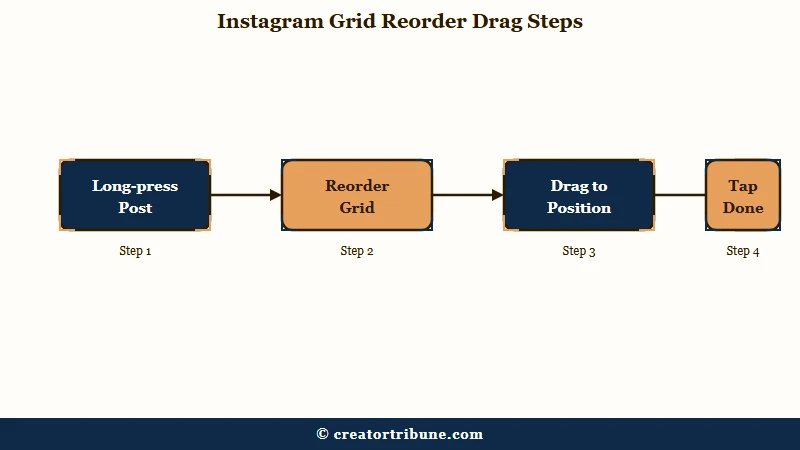
Here is the sequence I would walk through:
- Open the Instagram app on your phone (this does not work on desktop or tablet browsers).
- Go to your profile by tapping your avatar in the bottom right.
- Long-press any post on your grid until a pop-up menu appears.
- Tap “Reorder Grid” (some accounts show “Edit Grid” instead).
- Drag posts to new positions. The interface works like rearranging app icons on your home screen.
- Tap “Done” or simply exit the editing view. Changes save automatically.
The rearrangement goes live instantly. Anyone visiting your profile sees the new layout the moment you save it.
Before: You wanted your best-performing Reel at position one. Your only option was to delete it, lose 14,000 likes, and repost it to the top.
After: Long-press, drag it to row one, done. Every like, comment, and share stays attached.
If your profile has been stale for months and you are trying to revive it, the dead account recovery guide pairs well with this feature. There is no limit on how many times you can rearrange. You can shuffle your grid daily if you want, and Instagram confirmed this is by design.
The feature is a visual-only change. It does not affect your post timestamps, your engagement metrics, or how your content appears in followers’ home feeds.
Why Did Instagram Wait Four Years to Ship This?
Instagram had a working version of grid reorder in its codebase since 2022, but the 3:4 ratio shift in late 2025 forced their hand. Paluzzi’s code teardown showed the “edit grid” option existed years before the public announcement. Meta sat on it.
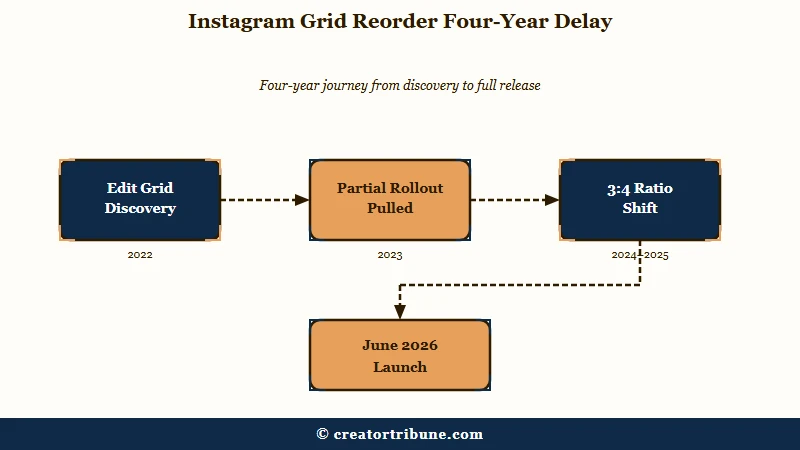
The likely trigger was the switch from square (1:1) thumbnails to a 3:4 portrait ratio on profile grids. That ratio change broke thousands of carefully curated grids overnight.
Banner images got cropped. Text overlays on carousel covers were cut off at the bottom. Brand accounts that had planned their visual identity around a 3×3 square layout looked like a mess overnight.
I would guess the internal pressure to ship grid reorder became impossible to ignore once the support tickets started piling up from business accounts. Meta’s own statement called it “one of the most requested features for years” and said they “wanted to take the time to get it right.” The timing suggests the 3:4 breakage accelerated what was already on the roadmap.
Some users got brief access to the feature in mid-2025 before it was pulled back. That partial rollout created confusion on Reddit’s r/Instagram community, where dozens of posts asked why “Edit Grid” had appeared one night and vanished by morning. The current June 2026 rollout appears to be the stable, permanent version.
What Happens to Pinned Posts When You Reorder?
Pinned posts stay locked at the top of your profile and cannot be moved during a grid reorder. In the editing window, they appear blacked out or grayed out to signal that they are not part of the drag-and-drop zone. That is by design.
Pinned posts are your permanent top-of-profile content. Letting them get shuffled accidentally would defeat their purpose.
If you have three pinned posts and want to rearrange the rest of your grid, you are working with everything below row one. The pinned trio stays put while every other post becomes draggable.
One edge case to watch: if you are on Instagram Plus (available in India at Rs 299 per month, roughly $3.50), you can pin up to six posts instead of the standard three. That means your first two rows could be locked, and your draggable grid starts at row three. For most creators outside India, the standard three-pin limit applies.
| Feature | Free Instagram | Instagram Plus (India) |
|---|---|---|
| Grid reorder | Yes, drag-and-drop | Yes, drag-and-drop |
| Max pinned posts | 3 | 6 |
| Availability | Global, mobile only | India only (as of June 2026) |
| Price | Free | Rs 299/month (~$3.50) |
Why Does the Grid Reorder Option Keep Disappearing?
The “Reorder Grid” option vanishes from some accounts due to a server-side rollout bug, not because you did anything wrong. This is the single most frustrating issue with the launch, and Instagram has not officially acknowledged it.
A Reddit user named westillfight reported the feature appearing for a single night and then vanishing completely. Dozens of similar reports followed. The pattern is consistent: the option shows up, works perfectly for a session, and then is gone the next time you open the app.
From what I can tell, this is a gradual server-side rollout where Instagram enables the feature per account in waves. Some accounts get toggled off during A/B testing. The fix sequence that has worked for affected users:
- Update the Instagram app to the absolute latest version from your app store.
- Force-close the app entirely (swipe it away from your recent apps, do not just minimize).
- Clear the app cache (Settings > Apps > Instagram > Clear Cache on Android; delete and reinstall on iPhone).
- Reopen Instagram and check your profile again.
- If the option still does not appear, wait 24 to 48 hours. The rollout is gradual and your account may be in a later wave.
Do not create a new account or contact Instagram support over this. The feature is confirmed as a permanent addition, and every account will get it. The timing is just inconsistent across regions and account types.
If your reach has been declining alongside this frustration, the Instagram explore page diagnostic covers whether the algorithm changed or your distribution did.
Do You Still Need a Third-Party Grid Planner?
Third-party grid planners like PlanMyGrid are not obsolete yet, but their core value proposition just shrank dramatically. The main reason creators paid $9 per month for tools like PlanMyGrid Pro was to preview how posts would look in a specific grid arrangement before committing. Instagram’s native reorder removes that need because you can now rearrange live posts freely without consequences.
Where planners still add value:
- Pre-publish planning. You cannot reorder posts that do not exist yet. If you batch-create content and want to see how a week’s worth of posts will look on your grid before publishing, planners still do that.
- AI-assisted captions and scheduling. Some planners bundle caption generators and auto-posting, which Instagram’s native tool does not touch.
- Offline planning. PlanMyGrid offers offline-first architecture for creators who work in areas with unreliable internet. Instagram’s reorder requires a live connection.
For creators who were paying solely for post-arrangement previews, the native tool is a direct replacement. I would cancel the subscription and test Instagram’s built-in option for two weeks before deciding. According to Statista’s 2026 social media data, Instagram has over 2 billion monthly active users, and the grid is every creator’s storefront. Getting this right matters.
Vague: “I’ll rearrange my grid to look better.”
Specific: Move your three highest-performing Reels to positions 1, 4, and 7 (the left column) so they form a visual anchor. Place your strongest carousel at position 2 (top center) for maximum profile-visit conversions. Keep text-heavy posts away from adjacent slots to avoid visual clutter.
What Is the Best Grid Layout Strategy Now?
The best strategy is to treat your grid as a portfolio, not a timeline, and follow the anti-similarity rule. Professional photographers and brand strategists agree on one point: never place visually similar content side by side.
Here is a framework I would use:
- Anchor column (positions 1, 4, 7). Place your best-performing content in the left column. Profile visitors scan left-to-right, and the first column gets the most initial attention.
- Alternating visual weight. Alternate between face shots, product images, and text-based graphics. Three face shots in a row reads as repetitive. Three product shots reads as a catalog.
- Top row = elevator pitch. Your first three posts are the only ones visible without scrolling. Make them represent your three strongest content pillars.
- Seasonal rotation. Use the unlimited rearrangement to rotate seasonal or campaign content to the top during launches, then move it back afterward. This “ghost reordering” approach lets you use old content as temporary promotional real estate without reposting.
One concern analysts have raised is that heavy curation blurs the line between a creator’s chronological history and an aesthetically optimized persona. If authenticity is part of your brand, consider keeping a roughly chronological flow within each row while still placing your strongest pieces at anchor positions. The reorder tool gives you that balance.
For a deeper look at how your profile layout connects to the algorithm’s discovery signals, the Instagram hashtag strategy guide covers the discovery side of the equation. If your reach has been declining despite a polished grid, the Instagram reach diagnostic walks through the four signals that matter most. Timing your posts right also compounds the effect of a better grid, and the best-time-to-post guide has the platform-specific data.
Frequently Asked Questions
Does reordering my grid affect my engagement or reach?
No. Reordering only changes the visual layout on your profile page. It does not modify likes, comments, original post dates, or how posts appear in the home feed. Your engagement history stays intact.
Can I reorder Instagram grid posts on desktop?
Not yet. The feature is exclusive to the Instagram mobile app on iOS and Android. Desktop and tablet browser users cannot access the drag-and-drop reorder interface as of June 2026.
Is there a limit to how many times I can rearrange my grid?
No limit. Instagram confirmed you can rearrange your profile grid as many times as you want. There is no cooldown, no daily cap, and no penalty for frequent changes.
Why did my “Reorder Grid” option disappear?
This is a known rollout bug. Instagram enables the feature via server-side toggles, and some accounts lose access temporarily during A/B testing. Update your app, clear cache, and wait 24 to 48 hours.
Do I still need a grid planner app like PlanMyGrid?
For rearranging existing posts, no. The native tool replaces that functionality entirely. Grid planners still help with pre-publish layout previews, AI captions, and offline planning.
Does grid reorder work with carousel posts and Reels?
Yes. All post types on your profile grid, including carousels, Reels, and single images, can be dragged to new positions. The only exception is pinned posts, which remain locked at the top.
Quick Takeaways
- Instagram grid reorder launched globally on June 8, 2026, as a free drag-and-drop tool on the mobile app.
- The feature was in Instagram’s code since 2022, and the 3:4 ratio shift likely forced Meta to finally ship it.
- Pinned posts stay locked at the top and appear blacked out in the editing window.
- If the option disappears from your account, clear cache and wait. It is a server-side rollout bug, not a permanent removal.
- Third-party grid planners lost their primary selling point but still offer pre-publish planning and offline access.