Stop AI Channels From Stealing Your YouTube Clips
Stop AI Channels From Stealing Your YouTube Clips
AI channels are stealing your YouTube clips. Here is the takedown workflow that works when automated tools miss short clips, plus prevention settings.
- 1Why Do Automated Tools Miss Stolen Clips?
- 2Does YouTube’s Likeness Detection Catch AI Channels?
- 3How Do You Report Many Stolen Clips in One Video?
- 4Does the Comment-Demand Tactic Work?
- 5When Should You Escalate to a Formal Takedown?
- 6How Do You Make Your Channel a Harder Target?
- 7Frequently Asked Questions
- Why does the Copyright Match Tool miss stolen clips?
- Does likeness detection find my stolen clips?
- How do I report stolen clips on YouTube?
- What happens if the thief files a counter-notification?
- Is it fair use if someone reuses my clip?
- Can I stop people from clipping my videos?
- 8Quick Takeaways
TL;DR: AI compilation channels steal 2 to 3 second clips that slip past YouTube’s automated Copyright Match Tool, because that tool only catches full reuploads. The fix is the manual copyright webform, filed clip by clip with exact timestamps, plus a public comment demanding removal and a few channel settings to make your footage harder to grab.
There is a detection gap most creators never hear about until their footage shows up in someone else’s video. YouTube’s Copyright Match Tool scans for full reuploads of your videos, and Content ID is aggressive on audio, matching sound recordings down to short excerpts.
The 2 to 3 second video clips that AI compilation channels stitch together slip past both. YouTube’s own Copyright Match Tool documentation says it plainly: if someone used a short clip of your video, it may not be surfaced.
That gap is why a small travel channel can wake up to a dozen AI channels reusing its footage and find that nothing was caught automatically. When the automated net misses, YouTube puts the entire burden on you, the copyright owner, to find each theft and report it by hand.
What follows is the workflow that clears these takedowns, not the generic “file a copyright claim” advice. It covers why the tools miss short clips, and how to document and file when one thief video holds a dozen of them.
From there it moves to the public-comment tactic that gets fast removals, when to escalate to a formal takedown, and the settings that make you a harder target.
Why Do Automated Tools Miss Stolen Clips?
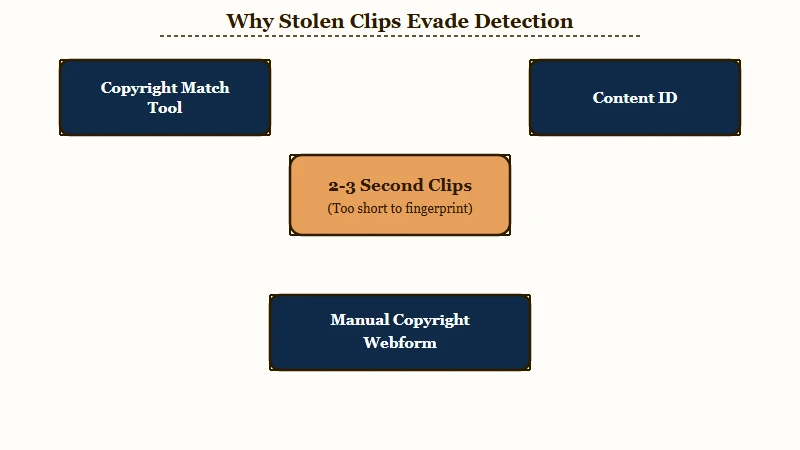
Automated tools miss stolen clips because the Copyright Match Tool only scans for full or nearly-full reuploads, so edited 2 to 3 second selections sneak through. Content ID is aggressive on audio but does not reliably catch tiny visual snippets.
YouTube’s own Copyright Transparency Report puts Content ID at more than 2.2 billion claims in 2024, over 99 percent of them raised by automated detection. That firepower is aimed at full songs and full videos.
AI compilation channels exploit the blind spot on purpose, slicing many creators into one reel so no single clip is long enough to trip the match.
If a thief reused a short cut of your footage, do not wait for the Copyright Match Tool to flag it, because it will not. The manual copyright webform is your real tool here.
| Tool | What it catches | What it misses |
|---|---|---|
| Copyright Match Tool | Full or near-full reuploads | Short edited clips |
| Content ID | Audio matches, down to short excerpts | Tiny muted visual snippets |
| Manual copyright webform | Anything you document by URL | Nothing, but it is manual |
Does YouTube’s Likeness Detection Catch AI Channels?
Likeness detection finds videos where your face appears to be altered or generated by AI, not videos that reuse your footage. A compilation that stitches your clips together without your face on screen stays invisible to it.
YouTube announced on May 16, 2026 that likeness detection was opening to all creators over 18, rolling out over the following weeks. It first launched in October 2025 for the YouTube Partner Program, then widened through 2026 to civic leaders, journalists and other high-visibility groups.
Enrollment runs through YouTube Studio under Content detection, then Likeness, and asks for a government ID plus a video selfie, with verification taking up to five days.
YouTube’s likeness detection help page states that the feature is only used to detect visual matches of an enrolled creator’s face, and that audio detection is planned but not yet live. A thief who lifts your voice or your muted B-roll triggers nothing.
YouTube also warns that during this experimental phase the tool may surface videos showing your actual, unaltered face. It notes that those videos usually cannot be removed under privacy rules, but may still qualify for a copyright removal request.
For a creator who appears on camera, that turns likeness detection into a discovery feed for AI compilation channels reusing their footage. Treat the matches it returns as leads for the manual copyright webform, not as a removal button.
How Do You Report Many Stolen Clips in One Video?
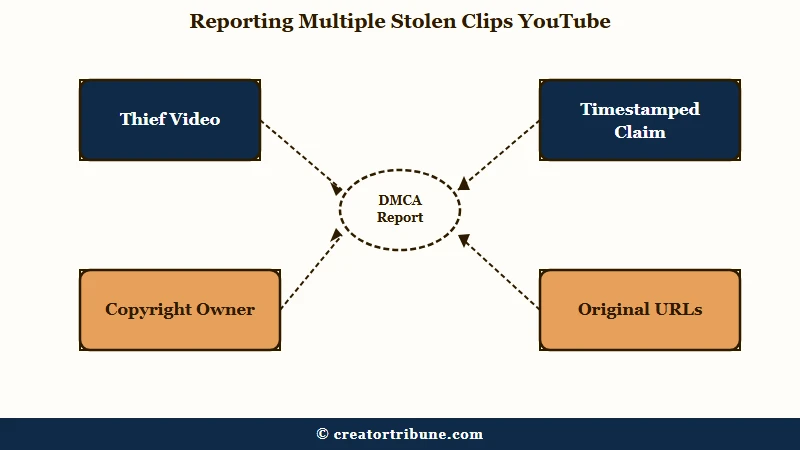
You report them through YouTube’s manual copyright complaint form, one specific timestamped claim at a time, because the platform makes you identify each infringing segment yourself. There is no bulk button for a single thief video packed with your clips.
The law is why the burden lands on you. In the Google versus Viacom case, Viacom could not provide a clip-by-clip assessment of the 63,060 clips it sued over, and the court placed that identification burden squarely on the copyright owner. YouTube built its process around exactly that principle.
Run this workflow for each thief video.
- Document first: save your original video URL, the thief’s URL, the upload dates, and side-by-side screenshots with timestamps.
- Separate “they copied my style” from “they reused my actual footage,” because only the second one wins a claim.
- Open the YouTube copyright complaint form, add the infringing URL, and link your original as proof.
- Write the claim specifically, naming the reused footage by timestamp, then submit with your signature.
- Track every open claim and its deadline in a simple spreadsheet so nothing slips.
Before: Your claim says “this AI channel is stealing my content.”
After: Your claim says “this video reuses my original footage from 0:14 to 0:39, taken from my video at the linked URL uploaded three months earlier.” The specific version is the one reviewers act on.
Does the Comment-Demand Tactic Work?
Yes. A direct public comment on the stolen video demanding removal often works faster than a formal claim, especially against smaller thief channels. Many will pull the video rather than deal with the attention.
The pattern creators describe is consistent. Formal claims filed on a handful of clips move slowly, while a removal demand posted publicly on every stolen upload tends to get the whole batch pulled.
These channels run on volume and do not want a visible paper trail of theft sitting under their videos.
Keep the comment factual and firm, not a rant. State that the video reuses your footage without permission, name the timestamp, and say you will file a formal takedown if it is not removed within a set window.
When Should You Escalate to a Formal Takedown?
Escalate to a formal DMCA takedown when the thief ignores your comment, counterclaims, or runs a monetized channel profiting from your work. For low-stakes theft, weigh whether the 30 minutes is worth it.
When you file, you choose between a 7-day notice that lets the uploader remove the video without a strike, or immediate removal that issues a copyright strike right away. The 7-day option lowers the odds of a retaliatory counter-notification, which matters when one channel holds dozens of your clips.
If the thief files a counter-notification, understand what it is. It is a sworn statement under penalty of perjury, and YouTube will restore the content unless you notify them within 10 to 14 days that you have filed a court action. Most middleman thieves let a claim drop rather than risk that, but it is the point where you decide if a lawsuit is realistic.
Not every theft is worth chasing. Use this framework to triage.
| Situation | Worth chasing | Action |
|---|---|---|
| Monetized thief, real views | Yes | Document and file the webform claim |
| Small channel, under 500 views | Maybe | Try the comment-demand first |
| They copied your style only | No | Style is not protected, let it go |
How Do You Make Your Channel a Harder Target?
You reduce easy theft by disabling viewer clipping, opting out of third-party AI training, and watermarking your footage. None of these stop a determined thief, but they cut off the lazy routes.
Run this prevention checklist once across your channel.
- Go to Settings, then Channel, then Advanced, and uncheck “Allow viewers to clip my content.”
- In YouTube Studio channel settings, turn off third-party AI training so outside companies cannot scrape your library to train models.
- Set Shorts remixing to “Don’t allow remixing” on videos you do not want sampled.
- Add a small moving or corner watermark so any stolen clip carries your brand into the thief’s video.
These settings sit next to the same controls that protect your wider channel health, so pair them with a periodic check on your Content ID dispute history and your channel trust score. The same AI compilation wave driving this theft is what fueled YouTube’s crackdown on AI slop channels, so the platform is slowly moving in your favor.
Frequently Asked Questions
Why does the Copyright Match Tool miss stolen clips?
The Copyright Match Tool only scans for full or nearly-full reuploads. Short edited clips of 2 to 3 seconds slip past it, so you have to report those manually through YouTube’s copyright complaint form instead.
Does likeness detection find my stolen clips?
Not directly. Likeness detection looks for videos where your face appears to be altered or generated by AI, so a compilation that reuses your footage without your face on screen never registers. YouTube does say the tool can surface videos containing your real face while the feature is experimental, and those are worth a copyright removal request.
How do I report stolen clips on YouTube?
Use the official copyright complaint form. Add the infringing video URL, link your original as proof, name the reused footage by timestamp, add your contact details, and sign it. Reviews usually take one to seven business days.
What happens if the thief files a counter-notification?
A counter-notification is a sworn statement under penalty of perjury. YouTube restores the content unless you notify them within 10 to 14 days that you have filed a court action, so most casual thieves let the claim stand instead.
Is it fair use if someone reuses my clip?
Fair use can cover commentary, criticism, or parody when the use is transformative. Reposting your raw footage in a compilation adds no commentary of its own, so it rarely qualifies, and fair use is decided case by case rather than by a fixed rule a thief can lean on.
Can I stop people from clipping my videos?
Yes. In YouTube Studio, go to Settings, then Channel, then Advanced, and uncheck “Allow viewers to clip my content.” That removes the clip tool from your videos, though it will not stop someone screen-recording.
Quick Takeaways
- The Copyright Match Tool only catches full reuploads, so short stolen clips need the manual copyright form.
- Likeness detection only matches your face, so it will not surface a compilation built from your footage alone.
- Document everything with timestamps and file each claim specifically, naming the reused footage by time.
- A public comment demanding removal often works faster than a formal claim against small channels.
- Disable viewer clipping, opt out of AI training, and watermark your footage to become a harder target.