Diagnose a YouTube Shadowban From Studio Analytics
Diagnose a YouTube Shadowban From Studio Analytics
Diagnose a YouTube shadowban in Studio. The impressions-to-CTR signal, the traffic-source collapse, and the 48-hour test that confirms it.
- 1What YouTube Really Calls a Shadowban
- 2The Two Studio Tabs That Matter
- 3The Impressions-to-CTR Diagnostic
- 4Common Triggers That Get Channels Limited
- 5The Recovery Sequence
- 6Surprising Patterns Most Creators Miss
- 7Frequently Asked Questions
- Does YouTube really shadowban channels?
- Where do I check for a shadowban in Studio?
- How long does a YouTube shadowban last?
- Will deleting flagged videos remove the flag?
- What does an impressions cap look like in Studio?
- Can engagement pods help recover from a YouTube shadowban?
- 8What to Do Right Now
TL;DR: YouTube does not call it a shadowban. It calls the same thing “limited,” “not suitable for advertising,” or “borderline content,” and the diagnostic lives in two specific tabs of YouTube Studio. The cleanest signal is an impressions collapse of 70 to 90 percent inside 48 hours of upload, with CTR holding steady. Recovery runs 2 to 4 weeks of consistent clean uploads after addressing the trigger.
The reason most YouTube creators search for “am I shadowbanned” is that they are looking for a word YouTube refuses to use. The platform’s own language is colder and more specific. Limited. Not suitable for advertising. Borderline.
If you have been on YouTube long enough to know what a yellow dollar sign means in Studio, you have already seen the thing creators on Twitter call a shadowban. It just had a different label and a different fix.
This guide stays in Studio. The diagnostic lives in two tabs and takes about three minutes. No third-party checkers, no incognito hashtag tests, no guessing.
By the end you will know whether your channel is genuinely throttled, whether it is a per-video flag, or whether your impressions just plateaued because the content was not strong enough on its own. The recovery path branches based on which answer you get.

What YouTube Really Calls a Shadowban
YouTube uses three official terms for what creators call a shadowban: “limited distribution,” “not suitable for advertising,” and “borderline content.”
All three reduce reach and Browse and Suggested Videos surface in the algorithm. Only one of them, the yellow dollar sign on a specific video, comes with a clear in-Studio signal.
What is “limited” on YouTube: A per-video or per-channel state where the algorithm reduces distribution to the Browse Features and Suggested Videos surfaces, while the video remains live and searchable.
The way I see it, the language matters because each label has a different fix. Limited distribution from a borderline-content flag is appealable inside the video’s monetization panel. A “not suitable for advertising” tag is appealable through the Studio request-review button. A search-suppression issue is harder to fix because YouTube does not always confirm it exists.
In my experience, the first three minutes in Studio tells you which of these you are dealing with. The mistake most creators make is treating all three as the same problem and applying the wrong fix.
For creators searching the broader “am I shadowbanned” question across multiple platforms, the cross-platform shadowban diagnostic walks through the universal checks before the platform-specific ones in this article.
The Two Studio Tabs That Matter
The two tabs that catch every YouTube reach-restriction signal are the Earn tab (or per-video Monetization panel) and the Analytics Traffic Sources tab.
Together, they cover ad-suitability flags, per-video limits, and the impressions-collapse pattern that confirms a channel-level throttle.
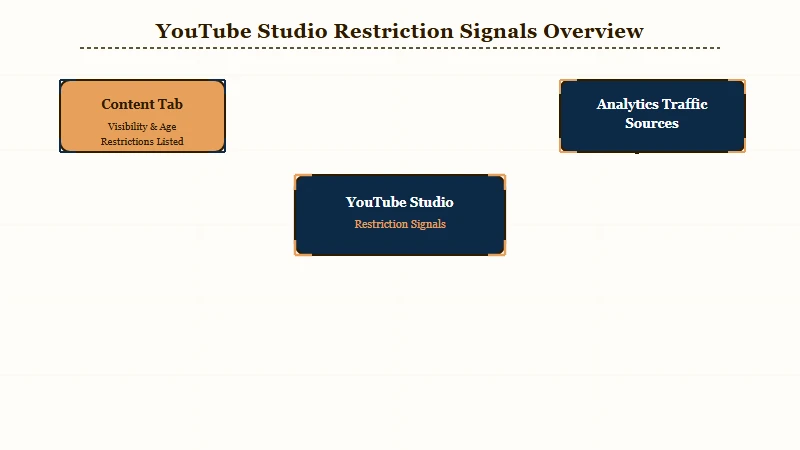
Walk it in this order on a desktop browser, mobile Studio hides some of these.
- Open YouTube Studio at studio.youtube.com and sign in.
- Click Content in the left sidebar and look at the monetization column for any video flagged with a yellow dollar sign.
- Click any flagged video, then Details, then Monetization, and read the specific policy reason: profanity, controversial issues, sensitive events, harmful or dangerous acts.
- Go back to the sidebar and click Analytics, then the Reach tab.
- Find your last 5 uploads and check the Impressions column against your trailing 30-day average.
Each of these surfaces a different fix path. A yellow dollar sign with a policy reason is the easiest signal to act on because YouTube tells you exactly what the system flagged. An impressions collapse without a yellow dollar sign points to a channel-level or content-pattern issue. No yellow flag and steady impressions but low views points to a thumbnail or hook problem, not suppression.
The Impressions-to-CTR Diagnostic
The cleanest single signal that YouTube is suppressing reach is impressions collapsing 70 to 90 percent on new uploads while CTR holds steady or rises.
Healthy channels see impressions grow for 48 to 72 hours after upload, then plateau. A shadowbanned channel sees impressions cap inside the first 24 hours and refuse to grow even when click-through rate is normal or above your channel average.
Healthy pattern.
Before: Upload at 10am. Impressions hit 1,000 in the first hour, 5,000 by 6 hours, 15,000 by 24 hours, plateau around 25,000 by 48 hours.
After: Upload at 10am. Impressions hit 1,000 in the first hour, then crawl to 1,800 by 24 hours, then stop growing entirely. CTR sits at 7 percent, which is above the channel average. Views land at 120.
The “after” pattern is what a traffic ceiling looks like. YouTube placed the video in front of a tiny audience pool, did not expand the pool when CTR signaled the content was working, and stopped the test before the algorithm could escalate. That gap between high CTR and capped impressions is the most reliable shadowban signal Studio gives you.
The trap in this diagnostic is comparing impressions on a Short to impressions on a long-form video. They behave differently. Apples-to-apples comparison only works inside the same content format. The YouTube Shorts views stopped breakdown covers the Shorts-specific version of this pattern in detail.
Common Triggers That Get Channels Limited
The four most common triggers in 2026 are borderline content, search suppression, negative viewer feedback signals, and ad-unfriendly classification.
Each one has a different Studio surface and a different fix path.
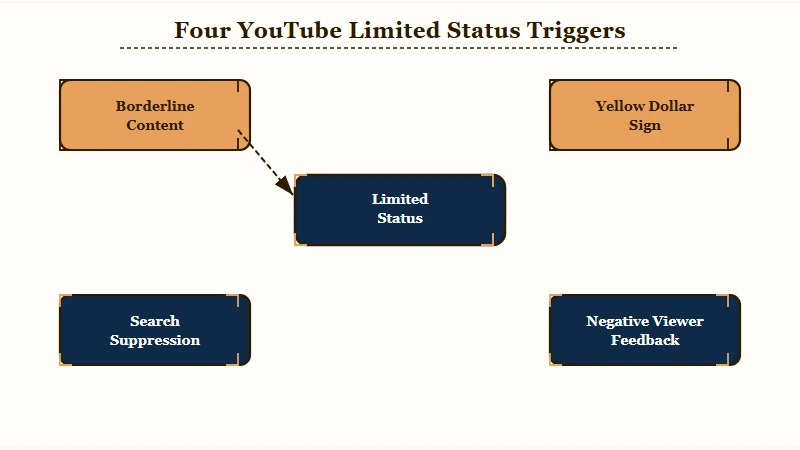
| Trigger | Studio surface | Severity |
|---|---|---|
| Borderline content | Per-video Monetization panel | High |
| Not suitable for advertising | Yellow dollar sign on video | High |
| Search suppression | Title test in incognito search | Medium |
| Negative viewer feedback | Audience tab signals | Medium |
Borderline content is the trigger most creators do not realize they hit. YouTube classifies content as borderline when it touches sensitive topics like health, misinformation, politics, and certain news events without crossing into outright violation.
The platform’s Advertiser-friendly content guidelines lay out the categories that trip this classifier, and the document is worth reading once a year because the line moves.
Search suppression is the trigger creators most often miss. The diagnostic is the “full-title search test”: copy your video’s exact title, paste it into YouTube search from an incognito window, and see if your video appears in the top 5 results.
If it does not appear even with the exact title, the video has been demoted in priority recommendations. This is separate from the impressions cap.
Negative viewer feedback is the slowest-moving trigger. If a channel accumulates a high rate of “not interested” signals or fast swipe-aways on Shorts, the algorithm reads it as a quality signal and pulls back distribution gradually over days or weeks. The fix is to stop posting low-engagement content and let watch-time data rebuild.
The Recovery Sequence
The recovery sequence is: pause uploads for 48 to 72 hours, address the specific trigger Studio flagged, then rebuild over 2 to 4 weeks of consistent clean uploads.
Posting more during the suppression phase makes the algorithm read your channel as declining in quality, which deepens the restriction.
The three phases hold across all four triggers.
- Pause for 48 to 72 hours: no uploads, no community posts, no excessive commenting from the channel account.
- Open Studio, identify the specific trigger from the table above, and act on it: appeal a borderline flag, request a review on a yellow dollar sign, hide (do not delete) the lowest-performing videos that may be dragging the channel signal.
- Resume uploading at 1 to 2 videos per week, all in your established niche, with clean thumbnails and titles, for at least 2 weeks before evaluating whether recovery is working.
The “hide instead of delete” rule is the recovery step most creators get wrong. Deleting low-performing videos drops your total watch-time weight, which the algorithm reads as a quality decline. Setting them to private or unlisted preserves the watch time but removes them from public surfaces.
If the trigger turned out to be channel-level rather than per-video, the rebuild phase is also a useful moment to repurpose existing long-form into Shorts to test the algorithm’s response on a faster cycle. The YouTube long-form to Shorts repurposing workflow covers the seven-step version.
A useful recovery diagnostic during the rebuild phase is the Shorts ceiling test. Post one well-made Short during the recovery window. If it crosses 1,000 to 2,000 views in the first 24 hours, the channel-level throttle is starting to lift. If it caps under 500, the restriction is still active and the recovery clock has not started yet.
Surprising Patterns Most Creators Miss
Three patterns trip up YouTube creators repeatedly during a suppression event. None of them are obvious, and all three actively make recovery harder.
The first is the assumption that deleting flagged videos clears the flag. It does not. Deletion removes the video from public view but leaves the flag against the channel, and the algorithm then reads the deletion as cleanup behavior.
Setting the video to private or unlisted is the better move because it preserves the watch-time signal and removes the audience-facing surface without producing the cleanup pattern.
The second is the engagement-pod trap. Some creators use third-party “view boost” services or community pods to try to lift a suppressed video. Every signal these services produce, low-watch-time bot traffic, unnatural engagement bursts, geographic mismatches, is a new strike on the channel’s quality score. Channels that try to boost out of a suppression usually end up with a deeper one.
The third is the search-suppression blind spot. Most creators do not run the full-title search test because they assume Browse and Suggested are the surfaces that matter. Search is the surface that matters for evergreen content. If your top-performing video from a year ago stopped pulling traffic, search suppression on the title is the most likely cause. Test it from an incognito window before anything else.
The fourth pattern is short-form-specific but worth flagging. Shorts have a faster distribution cycle than long-form, so they make the cleanest test bed for whether a recovery is working. The Shorts views stopped guide covers the Shorts-specific signal patterns in detail.
Frequently Asked Questions
Does YouTube really shadowban channels?
YouTube does not use the word. The platform officially uses “limited distribution,” “not suitable for advertising,” and “borderline content.” All three reduce reach to Browse and Suggested Videos surfaces, which is what creators mean when they say shadowban.
Where do I check for a shadowban in Studio?
Two tabs. The Content tab to look for yellow dollar signs on specific videos. The Analytics Traffic Sources tab to check whether Browse Features and Suggested Videos collapsed across your last 5 uploads. The Earn tab is also useful for channel-level monetization warnings.
How long does a YouTube shadowban last?
Per-video flags resolve in 24 to 72 hours through the appeal process. Channel-level suppression takes 2 to 4 weeks of consistent clean uploads to lift. Severe cases tied to repeat policy issues can run past a month.
Will deleting flagged videos remove the flag?
No. Deletion removes the video from public view but leaves the channel-level flag in place, and the algorithm reads the deletion as cleanup behavior. Setting the video to private or unlisted is the better move because it preserves the watch-time signal.
What does an impressions cap look like in Studio?
Impressions hit a low number in the first hour after upload, then stop growing. CTR stays normal or rises, but impressions refuse to expand even when click-through signals tell the algorithm the content is working. That gap between high CTR and capped impressions is the cleanest shadowban signal Studio gives.
Can engagement pods help recover from a YouTube shadowban?
No. Engagement pods and third-party view-boost services produce signals the algorithm reads as low-quality engagement, and those signals add new strikes on top of whatever original trigger caused the suppression. Channels that try to boost out usually end up suppressed more.
What to Do Right Now
The next step depends on which Studio signal you have, but the order is fixed: identify the specific trigger, pause, address, then rebuild. Acting on a guess instead of a Studio signal is how creators extend the suppression by weeks.
If Studio shows a yellow dollar sign with a policy reason, request a review on that specific video through the Studio appeal button. Most yellow-dollar-sign appeals are resolved within 24 to 72 hours.
If impressions have collapsed across the last 5 uploads with no yellow flag, you are looking at a channel-level throttle. Pause for 48 to 72 hours, address any visible trigger from the table above, then rebuild for 2 to 4 weeks at 1 to 2 uploads per week.
If the full-title search test fails (your video does not appear in incognito search for its own title), you have search suppression. Update the title with a stronger primary keyword, refresh the thumbnail, and republish. Search distribution often returns within a week of the refresh.
If none of the Studio signals fire and views are just low, you do not have a shadowban. You have a content problem. The fix is a stronger hook and a better thumbnail, not a recovery cycle.