How to Add Links to Instagram Posts With or Without Meta One
How to Add Links to Instagram Posts With or Without Meta One
Meta One now lets some Instagram accounts add clickable links to posts and reels. See the limits, the steps, and the free routes that still work.
- 1Can You Add Clickable Links to Instagram Posts?
- 2How Do You Add a Link to an Instagram Post With Meta One?
- How Many Links Does Each Meta One Plan Allow on Instagram?
- Which Instagram Links Don’t Count Toward the Meta One Limit?
- Can You Edit a Link on an Instagram Post After Posting?
- Is Meta One Worth It Just for Instagram Post Links?
- 3How Do You Add a Link to Your Instagram Bio for Free?
- 4How Do You Put a Clickable Link in an Instagram Story?
- 5How Do You Add a Link to an Instagram Reel?
- 6How Do You Send Your Link in Instagram DMs Automatically?
- 7Quick Takeaways
What’s Changed: You can now add clickable links to Instagram posts, but only on a paid Meta One plan, from $49.99 a month for 4 linked posts and 4 linked reels. Meta Verified Plus costs the same $49.99 and links only 2 reels a month, with no posts. Without a paid plan, you still have up to 5 free bio links, the free Story Link sticker on most accounts, and comment-to-DM replies through a messaging tool.
Ask how to add links to Instagram posts and, until September 2026, the answer was one word: you couldn’t. A URL pasted into a caption still shows up as dead text on most accounts. That changed for paying accounts on September 15, when Meta launched its Meta One subscription plans.
Those links cost money. The cheapest plan that includes them, Meta One Advanced, starts at $49.99 a month for 4 linked posts, about $12.50 per post. I don’t pay that for links alone, and most solo creators don’t need to.
If one linked post won’t earn back that $12.50, the free routes further down still put a tappable link in front of your followers. Pick the route by what one click is worth to you.
Can You Add Clickable Links to Instagram Posts?
Clickable links in Instagram posts are a paid Meta One feature. Eligible public accounts on Advanced, Expert or Max can link a set number of posts and reels each month, and teens can’t use it. Meta Verified Plus or higher links reels but not posts, and without either plan a caption URL stays plain text, as a comment URL does on every account.
Meta tested the idea before it shipped. In March 2026, some Meta Verified subscribers found a link option in their captions, capped at 10 links a month, according to TechTimes. The version that launched in September put post links in Meta One with a smaller cap on the entry plan, and Meta Verified’s own plans now list reel links only.
Meta also warns that the plans differ by place. Its launch notes, as reported by TechCrunch, say benefits, pricing and availability “may vary by region, app, and account.” My rule of thumb: confirm Meta One is offered on your account before you plan any post around a link.
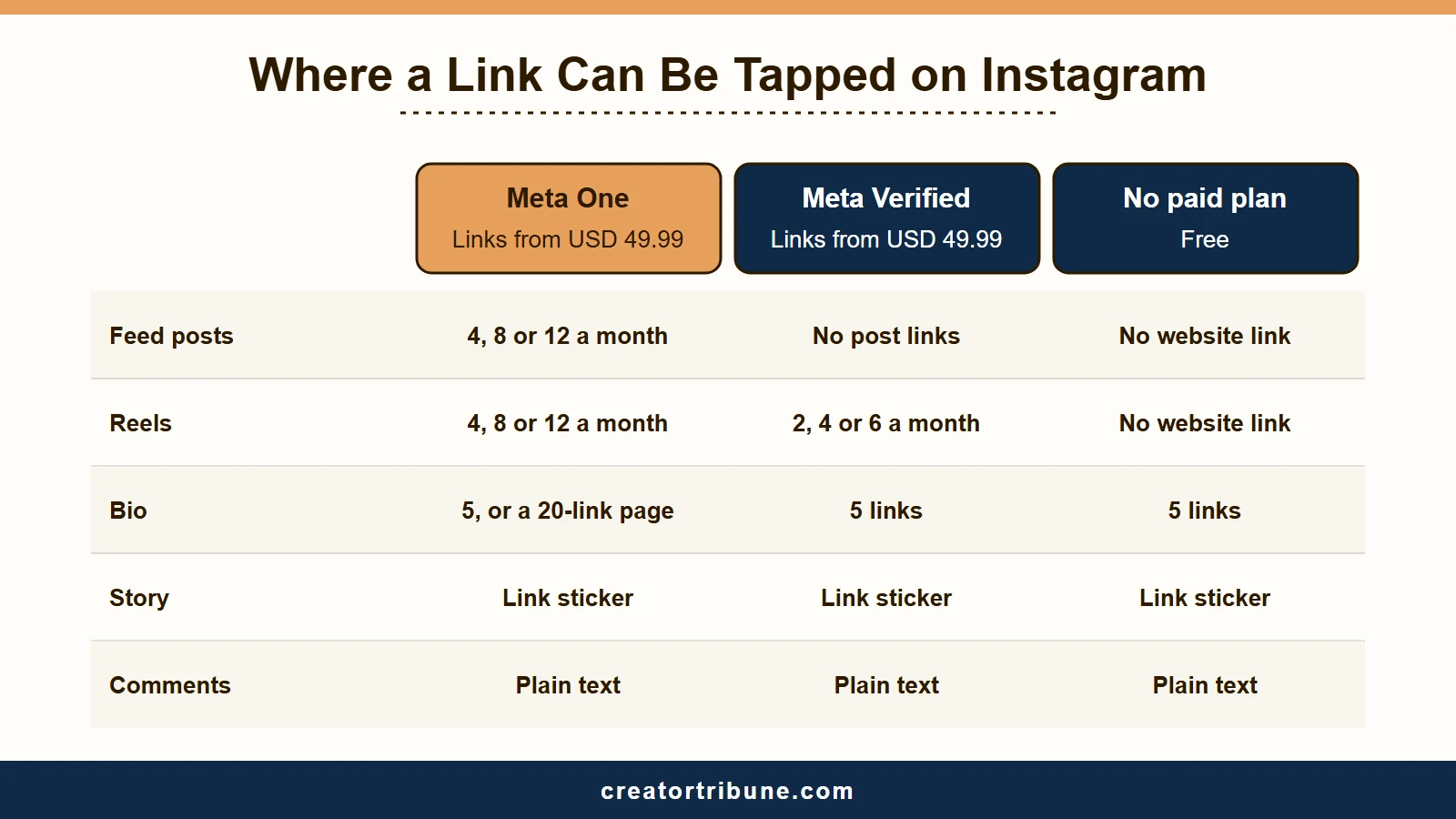
Here is where a link is tappable on Instagram today, and who can use each spot:
| Where the link goes | Who gets a tappable link | Cost | Monthly cap |
|---|---|---|---|
| Feed post | Meta One Advanced, Expert, Max | From $49.99 a month | 4, 8 or 12 posts |
| Reel | Meta One Advanced, Expert, Max, or Meta Verified Plus, Premium, Max | From $49.99 a month on either | 4, 8 or 12 reels on Meta One, and 2, 4 or 6 on Meta Verified |
| Bio | Every account | Free | 5 links, or 20 on a paid link page |
| Story Link sticker | Most accounts | Free | No cap stated |
| Comment | Nobody, it stays plain text | Free | Not applicable |
| Automated DM reply | Professional accounts using a DM tool | Depends on the tool | 1 reply per comment |
If your account does have Meta One, the next section walks through the exact taps.
How Do You Add a Link to an Instagram Post With Meta One?
You add a Meta One link in the Instagram app while you create the post. Write a caption, tap Add link, paste the URL and share, and the button shows how many links you have left that month.
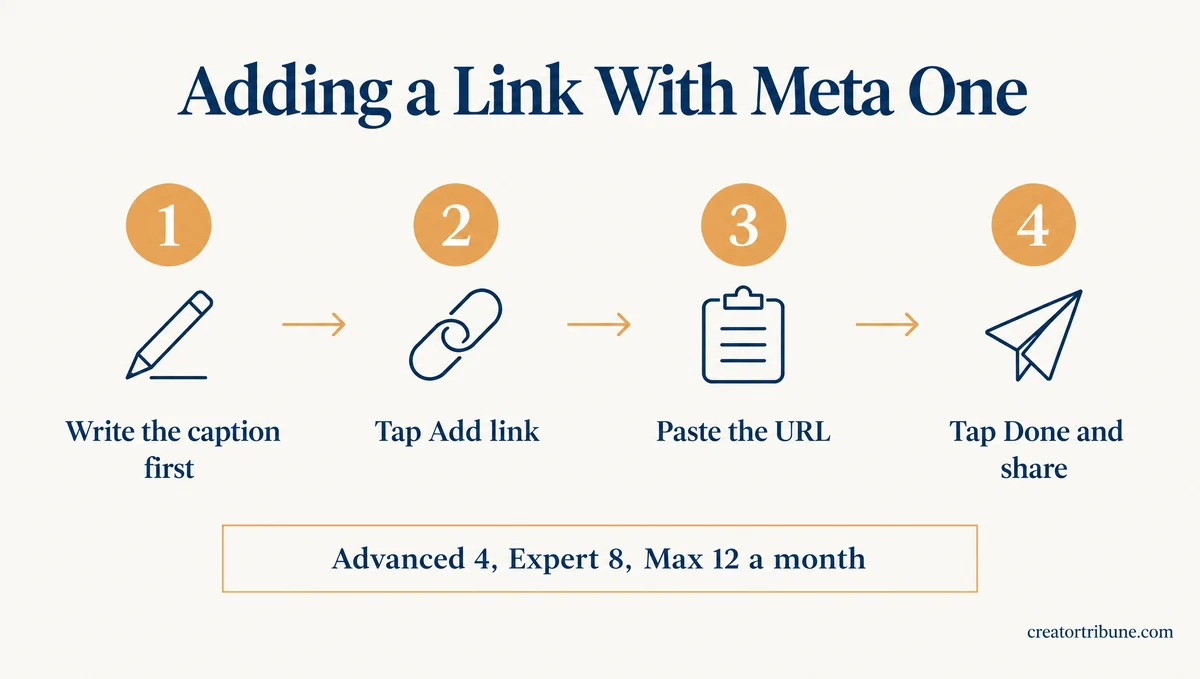
Meta’s help page gives the steps in this order:
- Start a new post or reel in the Instagram app and write the caption first, since Meta requires a caption on linked posts.
- Tap Add link. The option carries a Meta One label and shows how many links you have left.
- Paste the full URL on the Add link screen.
- Tap Done, read the address once more, then share.
The Meta One help page also says your allowance resets on the date your subscription renews. Unused links don’t carry over to the next month.
Scheduling apps that publish through Instagram’s API can’t attach the link for you, because that API has no field for a post link, per Meta’s developer docs. My workaround is to schedule everything else and post the linked ones from the app by hand.
How Many Links Does Each Meta One Plan Allow on Instagram?
Meta One allows 4 linked posts and 4 linked reels a month on Advanced, 8 of each on Expert and 12 of each on Max. Essential, the cheapest creator plan, adds no post or reel links at all.
| Meta One plan | Price from (US) | Linked posts a month | Linked reels a month |
|---|---|---|---|
| Essential | $14.99 a month | 0 | 0 |
| Advanced | $49.99 a month | 4 | 4 |
| Expert | $149 a month | 8 | 8 |
| Max | $499 a month | 12 | 12 |
Prices come from Meta’s launch announcement, and the link counts come from Meta’s help page. Posts and reels have separate counts, so plan them as two budgets. I count the reels in the math, which brings Advanced down to about $6.25 a link.
Instagram Plus, the $3.99 personal plan, has no post links, and our Instagram Plus guide covers what it does include.
Which Instagram Links Don’t Count Toward the Meta One Limit?
Links to Meta’s own apps, catalog product links and links in ads don’t use up your Meta One allowance. Meta lists three exceptions on its help page:
- Links to Facebook, Instagram, WhatsApp or Threads.
- Product links, affiliate links included, that are part of a business’s existing commerce catalog on Meta.
- Links inside ads.
Save the paid slots for links that leave Meta entirely, like a newsletter signup or a booking form. If you sell through a Meta catalog, product tags cost nothing extra, and the guide to affiliate links in Reels shows how tagging works.
Can You Edit a Link on an Instagram Post After Posting?
You can’t edit a link on an Instagram post after you share it. Meta’s help page rules it out for both posts and reels, and it only describes adding a link while you create the post.
Meta’s page doesn’t say whether deleting a post gives the link back, so treat each one as spent the moment you tap Share. I open every URL in my phone’s browser before I paste it into Instagram.
Is Meta One Worth It Just for Instagram Post Links?
Meta One is worth it for links only when one linked post earns you more than about $6 to $12.50. A product launch or a paid course can clear that bar, while a link to a free blog post usually won’t.
Advanced makes more sense to me when you also need its other tools, like scheduling Stories up to 30 days ahead. Paying isn’t always possible yet: in one r/Instagram thread, a checkout in Poland returned “Local price not supported for your country.”
If you only need one post to carry a link, boosting it is the other paid route. Ad links don’t count toward Meta One, and a boost can reach people who don’t follow you, though some posts can’t be boosted. For most posts, a free bio link gets the reader there with one extra tap.
How Do You Add a Link to Your Instagram Bio for Free?
Every Instagram account can add up to 5 links to its bio for free. You do it in Edit profile on your phone, since Instagram’s help page says the feature isn’t available on computers.
This is the first link I set up on any account, and it takes four taps:
- Tap Profile or your profile picture in the bottom right.
- Tap Edit profile.
- Tap Links, then Add external link on iPhone or Add link on Android, and paste your URL.
- Tap Done.
To change the order, go to Edit profile, then Links, then Options, then Reorder links. Anyone, on or off Instagram, can see the links you add.
Meta One Essential and every higher plan add a link page that holds up to 20 links, each with its own image and title. That page opens without leaving Instagram and has its own URL you can share anywhere, per Meta’s link page help.
A bio link only gets taps when the post says which link to tap. “Link in bio” on its own makes people guess between five:
Before: “New guide is live, link in bio!” After: “The free shot list is the second link in my bio, titled Shot List.”
If your followers are new to the phrase, what link in bio means explains it in plain terms. I point the top link at a page I own, so the audience stays mine if the account ever goes. Our free creator money page template gives you one with an email signup built in.
If a link won’t save, check that you’re on the phone app and under the 5-link limit. Links also have to follow Meta’s Community Standards, the same rule Meta spells out for its paid link pages.
How Do You Put a Clickable Link in an Instagram Story?
The Link sticker puts a tappable link in an Instagram Story for free. Instagram opened it to all accounts on October 27, 2021.
I use the sticker for anything that only matters this week, and it takes four steps:
- Capture or upload your photo or video in the Story camera.
- Tap the sticker icon in the top bar.
- Choose Link, paste the URL and tap Done.
- Place the sticker, tap it to change its color, then share.
The link disappears with the Story after 24 hours, unless you add the Story to a Highlight on your profile. If the sticker is missing, Instagram’s announcement explains that new accounts and accounts that repeatedly break its Community Guidelines don’t get it.
How Do You Add a Link to an Instagram Reel?
Outside of ads, a reel gets a tappable link through Meta One Advanced or higher, Meta Verified Plus or higher, or a product tag. A URL in the caption or in a pinned comment stays plain text, so viewers have to copy it by hand.
Meta One reel links follow the same steps as posts and have their own monthly count of 4, 8 or 12, depending on the plan. Product tags from a Meta catalog also give viewers a tappable product link.
Meta Verified, Meta’s badge subscription, also lists links in reels on its Plus, Premium and Max plans: 2, 4 or 6 reels a month, per Instagram’s Meta Verified benefits page. Its pricing page puts those plans at $49.99, $149.99 and $499.99 a month. Meta One starts at $49.99, $149 and $499 a month for Advanced, Expert and Max, so at each price step it links twice as many reels and adds feed posts.
The same benefits page sets two rules for Meta Verified reel links. Unused ones expire at the end of each billing cycle, and links you already added stay on your reels if you cancel. Meta One’s plans page says every plan with links also lets you apply for the verified badge, and that current Meta Verified subscribers will be told when they can switch.
Pinning a comment with your URL still works as a pointer, but nobody can tap it. I only do that with a short address someone can type from memory.
From October 28, 2026, Instagram no longer lets creators link Reels in a series, per Metricool’s Instagram news log. A creator’s post about the change says existing series links disappear too, so don’t count on them to move viewers between reels.
How Do You Send Your Link in Instagram DMs Automatically?
A comment-to-DM tool can send your link automatically when someone comments a keyword, using Meta’s Private Replies. Each comment can trigger one automated message, it has to go out within seven days of the comment, and links in DMs are tappable.
Tools like Manychat run this flow, and the setup takes four steps:
- Switch to a professional account, creator or business, since Private Replies works with professional accounts.
- Connect a comment-to-DM tool and pick a keyword, such as LINK.
- Write the reply with your URL near the top, since the tool gets one message per comment.
- Put the keyword in your caption, then test it by commenting from a second account.
Under Meta’s developer rules, the automated reply also includes a link back to the comment. This is the route I’d pick for a post that already pulls comments, because anyone who answers that message opens a chat you can continue by hand.
Quick Takeaways
- Start with the free routes: fill your 5 bio links, point the top one at a page you own, and use the Story Link sticker for anything time-limited. Then add a comment-to-DM keyword to posts that pull comments.
- Read every URL before you tap Share, because Meta One links can’t be edited after posting.
- Links to Meta apps, catalog product links and ad links don’t count toward the Meta One monthly cap.
- A URL in a comment is plain text on every account, and a caption URL stays plain text unless your plan includes links.
- Meta One Advanced or higher links posts and reels, while Meta Verified Plus or higher links reels only, from the same $49.99 a month.
- Pay for Meta One only if one linked post earns you more than about $6 to $12.50, since Advanced covers 4 linked posts and 4 linked reels a month.