How to Block AI Content on Instagram and Clean Up Your Feed
How to Block AI Content on Instagram and Clean Up Your Feed
Instagram has no switch that blocks AI content. Here are the four controls that exist, what Instagram documents about their limits, and which one works.
- 1How Do I Block AI Content on Instagram?
- 2Why Is There No Setting to Turn Off AI Content?
- 3Why Does Blocking the Word AI Not Work?
- 4How Do I Pause All Suggested Posts for 30 Days?
- 5What Does Resetting Suggested Content Do?
- 6Why Do the Same AI Accounts Keep Coming Back?
- 7Why Do Real Photos Get an AI Info Label?
- 8Frequently Asked Questions
- Is there one setting to turn off all AI content on Instagram?
- Does tapping Not interested reduce AI posts?
- Why does blocking the word AI not clear my feed?
- Is resetting suggested content permanent?
- Does the AI-generated profile label filter anything for viewers?
- Do these controls work on Instagram on a computer?
- 9Quick Takeaways
TL;DR: There is no single setting for how to block AI content on Instagram, and the word filter most guides recommend is documented by Instagram to match only exact hashtags. The control that does the most is Snooze, which pauses every suggested post in your feed for 30 days. Everything else is a nudge to the recommendation system, not a filter.
Your feed fills with glossy faces that never blink right, captions written by something that has never held a camera, and accounts with 400,000 followers that did not exist last month. You go into settings looking for the off switch. It is not there.
What surprised me is how far Instagram has gone on the creator side while shipping almost nothing for viewers. On August 31, 2026 the company renamed its “AI creator” label to “AI-generated profile” and started cutting the reach of accounts that hide what they are. Read that announcement end to end and you will not find a single control for the person scrolling.
So the honest answer is that you cannot block AI content on Instagram outright. You can shape what gets recommended to you, and four controls do that with very different amounts of force.
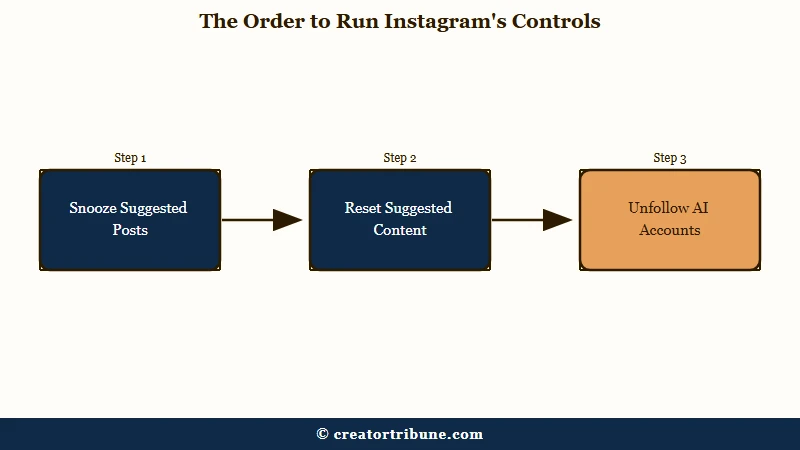
This guide covers each one, what Instagram’s own help pages say about where they stop working, and the order I would run them in.

How Do I Block AI Content on Instagram?
Blocking AI content on Instagram means using four recommendation controls, because no filter exists. Snooze pauses all suggested posts for 30 days, and Reset suggested content clears Explore, Reels and Feed. Not interested and the word list only nudge the algorithm.
Every one of these lives in the same place: tap the three dots above a suggested post, or open your profile and go to Content preferences under the menu. None of them touches accounts you already follow.
That last point is the one I hand people first, because it reframes the whole problem. AI slop reaches you through recommendations, not through your following list. Fix recommendations and you fix most of it.
Here is how the four compare on what each one does:
| Control | What it does | How long it lasts |
|---|---|---|
| Snooze | Pauses all suggested posts in Feed | 30 days, then resets |
| Not interested | Signals dislike on one post | Ongoing and gradual |
| Specific words and phrases | Screens suggested posts by hashtag or caption | Until you remove the word |
| Reset suggested content | Clears recommendations across Explore, Reels and Feed | Cannot be undone |
Why Is There No Setting to Turn Off AI Content?
Instagram has built AI transparency entirely on the creator side. The August 2026 policy requires accounts featuring an AI-generated person to carry a label and cuts recommendation eligibility if they do not. It gives viewers no matching filter.
The policy is narrow on purpose. It targets profiles that present a synthetic person as a real human, which is why Instagram says creators who “simply use AI tools as part of their creative process don’t need to add the label.”
That leaves the bulk of what people mean by AI slop untouched. Faceless quote pages, AI-generated scenery, auto-assembled news graphics and template product reels feature no synthetic person, so the label rules never reach them. TechCrunch’s report on the policy makes the same point about its scope.
I don’t buy the framing that this was a slop crackdown. It is an impersonation rule, and reading it as anything broader sets you up to expect a cleanup that is not coming. The older AI creator label was the same shape under a different name.
Why Does Blocking the Word AI Not Work?
Instagram’s word filter for suggested posts requires an exact match to hashtags. Its help page also states it will not hide posts from accounts you follow, will not work on instagram.com, and reads only hashtags and captions, so comments are ignored.
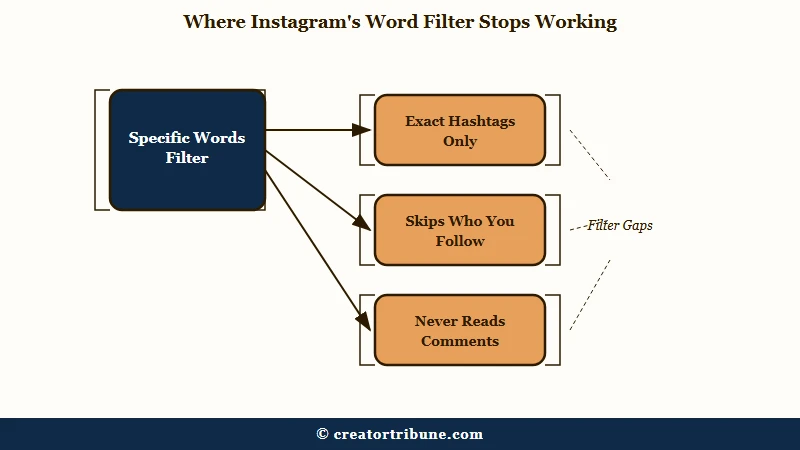
This is the part almost every guide gets wrong, and it explains why adding “ai” and “slop” to your list changes so little. Instagram publishes four limitations on the feature, and each one carves out a large share of what you were trying to block.
An AI-generated reel that carries no hashtags is invisible to a hashtag-matching filter, however many words you add to the list.
What is the difference between Hidden Words and Specific words and phrases: Hidden Words filters comments and message requests on your own posts. Specific words and phrases filters suggested posts in your feed. They are separate settings and guides routinely confuse them.
To set it up on iPhone or Android, since the feature does not exist on desktop at all:
- Tap Options above a suggested post, or bottom right on a reel.
- Tap Not Interested, then Don’t suggest posts with certain words.
- Enter your words, separated by commas to add several at once.
- Tap Done, then allow up to 24 hours for it to take effect.
The limitation that bothers me most is the comments one. A post can be wall to wall AI in the replies and still sail through, because the filter never reads that far.
Before: you add “ai, slop, aigenerated” and expect the feed to clear, then nothing changes because the reels carrying that content use no hashtags at all.
After: you treat the word list as a narrow tool for tagged content, add hashtag-shaped terms like “aiart” and “midjourney”, and use Snooze for the untagged flood.
How Do I Pause All Suggested Posts for 30 Days?
Snooze pauses every suggested post in your Feed for 30 days. It sits inside the Not interested menu on any suggested post, and it is the only control that stops recommended content wholesale rather than filtering it by signal.
Instagram documents it in one line on its help page for hiding suggested posts, buried under the same menu as the word filter. It gets almost no coverage anywhere else.
Snooze is the one I use, and the reason is arithmetic rather than preference. AI content reaches you through recommendations, so pausing recommendations removes the delivery mechanism instead of arguing with it post by post.
The catch is the calendar. It expires after 30 days with no auto-renew, so it becomes a monthly habit rather than a fix. Set a reminder or you will find the feed refilled without noticing when.
What Does Resetting Suggested Content Do?
Reset suggested content clears your recommendations across Explore, Reels and Feed and starts them over. Instagram states it cannot be undone, that it will not change who you follow, and that suggestions personalize again as you interact.
The path is Profile, then Menu at the top right, then Content preferences under “What you see”, then Reset suggested content.
Two things Instagram is upfront about, and both matter. The reset does not delete any data, and your recommendations rebuild from your behaviour immediately afterward.
So a reset buys you a clean slate for a few weeks. If the accounts and topics that fed you AI content are still the ones you linger on, my feed and yours will both drift back. Pair the reset with a pass through your suggested accounts so the rebuild starts from a cleaner base.
Why Do the Same AI Accounts Keep Coming Back?
Blocking individual AI accounts does not scale because the accounts are disposable. Content farms publish from rotating handles, so a block removes one output while the operation continues from the next account.
This is the structural reason a block list never feels like it is winning. You are removing endpoints from something that generates new ones cheaply.
The word filter cannot close the gap either, for the reason above: untagged posts slide straight past a hashtag matcher. Neither control was designed for adversarial volume.
My take is that account-level blocking is worth doing only for the handful you see repeatedly, and that everything else belongs at the recommendation layer. Snooze and a reset move more in ten seconds than an hour of blocking does.
If one of the four controls has already let you down, this is usually why:
| What you tried | Why it fell short | What to do instead |
|---|---|---|
| Blocked the word “ai” | Filter needs an exact hashtag match, so untagged posts pass straight through | Snooze all suggested posts for 30 days |
| Blocked accounts one by one | Content farms publish from rotating handles | Reset suggested content, then prune who you follow |
| Tapped Not interested repeatedly | It is a slow signal, not a removal | Combine it with Snooze while the signal builds |
| Changed settings on a laptop | The word list has no effect on instagram.com | Redo it in the Android or iPhone app |
Why Do Real Photos Get an AI Info Label?
The “AI info” label is triggered by metadata rather than human review. Meta detects industry-standard signals embedded by editing and generation tools, so an ordinary photo touched by an AI-assisted retouching feature can carry the same label as a fully generated image.
Meta announced this approach in February 2024. It named invisible watermarks and embedded metadata as the mechanism, and said it was working with industry partners on common technical standards.
What is C2PA: The Coalition for Content Provenance and Authenticity, a cross-industry standard that attaches tamper-evident “content credentials” to a file when it is created or edited.
The side effect lands on photographers. A portrait cleaned up with a generative retouching tool can be flagged, while a fully computer-generated render that never carried the metadata is not.
I’d treat the label as a weak signal rather than a verdict. It tells you a file passed through a tool that writes provenance data, which is a different claim from “a machine invented this scene.” If Meta’s AI features are the wider concern, turning off Meta AI and AI dubbing on Reels are separate settings worth a look.
Frequently Asked Questions
Is there one setting to turn off all AI content on Instagram?
No. Instagram offers no switch that hides AI-generated content. The closest option is Snooze, which pauses all suggested posts in your Feed for 30 days, and it covers recommendations rather than AI specifically.
Does tapping Not interested reduce AI posts?
It helps gradually rather than immediately. Not interested is a signal to the recommendation system, so it shifts what you get shown over time. It removes nothing on its own and works slowly against high-volume accounts.
Why does blocking the word AI not clear my feed?
Instagram states the filter needs an exact match to hashtags in a suggested post. Posts with no hashtags are unaffected, comments are never read, and posts from accounts you follow are excluded entirely.
Is resetting suggested content permanent?
No. Instagram says the reset cannot be undone, but your recommendations personalize again as you like, share and interact. Treat it as a fresh start that rebuilds from your next few weeks of behaviour.
Does the AI-generated profile label filter anything for viewers?
No. The August 2026 policy is creator-facing. It requires profiles featuring an AI-generated person to disclose it and limits recommendation eligibility for those that do not, without giving viewers any filtering control.
Do these controls work on Instagram on a computer?
No. Instagram states the specific words and phrases feature is available only in the Android and iPhone apps, and that the list has no effect on suggested posts viewed at instagram.com.
Quick Takeaways
- No setting blocks AI content on Instagram, so stop hunting for one and work the recommendation controls instead.
- Snooze is the strongest lever available, pausing all suggested posts in your Feed for 30 days from the Not interested menu.
- The word filter matches exact hashtags only, skips comments, ignores accounts you follow, and does nothing on desktop.
- Reset suggested content clears Explore, Reels and Feed, then rebuilds from your behaviour, so pair it with a follow list cleanup.
- Treat the “AI info” label as a metadata signal, not proof that an image was generated.