How to Turn Off Suggested Accounts and Posts on Instagram
How to Turn Off Suggested Accounts and Posts on Instagram
Suggested accounts flooding your Instagram feed and Stories? Here is every setting that cuts them down, and why the 30 day snooze keeps expiring.
- 1How Do You Turn Off Suggested for You on Instagram?
- 2Can You Turn Off Suggested Posts on Instagram Permanently?
- 3Why Does Your Following Feed Reset When You Reopen the App?
- 4Can You Turn Off Suggested Stories on Instagram?
- 5How Do You Remove People You May Know on Instagram?
- How Do You Turn Off Contact Syncing on Instagram?
- Why Does Instagram Show Facebook People You May Know?
- 6How Do You Stop Instagram From Suggesting Your Account?
- 7Does the Your Algorithm Panel Reduce Suggested Posts?
- 8When Should You Reset Your Suggested Content?
- 9Quick Takeaways
TL;DR: Instagram has no permanent off switch for Suggested for you, whether it is showing you posts, accounts or stories. The 30 day snooze expires on its own, the Following feed drops back to For You when you reopen the app outside the Netherlands, and the Stories row has no toggle. The switches that do hold are contact syncing off, Facebook unlinked, and the desktop-only setting for account suggestions on profiles.
Learning how to turn off suggested accounts and suggested posts on Instagram is easy, and Meta labels both of them “Suggested for you”. Making the change last is the hard part, and that is where most guides stop.
Instagram spreads the controls that touch suggested content across the feed menu, Content preferences, Accounts Center and the desktop site. The feed controls expire, reset, or apply to a single post, and the app never tells you when one has lapsed.
The feed fixes annoy me because they do not stay put. You set them, the feed goes quiet for a while, and then the recommendations come back without a notification or a changelog entry.
Below is every control that exists, what each one does, and the honest limit on each, including people you may know from contacts and Facebook. There is also a straight answer to the question people mix up most, which is the difference between stopping suggestions shown to you and stopping Instagram from pushing your profile at strangers.
How Do You Turn Off Suggested for You on Instagram?
Four settings do most of the work on suggested posts and accounts, and none of them switches Suggested for you off for good.
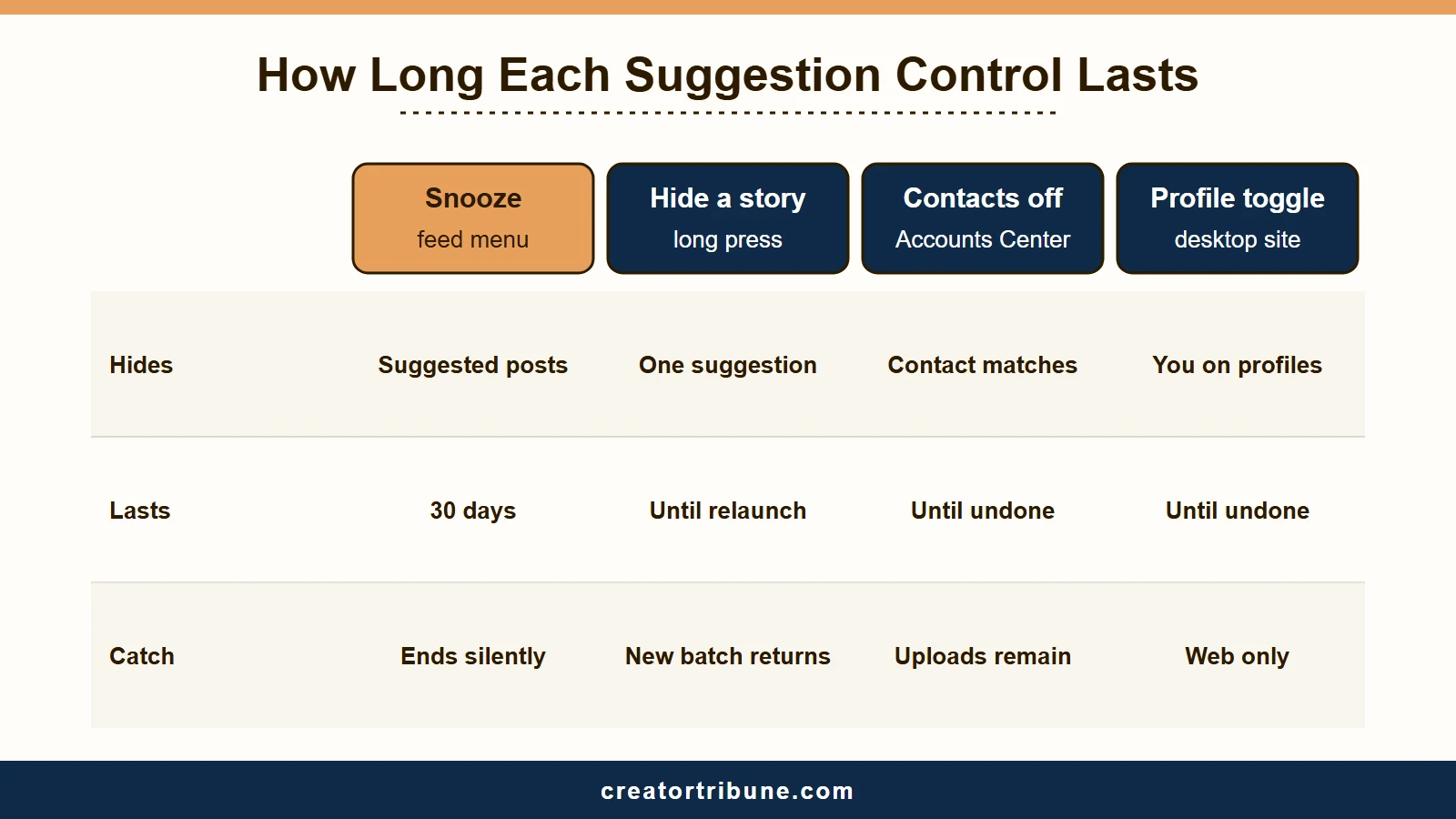
Snooze pauses suggested posts in your feed for 30 days, and Don’t suggest posts from [name] removes one account at a time. Keyword filters cut them by topic, and a desktop-only toggle keeps your profile out of the suggestions on other people’s profiles.
The order I use runs cheapest fix first. Each step takes under a minute, and each one covers a gap the step before it leaves open.
- Open any post labelled “Suggested for you”, tap the three dots above it, tap Not interested, then tap Snooze. Meta’s help says that pauses all suggested posts in your feed for 30 days.
- From the same Not interested menu, tap Don’t suggest posts from [name] to stop suggested posts from that account.
- In the same menu, choose Don’t suggest posts with certain words and add the topics you never want surfaced. This one catches whole categories rather than single accounts, and it is the filter my guide to blocking AI content on Instagram builds on.
- On a desktop or mobile browser, go to Edit profile and switch off Show account suggestions on profiles. That is the outbound control, and it is missing from the phone app entirely.
Not interested is missing from some menus. A 13 October 2026 r/Instagram post with over 700 upvotes showed a suggested post from Mark Zuckerberg’s account without it on the desktop site, while another post’s menu had it. Snooze in Content preferences still works when it is missing.
Here is the full set, including the Following feed and the account-level switches covered further down.
| Control | What it does | The catch |
|---|---|---|
| Snooze suggested posts | Pauses all suggested posts in your feed | Expires after 30 days, no reminder |
| Not interested | Hides that post, and Meta says it also stops posts from that author | Missing from some posts’ menus |
| Don’t suggest posts from [name] | Stops suggested posts from that account | One account at a time |
| Don’t suggest posts with certain words | Filters by keyword, phrase or emoji | Reads captions and hashtags only, not images |
| Following feed | Removes suggestions completely | Reverts to the algorithm on relaunch everywhere except the Netherlands |
| Show account suggestions on profiles | Removes suggestions from your profile and keeps you out of them on other profiles | Desktop and mobile web only |
| Contact syncing off | Stops suggestions based on your phone’s contacts | Contacts already uploaded stay until you delete them |
| Facebook removed from Accounts Center | Stops Instagram using Facebook data for account suggestions, per Meta | Unlinked users still report a Facebook people you may know row |
None of these switch off ads. Meta’s help says suggested posts are not ads, and its feed recommendations system card puts ads outside the system these controls tune, so ads keep running through a snooze.
Can You Turn Off Suggested Posts on Instagram Permanently?
No. Snooze pauses all suggested posts in your feed for 30 days, the longest pause Instagram offers, and then switches itself back on without telling you.
There are two routes to the same pause. Tap the three dots on any suggested post, then Not interested and Snooze, or go to your profile, tap the menu and open Content preferences.
Content preferences also holds the keyword filter and the sensitive content control, per Meta’s feed card.
I put a reminder on day 30, because the toggle will not tell me when it lapses. The recommendations return to a full feed with no banner and no prompt, so the lapse reads as a broken setting rather than an expiry.
People keep asking for a permanent version anyway. On 2 October 2026 an r/Instagram user asked how to hide suggested posts for good, because only the snooze button showed. The replies said it cannot be done and pointed to the Following feed.
Why Does Your Following Feed Reset When You Reopen the App?
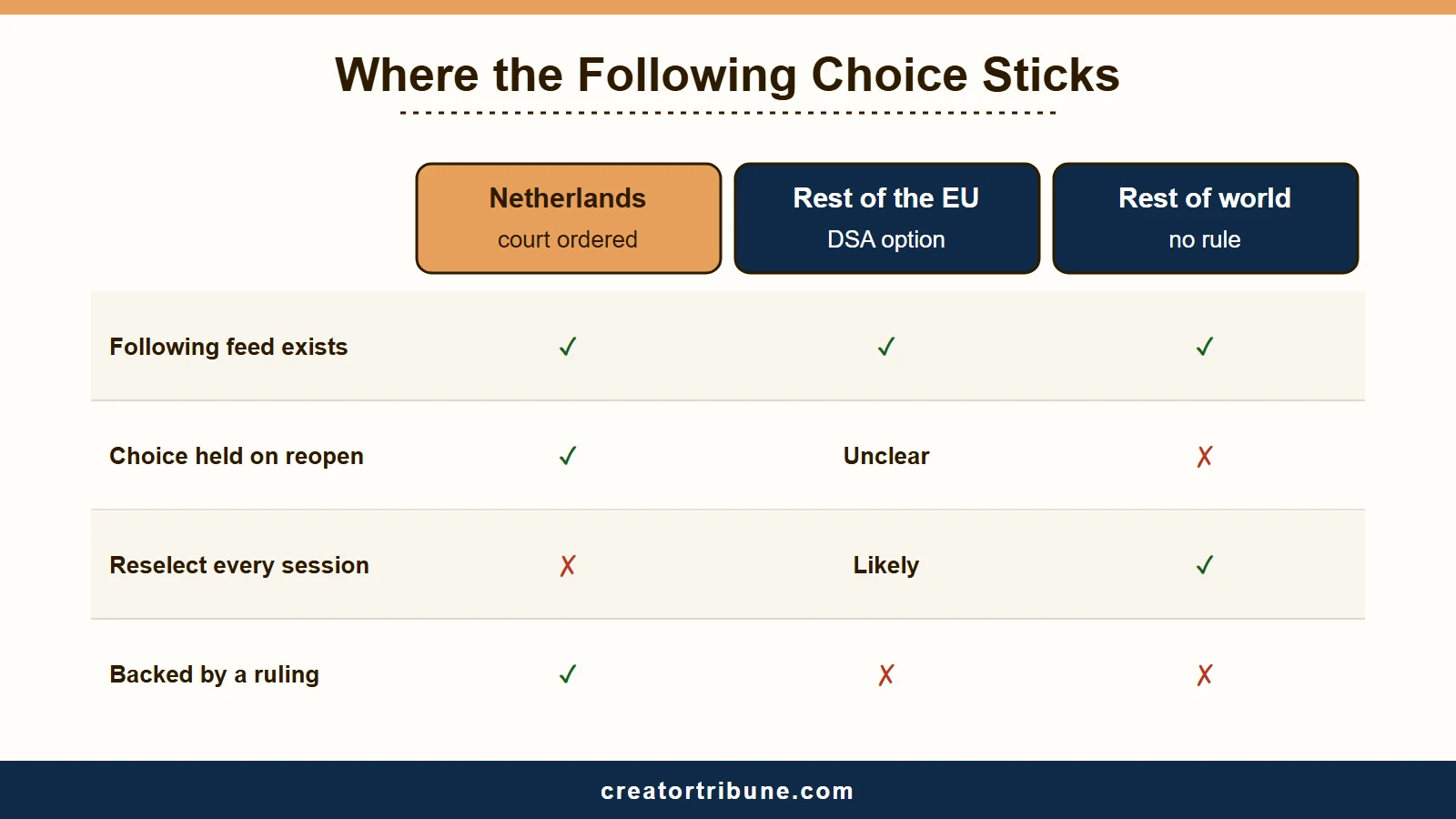
The Following feed shows only accounts you follow in chronological order with zero suggestions, and almost everywhere it resets to the algorithmic feed every time you relaunch the app. The Netherlands is the one place a court has ordered that choice to stick.
Reach it by tapping the Instagram wordmark or the small arrow next to “For You” in the top left.
Meta’s feed recommendations card, updated 29 June 2026, describes Following as posts that are not chosen or ordered for you personally. On tablets it describes a Latest option that shows posts from accounts you follow in reverse chronological order and “will not include recommendations”.
The reset is a deliberate default rather than a fault on your phone, and no setting in the app disables it. In one jurisdiction it has now been ruled illegal.
That court ruling changed how I read this whole feature. In Bits of Freedom v Meta Ireland, decided on 2 October 2025, the Amsterdam District Court held that sending users back to the profiled feed each session breaches the Digital Services Act. Its grounds, translated from the Dutch, were that the reset “leads to user choice fatigue” and substantially interferes with the autonomy of Facebook and Instagram users.
Meta was ordered to make the choice persist within two weeks, on a penalty of 100,000 euros for every day it failed to, capped at 5 million. The deadline was later pushed back to 31 December 2025, even though the original two week window had been set with the Dutch general election of 29 October 2025 in mind.
Bits of Freedom reported on 21 January 2026 that Dutch users could switch persistently from 1 January 2026. The DSA Observatory puts the full set of required interface changes at 6 January, six days past the extended deadline.
The DSA Observatory also records that about 4 percent of Facebook and Instagram users could not see those changes until at least mid March 2026. Meta said it needed to keep that group on the old interface temporarily while it fixed bugs and other technical problems.
Meta appealed and lost. The Court of Appeal upheld the orders on 10 March 2026 while doubling the penalty cap to 10 million euros.
Legal analysts describe the non-persistent setting as a dark pattern ruling rather than a design accident. The case is still running, because Bits of Freedom said in May 2026 that Meta had taken it to the Dutch Supreme Court. That court checks whether the lower courts applied the law correctly rather than reopening the facts.
The judge limited the order to people using Facebook and Instagram inside the Netherlands, so the practical result is a split that no settings menu explains, and a narrower one than most guides suggest.
| Where you are | Following feed behaviour | What you have to do |
|---|---|---|
| Netherlands | Choice persists across sessions and app restarts, under a court order Meta implemented in January 2026 | Set it once |
| Rest of the European Union | A non-profiled option exists under the DSA, but the Dutch order was expressly limited to users in the Netherlands | Check it yourself after a relaunch |
| United States and the rest of the world | Reverts to the For You algorithm on every relaunch | Reselect it every session |
EU accounts did gain chronological, follow-only viewing for Stories and Reels, not just the main grid, as Mashable covered at the time. Having the option and keeping it selected are two different guarantees, though, and only the second one went to court.
Everywhere outside the Netherlands, treat the Following feed as a per-session choice until you have watched it survive a relaunch on your own phone. If you are trying to cut Reels specifically rather than suggestions in general, my guide to turning off Reels on Instagram walks through the Reels-specific settings.
If you want a curated version of the same thing, the Favorites feed is capped at 50 accounts and behaves the same way on persistence.
Can You Turn Off Suggested Stories on Instagram?
No setting turns off suggested stories, the stories from accounts you do not follow that now appear in the Stories tray.
Recommended profiles now appear in the row at the top of the feed, sometimes ahead of people you follow, and there is no toggle in the app that disables the placement.
This is the placement that bothers me most, and it has no off switch. For a single suggested story, press and hold it and choose the hide option, which clears that one entry.
The suggestions return on the next app launch, usually as a different set of accounts. An r/Instagram user described the same loop on 14 September 2026, hiding each one by long press and starting again with a new batch after reopening the app.
Meta’s suggested accounts system card mentions one more option. When a unit of suggested accounts appears inside Stories, you can dismiss the whole unit rather than one account. Meta calls that feedback for future suggestions and promises nothing about how long the unit stays away.
When a suggested profile sits where a friend’s story usually sits, the habit of tapping the first circle backfires. It turns into an accidental profile visit or a follow request to somebody you did not mean to contact.
Turning on the Following feed removes the suggestions from the tray for as long as that feed holds, which brings you back to the persistence problem above. In the Netherlands that is a durable fix, and elsewhere it lasts until you close the app.
How Do You Remove People You May Know on Instagram?
Tap the X to dismiss a suggested person, then cut off the sources: disconnect contact syncing, delete the contacts Instagram already holds, and remove Facebook from Accounts Center.
Instagram’s own pages call these suggestions Suggested for you and Discover people. People You May Know is the name Meta uses on Facebook.
Meta’s Instagram Suggested Accounts card, updated 7 March 2025, says the system draws candidates from followers of accounts you follow, popular accounts in your region and accounts tied to topics you engaged with. It ranks them on signals such as mutual friends and whether the suggested account already follows you.
Dismissing with the X counts as feedback. Meta’s card says it “helps the system provide better suggestions in the future”, and it names blocking as the step that filters an account out of suggestions altogether.
Meta’s card also says you can turn off notifications about suggested accounts, the Account suggestions switch under Notifications, then Following and followers, as MakeUseOf documents. The card also lists a Discover more accounts option, which shows suggestions that are not personalized, where available.
How Do You Turn Off Contact Syncing on Instagram?
Go to your profile, tap Menu, then Meta Account or Accounts Center, Your information and permissions, and Upload contacts. Pick the profile, switch off Connect contacts and tap Disconnect.
Meta’s contact syncing help puts three limits on that switch. It stops only the recommendations based on your phone’s contact list. It does not delete contacts already uploaded, and your phone re-uploads them on the next sync unless you also revoke contact access on every device logged into the account.
Deleting what is already uploaded needs a computer. Sign in at instagram.com, open Edit profile, choose See more in Meta Account, then Your information and permissions, Manage contacts and Delete all.
You cannot delete contacts one at a time, and Meta says the deletion can take up to 90 days, during which suggestions based on those contacts may continue. Its own advice for that window is to block anyone you do not want suggested.
Your setting has no say over other people’s address books. Meta’s notice on contact uploading says synced address books are uploaded daily, and anyone in one who is on Instagram can be suggested to the uploader as an account to follow. The same notice says those contacts “may also be recommended people and things they care about”.
That fits an r/Instagram thread from 18 September 2026 by a user who switched sync off over ten years ago yet sees each newly saved contact suggested. Replies blamed the other person’s syncing, which matches Meta’s notice, though nobody proved it.
The Upload contacts screen asks which profile you mean, so check the Facebook profile too, since Meta runs one contact uploading process across Facebook, Messenger and Instagram.
Why Does Instagram Show Facebook People You May Know?
Meta says that once Facebook is unlinked, the system “won’t use Facebook data to recommend Instagram accounts to you”. The Facebook people you may know row that users describe suggests people to connect with on Facebook, which that promise does not cover.
On 24 July 2026 an r/Instagram user noticed a people you may know section “but for Facebook” without Facebook connected, listing people they already followed on Instagram. On 2 October another unlinked user said the same Facebook people kept returning after tapping the X and blocking them, and suspected Instagram could see their Facebook searches.
Meta’s pages do not explain those cases. Its Stories system card lists Facebook friendship with a suggested person among its signals. Its Accounts Center help says syncing your name and photo across apps can surface suggestions to follow or add you in both.
Nothing in Meta’s help says Instagram reads your Facebook searches, so treat the search theory as unproven. To remove Facebook, open Accounts Center, then Accounts, tap Remove next to the Facebook profile and confirm, setting an Instagram password first if you log in with Facebook.
How Do You Stop Instagram From Suggesting Your Account?
Switch off “Show account suggestions on profiles” in Edit profile on the desktop or mobile web version of Instagram.
The setting does not exist in the iOS or Android app, which is why searching for it on a phone turns up nothing.
My advice is to open a laptop for this one. Sign in at instagram.com, click your profile picture on the left, choose Edit profile, switch off the toggle and click Submit.
Meta’s help page for this setting describes both halves. People who tap Follow on your profile stop seeing similar profiles suggested there, and you stop appearing as a suggestion on other people’s profiles.
Meta’s wording covers profiles only, so nothing in it says the setting reaches Discover people or the contact matches described above. People can still find you through mutual follows, synced contacts or search.
This is also the control people conflate with the feed settings, and the two do opposite jobs.
Before: you turn on Snooze, expecting your profile to stop appearing in other people’s “suggested for you” panels. Nothing changes, because snooze only governs what Instagram shows you.
After: you switch off “Show account suggestions on profiles” on the desktop site, which governs what Instagram shows other people about you. That is the one that removes your profile from the recommendation panels on similar accounts.
A related setting worth checking while you are there is who views your profile, which is a separate question people often assume is connected to suggestions. If discovery through your connections is the concern, you can also hide your following list.
Does the Your Algorithm Panel Reduce Suggested Posts?
No. “Your Algorithm” edits the topics Instagram associates with your account, and it cannot prioritise people you follow or reduce content from accounts you do not.
It reached Reels in December 2025, Explore in April 2026, and the main feed in June 2026.
I do not buy the idea that this panel is a suggestions control, despite how it was presented. Engadget tested that exact use case by entering “posts from people I follow” as a preference and got a “no results found” response. The tool only accepts interest topics such as skincare or rescue dogs.
What it does do is let you add and remove subject categories, which changes the flavour of the recommendations rather than the volume. If suggested posts are the problem, this panel will not move the number.
When Should You Reset Your Suggested Content?
Reset suggested content wipes your inferred interests across the feed, Reels and Explore, and starts the recommendation model from scratch. Find it under Settings and activity, then Content preferences, then Reset suggested content.
I would reset only when the feed stops resembling anything I follow. It is a blunt instrument, and the model begins retraining on your very next tap.
The reset does not unfollow anyone, delete posts or messages, or change ad preferences. It clears the interest profile and nothing else, so the accounts you follow are untouched.
Retraining takes deliberate effort for a few days afterwards. If you go straight back to watching the same content, the same suggestions rebuild within a week, which is the trade-off to weigh before using it. There is a fuller walkthrough of how to retrain your Explore feed if the grid rather than the main feed is what went wrong.
While you are auditing what the app decides for you, the same settings area is where you turn off Meta AI features that were switched on by default.
Quick Takeaways
- Snooze suggested posts buys 30 days of a clean feed, then switches itself back on with no warning.
- The Following feed is the only true zero-suggestion view, and it is guaranteed to hold between sessions only for users in the Netherlands, under a court order Meta implemented in January 2026.
- Suggested stories have no off switch, and hiding one lasts only until a new batch arrives on the next launch.
- For people you may know, the X only gives feedback, so disconnect contact syncing, delete uploaded contacts and unlink Facebook, though users report a Facebook row that persists.
- Stopping your own profile from being suggested is a separate, desktop-only setting that the phone app does not carry.
- Set a calendar reminder for day 30 of the snooze, because that lapse is what people mistake for the setting failing.