Does Instagram Count Your Own Views and What Meta Never Says
Does Instagram Count Your Own Views and What Meta Never Says
Instagram has never said whether your own views count. Here is what Views and Viewers measure, why the grid and Insights disagree, and how to test it.
- 1Does Instagram Count Your Own Views on Your Posts?
- 2Why Do the Grid Count and Insights Views Disagree?
- 3What Does Instagram Officially Document About Views?
- 4Does Rewatching a Reel Count as Another View?
- 5Why Do the Top Results Give Four Different Answers?
- 6How Do You Test Whether Your Own View Counts?
- 7Does Your Own View Show in Story Views or Profile Visits?
- 8What Should You Track Instead of the View Count?
- 9Quick Takeaways
TL;DR: Instagram has never published whether your own views count on your own posts. The profile grid number and the Insights Views number run on two different rules, so a self view could show on one and not the other. The one number documented to count each account only once is Viewers, which Insights called Accounts reached until mid-2026.
Does Instagram count your own views? Type the question into Google and the AI Overview answers with a confident no, citing a blog post, a Quora thread and an AI-written Facebook page. Scroll a little and the picture falls apart.
This is the rare question where the confident answers are the ones I trust least. Four of the guides ranking for it give four different rules, and not one of them points at a Meta page to back the claim.
In one r/Instagram thread, the question gets asked in four parts. Do Reels and static posts follow the same rule, does a self view land in the follower or non follower bucket, does it reach the total, and has any of this changed recently? In a follow-up comment underneath, the poster adds that they cannot find an answer that is current or more than a guess.
A new r/Instagram post on 15 October 2026 asked whether watching your own Story counts as an impression, and it had no replies when this page was updated.
Instagram passed three billion monthly users in September 2025, per TechCrunch. A platform that big has a documentation gap sitting in the middle of it, and this page is about mapping the gap precisely rather than filling it with a guess.
Does Instagram Count Your Own Views on Your Posts?
Instagram has never published an answer. Neither Meta nor Instagram has a page saying whether the owner’s own views are left out of the public Views count. SocialCrawl’s August 2026 study found the same gap after reading both the Help Centre and Meta’s API reference.
That gap between a confident answer and a documented one bothers me. In eight samples of Google’s AI Overview read on 19 October 2026, all eight said Instagram does not count your own views, and seven called Stories the exception. None cited an Instagram help page.
In seven of the eight, the citations were a skweezer.net blog post, a Quora thread and a facebook.com answers page. Meta labels that page an AI-generated summary based on public discussions, and its claim that your own Story views do count matches the overview’s Story exception almost word for word.
The absence cuts both ways. Nobody has shown that your view is counted either, and the platform has no obvious reason to want its own numbers padded.
What you can do is stop treating “views” as one number. Split it by surface and two of the four sub questions get partial documented answers: the rules differ by format, and the recent changes are on record.
The follower question narrows to an inference. You do not follow yourself, so a counted self view would have to land with non followers, and Instagram has never said so either way. Whether it reaches the total is the open question this page is about.
Why Do the Grid Count and Insights Views Disagree?
The number under a Reel on your profile grid and the Views figure inside Insights are two different metrics. Instagram’s help page for the grid count says it counts how many times your reel starts to play and does not include replays. The Insights definition of Views explicitly does include them.
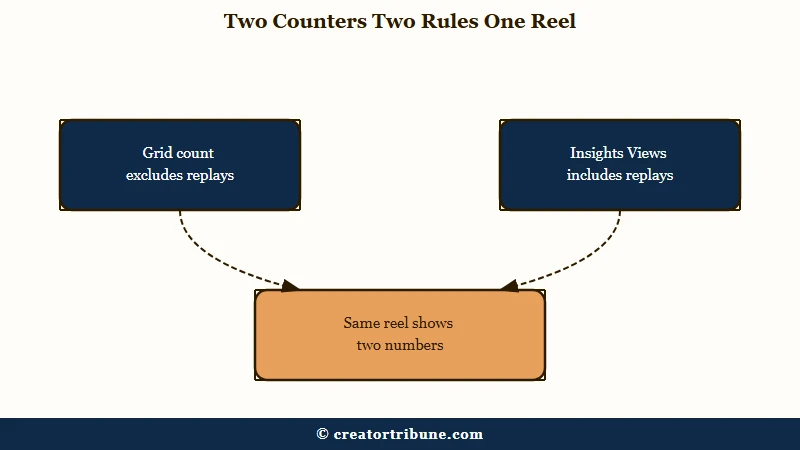
This is the detail I check first whenever a view count looks wrong. Two counters, two rules, sitting a tap apart in the same app. Almost nobody writing about this mentions it.
The consequence for the self view question is direct. Watching your own Reel five times could move the replay inclusive Insights figure while leaving the replay exclusive grid figure alone, and you would read that as a bug.
It also means a test that only checks one surface proves nothing about the other. Check both, or the result means nothing.
The grid count can also carry Facebook plays. The same grid help page says that if you recommend your reel to Facebook, play and like counts may include Facebook interactions, and Meta’s API has reported Facebook views separately since 3 December 2025.
Insights does not always add them back. A creator with almost 500,000 followers posted on 10 October 2026 that Reel Insights on their main account showed about 191,000 Instagram views. It left out roughly 1.5 million Facebook views, which the Reel’s likes and views screen did show.
| Surface | What Instagram defines it as | Counts replays |
|---|---|---|
| Profile grid count under a Reel | How many times your reel starts to play, which can include Facebook plays | No |
| Insights Views, Reels | The number of times your reel starts to play or replay | Yes |
| Insights Views, feed post or carousel | The number of times your content was displayed | Yes |
| Insights Views, Story | The number of times your story was played or displayed | Yes |
| Viewers (formerly Accounts reached) | Unique accounts that saw it on screen at least once, played or not | No |
What Does Instagram Officially Document About Views?
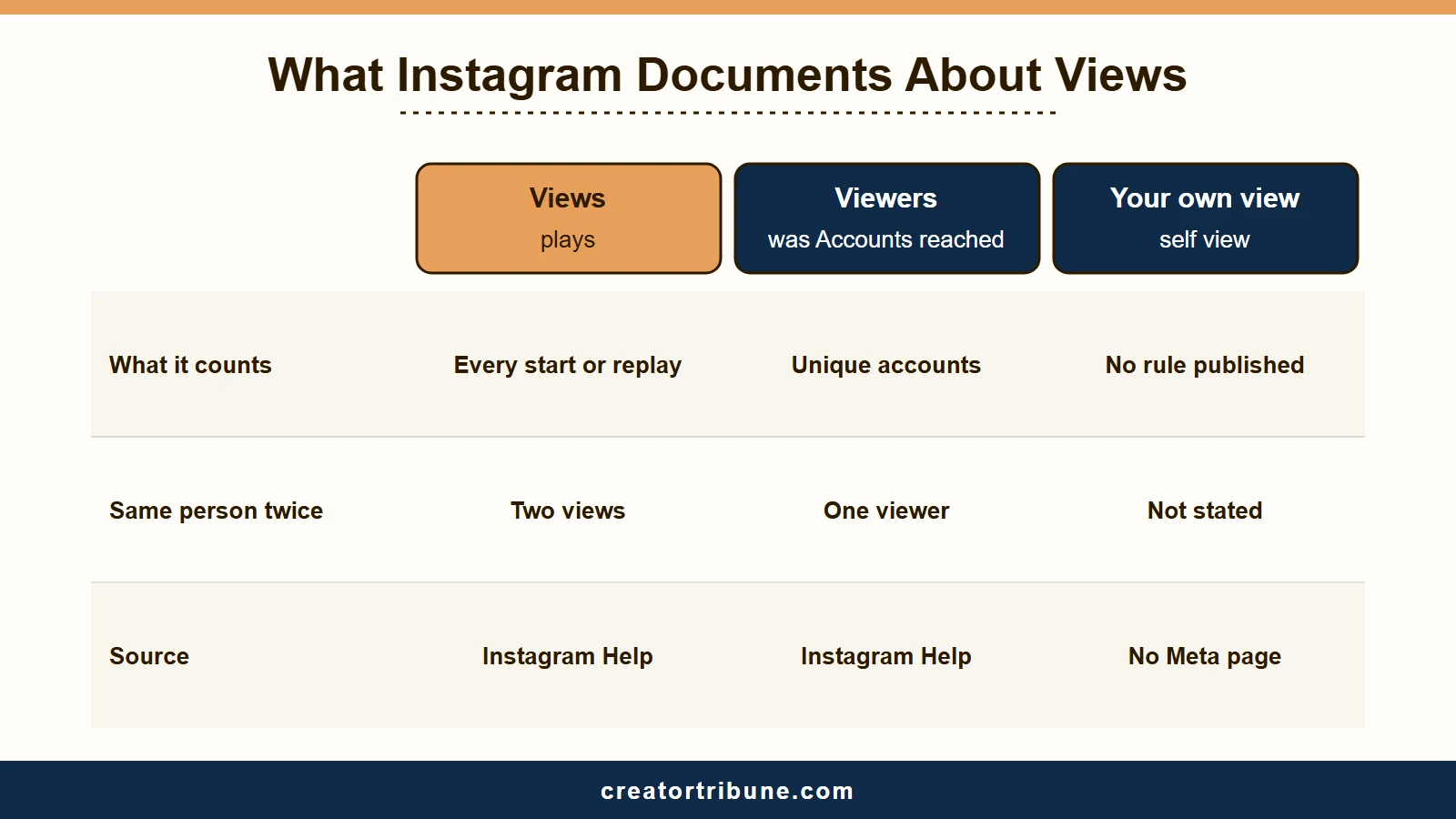
Instagram documents four things. A reel view is every start or replay, a feed or carousel view is every time the content was displayed, and a story view is every play or display. Viewers counts unique accounts rather than plays.
Insights now labels that unique-account metric Viewers. Until mid-2026 it was called Accounts reached, the name most older guides still use, and views versus viewers covers what the gap between the two numbers tells you.
These four definitions are the only ground I will stand on here. Everything else on this page is either an inference I flag as one, or a claim I attribute to whoever made it.
The Viewers wording is the useful one, because Instagram spells out the contrast itself. Its About Instagram insights page says “Viewers is different from views, which may include multiple views of your reel by the same accounts,” and labels the metric estimated and in development.
Read that sentence twice. Instagram is telling you, in its own words, that Views is not deduplicated per account.
What is Viewers: The number of unique accounts that saw your content on screen at least once, counted once per account no matter how many times they watched.
On 2 December 2025, creator Edward Sturm posted a reel quoting the Head of Instagram on a change to how views were counted on posts and carousels. Views had briefly included appearances in Explore and on profiles “even if someone didn’t tap in”, and Instagram was reversing it.
After the reversal, a view counts only “when someone sees your post in their feed, or taps into it from your profile or Explore”. The statement says nothing about the owner’s own views, and the reel’s own timestamp pins the date that SocialCrawl’s study listed as disputed.
Does Rewatching a Reel Count as Another View?
Yes, on the Insights Views metric. The definition is the number of times your reel starts to play or replay, with no minimum watch time. On the profile grid count, replays are excluded, which is why the two numbers drift apart on rewatchable content.
The replay rule is the one that surprised me most, because it quietly demolishes the most popular reason offered for the confident no. The reasoning runs like this. Instagram counts one view per unique account, so your account adds one at the very most, and one is not worth filtering.
The first half of that is wrong. Views counts plays; the metric that counts accounts is Viewers, and Instagram keeps the two apart for exactly this reason.
The other zombie claim is the three second rule. That threshold belonged to a metric called video_views, which stopped being supported on 8 January 2025, and it survives in guides written years later because nobody rechecked it.
Meta’s Reels ranking explainer still lists how many times people watched at least 3 seconds of a reel as one ranking input. No current help page ties that figure to when a view counts.
On 21 January 2025, Meta’s changelog logged a single new views metric, and impressions and plays were retired across every API version on 21 April 2025. Neither entry mentions the owner’s own views.
Why Do the Top Results Give Four Different Answers?
Because none of them is sourced. Four pages ranking for this question state four incompatible rules, and every one of them asserts it without citing a Meta or Instagram page.
I do not blame anyone for believing the first result. The answers are stated flatly and they sound researched, with no visible seam between the ones built on documentation and the ones built on nothing.
The table below is the whole problem in one screen. Note that the two sources arguing hardest for the confident no are also the two that get the replay mechanics wrong.
| Position taken | What it claims | Cites Meta docs |
|---|---|---|
| Your views count | Your own views on your Reels and videos get added to the total count | No |
| Your views are filtered | Your own views do not contribute to the public count or to Insights | No |
| It depends on format | Reels and feed count your view once with replays ignored, Stories count every rewatch | No |
| It changed in 2026 | Self views used to count and were removed from analytics this year | No |
| Nobody knows | No Instagram or Meta documentation states whether the owner’s views are excluded | Checked and found none |
The format specific claim in row three is the one that contradicts Instagram directly. It says replays do not add new views on Reels, and the Help Centre says a view is every time the reel starts to play or replay.
How Do You Test Whether Your Own View Counts?
Post a Reel, view it only from the posting account, and record the grid number and the Insights Views number before and after. Static posts are harder: SocialCrawl’s 425-post sample found no public view count on any image or carousel. Instagram’s view counts help says grid counts on posts are visible only to you, and only on a professional account.
The sequence I would run first is short, and the whole point is changing one variable at a time.
- Post a Reel at a quiet hour, leave it completely unshared, and leave the option to recommend it on Facebook off.
- Screenshot the grid count and the Insights Views count within the first minute.
- Open the Reel from your own profile grid once, let it play through, and back out.
- Wait ten minutes, then screenshot both numbers again.
- Replay it four more times from your own account, wait ten minutes, and screenshot both a third time.
- Take a last pair of screenshots 48 hours after posting.
- Compare all four pairs, and treat the grid and Insights columns as separate results.
Ten minutes is not an arbitrary pause. SocialCrawl pulled the same posts twice, roughly six to seven minutes apart. The public count ticked up on 69 of 70 posts from accounts with over a million followers, but on only 4 of 72 from accounts under 100,000.
So the public number updates live, but a quiet Reel may barely move in ten minutes. Meta’s API reference also warns that the data behind insights metrics can be delayed up to 48 hours, which is why the last screenshot waits two days.
Before: Open your Reel a few times, glance at the view count, decide it feels high, and conclude Instagram is padding your numbers.
After: Log the grid count and the Insights count at minute zero, after one self view, and after five, then compare the two columns against each other rather than against a feeling.
The honest limit of this test is that it tells you what happened on your account this week. It cannot tell you the rule, because a filter that runs on a delay or applies above some threshold would look exactly like no filter at all in a ten minute window.
Anything you see on a post with real traffic is worthless here, since you cannot separate your own view from a stranger’s. The unshared Reel is the whole method.
A second account does not help either. It is a separate account, so it says nothing about the owner exclusion. Replaying your own content from alts to pad the count is engagement manipulation, and not worth the risk to your reach.
Does Your Own View Show in Story Views or Profile Visits?
Neither has a published self view rule. Instagram’s Story insights help defines Views as every time your story was played or displayed and Viewers as unique accounts that saw it, without mentioning the owner. Profile visits get no self visit rule either.
That leaves Stories where the rest of this page sits. Google’s overview calls them the exception where your first self view counts, and the nearest thing to a source is the Meta AI summary of public posts described above.
Story viewer lists are a different matter, and here the documentation runs out again. The list is visible only to you, guides put its life at 48 hours from posting, and Instagram has never stated whether the posting account appears on its own list.
Read why Story views drop before you draw conclusions from a shrinking number, because view drops usually have a duller cause than a counting rule.
For the TikTok side of the same question, how TikTok handles Story views covers what is and is not pinned down there.
What Should You Track Instead of the View Count?
Viewers, watch time and skip rate. Viewers is documented as counting each account once, so a self view could move it by one at most. Watch time is one of the inputs Meta lists for ranking Reels.
My take is that watch time is the number worth protecting, and it is the one your own habits can genuinely damage. Views is a vanity counter, and its self view rule is unpublished.
The Reels ranking explainer lists how much time people have spent viewing a reel among its inputs, and the Help Centre defines watch time as total play time, replays included.
Consider what happens when you open your own Reel to check the caption, watch two seconds, and back out. Meta defines skip rate per view, as the percentage of a Reel’s initial views that skipped during the first 3 seconds, with an initial view being the first play in a viewing session. That window belongs to a live Insights metric, separate from the retired video_views threshold above, and your two second check fits inside it with nothing marking the view as yours.
Whether Instagram strips your session out before it hits that calculation is, once again, undocumented. The safe habit costs nothing: check your caption in the editor before you post, not by reopening the live Reel eleven times.
That is also the better answer to the worry underneath the original question. Numbers that look inflated next to your follower count usually come from non follower distribution, and why reach suddenly drops will get you further than auditing your own taps. The same logic applies in reverse when a viral post then stalls.
If the bigger problem is that too few accounts see your Reels at all, a larger follower base is one way to change that. Kicksta is one Instagram-only tool for that: you pick accounts and hashtags in your niche, and it follows and likes people who follow them, so the follow-backs come from that niche. It needs your Instagram password and automates follows, likes and unfollows, so like any outside automation it carries account risk under Instagram’s rules.
Quick Takeaways
- Instagram has never published whether your own views count, and no confident answer ranking for the question cites a Meta help page.
- The profile grid count excludes replays but can include Facebook plays, while Insights Views includes replays, so the two numbers answer different questions.
- Viewers, formerly Accounts reached, is the documented deduplicated metric, so a self view could move it by one at most.
- Test it on an unshared Reel and log both counters at minute zero, after one view, after five, and 48 hours later.
- Stop reopening your own Reels to check them, because a two second self view lands inside the window skip rate measures.