How to Turn Off Auto Translate on Instagram and Stop AI Dubbing
How to Turn Off Auto Translate on Instagram and Stop AI Dubbing
Instagram plays AI dubbed Reels by default for viewers. Here is the exact setting that stops it, plus the fix for the shared Reel bug.
- 1How Do I Turn Off Auto Translate on Instagram?
- 2Why Is Instagram Dubbing Reels Into Languages I Don’t Speak?
- 3How Do I Stop Instagram From Translating My Own Reels?
- 4Why Do Shared Reels Play in Spanish When My Settings Are Off?
- 5Does Turning Off Auto Translate Hurt My Reach?
- 6Frequently Asked Questions
- How do I turn off auto translate on Instagram permanently?
- Can Instagram dub my Reel without my permission?
- Why is a Reel in my DMs playing in Spanish?
- Which languages does Instagram translate Reels into?
- Does turning off translation reduce my views?
- Can I turn translation back on after posting?
- 7Quick Takeaways
TL;DR: Learning how to turn off auto translate on Instagram takes about fifteen seconds, but only once you know which of three separate things is dubbing your Reels. Viewers get translations switched on by default. Creators have to opt in per video. A third case ignores both settings and needs a workaround instead.
A Reel opens, the creator’s mouth moves, and the voice coming out is theirs in a language they do not speak. It is a strange thing to watch, and stranger still when the setting you switched off last week did nothing to stop it.
Most guides treat how to turn off auto translate on Instagram as one problem with one fix. It is three problems wearing the same coat, and picking the wrong fix is the reason the toggle you changed did nothing.
The account level setting below is the one I point people to first, so start there. The sections after it cover the two cases that setting does not touch, including one that no menu will resolve.
How Do I Turn Off Auto Translate on Instagram?
Add every language you understand to the Don’t translate list under Language and translations. That stops dubbing across your whole feed. The per Reel control only fixes the one video in front of you.
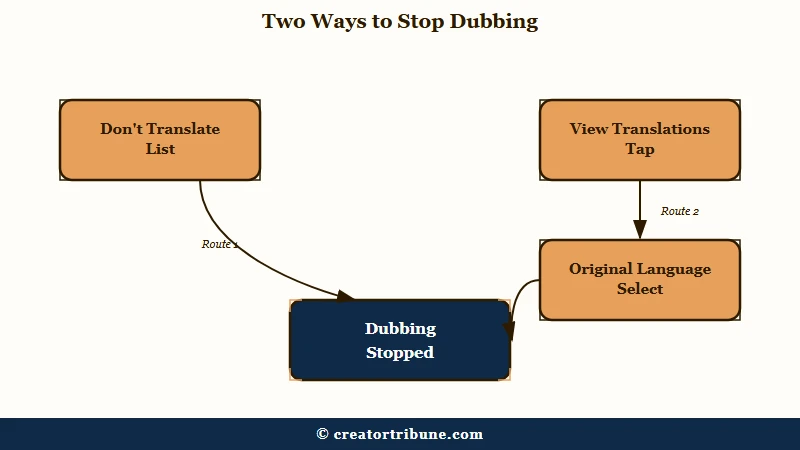
Open your profile, tap the menu, then Language and translations, and add your languages to the Don’t translate list. Telling Instagram you do not need help with English means English Reels stop arriving dubbed, while genuinely foreign ones still get translated.
That account level list is the one I reach for, because it stops the dubbing before it starts rather than undoing it one Reel at a time. The per Reel control is worth knowing anyway, since it is the route Instagram documents.
For a single video, the sequence is short:
- Open the Reel that is playing dubbed audio.
- Tap View translations, or tap the Translated with Meta AI label if that is what your build shows.
- Tap Select next to the language marked Original.
Instagram documents that per Reel route on two separate help pages and the wording differs between them, which is why the label you see depends on your build. One page says to tap the Translated with Meta AI label on the video, the other says View translations.
One caveat no other guide on this topic carries. Instagram publishes help articles for the per Reel control and none for the account level list, so the path above reflects what the app currently shows rather than something Meta has written down.
Before: the Don’t translate list is empty, so Instagram assumes every language that does not match your app needs dubbing, and your feed fills with cloned voices.
After: English and any other language you read sit on the list, those Reels play in their original audio, and translation still fires for languages you genuinely cannot follow.
Why Is Instagram Dubbing Reels Into Languages I Don’t Speak?
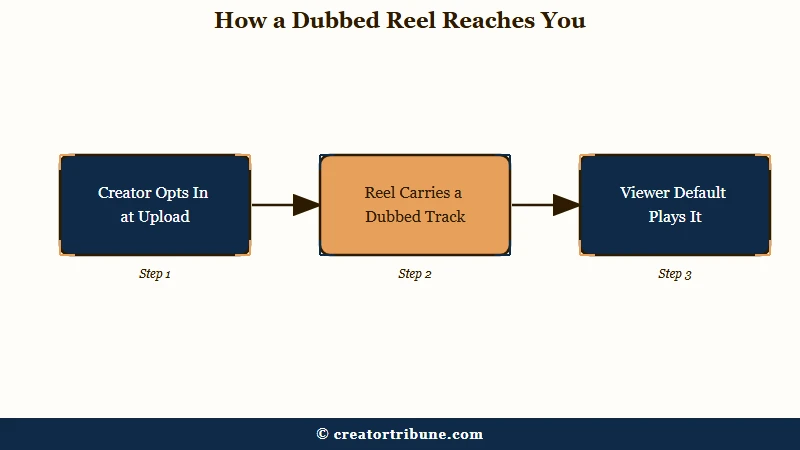
Instagram runs two separate translation systems. Creator side dubbing is opt in per video, so a creator chose it. Viewer side playback is on by default and keyed to your app language, which is the half most people are fighting.
Meta launched voice translation for Reels on 19 August 2025, starting with English and Spanish, then added Hindi and Portuguese on 9 October 2025. The system clones the speaker’s timbre and pacing rather than pasting a generic voice over the top.
That asymmetry surprised me, and it explains why the two sides get mistaken for each other. Instagram’s help page says you can hear the original on “reels the creators used speech dubbing and translation on”, so a dubbed Reel exists only because that creator switched it on.
Nothing is being done to your account. Your feed is showing other people’s opt in choices played back through your language preference, and that preference is the half you control.
Instagram also documents a shorter language set than the coverage does. Its help page for translated Reels names nine: Spanish, English, Hindi, Portuguese, Bengali, Tamil, Telugu, Marathi and Kannada. Six of those nine are Indian languages.
Press coverage from July 2026 puts the figure at fourteen and leads on Japanese, Korean, French, German and Italian, none of which appear on that help page. Part of the gap is a Facebook and Instagram split, since Arabic, Bahasa Indonesian, French, Thai and Vietnamese were announced for Facebook rather than Instagram.
| Symptom | Which system | The fix |
|---|---|---|
| Feed full of dubbed Reels from strangers | Viewer playback, on by default | Add your languages to the Don’t translate list |
| One Reel is dubbed, the rest are fine | That creator opted in | Tap View translations, pick Original |
| Your own Reel got dubbed | Creator side, opted in at upload | Turn it off in the Reel’s settings |
| A Reel sent in a DM plays in Spanish | Known bug, ignores settings | Scroll away and back, or clear the app language |
| A setting was off and came back on | Reverts after app updates | Recheck after each update |
If your feed shifted in other ways at the same time, why Reels reach drops is worth ruling out before you blame translation.
How Do I Stop Instagram From Translating My Own Reels?
Nobody can dub your Reel unless the option was on at upload. Switch off “Translate your voice with Meta AI” on the sharing screen, and check any published Reel you did not mean to translate.
The toggle sits on the final sharing screen under More options, in the accessibility and translation area. Switching it off there is the whole job, and I leave it off on every upload unless a video is built for a second market.
Eligibility explains most cases of a missing toggle. TechCrunch reports the feature went to Facebook creators with 1,000 or more followers and to all public Instagram accounts, so Instagram carries no follower minimum. Any guide quoting a 1,000 follower Instagram threshold is describing the Facebook rule.
The feature is unavailable in several regions, including Texas and Illinois. Both states have biometric and voice privacy statutes, which is the likely reason a voice cloning feature stops at their borders.
Two constraints decide whether the output is usable. The tool handles a maximum of two speakers, their dialogue cannot overlap, and background noise degrades it badly, so panel clips and interviews are poor candidates.
One rule catches people out after the fact. You can switch translation off on a Reel you already posted, and you cannot switch it back on for that video, so treat that toggle as one directional once the Reel is live.
Instagram’s help page for the creator side currently reads, in full, “This feature isn’t yet available for everyone.” The detailed step lists circulating elsewhere are reconstructions from press coverage and creator accounts rather than published documentation, which is worth holding lightly if your menu looks different.
Why Do Shared Reels Play in Spanish When My Settings Are Off?
A bug causes this one, and no toggle resolves it. Reels sent through direct messages have played dubbed audio for accounts whose app language, device language and translation settings are all English.
Scope is the giveaway. If your feed behaves and only Reels arriving in DMs are dubbed, more time in the settings menu will not help.
Three workarounds circulate for it, none official. Scrolling to a different Reel and scrolling back resets the audio in many cases, and it is the one that cleared it for me as a first try.
The second is device level. Remove any secondary preferred language from your phone’s own language settings, force quit Instagram, and reopen it, since the app reads the operating system locale as well as its own.
The third is a full logout and login rather than a profile switch, which clears a cached translation preference that survives ordinary restarts. Other oddities in the app’s language handling turn up in how Instagram search changed too.
One more thing deserves a check after every app update, whichever of the three cases you are in. The caption and story translation toggles have a habit of switching themselves back on following an update, so a setting fixed in March may not still be off today.
Does Turning Off Auto Translate Hurt My Reach?
Turning it off costs nothing on your original video. Meta reported up to a 20% viewership lift on translated content in early testing, so what you give up is reach in other languages while your posted Reel performs as normal.
That 20% figure comes from Meta’s own early tests and is the only number published on this. I would treat a vendor’s pre launch measurement as directional at best.
A “reach hack” framing circulates widely and gets attributed to Instagram head Adam Mosseri in secondhand posts. None of those posts links the original statement, so it is not something to plan around.
The geography question deserves more weight, because views can drift toward markets a creator does not sell to. Six of the nine languages on Instagram’s list are Indian, so the languages your Reel can be dubbed into skew hard toward one market.
The skew in that language list is documented. Whether it redirects anyone’s distribution is untested, because Instagram has never published how translated Reels are routed.
If your numbers moved, a broader reach drop has more common explanations worth eliminating first. Every dubbed Reel carries a visible “Translated with Meta AI” label, and if the wider footprint is your concern there is a separate set of Meta AI controls worth going through.
Frequently Asked Questions
How do I turn off auto translate on Instagram permanently?
Open your profile, tap the menu, then Language and translations, and add every language you understand to the Don’t translate list. That covers your whole feed rather than one video, though the caption and story toggles can revert after an app update.
Can Instagram dub my Reel without my permission?
No. Voice translation is opt in per video and has to be switched on at upload through “Translate your voice with Meta AI”. If a published Reel of yours is dubbed, that toggle was on when you posted it.
Why is a Reel in my DMs playing in Spanish?
That is a known bug affecting shared Reels, and it ignores your translation settings. Scroll to another Reel and back, remove secondary languages from your phone’s own settings, or log out fully and back in.
Which languages does Instagram translate Reels into?
Instagram’s help page lists nine: Spanish, English, Hindi, Portuguese, Bengali, Tamil, Telugu, Marathi and Kannada. Press coverage cites fourteen, but several of those additions were announced for Facebook rather than Instagram.
Does turning off translation reduce my views?
Not on your original video. You forgo the reach dubbed versions would have earned in other languages, which Meta measured at up to 20% in early testing, and the Reel you posted is unaffected.
Can I turn translation back on after posting?
No. Switching translation off on a live Reel is permanent for that video, so decide before you toggle it. A fresh upload is the only route back.
Quick Takeaways
- Three different systems dub Instagram Reels, and picking the wrong fix is why the setting you changed did nothing.
- Viewers get translations by default, so add your languages to the Don’t translate list under Language and translations to stop it feed wide.
- Creators are never dubbed without opting in at upload, and switching it off after publishing cannot be undone.
- Dubbed Reels arriving only through DMs are a bug, so scroll away and back or clear your device’s secondary languages instead of hunting settings.
- Six of the nine languages Instagram documents are Indian, worth knowing before you read a geography shift in your analytics as coincidence.